

AI Thumbnail Testing: Case Studies of Success
AI thumbnail testing can lift clicks fast when I test small visual changes instead of guessing. In these examples, CTR moved from 4.1% to 7.3% for a gaming channel, 4.2% to 8.7% for an education channel, and 4.2% to 6.8% for a lifestyle channel.
Here’s the short version: high contrast, fewer elements, short text, and stronger facial emotion kept winning. The tool helped make more versions in less time, but the data still decided the winner.
If I boil the article down, these are the main takeaways:
- Gaming: brighter colors, tighter face framing, simpler layouts
- Education: shorter text, close-up face shots, darker backgrounds with warm accents
- Lifestyle: bigger text, one main subject, mobile readability
- Main metrics: CTR first, then average view duration
- Best test rule: change one thing at a time
This AI Analyzed My Videos and Generated Better Thumbnails
sbb-itb-b59debf
Quick Comparison
| Channel | What changed | Main result |
|---|---|---|
| Gaming | Higher contrast, clearer character focus | CTR: 4.1% → 7.3% |
| Education | Close-up face, short text, trust cues | CTR: 4.2% → 8.7% |
| Lifestyle | Mobile-friendly layout, more emotion | CTR: 4.2% → 6.8% |
I see one clear point across all three cases: the best thumbnail is usually not the one I like most - it’s the one viewers click and keep watching. This shift toward advanced thumbnail optimization is what separates top creators from the rest.
How AI Thumbnail Testing Works on YouTube
YouTube Test and Compare and the Metrics That Matter
YouTube's Test & Compare lets creators run thumbnail variants against the same video and see which one performs best. YouTube tracks how each version does during the test window. That tells you what won. From there, the job is simple: make sure each variant changes as little as possible.
For these tests, CTR is the main number to watch. But it can't be the only one. Watch time still needs to hold up, because a click that leads to a fast drop-off weakens the result. When you review a test, focus on CTR percentage, not total clicks, since impressions can move around during the test window. A CTR above 6% is solid. Above 10% is exceptional.
AI Features That Help Build Better Test Variants
AI makes thumbnail testing much faster by generating 5–8 testable concepts in minutes. The most useful features include:
- Contrast and color adjustment
- Text editing
- Face swapping
- Object swapping
These features help creators test one variable at a time. For example, you might swap a neutral face for a shocked expression while keeping everything else the same. That's what gives the data meaning. If you change too many things at once, you can't tell what caused the lift.
Tools like ThumbnailCreator are made for this kind of workflow. They cut the gap between having an idea and getting a test-ready image uploaded.
One pattern stands out: AI prompts based on emotion, not just topic, often lead to better variants. Instead of asking for "budget tips video", try "realizing you've been budgeting wrong." Start with the feeling first, then let AI build variations around it.
These testing patterns show up differently across gaming, education, and lifestyle channels.
3 Case Studies: Gaming, Education, and Lifestyle Channels
The same thumbnail A/B testing method led to very different winning thumbnail patterns across gaming, education, and lifestyle channels. That’s the big lesson here: the process stayed the same, but the visual choices that worked best changed by niche.
Gaming Channel: Brighter Colors, Higher Contrast, and a Clear Character Focus
In early 2026, a gaming creator swapped manually designed thumbnails for AI-made versions built around higher contrast and tighter face framing. The shift paid off fast. CTR went from 4.1% to 7.3%, and impressions jumped from 15,000 to 67,000 in the first week.
The winning thumbnails were also simpler. Designs with just 1–2 visual elements averaged a 9.6% CTR, while thumbnails with 8 or more elements averaged 4.1%.
That makes sense if you think about how people scroll. A crowded thumbnail asks the eye to do too much work. A clear character face and a few bold elements are easier to process in a split second.
The next case shows the same testing approach at work in education, where trust and clarity mattered more than pure visual punch.
Education Channel: Shorter Text, Instructor Face, and Stronger Trust Signals
Alex, a tech reviewer and tutorial creator with 85,000 subscribers, had been spending about 45 minutes on each thumbnail. After switching his process, he cut production time to 5 minutes and tested 3–5 variations for every video.
The patterns that won were pretty clear: dark backgrounds, warm accents, tight product framing, and a clear face. Close-up shots outperformed wide shots by 40%.
By early 2026, his average CTR had climbed from 4.2% to 8.7%. Monthly views also grew from 180,000 to 420,000.
For this kind of channel, the thumbnail didn’t just need to look good. It had to signal, fast, that the video was clear, useful, and worth trusting.
Lifestyle content had a different problem to solve. The main issue wasn’t trust as much as mobile readability and instant visual meaning.
Lifestyle and Vlog Channel: Emotion, Zoom, and Story in One Frame
A travel vlog channel tuned its thumbnails for mobile, where they appear at about 120×90 pixels. Over a three-month period ending in March 2026, the creator used AI tools to make the text larger, increase contrast, and simplify each frame around one clear foreground subject.
That change helped the channel grow from 45,000 monthly views to 178,000 over six months. Average views per video also went from 3,200 to 8,000, as older videos started picking up new traffic.
In this case, the thumbnail had to do a lot in one small frame: show emotion, set the scene, and tell a quick story without feeling cluttered.
What the Case Studies Have in Common
AI Thumbnail Testing: CTR Results & Winning Visual Patterns
Three different niches. Three different visual problems. Yet the same few variables kept showing up in the thumbnails that won.
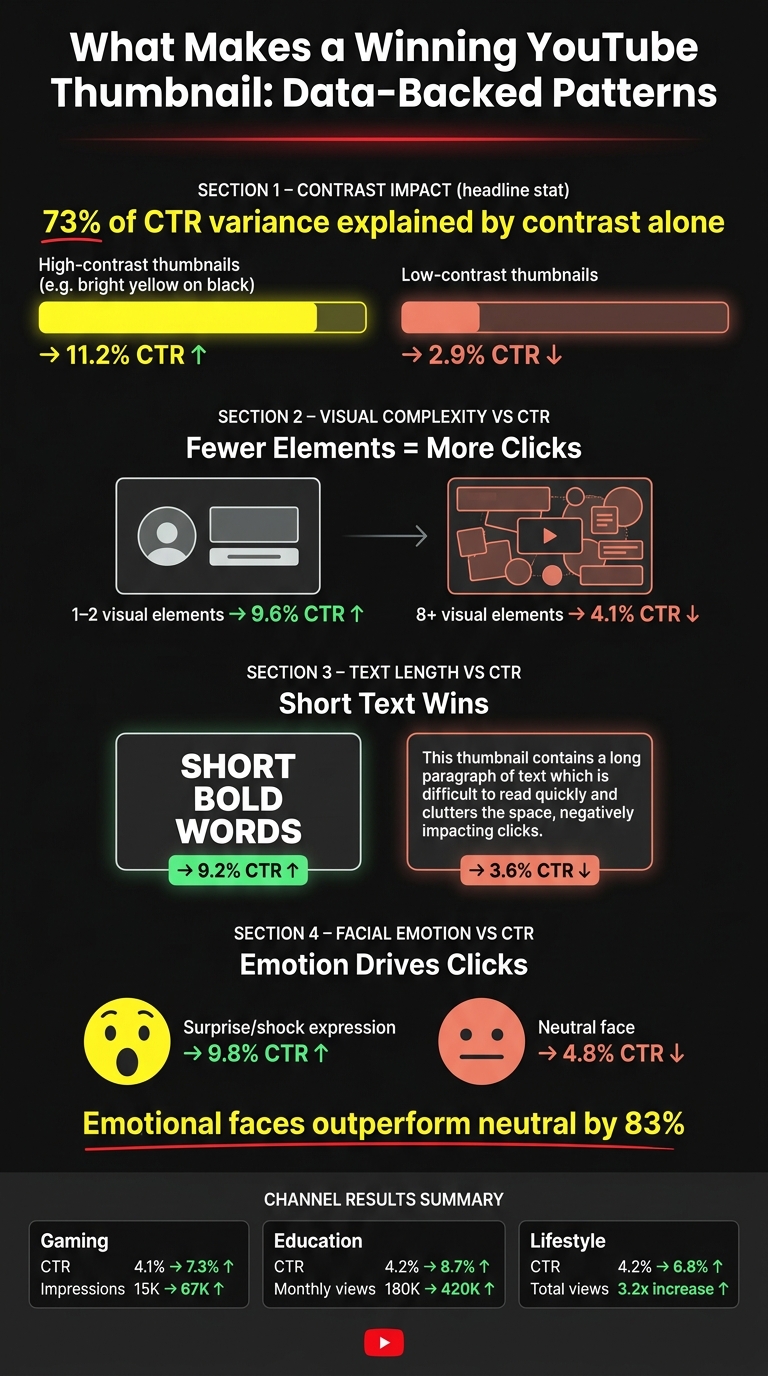
Contrast came first every time. In one 240-thumbnail analysis, contrast by itself explained 73% of CTR variance. High-contrast color pairings, like bright yellow on black, averaged an 11.2% CTR. Low-contrast designs fell to 2.9%. The takeaway was simple: when the subject, text, and background were easier to separate at a glance, CTR went up.
Less clutter helped too. Thumbnails with 1–2 visual elements averaged a 9.6% CTR, while designs with 8+ elements dropped to 4.1%. That makes sense. On a crowded YouTube feed, too much going on can muddy the message.
Text followed the same rule: keep it short, make it bold. Thumbnails with 1–3 bold words averaged a 9.2% CTR. Once the text hit 10+ words, CTR dropped to 3.6%. People don't read thumbnails like blog posts. They scan them in a split second.
Faces were the clearest emotional cue. Thumbnails showing surprise or shock beat neutral imagery by 83%, with an average 9.8% CTR versus 4.8% for neutral faces. If contrast grabs the eye, facial emotion often does the rest.
AI made production faster, but the lift still came from testing the right variables. That's the part that kept paying off across niches.
Here’s the pattern in a compact view.
Comparison Table: Tested Change, AI Method, and Measured Result
| Channel Type | Main Thumbnail Change Tested | AI Features Used | Testing Method | Result |
|---|---|---|---|---|
| Gaming | Better face composition & higher contrast | AI pattern analysis | 7-day tracking | CTR: 4.1% → 7.3%; weekly impressions: 15,000 → 67,000 |
| Education | Dramatic lighting & conceptual imagery | AI concept generation | A/B testing vs gut feeling, using 3–5 variants per upload | CTR: 4.2% → 8.7%; monthly views: 180,000 → 420,000 |
| Lifestyle/Vlog | Mobile-friendly patterns & facial expressions | AI-generated variations | 20-video experiment | CTR: 4.2% → 6.8%; 3.2x more total views |
Conclusion: A Simple Workflow Creators Can Repeat
Across gaming, education, and lifestyle channels, the same pattern kept showing up: stronger contrast, simpler composition, and more emotion. The big lesson is simple. AI helps you test ideas faster, but viewer data tells you which thumbnail actually wins.
You can turn those patterns into a process you use again and again.
Build each test around the same factors that kept working above: contrast, clarity, and emotion. Use this 5-step workflow on your next upload. Tools like ThumbnailCreator can speed up steps 2 and 3. Its YouTube URL-to-Thumbnail feature can generate multiple variants from a video link, and Face Model Training can help keep your look steady across future thumbnails.
| Stage | Goal | AI Feature Used | Metric Reviewed |
|---|---|---|---|
| 1. Baseline Audit | Identify videos with room to improve | YouTube Studio Analytics | CTR & Impressions |
| 2. Concept Generation | Create 3–5 distinct visual hooks | AI generation / URL-to-Thumbnail | Visual variety |
| 3. AI-Assisted Refinement | Check contrast, clarity, and brand consistency | Face consistency / contrast check | Contrast and clarity |
| 4. Live Testing | Let real viewers pick the winner | YouTube Test and Compare | Real-time CTR |
| 5. Documentation | Log the winner and the reason it won | Spreadsheet or Notion | CTR and average view duration |
One more thing: compare CTR with average view duration. If CTR is high but retention is weak, the thumbnail may be promising one thing while the video delivers another. That's a mismatch.
Keep running this loop on future uploads, and you'll start to see what your audience reacts to most: the colors, the facial expressions, the amount of text. Once you write those patterns down, thumbnail testing stops being a one-off task and starts becoming a repeatable system for channel growth.
FAQs
How long should I run a thumbnail test?
Run a thumbnail test for at least 7 days. That gives you a better read on both weekday and weekend behavior, which helps you get cleaner results.
You should also aim for enough impressions - ideally 1,000+ per variant. Without enough data, it's easy to call a winner too early.
If you're using YouTube’s built-in Test & Compare tool, YouTube may end the test on its own once it finds a clear winner. In many cases, that happens after about a week or more.
What if CTR goes up but watch time drops?
If CTR goes up but watch time falls, your thumbnails may be winning the click while the video loses the viewer.
That usually points to a gap between what the thumbnail seems to promise and what the video actually delivers. And when that happens, it can hurt overall channel performance.
Which thumbnail change should I test first?
Start by testing a thumbnail with a face that shows clear emotion. Data suggests this can increase CTR by 15% to 34%.
That makes it an easy first test. The upside is clear, and the change is simple to make.