

AI Tools for Comedy Thumbnails
Creating comedy thumbnails for YouTube can be time-consuming and challenging, but AI tools make it faster and more efficient. Thumbnails are critical for grabbing attention - viewers decide in just 1.3 seconds whether to click, and expressive faces can boost click-through rates by 38%. AI tools like ThumbnailCreator, Tool B, and Tool C help automate the process, cutting design time from hours to minutes while optimizing for mobile and desktop viewers.
Here’s a quick overview of the tools:
- ThumbnailCreator: Generates thumbnails in under 30 seconds using face-aware tech, expression morphing, and style cloning. Plans start at $24/month.
- Tool B: Focuses on AI-driven concept suggestions and vibrant designs tailored to comedy. Includes pre-tested formats and emotional tone adjustments.
- Tool C: Specializes in bold text designs and AI-generated visuals, ideal for creating playful and dynamic thumbnails.
Using these tools, you can test multiple thumbnail variations, reduce workload, and focus on what matters most - making people laugh.
1. ThumbnailCreator

ThumbnailCreator is an AI-driven tool designed to simplify the process of creating YouTube thumbnails. Instead of browsing through static templates, you can describe your idea in plain English or even paste a YouTube link, and the AI will generate a custom thumbnail in less than 30 seconds. For comedy creators, this means you can type commands like "shocked reaction with fire effects" or "confused face in a messy room" to instantly produce attention-grabbing thumbnails. The tool is trained on over 3 million high-performing YouTube thumbnails, ensuring its designs are optimized for clicks. Here’s a closer look at its standout features for comedy creators:
AI Generation
One of the most exciting features for comedy creators is its face-aware technology. By uploading five high-quality photos and completing a 15-minute training, the AI can seamlessly incorporate your face into any scene with realistic lighting and positioning. The Expression Morphing feature takes things a step further, allowing you to generate exaggerated reactions - like shock, confusion, or happiness - without needing to pose for new photos.
Want your thumbnails to match the style of trending comedy videos? The Style Cloning feature lets you upload a reference thumbnail, and the AI will replicate the aesthetic while keeping your content fresh and original. If you need quick adjustments, natural language editing allows you to make changes with simple commands like "add fire effects" or "make the background more dramatic". For more targeted edits, the inpainting tool lets you paint over specific areas to regenerate them - perfect for swapping out props or tweaking background details. These capabilities combine creativity with precision, making it easier than ever to craft standout thumbnails.
Customization Options
ThumbnailCreator doesn’t just stop at AI generation - it also offers robust customization tools. The layer-based editing feature lets you split, rearrange, and fine-tune individual elements. If you’re experimenting with different visual gags, the Variation Generator can create multiple versions of a single concept, making A/B testing vs gut feeling decisions a breeze. To ensure your thumbnail is optimized for YouTube, the built-in Thumbnail Analyzer provides expert feedback before you hit publish.
With over 10 million thumbnails created by more than 15,000 users, this platform has earned its reputation as a trusted tool for creators. It’s particularly popular among comedy creators for its ability to test and refine visual humor efficiently.
Pricing
ThumbnailCreator offers flexible pricing to suit different needs.
- Starter Plan: $24/month, includes 600 credits annually and basic face features.
- Creator Plan: $41/month, includes 1,200 credits annually, advanced face training, and Expression Morphing.
- Teams Plan: $83/month, includes 3,000 credits annually, multiple face training options, and API access.
All plans come with a 7-day free trial, which includes 10 credits to test the platform. With a 4.9/5 rating from users, creators frequently praise its speed and face-aware generation capabilities. However, it’s worth noting that AI results can sometimes require a few attempts to get the perfect design.
2. Tool B
Tool B takes a fresh approach to thumbnail design by leveraging AI-powered concept suggestions instead of relying on static templates. Just describe your video topic, and the AI will generate tailored, attention-grabbing ideas designed to go viral. This feature is especially helpful for comedy creators who need quick, unique concepts without getting bogged down in creative blocks.
AI Generation
One of Tool B's standout features is its ability to produce vibrant, high-energy thumbnails. Think bright colors, bold text, and expressive faces that immediately catch the eye. This style is perfect for comedy content, where dynamic visuals and exaggerated expressions are key. The platform also offers 12 pre-tested formats like "Humor/Satire", "Close-Up Reactions", and "Emotional Moments" to guide the AI in creating thumbnails that align with your content. Plus, you can tweak facial features and overall image tone, ensuring the final design matches your comedic style. These features provide a solid foundation for further refinement in Tool B's editing suite.
Customization Options
Tool B aligns with current YouTube trends by focusing on minimal text in thumbnails. You can steer the AI toward comedy-specific formats and tweak images to evoke a range of emotional tones. This makes it easier to choose the most effective reaction shots while keeping your channel's unique personality front and center.
3. Tool C
Tool C stands out with its text-focused design, specifically tailored for creating comedy thumbnails. It offers a handpicked selection of fonts designed to capture the playful and energetic spirit of comedy, making it a favorite among creators in this niche.
Customization Options
This tool goes beyond just offering fonts - it provides a robust editing suite that allows for creative freedom. Users can add dramatic shadows, curve text into unique shapes, and apply instant text styles to craft eye-catching headlines. These features make it easier to design thumbnails that grab attention. Additionally, Tool C integrates AI-driven imagery, ensuring that visuals complement the bold text designs perfectly.
AI Generation
Tool C’s AI tools take creativity to the next level. Its Image and Vector Generator allows users to create custom backgrounds, characters, and editable artwork simply by describing them in text. The AI is designed to align visuals with specific content goals - whether the theme is funny, educational, serious, or viral. For comedy thumbnails, it excels at generating elements like exaggerated facial expressions, vibrant colors, and bold text overlays.
The AI operates using two models, Altair and Orion, which analyze text prompts to fine-tune details such as emotion, lighting, and color schemes. This ensures the final visuals not only match your comedic tone but also stand out in crowded feeds. These features make Tool C a powerful option for creating bold, humorous visuals that resonate with audiences.
sbb-itb-b59debf
Pros and Cons
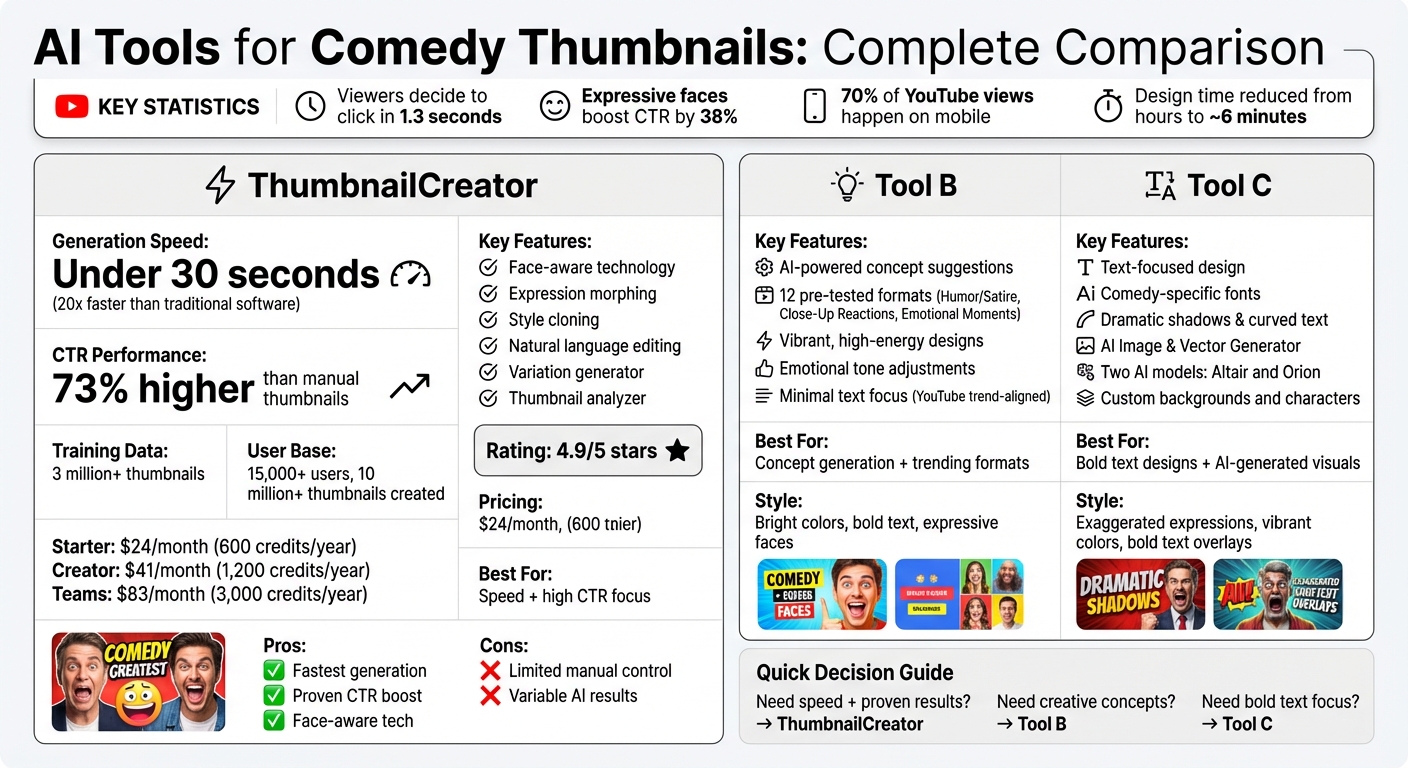
AI Thumbnail Tools Comparison: Features, Pricing & Best Use Cases
ThumbnailCreator brings some strong advantages to the table for anyone creating comedy thumbnails. It can generate thumbnails in under 30 seconds, cutting down the design process from hours to just minutes - about 20 times faster than traditional design software. Even better, users have reported a 73% higher click-through rate (CTR) compared to manually created thumbnails. The platform's AI, trained on over 3 million high-performing YouTube thumbnails, is designed to produce eye-catching comedy thumbnails that stand out.
That said, there are a few downsides to keep in mind. While the tool is incredibly fast and efficient, it offers less manual, pixel-level control compared to professional design software. Additionally, the AI-generated results might require several tries to get the perfect thumbnail.
"ThumbnailCreator has saved me so much time. I used to spend 1-3 hours per thumbnail... Now, my thumbnails are finished within a few mins and they look (and convert) better as well." - Dave S Anderson, YouTube Creator
Here’s a quick breakdown of ThumbnailCreator’s strengths and weaknesses:
| Tool | Key Strengths | Main Weaknesses | Best For |
|---|---|---|---|
| ThumbnailCreator | Fast generation (under 30 seconds), 73% higher CTR, face-aware generation, expression enhancement | Limited manual control, variable AI results | YouTube creators focused on speed and high CTR |
Conclusion
When selecting an AI tool for comedy thumbnails in 2026, your choice will come down to three key factors: speed, budget, and how much creative control you want. For creators uploading frequently and needing thumbnails that grab attention quickly, ThumbnailCreator is a standout option. It’s designed for fast results and uses proven visual strategies and comparisons - like bold colors, well-placed text, and expressive faces - to draw viewers in effectively. These features, backed by data, let you test ideas quickly while keeping your channel’s humor front and center.
One of ThumbnailCreator’s standout features is its focus on faces, which is a game-changer for comedy creators. Expressive faces can increase click-through rates by up to 37%, and its face-swap technology lets you personalize thumbnails without the need for costly photoshoots. With 70% of YouTube views happening on mobile devices, ThumbnailCreator ensures your thumbnails are optimized for smaller screens, using large, readable text and high contrast. Plus, its A/B testing feature slashes design time - from hours to just about 6 minutes.
To maximize results, try testing 3–5 thumbnail variations for each video. Experiment with different emotional tones - like shock, excitement, or intense focus - to see what connects best with your audience. For comedy channels where your personality is the brand, ThumbnailCreator keeps your expressions front and center while handling all the technical details in the background. This blend of speed, personalization, and creative flexibility makes it an essential tool for comedy creators, letting you focus on what makes your content truly unique.
FAQs
How do I train ThumbnailCreator to use my face?
To get ThumbnailCreator to recognize your face, you’ll need to upload 3–5 high-quality photos that show your face from different angles. The AI uses these images to build a custom face model, which takes about 15 minutes. Once the training is done, you can effortlessly insert your face into thumbnails and tweak expressions to keep your personal branding consistent.
How many thumbnail variations should I test per video?
Testing 2 to 3 thumbnail variations for each video is a smart move. To figure out which design grabs the most attention and boosts your click-through rate (CTR), try running A/B tests. Ideally, test these variations over a span of 7 to 14 days to gather enough data for a clear winner.
Will my thumbnails look good on mobile?
Thumbnails made with AI tools like ThumbnailCreator are tailored for mobile devices. These tools apply established design principles, such as the Rule of Thirds and the 3-Element Rule, to craft visually engaging thumbnails that work well on smaller screens. Features like background removal, bold fonts, and high-contrast colors ensure thumbnails catch attention in mobile feeds while maintaining a polished appearance across various platforms.