

AI Tools for Travel Thumbnail Design
Creating eye-catching travel thumbnails can be fast, affordable, and effective with AI tools like ThumbnailCreator. Instead of spending hours or hundreds of dollars on designs, you can generate professional-quality thumbnails in minutes. AI-generated thumbnails have been shown to boost click-through rates by up to 73%, helping creators grow their audience and engagement.
Key Benefits of AI for Travel Thumbnails:
- Speed: Create thumbnails 20x faster compared to traditional tools like Photoshop.
- Quality: AI ensures polished designs with features like face-aware technology and mobile-friendly text placement.
- Engagement: Better designs can prevent a potential 50–70% drop in views caused by weak thumbnails.
How It Works:
- Use AI thumbnail generation prompts like “vibrant sunset over Grand Canyon with hiker” to generate designs.
- Customize thumbnails with tools like face swapping, object replacement, and text editing.
- Export in YouTube’s recommended resolution (1280x720 pixels).
Plans start at $0/month for basic features, with Pro ($19/month) and Agency ($49/month) tiers offering advanced tools like unlimited generations, face/object swapping, and team collaboration.
AI tools simplify thumbnail creation, saving time and delivering better results. Whether you're a solo vlogger or a team managing multiple channels, these tools can transform your workflow.
How I Create FACELESS Travel Videos (Secret Blueprint Revealed)
sbb-itb-b59debf
Why AI Tools Work Well for Travel and Adventure Thumbnails
Travel content thrives on thumbnails that highlight the thrill of exotic locations, outdoor escapades, and one-of-a-kind experiences. AI tools are particularly suited for this task because they’ve been trained on millions of successful thumbnails, helping them identify what works visually. For instance, ThumbnailCreator’s AI analyzed 3 million top-performing thumbnails to uncover the most effective travel designs. This foundation enables AI to deliver benefits like speed, quality, and improved viewer engagement.
Speed and Time Savings
What used to take hours can now be done in minutes with AI. By breaking your thumbnail into layers - foreground, background, text, and objects - AI makes it simple to swap out elements. Want to replace a plain background with a dramatic mountain scene? A quick prompt does the trick, all while keeping your portrait intact. You can even reposition elements, like shifting your face to the left side of the frame and adding text to the right for a balanced composition. This drag-and-drop simplicity has already attracted over 15,000 YouTube creators who use ThumbnailCreator's AI tools to speed up their workflow.
But it’s not just about saving time - AI also ensures your thumbnails look polished and professional.
Better Visual Quality
AI tools fine-tune the elements that make travel thumbnails pop. With face-aware technology, AI detects facial expressions and seamlessly integrates your portrait into YouTube thumbnail templates. This means your image conveys the right mood without needing a professional photoshoot. AI also recommends bold, high-contrast fonts for mobile-friendly designs and places text strategically to avoid covering key details like your face or the area where YouTube’s timestamp appears. Plus, you can easily swap out objects - like changing a backpack to a camera or replacing a cityscape with a beach scene - so your thumbnail aligns perfectly with your video’s theme.
Once your thumbnail is visually striking, the next step is driving engagement.
Designed for Higher Click-Through Rates
The stats are hard to ignore: AI-generated thumbnails can boost click-through rates by 73% compared to DIY designs. This is because AI analyzes your video content and suggests layouts that naturally stand out in crowded feeds. As YouTube creator Maria Reyes puts it:
"The AI not only generates beautiful thumbnails, but it also understands what style works best for different types of videos."
Considering weak thumbnails can lead to 50–70% fewer views, using AI goes beyond convenience - it’s an essential tool for maintaining and growing your channel’s audience.
Using ThumbnailCreator for Travel Thumbnails
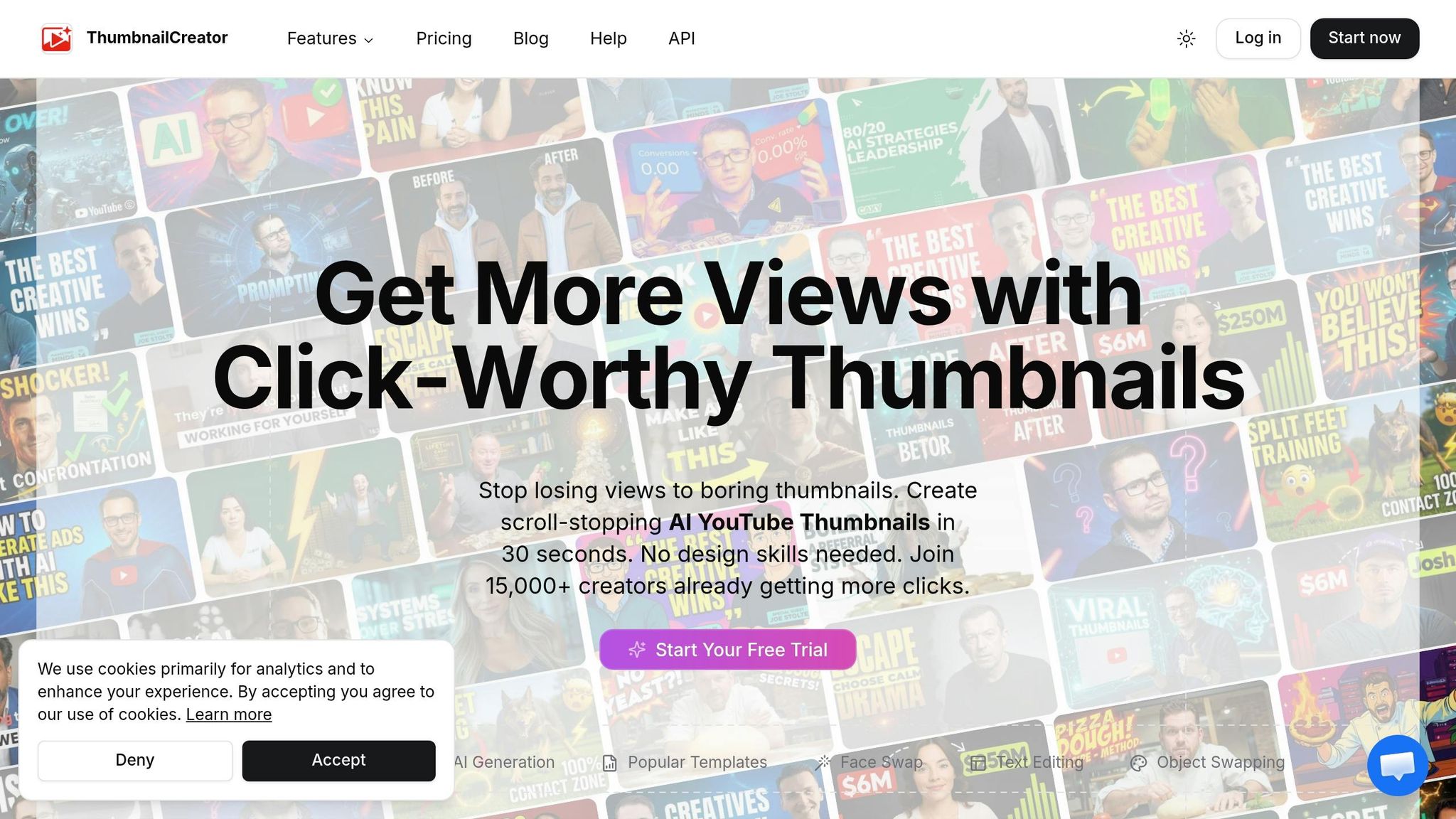
ThumbnailCreator is designed specifically for YouTube creators who want professional-looking thumbnails without needing advanced design skills. Built on an advanced AI framework, it understands what grabs attention visually and makes creating thumbnails fast and simple. For travel creators, it’s as easy as typing a prompt like "vibrant sunset over Grand Canyon with hiker" to get polished thumbnails in just a few minutes.
This tool goes beyond just creating new images. It can upscale existing photos for better quality, remove unwanted backgrounds with a single click, and export thumbnails in YouTube’s recommended 1280x720 resolution for optimal performance.
Main Features of ThumbnailCreator
ThumbnailCreator offers a variety of tools to simplify and enhance thumbnail creation, especially for travel creators:
- AI Thumbnail Generator: Using either a text prompt or a YouTube video URL, the generator creates multiple thumbnail options. For example, describe a scene like "vibrant sunset over Grand Canyon with hiker", and the AI will deliver several designs to choose from.
- Face Swapping: This feature allows creators to insert their own portraits into AI-generated scenes or templates. It’s perfect for travel creators who want to appear in scenic backdrops without physically being there. Upload a clear photo, and the tool ensures your face remains consistent across thumbnails, reinforcing your personal brand.
- Style Cloning: If you spot a successful thumbnail in your niche, this feature lets you replicate its visual style effortlessly. No need to manually copy design elements - the AI does it for you.
- Natural Language Editing: Fine-tune thumbnails with simple commands like "make the colors more vibrant" or "add bold white text." These tools are especially handy for perfecting scenic shots.
Additional tools include a background remover, color enhancer, and even A/B testing capabilities to compare different thumbnail designs and see what performs best. Plus, there’s an AI chat assistant to help brainstorm thumbnail ideas that align with your video scripts.
How Travel Creators Benefit
For travel creators, these features solve common challenges like inconsistent lighting, missed photo opportunities, or blurry shots taken on the go. ThumbnailCreator helps you create the thumbnail you wish you had captured. For instance, a backpacker can use face swapping to place themselves in a Patagonia trek scene, add a tent object, and overlay text like "Surviving Patagonia Alone" for a professional and engaging result.
Currently, over 15,000 YouTube creators, including 2,847 vloggers, use ThumbnailCreator to enhance their content. For creators juggling weekly uploads from different locations, the time savings are invaluable. Compared to spending around 2 hours designing a thumbnail in Photoshop, ThumbnailCreator can complete the task in just 6 minutes - up to 20 times faster. You can also set AI rules to maintain consistent fonts, colors, and branding across your travel series, making your content instantly recognizable to viewers.
How to Create Travel Thumbnails with ThumbnailCreator
Designing a standout travel thumbnail is simpler than you might think. With ThumbnailCreator, you can create professional and attention-grabbing thumbnails in just a few steps - even if you're new to design. Here's how to get started:
Step 1: Sign Up and Access AI Tools
Head over to ThumbnailCreator.com and sign up using your Google account, Microsoft account, or email. New users receive free credits to try out the platform right away. Once logged in, go to the Utilities tab in the sidebar and select the AI Thumbnail Generator. From there, pick a travel-specific template and craft a detailed prompt that reflects your video's theme.
Step 2: Pick Templates and Write Effective Prompts
The key to a great thumbnail is a clear and detailed prompt. Instead of something generic like "travel thumbnail", describe the scene you have in mind. Include details about the subject (like a traveler), their action or expression, text overlays (3–5 words), the mood (bright, moody, etc.), and the overall composition. For travel videos, use the 16:9 aspect ratio for YouTube or 9:16 for Shorts and Reels.
Here are examples of effective prompts:
- "Excited vlogger discovering hidden cafe on a colorful European street, bright lighting, aesthetic vibe."
- "YouTube reaction thumbnail: close-up of a surprised face with wide eyes, blurred tropical beach in the background, bold yellow text 'UNBELIEVABLE'."
Adding "YouTube thumbnail" to your prompt ensures the AI optimizes the framing and layout. To find the best fit, generate multiple versions - 3 to 10 variations is a good range. Research indicates that thumbnails with surprised facial expressions receive 35% more clicks, while happy expressions boost engagement by 23%.
Step 3: Personalize with Face Swapping
ThumbnailCreator's Face Swap feature lets you insert your face into any thumbnail, helping you maintain consistent branding across your travel content. You can upload a one-time photo or train a permanent AI face model using five or more high-quality images of yourself from different angles. Training takes about 15 minutes and allows you to generate expressions like shocked, happy, or curious to match your video's tone.
"Face Swap puts your face into any thumbnail - whether it's AI-generated, uploaded, or extracted from YouTube. Combined with a trained face model, it's the fastest way to maintain consistent branding." – ThumbnailCreator
For the best results, choose a thumbnail where the subject's face angle closely matches your own. If the skin tone looks mismatched after swapping, use the AI editor with a command like "match skin tones naturally" to fine-tune the image.
Step 4: Fine-Tune Text and Objects
Use the Edit with AI field to refine your thumbnail. Commands like "add bold white text saying 'MY TRIP'" or "make colors more vibrant" can enhance its visual appeal. Keep text short - 3 to 5 words - for better readability on mobile devices.
Want to make your thumbnail more dynamic? Swap out objects to better represent your content. For example, replace a generic backpack with a tent or camera that ties directly to your video. Use negative prompts in the advanced settings to remove unwanted elements like "blurry," "low quality," or "cluttered background." Once you're happy with the edits, finalize your design.
Step 5: Export and Optimize for YouTube
When your thumbnail is ready, export it at YouTube's recommended resolution of 1280x720 pixels. Preview the image at different sizes to ensure it looks great on both desktop and mobile screens. Fun fact: 90% of the top-performing YouTube videos feature custom thumbnails.
If you're working on a travel series, consider setting AI Design Rules to automatically apply consistent fonts, colors, and other branding elements. This keeps your channel visually cohesive and instantly recognizable to viewers.
Best Practices for Travel Thumbnail Design with AI
Selecting Colors and Fonts
The colors you choose for your thumbnail can set the mood instantly. Warm tones like red and yellow bring energy and excitement, while cool shades like blue and green give off a peaceful vibe. Since most viewers (about 70%) use mobile devices, it’s essential to use high-contrast combinations - like light text on dark backgrounds or vice versa. Adding solid outlines or drop shadows can further improve readability. A handy trick is the "postage stamp" test: shrink your thumbnail down to make sure the main subject stays clear and recognizable. For text overlays, stick with bold, sans-serif fonts that are easy to read, even at smaller sizes.
Keeping Designs Simple but Detailed
"Your thumbnail wins or loses 80% of your clicks before anyone reads your title."
– Caleb Leigh, Founder, CreatorSkills
Simplicity is key, but your thumbnail still needs enough detail to grab attention. Focus on a single main subject to avoid overwhelming the viewer. Test your design at 120 pixels wide - if the important elements aren’t immediately clear, it’s time to simplify. Remove distracting objects or busy backgrounds using tools like ThumbnailCreator's AI editor. Simple commands like "remove clutter" or "simplify background" can clean up your design effortlessly.
Emphasizing Key Visual Elements
Strong visual elements help your thumbnail stand out in a crowded search result. Faces, especially with exaggerated expressions, tend to grab attention. Position the face slightly off-center to leave space for text. You can also use visual archetypes like before/after comparisons or side-by-side contrasts to highlight transformations or choices. Want to spark curiosity? Try featuring three travel destinations but label only one as "The Winner", or pair a shocked expression with bold text like "THEY LIED" to intrigue viewers. High-contrast color palettes - such as dark navy with white text or bold black text on a white background with a single bright accent - can further draw the eye. Planning your layout early ensures that ThumbnailCreator's AI tools can emphasize your key visuals effectively.
ThumbnailCreator Pricing Plans
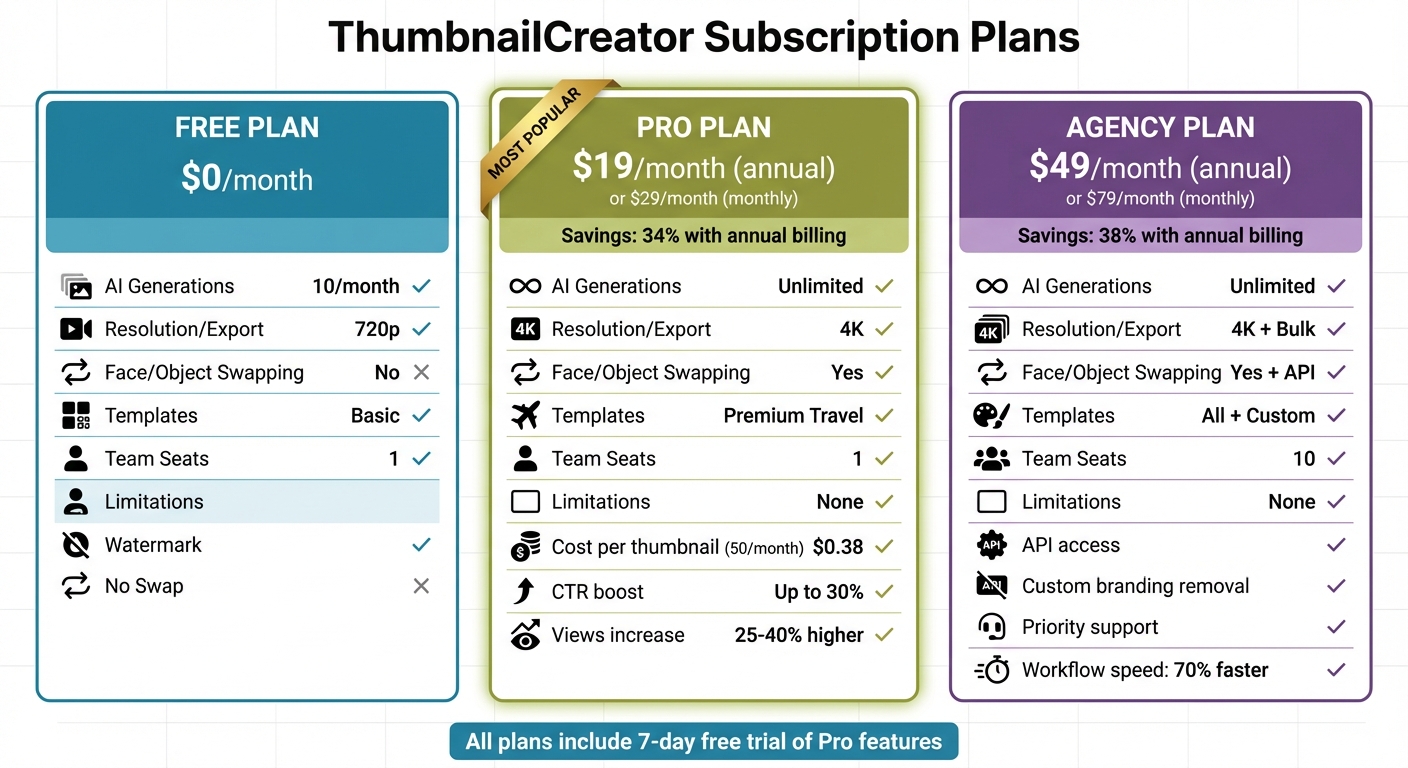
ThumbnailCreator Pricing Plans Comparison for Travel Content Creators
Free, Pro, and Agency Plans Compared
Understanding ThumbnailCreator's pricing options is key to getting the most out of your travel thumbnail designs. The platform offers three tiers, each tailored to different needs and budgets.
The Free plan is, as the name suggests, completely free at $0/month. It includes 10 AI-generated thumbnails per month, making it a good starting point for solo creators who want to explore features like AI prompts (e.g., "sunset beach adventure"). However, this plan comes with limitations: exported thumbnails include a watermark, and you won't have access to advanced tools like face or object swapping.
The Pro plan costs $19/month when billed annually (or $29/month with monthly billing), offering a 34% savings if you commit to the yearly option. This tier provides unlimited AI generations, advanced tools like face and object swapping, 4K exports, and access to premium travel templates. For weekly travel vloggers, these features can make a big difference - swapping faces onto eye-catching backdrops has been shown to boost click-through rates (CTR) by up to 30%. If you create 50 thumbnails a month, the cost averages out to about $0.38 per thumbnail, making it an affordable choice for frequent content creators.
The Agency plan is geared toward teams and organizations, priced at $49/month with annual billing (or $79/month on a monthly basis), saving 38% when billed yearly. It includes everything in the Pro plan plus tools for team collaboration (up to 10 seats), API access, custom branding removal, priority support, and bulk thumbnail generation - features that can speed up workflows by as much as 70%. This plan is ideal for travel agencies or influencer teams managing multiple channels, as it allows for shared workspaces and group editing of thumbnails.
All plans come with a 7-day free trial of Pro features, and payments are processed in USD via Stripe.
| Feature | Free ($0/mo) | Pro ($19/mo annual) | Agency ($49/mo annual) |
|---|---|---|---|
| AI Generations | 10/month | Unlimited | Unlimited |
| Resolution/Export | 720p | 4K | 4K + Bulk |
| Face/Object Swapping | No | Yes | Yes + API |
| Templates | Basic | Premium Travel | All + Custom |
| Team Seats | 1 | 1 | 10 |
| Limitations | Watermark, No Swap | None | None |
According to case studies, creators using the Pro plan see 25–40% higher YouTube views compared to those relying solely on free tools. For serious travel content creators, the $19/month investment can be a smart move. With these tiered options, you can pick the plan that best supports your goals and helps grow your channel efficiently.
Conclusion
Creating professional travel thumbnails no longer requires endless hours or advanced design expertise. With ThumbnailCreator, tasks that used to take ages can now be completed in just minutes. Simply type a prompt like "sunset hike in Yosemite", and you’ll have a 1280x720 thumbnail ready for YouTube. The best part? These eye-catching thumbnails can lead to better click-through rates, helping to grow your channel.
ThumbnailCreator offers options for every need, from a free plan for trying out AI-powered designs to a Pro plan with unlimited templates and advanced tools. It’s a time-saving solution that can also boost viewer engagement and channel performance.
FAQs
What makes a travel thumbnail “click-worthy”?
A travel thumbnail stands out when it includes expressive faces showing strong emotions, uses bold, high-contrast colors, and features short, readable text (ideally 3–5 words). The design should stay simple and uncluttered, grabbing attention in just 200 milliseconds. Plus, it needs to be optimized for mobile screens to make the biggest impact.
How do I write better prompts for travel thumbnails?
When using AI tools like ThumbnailCreator to design travel thumbnails, clarity and specificity are key. Here's what to include in your prompts to get the best results:
- Subject Details: Specify the main focus, like a traveler or a famous landmark.
- Action or Expression: Add emotional or dynamic elements, such as someone looking excited or surprised.
- Text Suggestions: Limit your text to 3-5 impactful words that grab attention.
- Color Scheme: Opt for bright and vibrant tones to make the thumbnail pop.
- Layout Instructions: Mention specific placements, like "text in the top right", to guide the design.
- Platform Context: Always include "YouTube thumbnail" to ensure proper framing and proportions.
By focusing on emotions and eye-catching visuals, you can create thumbnails that stand out and draw viewers in.
When should I upgrade from Free to Pro or Agency?
When your projects demand more advanced features or the ability to handle a higher workload, it might be time to upgrade to Pro or Agency plans. These upgrades come with perks like additional credits, tools for face training, person swaps, and enhanced team collaboration features. These can help you streamline your workflow and create thumbnails more efficiently.