

AI Thumbnail Generators vs YouTube Studio Tools
Your thumbnails directly impact your YouTube success. With 90% of a video’s click-through rate (CTR) influenced by thumbnails and titles, choosing the right creation tool is critical. AI thumbnail generators like ThumbnailCreator streamline design with automation, while YouTube Studio offers basic functionality for uploading or selecting frames. Here’s the breakdown:
- AI Thumbnail Generators: Use machine learning to create polished thumbnails in under 30 seconds. Features include face-aware tech, style cloning, and CTR-focused designs, with reported CTR boosts of 12-30%.
- YouTube Studio: Simple and free, it allows you to upload custom thumbnails or pick from three auto-generated frames but lacks design tools.
Quick Comparison:
| Feature | AI Thumbnail Generators | YouTube Studio Tools |
|---|---|---|
| Customization | Advanced (text, styles) | None |
| Speed | Under 30 seconds | Instant (auto-frames) |
| CTR Optimization | Data-driven designs | A/B testing only |
| Integration | External upload needed | Native to platform |
| Cost | $0-$99/month | Free |
AI tools save time, improve quality, and help grow CTR, but YouTube Studio’s simplicity suits casual creators. The choice depends on your goals, workflow, and budget.
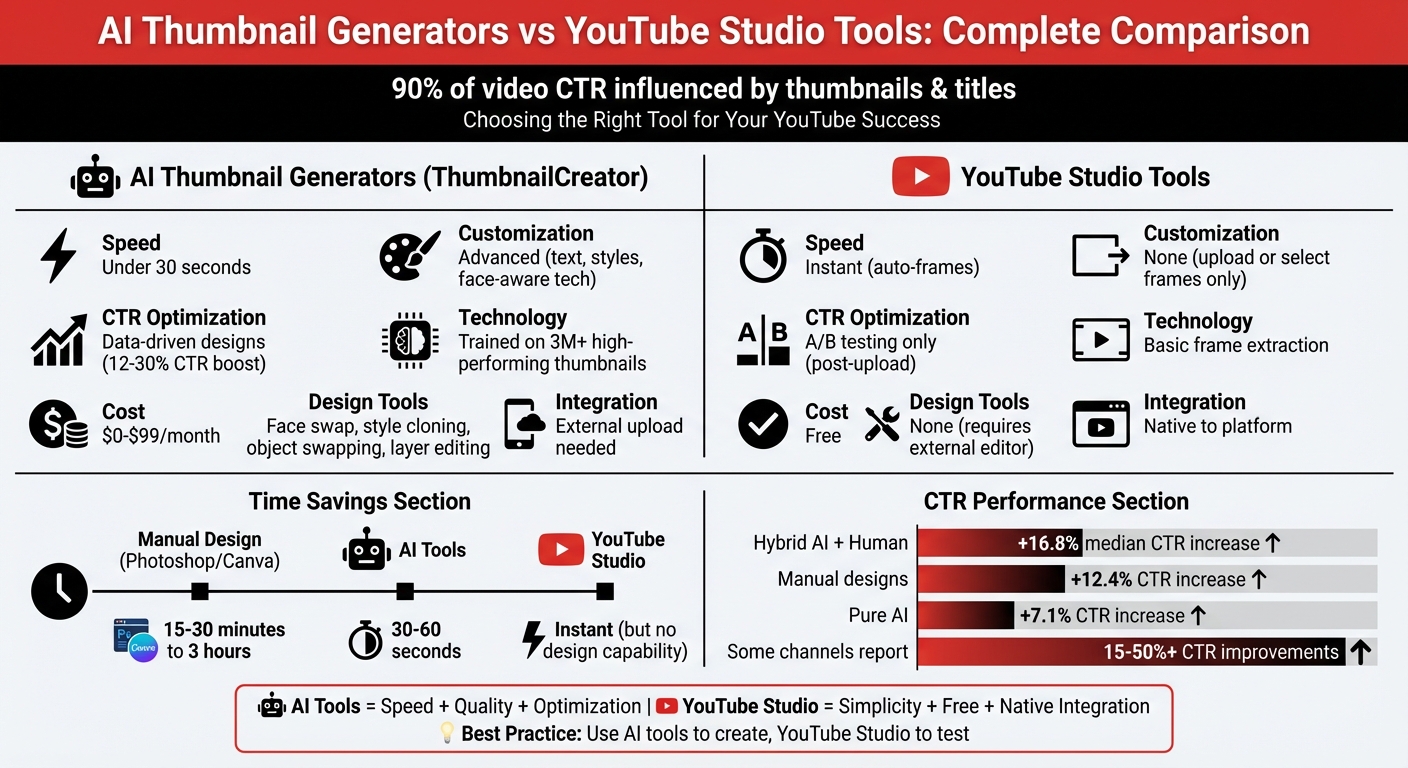
AI Thumbnail Generators vs YouTube Studio Tools Comparison
Feature Comparison: AI Thumbnail Generators vs YouTube Studio Tools
Side-by-Side Comparison: Features, Usability, and Performance
The main difference between AI thumbnail generators and YouTube Studio tools boils down to creation versus selection. YouTube Studio doesn’t provide design tools - it simply lets you upload custom images or choose from three automatically generated video frames. There’s no option to edit or enhance those frames. On the other hand, AI tools like ThumbnailCreator take things further by generating professional-quality designs based on text descriptions, YouTube links, or even face-aware technology. Here’s a closer look at how they compare:
| Feature | YouTube Studio Tools | AI Thumbnail Generators (ThumbnailCreator) | Winner/Advantage |
|---|---|---|---|
| Ease of Use | Simple uploader/selector | Automated generation from text or links | AI Generators |
| Customization | None (requires external editor) | Face-aware generation, style cloning, object swapping | AI Generators |
| Generation Speed | Instant (auto-frames from video) | Under 30 seconds for custom designs | AI Generators |
| Design Quality | Basic video screenshots | Professional layouts trained on over 3M high-performing thumbnails | AI Generators |
| Integration | Native (directly in YouTube) | External (requires export/upload) | YouTube Studio |
| CTR Optimization | A/B testing (post-upload) | Data-driven design (pre-upload) | AI Generators |
YouTube Studio’s biggest strength is its native integration, making it easy to upload and test thumbnails without leaving the platform. Its "Test and Compare" feature even allows A/B testing of up to three thumbnails to see which performs better based on Watch Time share. However, it lacks any design tools, so you’ll need to rely on external software if you want to create something custom.
AI tools like ThumbnailCreator, on the other hand, are built for performance optimization. They’re trained on a massive dataset of over 3,000,000 high-performing YouTube thumbnails, which means they automatically incorporate proven design patterns - like ideal face placement and high-contrast text - to drive clicks. Features like face-aware technology seamlessly integrate faces into the design, while style cloning lets you replicate the look of successful thumbnails you upload as references. These aren’t just cookie-cutter templates; they’re precision-engineered designs meant to maximize engagement before you even upload them.
The trade-off? AI tools require an extra step - you’ll need to download your generated thumbnail and then upload it to YouTube Studio. While YouTube Studio’s native integration is convenient, AI tools deliver polished thumbnails in under 30 seconds, cutting down on creation time. Ultimately, these tools complement each other: YouTube Studio handles testing and uploading, while AI generators provide the speed and quality needed to stand out.
sbb-itb-b59debf
Ease of Use and Workflow Efficiency
How AI Thumbnail Generators Speed Up the Process
AI thumbnail generators take the hassle out of thumbnail design. Instead of manually combing through your video for the perfect frame, tools like ThumbnailCreator do the heavy lifting by scanning your video URL to pinpoint emotional highs and visually striking moments. This automation eliminates the tedious task of reviewing frames one by one.
These tools also handle complex design tasks with ease. Features like automatic face detection and one-click background removal replace the need for manual masking and cutouts. Plus, with prompt-based editing, you can fine-tune elements - like adjusting text weight or changing background colors - on the fly, without starting over.
"AI thumbnail generators can produce high-quality thumbnails in a matter of seconds, saving creators valuable time and effort." - SuperAGI
The numbers speak for themselves: 70% of YouTubers spend up to 30 minutes crafting a single thumbnail, while others may spend as much as 4 hours on more intricate designs[8,16]. In contrast, AI tools slash this time down to just 30 to 60 seconds. This lightning-fast process allows you to create multiple thumbnail options - typically 4 to 6 variations - in a fraction of the time. Not only does this free up hours for content creation, but it also cuts design expenses by up to 90%. While AI tools excel in efficiency, YouTube Studio remains limited to basic frame selection.
YouTube Studio Tools: Simple but Limited
YouTube Studio takes a bare-bones approach compared to AI tools. It offers two options: upload a custom image or pick from three auto-generated frames extracted from your video. However, it lacks any built-in editing tools, so enhancing those frames - whether by adding text, adjusting colors, or swapping backgrounds - requires external software.
If you already have a polished thumbnail, YouTube Studio’s simplicity might suffice. Its "test and compare" feature does provide some value, allowing you to A/B test up to three thumbnails to determine which one performs better in terms of watch time. However, you’ll still need to create those thumbnails elsewhere, as YouTube Studio won't assist with the design process. This reliance on manual design methods can add hours to your workflow[8,16].
Time Comparison: AI Tools vs YouTube Studio
When it comes to speed, traditional methods just can’t compete with AI-driven tools. Manual thumbnail creation using programs like Canva or Photoshop typically takes 15 to 30 minutes for simple designs and up to 3 hours for more complex ones. On the other hand, AI tools like ThumbnailCreator can deliver professional-quality thumbnails in mere seconds[8,16].
This time-saving advantage also makes it easier to experiment. AI tools let you quickly generate multiple variations, testing different facial expressions, colors, and text placements. This streamlined workflow not only boosts efficiency but also helps you create data-driven, click-worthy thumbnails that are optimized for higher CTRs using advanced thumbnail optimization right from the start.
Customization Options and Advanced Features
Advanced Features in AI Thumbnail Generators
AI tools don’t just save time - they bring a suite of customization options to the table. Take ThumbnailCreator, for example. It offers face-aware generation, which automatically integrates your face into designs, matching the lighting and style seamlessly. The Face Swap feature ensures your on-screen presence stays consistent, even if the background changes, eliminating the need for constant photo shoots.
Another standout is Style Cloning. This feature lets you analyze a reference thumbnail and instantly replicate its layout, color scheme, and visual style. It’s a clever way to adopt the successful aesthetics of competitors while still maintaining your unique brand identity. The AI powering these features has been trained on a massive dataset of over 3,000,000 high-performing YouTube thumbnails, fine-tuning designs for better click-through rates.
For those who want more control, ThumbnailCreator includes layer-based editing, allowing you to move and adjust individual elements. Its AI-powered object swapping takes things further - you can describe changes in natural language, and the tool handles the edits for you. Additional features like the Color Enhancer, Image Upscaler, and Auto Optimization ensure your thumbnails look polished and professional.
The platform also supports branding with its Brand Kit, which keeps your colors and fonts consistent across all designs. Plus, the YouTube Preview feature lets you see how your thumbnail will appear on the platform. For creators managing larger channels, the Channel Makeover tool allows you to redesign all your thumbnails at once, creating a cohesive look across your entire video library.
These advanced tools aren’t just about aesthetics - they’re designed to boost click-through rates by making your thumbnails more engaging and aligned with viewer preferences.
YouTube Studio's Basic Customization Options
On the other hand, YouTube Studio sticks to the basics. It offers minimal customization for thumbnails. You can either upload a pre-designed image or choose from three automatically generated frames. However, there are no built-in tools for editing - no options for adding text, tweaking colors, changing backgrounds, or adjusting facial elements.
To make significant edits, you’ll need external design software. That said, YouTube Studio does include a "Test and Compare" feature, which allows for A/B testing of up to three thumbnails based on watch time performance. But even here, you’ll need to create those variations outside the platform. Essentially, YouTube Studio acts as an upload and testing hub, not a design tool.
While functional for basic needs, YouTube Studio lacks the advanced features that AI-powered platforms like ThumbnailCreator bring to the table.
Impact on Click-Through Rates and Performance
AI-Generated Thumbnails: Designed for Higher CTR
When it comes to boosting click-through rates (CTR), AI-powered tools have a clear edge. Channels that use A/B testing with AI-generated thumbnails often report CTR increases ranging from 15% to 30% compared to manually designed thumbnails. In some cases, the improvements are even more dramatic - some creators have seen CTR gains exceeding 50% by fine-tuning visual elements with AI.
What makes AI so effective? Tools like ThumbnailCreator analyze massive datasets - over 3 million high-performing YouTube thumbnails, to be exact. This analysis helps identify the best color combinations, emotional face positioning, and mobile-friendly text placement, ensuring thumbnails resonate with the 80% of viewers who watch on mobile devices. The goal is to capture attention and create relevance within just 0.8 seconds of a viewer seeing the image.
Take Lena Rodriguez from the "CodeWithLena" Python tutorial channel as an example. In early 2023, she transitioned from basic AI-generated designs to a hybrid approach. By using AI to prototype backgrounds and lighting while incorporating high-quality personal photos and custom typography, she saw her average CTR jump from 5.2% to 10.7% in just 90 days. Her subscriber conversion rate also grew by 22% during the same period.
Interestingly, hybrid workflows - where AI drafts are refined by human input - tend to outperform other methods. On average, hybrid designs achieve a median CTR increase of 16.8%, compared to 12.4% for manual designs and 7.1% for purely AI-generated thumbnails.
"A great thumbnail doesn't 'grab attention' - it reduces cognitive load for a viewer scrolling at 300 impressions per minute." - Maya Chen, Thumbnail Strategist at VidIQ.
YouTube Studio Thumbnails: Functional but Basic
YouTube Studio, on the other hand, offers a more straightforward and less sophisticated approach to thumbnail creation. Its "Test and Compare" feature allows users to A/B test up to three thumbnail variations based on watch time performance. While this tool is helpful, it requires users to design the thumbnails externally before uploading them for testing.
Unlike AI tools, YouTube Studio lacks generative capabilities, meaning it cannot produce the high-impact visuals that AI can deliver. Instead, users are limited to uploading pre-made images or choosing from three automatically generated frames. While functional for basic needs, this approach doesn't offer the data-driven insights or fine-tuned optimization that come from analyzing millions of successful thumbnails. The creative effort remains entirely on the user.
Choosing the Right Thumbnail Creation Tool
What YouTube Creators Should Know
Comparing AI-powered tools and YouTube Studio depends on what you're aiming for, your budget, and how much time you can dedicate. For example, ThumbnailCreator can produce professional-quality thumbnails in just 30 seconds to 2 minutes, whereas manually designing one might take hours. If you're testing multiple thumbnail variations, saving time can be a game-changer.
AI tools also bring features that YouTube Studio doesn't, like face-aware generation that seamlessly integrates your face into the thumbnail, style cloning based on reference images, and AI-powered object swapping. These tools are trained on millions of top-performing thumbnails, giving you an edge based on proven design trends. For creators juggling multiple channels or uploading daily, features like API access and batch generation can be a lifesaver.
"The creators who see the biggest CTR gains are not necessarily using the 'best' tool - they are the ones who generate multiple options and test rigorously." - YGen
Cost is another factor to weigh. While YouTube Studio is entirely free, AI tools like ThumbnailCreator range from free basic plans to paid subscriptions costing $29 to $99 per month, depending on the features and volume. Compare that to hiring a professional designer, which might set you back $20 to $100 per thumbnail. For many creators, especially those producing content at scale, AI tools offer a more affordable and efficient option.
That said, if you prefer hands-on control over every detail, manual design workflows might better suit your needs.
When YouTube Studio Tools Are Enough
AI tools may offer speed and advanced features, but YouTube Studio works perfectly for creators who prefer a more hands-on design approach. If you're already comfortable using external tools like Photoshop or Canva, YouTube Studio's basic features combined with A/B testing can help you optimize thumbnails based on watch time data.
For casual creators with fewer uploads, tight budgets, or a streamlined manual workflow that consistently delivers results, YouTube Studio might be all you need. It's also a great option for those who want full creative control without relying on AI. Keep in mind that over 70% of YouTube views happen on mobile devices, so it's crucial to check how your thumbnails look at smaller sizes (around 168×94 pixels) to ensure text is still readable.
I Tried EVERY AI Thumbnail Maker. Here’s the BEST One
FAQs
When should I use an AI thumbnail generator instead of YouTube Studio?
Using an AI thumbnail generator can be a game-changer when you're pressed for time or lack design skills. Tools like ThumbnailCreator can cut your workload significantly - saving up to 80% of your time - and slash costs by 90–97%. They’re especially useful for creators aiming to improve click-through rates while working under tight deadlines.
While YouTube Studio offers manual design options for more control, these often demand more time and a certain level of design expertise, making AI tools a faster, more efficient alternative for consistent, professional results.
How can I use AI thumbnails with YouTube Studio’s “Test and Compare”?
YouTube Studio offers a handy “Test and Compare” feature that allows you to run A/B tests on your thumbnails. This tool measures their performance by tracking click-through rates (CTR). Simply upload different thumbnail variations, and YouTube will automatically test them with your audience over a period of time, helping you identify which one resonates best.
If you’re looking to speed up the process, consider using AI tools like ThumbnailCreator to design multiple thumbnail options quickly. Once you’ve created your variations, upload them manually to YouTube Studio and test their performance to find the design that maximizes your CTR.
What makes an AI-generated thumbnail more clickable on mobile?
AI-generated thumbnails work wonders on mobile screens because they're crafted to catch the eye instantly, even when space is tight. They rely on high-contrast colors, bold text, and expressive faces to make an impact. Considering that 70% of YouTube views come from mobile devices, these tools are designed to predict and create layouts that resonate with mobile users, prioritizing clarity and visual appeal to drive higher click-through rates.