

AI vs Manual Design: Best Way to Create Thumbnails
When it comes to creating YouTube thumbnails, you have two main options: AI tools or manual design. Each approach has its strengths, and your choice depends on your goals.
- AI tools like ThumbnailCreator are fast and cost-effective, generating thumbnails in seconds and boosting click-through rates by up to 35%. They’re ideal for creators who want to save time and scale their workflow.
- Manual design offers complete control, allowing you to fine-tune every detail for branding and audience-specific preferences. This approach is better suited for those prioritizing originality and precision.
Key Takeaways:
- AI saves time (up to 80%) and reduces costs (90–97% cheaper than hiring designers).
- Manual design ensures brand consistency and emotional appeal but requires more time and expertise.
- Many creators combine both methods, using AI for drafts and manual tweaks for final touches.
Quick Comparison:
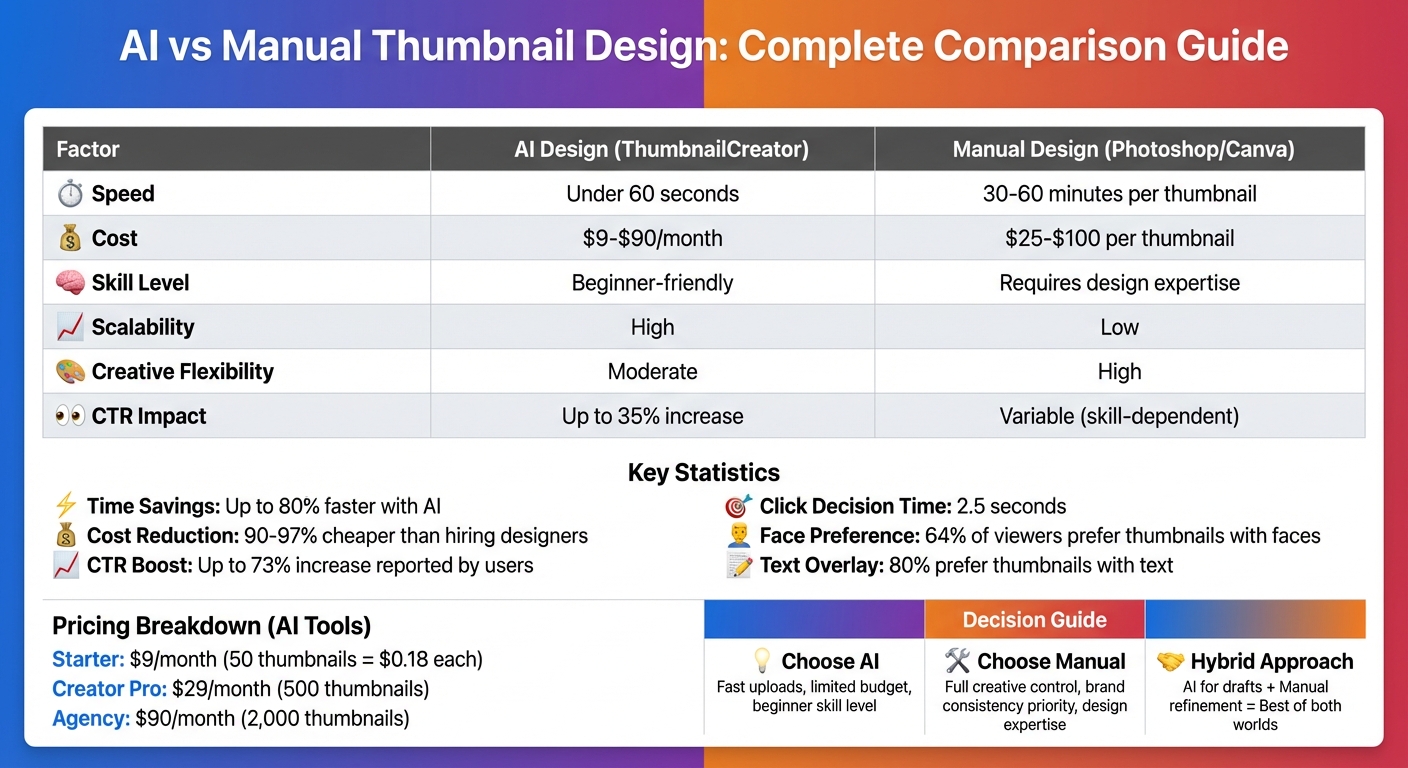
| Factor | AI Design (ThumbnailCreator) | Manual Design (Photoshop/Canva) |
|---|---|---|
| Speed | Under 60 seconds | 30–60 minutes per thumbnail |
| Cost | $9–$90/month | $25–$100 per thumbnail |
| Skill Level | Beginner-friendly | Requires design expertise |
| Scalability | High | Low |
| Creative Flexibility | Moderate | High |
To decide, consider your time, budget, and branding needs. For frequent uploads, AI is a great choice. For personalized designs, manual methods shine. Or, combine both for the best of both worlds.
AI vs Manual Thumbnail Design: Speed, Cost and Performance Comparison
FORGET Photoshop & Canva! This AI THUMBNAIL Maker does it All!
Benefits of AI Thumbnail Design with ThumbnailCreator
AI-driven thumbnail creation is changing the game for content creators. Instead of spending hours tweaking designs, you can get polished, professional results in just seconds. ThumbnailCreator's AI, trained on millions of high-performing thumbnails, knows what grabs viewers' attention and delivers layouts tailored for YouTube success.
The tool handles tasks like background removal, enhancing facial features, and positioning text, eliminating the need for advanced design skills. Plus, it lets you create multiple variations instantly, making A/B testing a breeze. This is especially useful since even small design changes can dramatically influence video performance.
Speed and Efficiency
Designing thumbnails manually can be a time sink - opening software, adjusting layers, and exporting files all take time. ThumbnailCreator, on the other hand, churns out high-quality thumbnails in under 30 seconds. For creators uploading several videos a week, this time savings is a game changer, freeing up hours for other creative tasks.
User feedback highlights the impact: some creators have seen their click-through rates (CTR) soar by up to 73% after switching to AI-generated thumbnails. The tool’s ability to generate multiple designs quickly also makes A/B testing more practical. With YouTube allowing creators to test up to three thumbnails per video, this feature ensures you’re always using the most effective design.
These time efficiencies also translate to reduced production costs, making the tool a win-win for creators.
Cost-Effectiveness
Hiring a freelance designer can cost anywhere from $25 to $100 per thumbnail. For creators who post frequently, these costs add up fast. ThumbnailCreator offers an affordable alternative.
- Starter Plan ($9/month): Includes 50 AI-generated thumbnails, basic face enhancement, and 20 background removals - bringing the cost to just $0.18 per thumbnail.
- Creator Pro Plan ($29/month): Provides 500 thumbnails, advanced features, and unlimited background removals.
- Agency Plan ($90/month): Offers 2,000 thumbnails, batch processing, and API access for more advanced needs.
"AI dramatically reduces production time - often up to 95% faster and 90–97% cheaper than traditional design workflows." - Volodymyr Davydenko, Software Engineering Expert, Gyre
Beyond subscription fees, the tool slashes opportunity costs by cutting production time by up to 80% compared to traditional methods. This makes ThumbnailCreator not just a budget-friendly option, but also a productivity booster.
Performance Optimization
ThumbnailCreator doesn’t just save time; it also boosts engagement. Its AI studies millions of successful thumbnails to identify the design elements that drive clicks. By focusing on aspects like contrast, text placement, and facial expressions, it ensures your thumbnails grab attention in the critical first 2.5 seconds. Studies show that 64% of viewers are more likely to click on videos featuring faces, and 80% prefer thumbnails with text overlays.
The tool’s impact is backed by user reviews, earning a 4.7 out of 5 rating on Futurepedia for its performance and speed. Unlike traditional design methods, which rely on intuition and stop once the thumbnail is published, ThumbnailCreator continuously refines its designs using real engagement data. This keeps your thumbnails aligned with evolving trends and viewer preferences.
Benefits of Manual Thumbnail Design
AI tools might be fast and efficient, but manual thumbnail design offers a level of creative precision that’s hard to beat. With manual design, you have complete control over every visual detail. There are no rigid templates or algorithmic constraints - you can experiment with custom color palettes, try out unique layouts, and add personal touches that make your content stand out from the crowd.
Full Creative Control
Using traditional design tools means you’re in charge of every aspect, from where the text goes to the exact shade of a color. This kind of control is crucial when you consider that viewers typically decide to click on a video within just 2.5 seconds. Manual design empowers you to create emotional connections by selecting the perfect facial expressions or capturing authentic moments that resonate with your audience. You can strategically place arrows, highlight key areas with circles, or position gestures to guide the viewer's eye exactly where you want it to go.
Brand Consistency
Another advantage of manual design is maintaining brand consistency. Whether it’s your logo, color scheme, or typography, manual workflows ensure your thumbnails are instantly recognizable. This consistency not only makes your content stand out in crowded feeds but also fosters long-term loyalty to your channel. In fact, custom thumbnails designed manually can boost engagement rates by up to 30%. By sticking to specific compositional patterns, your thumbnails become unmistakable - even when viewed at small sizes on mobile devices.
Audience-Specific Design
Manual design also allows for a tailored approach to your audience. You can choose facial expressions or incorporate symbols that align with their preferences, leading to a 20% increase in click-through rates. This level of customization helps you create visual cues that speak directly to your viewers' interests.
"Thumbnail psychology is 80% marketing psychology, and only 20% design skill." - Thomas Frank, Creator
sbb-itb-b59debf
AI vs Manual Design: Side-by-Side Comparison
When it comes to design, speed and creative flexibility are the main trade-offs between AI and manual methods. The choice often depends on your priorities and workflow.
Comparison Table
Here’s a quick breakdown of how AI tools like ThumbnailCreator stack up against manual design platforms like Photoshop or Canva:
| Factor | AI Design (ThumbnailCreator) | Manual Design (Photoshop/Canva) |
|---|---|---|
| Speed | High (under 60 seconds) | Low (30–60 minutes per thumbnail) |
| Creativity | Moderate (template- and prompt-based) | High (complete creative control) |
| Cost | Low (subscription-based; up to 90–97% cheaper) | High (software costs or designer fees) |
| CTR Impact | High (data-driven optimization, up to 35% increase) | Variable (depends on designer skill) |
| Scalability | High (great for high-volume creators) who need thumbnail testing at scale | Low (time-intensive, hard to scale) |
| Skill Level | Minimal (beginner-friendly) | High (requires design expertise) |
The numbers speak for themselves: AI tools can churn out professional-grade thumbnails in under a minute, while manual design often takes 30 to 60 minutes per image. For creators who produce content daily or need multiple thumbnail variations for A/B testing vs gut feeling decisions, this time savings can be a game-changer.
That said, speed isn’t everything. Manual design still holds the edge when it comes to precision and emotional resonance. It allows you to fine-tune every detail, capture subtle nuances, and build a visual identity that feels uniquely yours. This makes it ideal for projects that demand a personal touch or brand-specific storytelling.
"AI doesn't replace creativity - it removes repetitive work so you can focus on ideas, storytelling, and experimentation." – Volodymyr Davydenko, Software Engineering Expert, Gyre
The sweet spot for many creators in 2025? Combining both approaches. AI handles the grunt work - like generating initial concepts or automating tasks such as background removal - while manual refinement ensures the final product aligns with your vision and brand. This hybrid method brings together the efficiency of AI and the artistry of manual design.
Using AI and Manual Design Together
Blending AI with manual design is becoming a go-to strategy for many creators. Why? It pairs the efficiency of AI with the personalized detail that only manual editing can provide. AI tools can tackle time-consuming tasks like generating backgrounds, removing distractions, or crafting conceptual visuals. Meanwhile, manual edits let you incorporate your unique style - think signature fonts, brand colors, and your logo.
Here’s how this workflow typically plays out: start with a tool like ThumbnailCreator to quickly draft a design, then switch to manual refining for the finishing touches. For example, AI can upscale an image or suggest high-contrast color palettes that look great on mobile screens. From there, you can step in to position text overlays (ideally 3–5 bold words) so they don’t interfere with elements like YouTube's timestamp. This approach is especially effective for personality-driven channels, where a real photo of the creator is layered over an AI-generated background. The result? A design that feels both polished and authentic while keeping production time minimal.
This method also shines in A/B testing. You can use AI to create 4–10 variations with different facial expressions or color schemes, then manually tweak the most promising ones for YouTube's "test and compare" feature. Creators using ThumbnailCreator have reported up to a 73% boost in click-through rates by combining AI's speed with manual fine-tuning for brand consistency.
"Many creators find that a hybrid approach works best: generating the initial thumbnail with AI and then refining it manually to add that personal touch." – YouGenie
Conclusion: Which Method Works Best for You
Your choice depends on your priorities - time, budget, and branding goals. If you need to upload content frequently across multiple platforms, AI is the way to go. It works fast, producing results in seconds, whereas manual design can take significantly longer.
For those watching their budget, AI tools are a cost-effective option. Subscriptions typically range from $7.50 to $30 per month, offering a better return on investment compared to hiring designers or spending hours editing your work.
However, if you’re after complete creative control, manual design still holds its ground. Many creators find success by combining both approaches - using AI for tasks like generating backgrounds and then refining the details manually to ensure branding consistency. This balance reflects the trade-offs covered earlier, helping you decide what works best for you.
Quick decision guide:
- Use AI if you need speed and lack advanced design skills.
- Opt for manual design when you want full creative control and a distinct, personal touch.
- Try a hybrid approach to merge AI’s efficiency with your unique style.
FAQs
How can ThumbnailCreator help boost my YouTube click-through rates?
ThumbnailCreator is designed to boost your YouTube click-through rates (CTR) by leveraging AI-powered design and optimization to craft thumbnails that grab attention. Studies highlight the importance of custom thumbnails in drawing viewers, and AI tools make it easier to create polished, professional designs that align with your content.
With ThumbnailCreator, you can quickly generate thumbnails that use proven psychological and design techniques to stand out. Plus, the tool supports A/B testing, allowing you to try out different thumbnail styles and determine which ones connect best with your audience. This analytical approach helps ensure your thumbnails consistently drive engagement and improve CTR.
How do the costs of AI-generated thumbnails compare to manually designed ones?
The price gap between AI-generated thumbnails and those created manually can be striking. Manually designed thumbnails often require hiring professional designers, which can get pricey. Factors like the design's complexity, tight deadlines, and licensing fees can all drive up the cost. For creators who need a steady stream of thumbnails, these expenses can pile up fast.
On the other hand, AI tools like ThumbnailCreator offer a much more wallet-friendly option. Many of these tools operate on subscription plans, such as $9 per month, making them a cost-effective and scalable solution. For creators, this means saving both time and money without compromising on output.
Can I combine AI tools with manual design to create better thumbnails?
Combining AI tools with manual design is a smart way to create YouTube thumbnails that grab attention and look polished. AI tools can quickly generate ideas, layouts, or even complete designs, cutting down on the time and effort needed to start from scratch. Once you have a solid draft from the AI, you can tweak and refine it manually to match your brand's style and make it truly unique.
This mix of AI-driven efficiency and hands-on creativity gives you the best of both worlds. It allows you to craft thumbnails that not only catch the eye but also resonate with your content and appeal to your audience's tastes.