

How Competitors Boost Retention With Thumbnails
A thumbnail does more than win the click. It also helps decide whether people stay. If your image promises one thing and the first 10–30 seconds show another, viewers leave fast. One stat in the article says many videos lose 41% of viewers before the 30-second mark.
Here’s the short version: I’d focus less on getting the most clicks and more on getting the right clicks. That usually means:
- One clear subject
- Short text
- A face or emotion that fits the video
- A first 30 seconds that match the thumbnail
- Testing one thumbnail change at a time
- Watching CTR, 30-second retention, and watch time per impression together
A lower CTR can still win if watch time is better. That’s the main point. If the thumbnail sets the right expectation, people are more likely to keep watching, and that helps the video do better over time.
THUMBNAILS Can Hurt your Audience Retention?
Quick comparison
| Approach | What it looks like | What happens after the click |
|---|---|---|
| Click-first vs authentic thumbnails | Busy design, big drama, too much text | More mismatched clicks, sharper early drop |
| Retention-first thumbnail | One focal point, short text, clear promise | Better fit with viewer intent, smoother early retention |
I’d sum up the article like this: your thumbnail should act like a promise, and your opening should pay it off fast.
How Competitors Use Thumbnails to Keep Viewers Watching
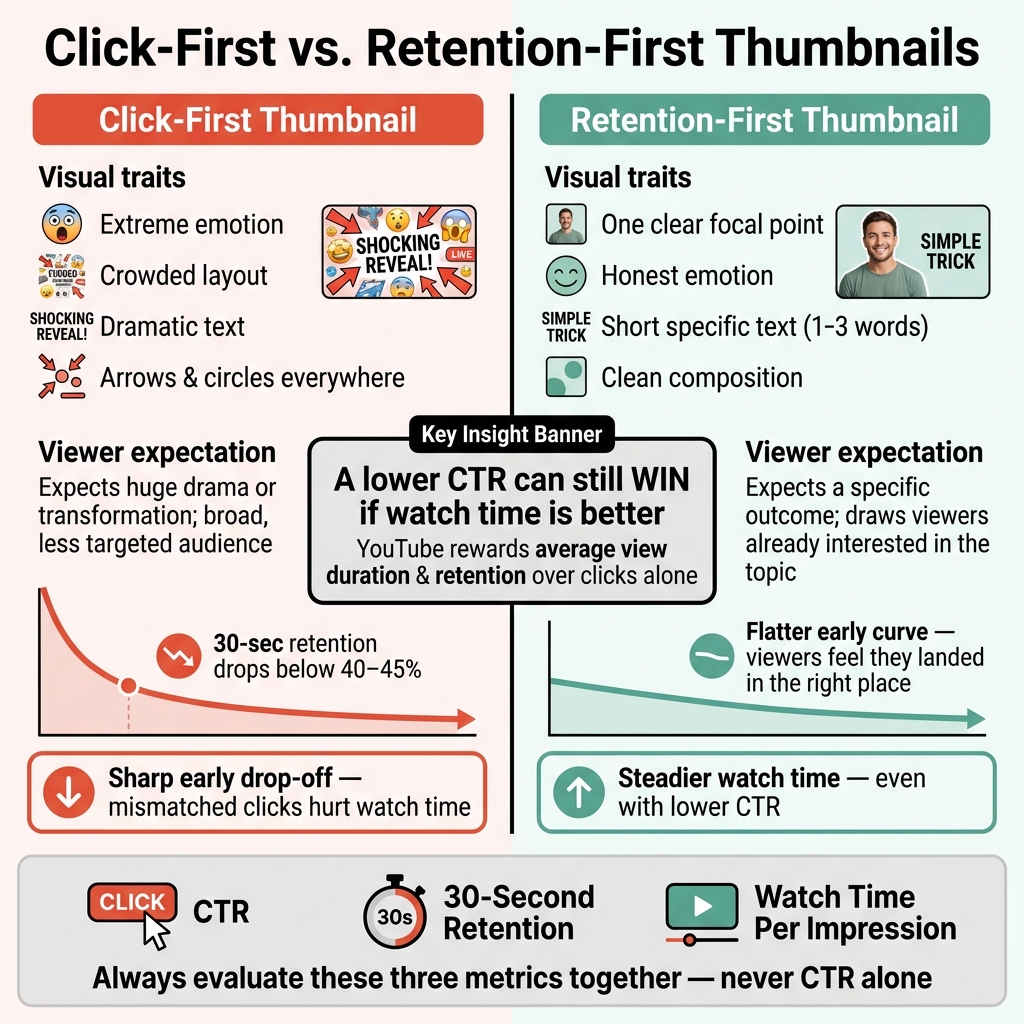
Click-First vs. Retention-First Thumbnails: What Actually Wins on YouTube
One Clear Idea, One Focal Point, One Instant Message
Once someone clicks, the thumbnail still matters. It helps shape whether the viewer feels, right away, that they landed on the right video. Strong competitors use thumbnails that get across one idea fast. Instead of cramming several ideas into one image, they build the frame around a single outcome or one clear point of tension.
This matters even more on mobile. At thumbnail size, clutter gets lost fast. High-performing channels usually keep things tight: one main subject, strong contrast between the subject and the background, and very few extra elements. That kind of simple layout helps viewers understand the topic at a glance, before they decide to stay.
Faces, Emotion, and Short Text That Match the Video's Payoff
Faces and short text help viewers read the tone of a video almost instantly. That lowers the chance of a mismatch after the click. In many niches, especially education, lifestyle, and commentary, competitors rely heavily on expressive faces. A large multi-channel analysis found that thumbnails with a single dominant face showing clear emotion beat neutral thumbnails or thumbnails with no face in most niches. Surprise, frustration, and excitement tend to help the right viewers click.
Short text plays a similar role. Strong competitors use thumbnail text like a filter, not a full headline. They stick to a short, outcome-focused phrase such as No More Back Pain or Worth It? to set a clear expectation. Vague or overhyped text may pull in more people, but it often pulls in the wrong people too. And when the video doesn’t match that promise, those viewers leave.
High CTR With Weak Retention vs. Lower CTR With Stronger Retention
You can see the gap most clearly when you compare clickbait vs authentic thumbnails to see how they impact viewer behavior.
| Thumbnail Type | Common Visual Traits | Viewer Expectations | Typical Retention Curve | What Smart Competitors Do |
|---|---|---|---|---|
| Click-Heavy | Extreme emotion, crowded layout, dramatic text, arrows and circles everywhere | Expects huge drama or transformation; draws a broad, less targeted audience | Sharp drop in the first 10–30 seconds; 30-second retention can fall below ~40–45% in many non-entertainment niches | Use sparingly; only when the first 30 seconds genuinely deliver on the drama shown |
| Retention-Heavy | One clear focal point, honest emotion, short specific text, clean composition | Expects a specific outcome or format; draws viewers already interested in that topic | Flatter early curve; viewers feel they landed in the right place | Default style for most videos; supports steadier retention |
The pattern is pretty clear: thumbnails that match viewer intent often keep people watching longer, even if CTR is lower. Competitors that line up the promise with the actual content tend to build steadier watch time.
Use these patterns as a simple checklist when you audit competitor thumbnails next.
A Simple Process to Reverse-Engineer Competitor Thumbnails
Build a Small Competitor List and Log Their Thumbnail Patterns
Start with a quick competitor audit. Pick 3–5 channels in your niche that rank often for your target keywords and sit close to your current size. You're not just looking for thumbnails that get clicks. You're looking for thumbnails that pull in the right viewers and help cut early drop-off.
Go to each channel's Videos tab and scan the thumbnails visually before you write anything down. Then log the basics in a simple spreadsheet:
- Face presence
- Emotion
- Text length
- Contrast
- Layout
- Promise type: result, curiosity, or process
Once you have your list, look for traits that show up again and again on the strongest videos. That's usually where things start to click.
Use Public Signals to Estimate What Is Working
You don't need private data to spot useful patterns. Public signals can tell you a lot.
They can point to thumbnails that set the right expectation, which often helps the first 30–60 seconds of the video. If a channel with a similar subscriber count keeps beating what you'd expect on non-viral topics, there's a good chance their packaging is working.
Compare videos on the same topic across several channels. Then note which thumbnail traits keep showing up in the strongest performers. After that, group those repeated traits into a simple pattern code. It sounds a bit nerdy, sure, but it makes channel-to-channel comparison much easier.
Competitor Thumbnail Patterns and Their Likely Retention Impact
Use these labels to tag competitor thumbnails. Then compare them with the videos showing the best early retention signals.
| Thumbnail Pattern | Promise Type | Retention Signal |
|---|---|---|
| Close-up face, strong emotion | Emotional payoff or personal story | Hooks viewers early; reduces confusion |
| Short text (1–3 words) + clear subject | Direct answer or practical solution | Aligns with viewer intent; reduces early bounce |
| Before-and-after vs single image thumbnails | Transformation or result | Encourages viewers to stay for the "after" |
| Minimalist composition, one focal point | Single, fast visual message | Sets a clear expectation; limits click-and-quit |
| Repeatable series format | Reliable or episodic promise | Returning viewers stay longer; steadier early retention |
| High-contrast color setup | Visual clarity and urgency | Reduces mismatched clicks; limits sharp early drop-offs |
These pattern codes make it much easier to see which thumbnail styles show up most often on videos that hold attention well.
sbb-itb-b59debf
Turn Competitor Insights Into Better Retention on Your Channel
Match Your Thumbnail Promise to the First 30 Seconds of the Video
Once you know what competitor thumbnails are promising, the next move is simple: pay that promise off fast. Your video should confirm the thumbnail within the first 30 seconds.
Use the patterns you spotted in competitor thumbnails as a guide for your own opening. If your thumbnail shows a specific result, like "$75 saved on your electric bill," say that result early and back it up with a quick visual, such as a screenshot or the actual bill. If the payoff takes too long, viewers leave early. The promise needs to show up in the opening scene, not live only on the thumbnail.
Track these three metrics together:
- CTR
- 30-second retention
- Watch time per impression
Watch time per impression tells you a lot about click quality. If impressions stay about the same but watch time per impression goes up, your thumbnail and opening are bringing in viewers who stick around.
Test One Thumbnail Change at a Time and Track the Right Metrics
If you change too many thumbnail elements at once, you won't know what made the difference. Change one variable at a time, a core principle of thumbnail testing at scale. That could be text length, facial expression, or subject framing.
For instance, test a short 3-word phrase against a longer 8-word description while keeping the image and colors the same. Or test a neutral face against a stronger emotional expression that fits the video's payoff. After each test, check whether CTR, 30-second retention, and watch time per impression moved the way you wanted together. If CTR goes up but watch time per impression drops, the thumbnail is likely pulling in the wrong viewers.
Focus on early retention first, not CTR by itself. In YouTube's Test & Compare feature, pick the version that drives the most watch time, and YouTube says to let tests run for at least 2 weeks - or about a month if your channel gets fewer than 10,000 impressions per week. Compare each result against your own channel baseline, not generic industry averages, because your audience and niche are the better benchmark.
Before-and-After: What Changed and What Improved
The table below shows how one competitor-led thumbnail change can connect to the retention metric it's most likely to affect.
| Thumbnail Element Changed | Old Pattern | Revised Pattern | Primary Metric Tracked |
|---|---|---|---|
| Text length | Long descriptive phrase (8–10 words) | Short direct phrase (3–4 words) | Watch time per impression |
| Facial expression | Neutral or generic face | Strong emotion matching the video's payoff | 30-second retention |
| Subject framing | Wide shot, busy background | Close-up, single focal point | Average view duration |
| Thumbnail promise | Vague curiosity hook | Explicit result shown upfront | 30-second retention |
In practice, CTR might stay flat or even dip a little while retention and watch time per impression go up. That's often a good trade. If CTR and retention both go up, that's a pattern worth repeating.
Log the date (MM/DD/YYYY), the topic, the exact change you made, and the resulting metrics. Over time, that gives you a playbook you can trust and a thumbnail workflow you can repeat.
Use ThumbnailCreator to Build a Consistent Thumbnail Workflow
Once you’ve found competitor patterns that keep showing up, the next move is simple: turn them into a workflow you can use on every upload. ThumbnailCreator helps you turn those patterns into repeatable thumbnail ideas fast. The goal here is speed and consistency, not starting over every time.
Build Retention-Friendly Thumbnail Variations Faster With AI
Start by saving the core layout as a template. Then change a single piece, like the background, facial expression, or payoff object. ThumbnailCreator’s AI can generate background and color changes, swap in different faces or expressions, and replace placeholder props with the final payoff image. Faces and expressions are some of the biggest thumbnail levers you can test.
A Simple Thumbnail Workflow
Use the same template structure across future uploads so every test begins from a known baseline. During filming, capture 2–5 high-resolution thumbnail shots. After the shoot, import your best stills into ThumbnailCreator, pick a saved template, and use AI generation to make 3–5 variations by changing one element at a time, such as the background, expression, or headline phrasing.
Then export the top option and upload it in YouTube Studio when you schedule the video.
After publishing, check YouTube Analytics at the 24–72 hour mark for CTR, average view duration, and retention in the first 30–60 seconds. When you connect those numbers back to the template choices and AI edits, you get a workflow you can keep using instead of guessing each time.
Conclusion: Better Retention Starts With Better Thumbnail Promises
The pattern across these thumbnails is pretty clear: the best channels improve retention by pulling in the right viewer, not just more viewers. A single clear focal point, emotion that fits the video's tone, and text that lines up with the actual payoff work together to attract people who want exactly what the video gives them.
YouTube cares more about average view duration and retention than clicks by themselves, so poor retention can shrink your reach. A high CTR with weak retention can drag down performance. In many cases, a thumbnail that gets a few fewer clicks but keeps people watching will come out ahead.
That’s why it helps to stay disciplined. Test one thumbnail change at a time. Judge the result by watch time, not CTR alone. And give it at least 2 weeks before you make a call.
ThumbnailCreator helps you put that approach into practice faster and with more consistency across every video.
The channels that win make the thumbnail promise and the first 30 seconds line up every time. Build that standard once, then use it on every upload.
FAQs
How do I know if my thumbnail is attracting the right viewers?
Look beyond CTR. A thumbnail is only doing its job if those clicks turn into retention and watch time.
Head into YouTube Studio Analytics and compare CTR with audience retention. If clicks are high but engagement falls off hard in the first 15–30 seconds, your thumbnail may be promising one thing while the video delivers another. That mismatch can hurt.
You can also use YouTube’s Test & Compare tool to see which thumbnail leads to better watch time.
What should I show in the first 30 seconds to match the thumbnail?
Show the exact promise from your thumbnail right away.
If the thumbnail points to a certain number, step, or result, make that clear in the opening. Don’t make people wait for it.
Keep the same subject and emotional tone, too. That way, viewers feel like they clicked on the right video instead of bait.
And don’t oversell it. If the opening promises more than the video delivers, people leave fast - and that hurts retention.
Which thumbnail metric matters most for retention?
Watch time share matters most because it brings together impressions, click-through rate (CTR), and average view duration (AVD).
CTR helps you get the click. But it doesn't tell you if viewers felt the video was worth their time.
That’s why it helps to track CTR, AVD, and audience retention as a group. If those numbers work well together, your thumbnail isn’t just pulling people in - it’s bringing in viewers who stick around.