

Why Thumbnails Matter for YouTube Search Rankings
Your thumbnail can shape whether a search impression becomes a click - and that can affect how long your video keeps showing in YouTube search.
Here’s the short version: if people see your video but skip it, YouTube gets a weaker signal that your video fits that search. That can lead to less search traffic over time. And even a low CTR can cut views by 50% to 70%.
If I want better search results from YouTube, I focus on a few simple things:
- Match the thumbnail to the title
- Match both to the searcher’s intent
- Use one clear subject
- Keep text short: 2–4 words
- Avoid common thumbnail mistakes like clutter and weak contrast
- Watch CTR, impressions, search views, and watch time after changes
- Keep clicks high without hurting retention
A few data points stand out:
- A study of 323,000 videos and 62.6 billion views found that text-heavy thumbnails got about 19% fewer views
- Branding should stay small, with logos using about 10–15% of the image at most
- After a thumbnail update, I’d review performance over 7–14 days
This comes down to one idea: the best thumbnail doesn’t just get clicks - it gets the right clicks. That means clear visuals, strong title fit, and no bait-and-switch.
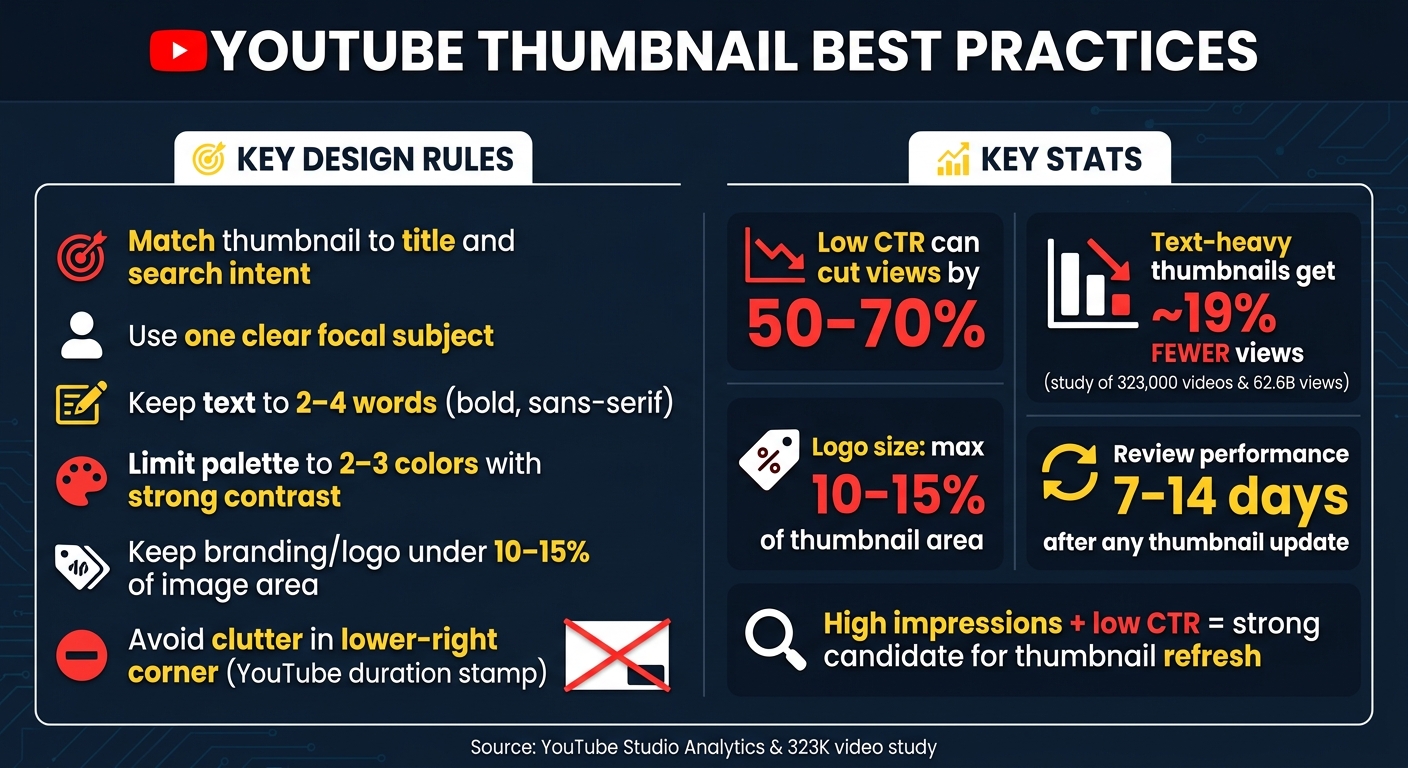
YouTube Thumbnail Best Practices: Key Rules & Stats
How Do Thumbnails Influence YouTube SEO Performance
sbb-itb-b59debf
How Thumbnails Influence YouTube Search Rankings
Thumbnails shape search performance through clicks. Once a video shows up in search, the thumbnail often decides whether that impression turns into a click.
Direct Ranking Signals vs. Indirect Thumbnail Impact
A low CTR can weaken YouTube's confidence that the video fits the query, which may reduce visibility. CTR matters most when it brings in the right viewer.
How CTR, Search Intent, and Title-Thumbnail Alignment Work Together
Think of the title and thumbnail as a two-part promise to the searcher. The title tells them what the video is about. The thumbnail backs that up in a split second. When both point to the same idea, people feel more sure about clicking. When they don't match, people move on.
That alignment also has to fit search intent. If the thumbnail feels off-topic, it breaks the searcher's expectation, even when the title is well-optimized. So the goal isn't just to grab attention. It's to show the searcher they're in the right place.
If you are just starting out, follow a YouTube thumbnail beginners guide to master the basics. Next, look at the thumbnail design choices that lift clicks without hurting relevance.
Thumbnail Design Choices That Improve Clicks
Subject Focus, Contrast, and Readable Text
Your thumbnail should make sense in about a second. That means one clear focal point, a tight crop, and no extra stuff fighting for attention. This matters even more in search results, where your thumbnail has to win against a row of competing options, not just nearby suggested videos.
Contrast does a lot of the heavy lifting. Strong light-dark contrast helps the image pop, and a palette of two or three colors usually works best. Too many colors can make the whole thing feel busy.
Text helps, but only when you keep it short. Stick with 2–4 words in a large, bold sans-serif font, then check how it looks on mobile using a mobile thumbnail optimization guide. If people can't read it on a small screen, it won't help. One study of 323,000 videos and 62.6 billion views found that text-heavy thumbnails got about 19% fewer views. So in most cases, less text is the safer bet.
Human Presence, Emotion, and Topic Relevance
Faces can help, but they aren't magic. In search results, emotion works best when it lines up with the query. If the video is about software or a step-by-step process, lead with the object, screen, or outcome instead of a face.
Use a face only when the expression fits the topic and makes the subject clearer. A shocked face, for example, only works if the nearby image makes the topic obvious. Otherwise, it just feels random.
Consistent Branding Without Hiding the Topic
Branding should help people spot your videos, not take over the frame. Use the same fonts and a recurring color scheme, and keep any logo small. A good rule is to place it in a corner and keep it under about 10–15% of the full thumbnail area, so it doesn't compete with the subject or text.
The middle of the thumbnail should still do the main job. Let the central image and hook text change from video to video so searchers can tell, at a glance, what each one is about. ThumbnailCreator makes this easier by saving branded templates while letting you swap the subject image and text for each upload. If these basics are off, the next problem is usually clutter, weak contrast, or visuals that promise one thing and deliver another.
Common Thumbnail Mistakes That Reduce Search Visibility
The fastest way to lose search visibility is simple: make the thumbnail hard to understand in a split second. A weak thumbnail hurts CTR, and lower CTR can lead to less search visibility over time.
Cluttered Layouts and Tiny Text
When a thumbnail tries to do too much, it gets harder to read. Search results move fast. People scan, not study. If the frame is stuffed with text, faces, icons, and extra details, nothing stands out.
The mistake shows up all the time: saying too much in one image. Instead of looking clickable, the thumbnail looks crowded and easy to skip.
One placement rule matters a lot here: avoid faces, text, or key objects in the lower-right corner; YouTube's duration stamp covers that area, especially on mobile.
Search thumbnails need instant clarity. Not more detail.
Misleading Visuals and Weak Contrast
A misleading thumbnail can do more damage than good. If the image hints at something the video doesn't actually cover, click-through may go up at first, but retention can drop - and YouTube will reduce its reach in response. The goal is to lift CTR without hurting retention. Understanding thumbnail CTR benchmarks helps determine if your current performance is on track.
Weak contrast causes another problem. The thumbnail blends into the row of search results and gets ignored. When the image matches the video and stands out on the page, it's more likely to earn clicks that hold up in search.
How to Review and Improve Thumbnail Performance
Review CTR, Impressions, and Post-Update Changes
Once the thumbnail goes live, check if it’s actually turning impressions into clicks.
In YouTube Studio, open Analytics → Reach to review impressions and impressions CTR. If impressions are going up but CTR stays flat, the thumbnail is getting seen but not pulling people in.
Then compare the 7–14 days before and after the update. Look at CTR, impressions, search views, and watch time. If CTR goes up and watch time stays steady or moves up too, that’s a good sign.
Use that data to decide the next move. If CTR is low and watch time is flat, try things like:
- simplifying the image
- shortening the text
- increasing contrast
- swapping the subject
Videos with high impressions and low CTR are strong candidates for a thumbnail refresh.
Use ThumbnailCreator to Produce Stronger Thumbnails Faster
After you find a weak performer, use ThumbnailCreator to make the next version faster. Reviewing YouTube thumbnail guides and iterating takes time, and ThumbnailCreator is built to speed up revisions.
ThumbnailCreator helps with:
- AI layouts
- text editing
- face swapping
- object swapping
- templates
The workflow is simple: use the data, make a new version, publish it, and review the numbers again after 7–14 days.
Conclusion: Better Thumbnails Support Better Search Results
Track the numbers, keep thumbnails that lift CTR without hurting watch time, and replace the rest.
FAQs
Do thumbnails directly affect YouTube rankings?
Not directly. Thumbnails can influence rankings indirectly because they affect CTR. And CTR can shape how often YouTube tests and distributes your video, especially in the early stage.
But thumbnails aren't a standalone ranking boost.
Over time, visibility depends more on what happens after the click, like watch time and retention. A high CTR paired with strong watch time can help a video grow. On the flip side, misleading thumbnails may win the click at first, then hurt recommendations later if viewers leave fast.
What is a good YouTube thumbnail CTR?
A good YouTube thumbnail click-through rate (CTR) usually lands between 4% and 6%. That’s a solid benchmark for most channels.
At the same time, about half of channels sit somewhere in the 2% to 10% range. So if your CTR moves around inside that band, that’s not unusual.
CTR also changes a lot depending on where the views come from:
- YouTube Search: 8% to 15%
- Suggested Videos: 5% to 10%
- Home: 2% to 6%
- Subscriber feeds: 10% to 30%
A CTR above 10% can be outstanding. But CTR doesn’t tell the whole story on its own. If people click and then leave fast, that high CTR won’t mean much. That’s why it makes sense to look at watch time right alongside it.
How often should I change a thumbnail?
Wait 48 to 72 hours after publishing before you change a thumbnail. Early views from subscribers can skew the data, so if you jump in too soon, you may end up judging the wrong thing.
Once you start a test, let it run for 7 to 14 days. You should also aim for 1,000 to 2,000 impressions per version before making a call. That gives you enough data to spot a pattern instead of reacting to a fluke.
If you're making broader thumbnail updates, give it at least 30 days. That buffer can help you avoid hurting impressions while the platform settles on how to show the video.
ThumbnailCreator can help you create and test pro-looking thumbnail designs fast.