

CTR Case Studies: Thumbnail Success
Want more clicks on your YouTube videos? Your thumbnail might be the key. Click-through rate (CTR) measures how many people click your video after seeing its thumbnail. Even small changes can double your CTR, boosting views without extra uploads.
Key Takeaways:
- Simplify your design: Cleaner thumbnails with fewer elements increase CTR by 23%.
- Use strong emotions: Faces with shocked expressions can boost CTR by up to 45%.
- Leverage bold colors: Red and yellow palettes drive 41% more clicks.
- Keep text short: 3–5 bold words improve readability and clicks by 28%.
- Consistency matters: Branded thumbnails build trust and improve CTR by 15–20%.
Example: A gaming channel cut clutter from its thumbnails, leading to a 32% CTR increase. Another creator swapped neutral faces for AI-generated surprised expressions, doubling their CTR in days.
Why it matters: CTR is the first step in growing your channel. Better thumbnails mean more views, longer watch times, and stronger algorithm signals. Start by auditing your low-performing videos and creating effective thumbnails based on these tips.
The Thumbnail Experiment: Using Science to Boost CTR
sbb-itb-b59debf
Case Studies: Thumbnail Redesigns That Raised CTR
Crafting thumbnails that grab attention and drive clicks is a game-changer. These case studies showcase how small yet intentional design changes can significantly boost CTR. Let’s dive into real-world examples of what worked.
Channel A: Simplifying Design for Better Results
A gaming channel struggled with cluttered thumbnails - busy backgrounds, excessive text, and competing visuals. Using a gaming thumbnail generator can help avoid these common pitfalls. On mobile screens, this chaos turned into an unreadable blur. The fix? A cleaner approach: swapping the cluttered background for a simple gradient and limiting the text to just three words. The result? CTR increases of +28% and +32% on two separate videos.
This wasn’t about a total overhaul. The key was eliminating distractions. Between 2020 and 2025, creators saw that high-performing thumbnails became more minimalist. Word counts dropped by 40%, while the size of faces in thumbnails grew by 35%, reflecting a shift toward focused, clear designs.
Channel B: The Power of Color and Emotion
In April 2026, digital marketer Sougan Kumar Mandi made a bold move by replacing a standard Canva thumbnail with an AI-generated image featuring a highly expressive face. Within five days, the CTR jumped from 2.1% to 4.8%. Another experiment, documented by the Hooksnap Blog, found that switching a neutral expression for a surprised one led to a 47% CTR increase.
Here’s a breakdown of what drives results:
| Variable | Average CTR Impact |
|---|---|
| Shock facial expression | +45% |
| Red + Yellow color palette | +41% |
| Face vs. no face | +38% |
| High visual contrast | +37% |
| Exaggerated vs. subtle expression | +33% |
"Facial expression... is consistently the highest-impact variable." - Hooksnap Blog
The takeaway? Bold colors and strong emotions aren’t just design choices - they’re powerful tools for driving engagement.
While these tactics deliver immediate results, consistent style vs. varied style thumbnails is what sustains long-term performance.
Channel C: Building Trust Through Consistency
Channel C took a different path, focusing on consistent branding. Their thumbnails followed a set formula: bold sans-serif fonts, 1–2 hero colors, clear face framing, and a recognizable style across all uploads. This approach made their content instantly recognizable, strengthening the connection with their audience.
YouTube growth strategist Daniel Whitmore of YTShark explains:
"Consistent thumbnail styling leads to 15-20% higher CTRs from subscribers compared to inconsistent approaches. That means picking a style and refining it over time beats constantly reinventing your approach."
Even small additions, like a brand logo, can make a difference, boosting CTR by 19%. The benefits compound over time: higher CTRs signal the algorithm to increase impressions, which drives more views and watch time, creating a positive feedback loop. Consistency, in this case, isn’t just about visuals - it’s about building trust and recognition.
Design Principles That Drive Higher CTR
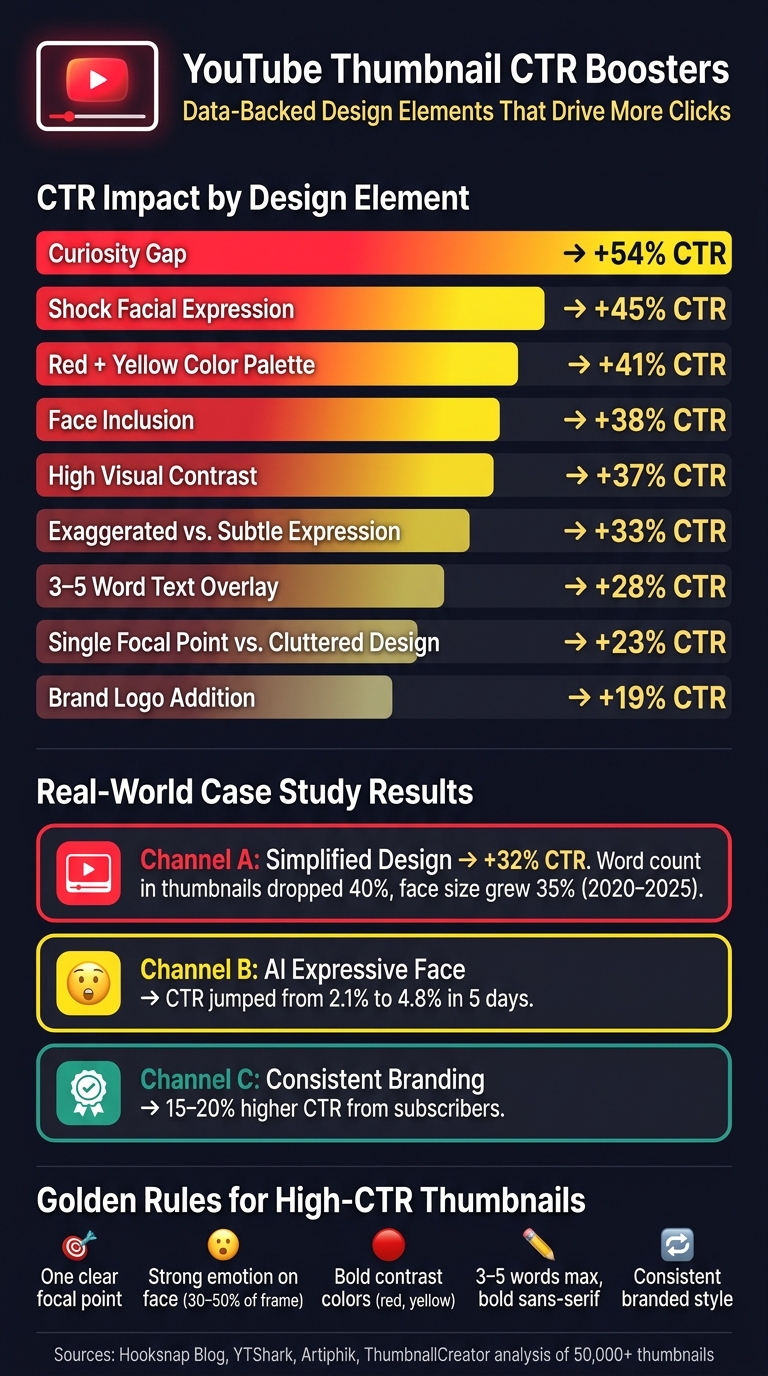
YouTube Thumbnail CTR Boosters: Data-Backed Design Elements
Looking at these case studies, it's clear that certain design principles consistently lead to higher CTRs. The success stories weren't random - they followed proven strategies. Here's what the data reveals about what works.
Simplicity and Focus
Clutter kills clicks. Thumbnails with three or more competing visual elements see about 23% lower CTR compared to those with one clear focal point. Why? Viewers only spend 0.4 seconds glancing at an image before deciding whether to scroll past.
A useful rule of thumb: if you can't identify the subject of the thumbnail from 20 feet away, it's too busy. Keep text short and bold - 3–5 words in a sans-serif font (like Impact or Montserrat Black) - to boost performance by 28%. Many creators miss this; 52% of new creators see CTRs below 2% because their fonts are unreadable at smaller sizes.
"The feed does not reward craft, it rewards legibility." - Rahaman Bin Ujit, Founder, Artiphik
This principle of simplicity ties directly to the higher CTRs seen in successful case studies.
Contrast and Curiosity
Colors speak volumes. Bright, high-saturation hues like red and yellow grab attention and stop the scroll. High visual contrast alone can increase impressions by 37%. Add a curiosity gap - a design that teases without fully revealing the content - and you could see CTRs jump by 54%.
Rahaman Bin Ujit compares this approach to MrBeast's thumbnails:
"MrBeast's team treats color like a volume knob, not an aesthetic. The thumbnails look loud because they need to be loud to be seen." - Rahaman Bin Ujit, Founder, Artiphik
Pair bold colors with complementary backgrounds - think yellow on purple or red on dark blue - to create that eye-catching "pop." If the thumbnail feels slightly over-the-top on a desktop, it's likely perfect for mobile.
Emotional and Visual Connection
Channel B's success highlights the power of emotion. Adding a face to your thumbnail can increase clicks by 38%, and the expression matters. Faces with strong, contextually appropriate emotions outperform neutral ones by 20–30%. For even better results, exaggerated shock expressions can push CTR up by 45%.
For the best effect, make sure the face occupies 30–50% of the thumbnail area. Cropping tightly ensures the emotion is clear and impactful, even on smaller mobile screens.
| Design Element | CTR Impact |
|---|---|
| Curiosity gap | +54% |
| Shock facial expression | +45% |
| Red + Yellow color palette | +41% |
| Face inclusion | +38% |
| High visual contrast | +37% |
| 3–5 word text | +28% |
| Single focal point vs. cluttered design | +23% |
These principles provide a solid foundation for creating thumbnails that stand out. Tools like ThumbnailCreator can help refine and amplify these strategies even further.
How ThumbnailCreator Helps You Apply These Principles

Turning data-backed strategies into consistent results can be tricky. That’s where ThumbnailCreator comes in. This AI-powered tool takes those proven strategies and makes them actionable, helping creators design eye-catching thumbnails in just minutes. With a focus on efficiency and ease, ThumbnailCreator bridges the gap between theory and execution, offering tools that streamline the entire design process.
AI-Generated Designs and Templates
ThumbnailCreator uses insights from analyzing over 50,000 trending thumbnails. The AI handles key design elements like isolating a central focus, creating clean backgrounds to reduce distractions, and applying high-contrast colors that work well even at the small mobile scale of 200x113 pixels (where 70% of YouTube views happen). Instead of starting from scratch, creators can instantly generate multiple thumbnail options, testing different color schemes, text hooks, or layouts to see what works best before publishing.
Face and Object Swapping for Better Visuals
Facial expressions are a game-changer for thumbnail performance, influencing click-through rates (CTR) by 12–18% on average. ThumbnailCreator's face-swapping feature allows users to experiment with various emotional triggers - like surprise or excitement - without needing to reshoot. Since exaggerated expressions can increase engagement by 45%, and thumbnails with faces have a 38% CTR advantage, this tool is a time-saver. Similarly, the object-swapping feature lets creators fine-tune supporting visuals to enhance focus, all without reworking the entire design.
Text and Color Editing for Clarity and Impact
Background color is the most influential factor in thumbnail design, with CTR changes ranging from 18–25%. ThumbnailCreator’s color editing tools let users test combinations like Red + Yellow, which can boost CTR by 41%. The text editor ensures creators stick to the ideal 3–5 word range - delivering a 28% performance boost - and provides bold sans-serif fonts with customizable outlines and shadows for better readability on small screens (improving clarity by 40%). Adding a brand logo can also increase trust by 19%.
Conclusion: Putting These Lessons to Work
The case studies reveal a consistent pattern: small, intentional changes can lead to noticeable improvements. Whether it’s swapping a neutral expression for a surprised one, keeping text overlays concise at 3–5 words, or using bold, high-contrast colors like Red and Yellow, every detail matters. These examples highlight one key takeaway: using data-driven design is essential for boosting engagement.
Even a minor adjustment can significantly impact a video's performance. The difference between channels that grow and those that stagnate often lies in viewing thumbnails as conversion tools rather than simple visuals. As Sougan Kumar Mandi, Founder of Peplio, aptly said:
"US creators don't treat thumbnails as decoration - they treat them as conversion assets."
For a practical approach, focus on auditing videos with over 10,000 impressions and a CTR that’s at least 1.5 percentage points below average. Redesigning the top 20% of these thumbnails could lead to a 45% increase in CTR. To find the winning version, follow a structured thumbnail A/B testing guide.
Tools like ThumbnailCreator make implementing these strategies easier. With its AI-powered editor - designed using insights from over 50,000 trending thumbnails - you can experiment with facial expressions, color schemes, and text hooks in just minutes, no design skills required.
FAQs
What’s a good YouTube CTR?
In 2026, a solid YouTube click-through rate (CTR) generally lands between 4% and 6%, with most channels seeing rates anywhere from 2% to 10%. If your CTR is above 6%, you’re in the high-performing category.
However, keep in mind that CTR can vary depending on your niche and audience. That’s why it’s crucial to monitor your channel’s average performance and identify which videos are resonating the most with viewers.
Want to improve your CTR? Tools like ThumbnailCreator can make a big difference. This AI-powered tool helps you design thumbnails that grab attention by incorporating bold colors, clear text, and striking visuals - all of which are key to boosting engagement.
How do I test if a new thumbnail really improved CTR?
To see if a new thumbnail boosts your click-through rate (CTR), try the Test & Compare tool in YouTube Studio. Upload up to three different thumbnail variations, but make sure to tweak just one element at a time - like the text or facial expression. Run the test for 7 to 14 days, aiming for each version to get between 1,000 and 2,000 impressions. Once the test wraps up, review the CTR and watch time share to ensure the updated thumbnail not only grabs attention but also brings in viewers who stick around.
Which videos should I redesign thumbnails for first?
Start by targeting evergreen videos - those that consistently draw traffic over time - but have a lower-than-average click-through rate (CTR). To ensure reliable testing, focus on videos with at least 500 impressions in the past 48 hours. Use YouTube Studio to sort your videos by CTR, pinpoint thumbnails that aren't performing well, and compare them to your top designs. Tools like ThumbnailCreator can simplify the process, offering features like AI-generated designs, face swapping, and text editing to help you craft professional, eye-catching thumbnails quickly.