

Custom Thumbnails vs Auto-Generated: CTR Comparison
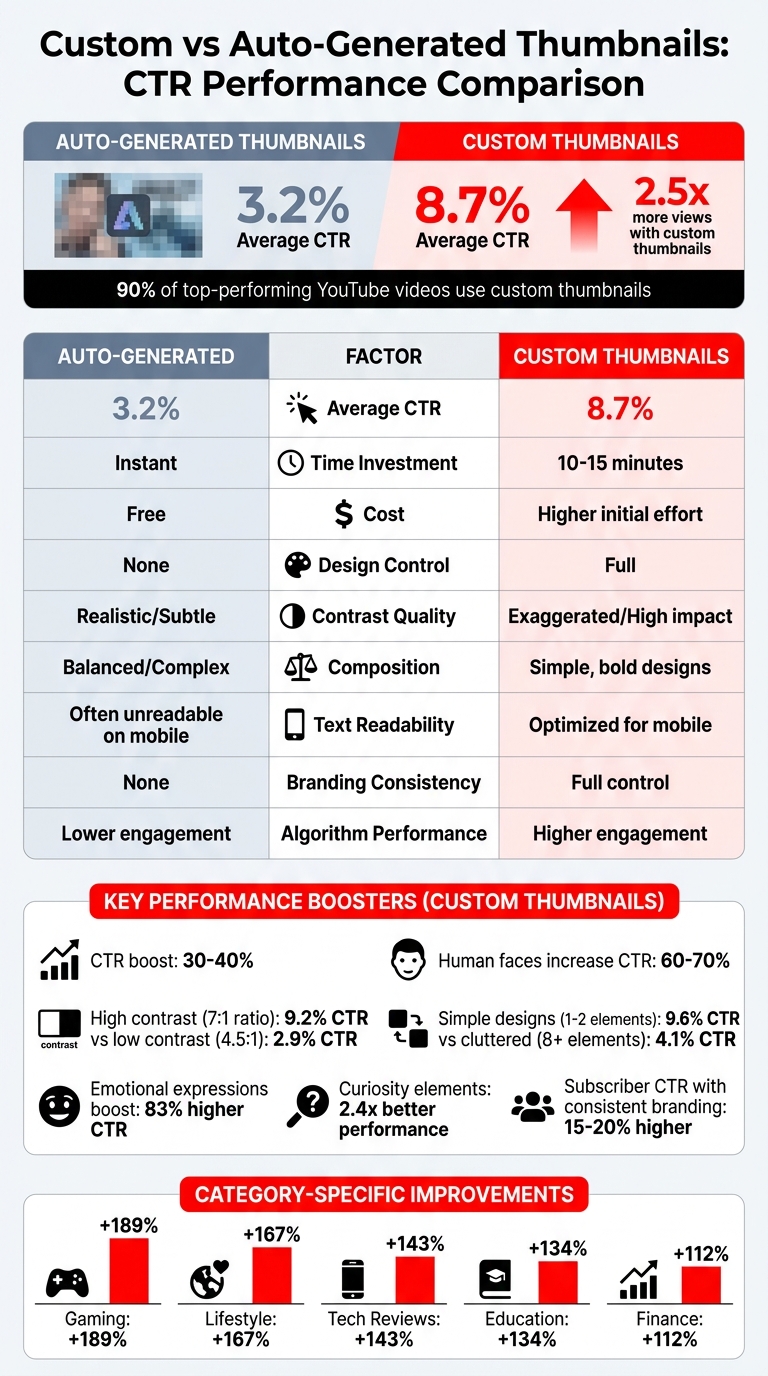
Custom thumbnails outperform auto-generated ones by a wide margin. Videos with custom thumbnails average a CTR of 8.7%, compared to just 3.2% for auto-generated options. This means custom thumbnails generate 2.5x more views on average.
Key takeaways:
- 90% of top-performing YouTube videos use custom thumbnails.
- Custom thumbnails can boost CTR by 30–40%.
- Thumbnails with human faces increase CTR by 60–70%.
- Simplicity, bold colors, and readable text are essential for better performance.
| Factor | Auto-Generated Thumbnails | Custom Thumbnails |
|---|---|---|
| Average CTR | 3.2% | 8.7% |
| Time Investment | Instant | 10–15 minutes |
| Cost | Free | Higher initial effort |
| Design Control | None | Full |
| Algorithm Performance | Lower engagement | Higher engagement |
If you're serious about growing your channel, switching to custom thumbnails is a must. They grab attention, improve click rates, and signal quality to viewers while avoiding common thumbnail mistakes that hurt performance.
Custom vs Auto-Generated YouTube Thumbnails: CTR Performance Comparison
CTR Performance: Custom vs Auto-Generated Thumbnails
CTR Data and Trends
A study analyzing 10,247 videos revealed that custom thumbnails achieve an average click-through rate (CTR) of 8.2%, compared to just 3.2% for auto-generated thumbnails. That’s a 154% increase in CTR for channels that use custom, optimized designs. Breaking it down further, specific categories see even greater improvements: gaming channels gain a 189% boost, lifestyle channels 167%, tech reviews 143%, education 134%, and finance 112% when using custom thumbnails.
Interestingly, the presence of human faces in thumbnails can elevate CTR by 60–70%, translating to about 921,000 additional views compared to faceless options. Thumbnails with a single face perform 15% better than those featuring three or more faces. Plus, faces that take up 30–50% of the thumbnail space see a 44% higher CTR than smaller ones. Even subtle details like direct eye contact can make a difference, increasing CTR by 22% compared to faces looking away. These stats highlight how thoughtful design choices can significantly influence viewer behavior.
Performance of Custom Thumbnails
Custom thumbnails excel because they give creators full control over design elements. This freedom allows for strategic adjustments, such as tweaking background colors (which can impact CTR by 18–25%), facial expressions (12–18%), and text placement (8–15%). By crafting thumbnails that create a curiosity gap vs direct value, creators encourage viewers to click. High-contrast visuals and bold graphics are other effective techniques that custom thumbnails can employ, standing out far more than the often-muted tones of auto-generated options.
In a test involving 240 thumbnails, human-designed custom thumbnails achieved an 8.7% CTR, compared to only 3.2% for thumbnails generated purely by AI. These results underscore the effectiveness of intentional design choices in driving engagement.
Limitations of Auto-Generated Thumbnails
Auto-generated thumbnails fall short in several areas. They often miss key moments, fail to capture engaging facial expressions, and lack the vibrant color contrasts that draw attention. The difference in performance is stark: videos with custom thumbnails secure 67% of their engagement within the first 24 hours, while those with auto-generated thumbnails only manage 31%.
Chris Munch, CEO of AmpiFire.com, highlights the importance of design alignment:
"It's critical to align your thumbnail with your video, and the first few seconds of your video must confirm to the viewer that what is promised in the title and thumbnail, will be delivered. Otherwise people don't watch and it reduces the chance of your video being recommended to others".
Without the strategic input that custom designs provide, auto-generated thumbnails simply can't compete. Their lack of design flexibility limits their ability to attract clicks, further emphasizing the value of investing in custom thumbnails.
sbb-itb-b59debf
How to Make Better YouTube Thumbnails and Increase CTR (Complete Guide)
Advantages and Disadvantages Comparison
Taking a closer look at the CTR data, let’s break down the practical upsides and downsides of custom thumbnails versus auto-generated ones.
Custom thumbnails demand more effort and resources but deliver better performance over time. On the other hand, auto-generated thumbnails are free and instantly available - YouTube automatically selects a frame from your video upon upload. While this convenience is tempting, it often results in lower discovery rates and algorithmic downgrades, which can significantly hinder your channel’s growth.
Modern AI tools can speed up the process of creating custom thumbnails, which is helpful for increasing CTR. However, even with these tools, you’ll still need to tweak contrast, add text overlays, and simplify the design to make them truly effective. This hybrid approach typically achieves a 7.8% CTR on average.
Auto-generated thumbnails tend to fall short because they lack critical design elements. While AI focuses on visual harmony and realistic lighting, YouTube thumbnails need bold, high-contrast designs to stand out in crowded feeds. At mobile-friendly sizes of just 120×90 pixels, AI’s intricate compositions often turn into visual clutter, whereas effective thumbnails rely on simplicity and clarity.
Comparison Table: Custom vs Auto-Generated Thumbnails
| Factor | Auto-Generated | Custom/Human-Optimized |
|---|---|---|
| Average CTR | 3.2% | 8.7% |
| Time Investment | Instant | 10–15 minutes (Hybrid approach) |
| Cost | Free | Higher initial investment |
| Contrast Quality | Realistic/Subtle (Low impact) | Exaggerated/High (High impact) |
| Composition | Balanced/Complex (Visual noise) | Simple, bold designs (Focal clarity) |
| Emotional Appeal | Moderate/Uncanny Valley | Exaggerated/High Trigger |
| Text Readability | Often unreadable on mobile | Optimized for mobile (Big/Bold) |
| Branding Consistency | None | Full control |
| Algorithm Performance | Deprioritized | Prioritized |
The numbers don’t lie: while auto-generated thumbnails are quick and cost-free, they can lead to missed opportunities in views and engagement. Custom thumbnails, on the other hand, boast an average CTR of 8.7%, far outpacing the 3.2% seen with auto-generated options. If growing your channel is a priority, investing time and resources into custom thumbnails is a no-brainer. For more help, check out these YouTube thumbnail guides to optimize your designs.
Key Factors Influencing CTR for Thumbnails
The difference between a video that goes viral and one that gets overlooked often comes down to how effectively its thumbnail grabs attention. Custom thumbnails outperform auto-generated ones by focusing on a few critical design elements that influence viewer behavior.
Relevance and Visual Appeal
High contrast vs low contrast designs play a major role in thumbnail success, accounting for 73% of CTR variation. Bold, high-contrast designs stand out during quick scrolling. For instance, thumbnails with a contrast ratio of 7:1 or higher averaged a 9.2% CTR, while those with a ratio below 4.5:1 dropped to just 2.9%. Even color choices matter - "garish" combinations like yellow on black can achieve an 11.2% CTR, while softer pastel tones like light blue on white struggle at 2.1%.
Simplicity also plays a big role. Thumbnails with just one or two elements see an average CTR of 9.6%, whereas cluttered designs with eight or more elements drop to 4.1%. On mobile screens, where thumbnails are often displayed at around 120×90 pixels, excessive detail can quickly become visual noise that users scroll past.
Text readability is another key factor, influencing 68% of CTR variance. Effective custom thumbnails feature 3–6 bold, large words in sans-serif fonts like Impact or Bebas Neue, often at sizes of 200pt or more. This ensures viewers can easily understand the message, even on small screens. Auto-generated thumbnails, by contrast, rarely include optimized text overlays, leaving potential viewers unsure about the video's content.
These visual improvements don't just make thumbnails look better - they also create emotional triggers that drive clicks.
Emotional Appeal and Engagement
Thumbnails that feature human faces with strong emotional expressions - like surprise, fear, or excitement - connect with viewers instantly. These designs boost CTR by a staggering 83% compared to neutral images. Custom thumbnails allow creators to intentionally capture these moments, while auto-generated frames often lack a clear focal point or emotional impact.
Adding curiosity elements, like arrows, circles, or partial details, also makes a big difference. Thumbnails designed to spark curiosity can double CTRs, performing 2.4× better than purely descriptive designs. A study by Louis Vick and Virvid.ai analyzed 240 thumbnails across 60 faceless channels and found that AI-generated thumbnails averaged a 3.2% CTR, while manually crafted designs that leveraged emotional and curiosity-driven elements achieved an 8.7% CTR.
By combining emotional triggers with consistent branding, creators can further strengthen their connection with viewers.
Branding and Consistency
Consistent visual identity helps viewers instantly recognize a channel and associate it with quality content. Thumbnails that use recurring colors, layouts, and design elements make it easier for subscribers to decide to click. Channels with consistent thumbnail styles see CTRs from subscribers that are 15% to 20% higher than those with inconsistent designs.
This consistency builds trust and reinforces channel growth. Subscribers come to expect a certain level of quality, and a well-designed thumbnail becomes a visual promise of that standard. In contrast, auto-generated thumbnails lack these branding opportunities, making each video feel disconnected. Custom thumbnails, on the other hand, establish a professional and reliable image that keeps viewers coming back.
Recommendations for YouTube Creators
Switching to Custom Thumbnails
Did you know that 90% of top-performing YouTube videos use custom thumbnails? This simple change can boost your click-through rate (CTR) by as much as 300%. In visually competitive spaces like gaming, tech reviews, or educational content, custom thumbnails are a must. The key is to create vibrant designs with concise text and clear, eye-catching imagery. To hit the sweet spot, aim for a CTR between 4% and 10%. With this in mind, it's time to explore tools that make professional thumbnail creation easier.
Using ThumbnailCreator for Professional Designs
You don’t need to be a graphic designer to create professional thumbnails anymore. ThumbnailCreator (https://thumbnailcreator.com) simplifies the process with AI-powered tools and pre-designed templates. You can customize everything - colors, text placements, and even facial expressions. Plus, the platform offers built-in A/B testing, so you can tweak elements like background colors or text placement to figure out what grabs attention. This means you can consistently produce thumbnails that drive clicks, even if design isn’t your strong suit. Once you've created your designs, the next step is testing them to see what works best.
Testing and Iterating on Thumbnail Designs
A/B testing vs gut feeling is a common debate, but data-driven testing is essential for long-term growth. Start by creating 2–3 variations of a thumbnail, each with one design element changed. Gather at least 1,000 impressions per variation over a 7–14 day period to account for traffic patterns. This method not only improves your CTR but also aligns with YouTube’s focus on watch-time share. Remember, a high CTR isn’t enough - viewers need to stick around. Use YouTube Analytics to measure both CTR and Average View Duration to determine whether your custom thumbnails outperform auto-generated ones.
| Metric | Target/Requirement |
|---|---|
| Target CTR | 4–10% |
| Minimum Impressions for Testing | 1,000+ per variation |
| Minimum Test Duration | 7–14 days |
Data Source:
Conclusion
The numbers don't lie: custom thumbnails consistently outperform auto-generated ones. In fact, 90% of top-performing videos use custom thumbnails, and well-designed thumbnails can boost click-through rates (CTR) by an impressive 30–40%. Unlike random frames pulled from your video, custom thumbnails convey emotion and provide visual cues that grab attention and encourage clicks. They’re not just a design element - they’re a tool for growth.
The best part? You don’t need to be a graphic design expert to start creating professional-looking thumbnails. Tools like ThumbnailCreator (https://thumbnailcreator.com) make it easy with AI-powered features, including pre-designed templates, face swapping, and text editing. In just minutes, you can create thumbnails that command attention - whether you’re optimizing for mobile (where over 70% of YouTube views happen) or experimenting with different designs to see what resonates with your audience.
"Your thumbnail is not a design problem - it is a growth lever." - TubeAI Learn
Use these strategies to enhance engagement and give your channel the boost it deserves.
FAQs
What thumbnail changes improve CTR the fastest?
Want to see faster click-through rate (CTR) improvements? Focus on your thumbnails. Thumbnails featuring expressive faces, high-contrast colors (think yellow on black), and bold, minimal text tend to perform much better.
Here’s why: Thumbnails with expressive faces can boost CTR by up to 30%, making them a game-changer. Plus, designs that are carefully optimized often blow auto-generated frames out of the water.
To fine-tune your approach, try A/B testing. Experiment with elements like color schemes or text placement to figure out what grabs attention the most. Small tweaks can lead to big results when it comes to boosting CTR.
Can higher CTR hurt watch time or retention?
A high click-through rate (CTR) might backfire if viewers feel misled and leave the video early. This can negatively impact watch time and retention. While CTR is crucial for drawing in viewers, it doesn’t necessarily lead to longer watch durations. To prevent this, make sure your thumbnails and titles accurately reflect the content of your video. This way, viewers are more likely to stay engaged, boosting retention and improving overall video performance.
How do I A/B test thumbnails on YouTube?
To experiment with thumbnails on YouTube, take advantage of YouTube Studio's Test & Compare feature. This tool allows you to see how different thumbnail designs perform with actual viewers.
Here's how to do it:
- Activate advanced features in YouTube Studio to unlock the tool.
- Upload multiple thumbnail options you want to test.
- Use the tool to distribute impressions evenly across your variations.
- Let the test run for 7–14 days to gather meaningful data.
- Review metrics like CTR and engagement to determine which thumbnail works best. For clearer results, adjust only one element at a time during testing.
This method ensures you make data-driven decisions to optimize your video's visual appeal.