

How Clickbait Impacts Viewer Retention
A high CTR can still hurt a video if viewers leave in the first 30 seconds. That’s the main point.
I’d sum it up like this: misleading thumbnails may get more clicks, but they often cut 30-second retention, average view duration, and repeat viewing. The article’s core pattern is simple: some thumbnails lift CTR by 27% to 43%, yet can also cut view duration by 22% to 41% when the video does not match the promise.
If you want the short version, here it is:
- CTR alone is not enough
- The first 30 seconds matter most
- Mismatch hurts trust over time
- YouTube tends to favor clicks plus watch time
- The best thumbnail is accurate, clear, and hard to ignore
Here’s the simplest way I’d read the article:
| What happens | Likely result |
|---|---|
| CTR goes up and retention stays strong | The thumbnail is doing its job |
| CTR goes up but 30-second retention drops | The thumbnail likely overpromised |
| Viewers leave fast after clicking | Lower watch time and weaker reach |
| Thumbnail matches the video fast | Better viewer response and more stable performance |
What stood out to me is that the article is not saying strong thumbnails are bad. It’s saying misleading thumbnails are expensive in the long run. A face, bold contrast, and 2–5 words of text can help get the click. But if the video delays the payoff, viewers often bounce fast.
The practical takeaway is simple: sell the right promise, then pay it off right away. That means watching CTR, 30-second retention, AVD, and the retention curve together, not one by one.
If I had to reduce the whole piece to one line, it would be this: the best thumbnail wins the click without losing the viewer.
📢 Why You Should NEVER Use Clickbait on YouTube! 🚨 (I Learned This the Hard Way!) | YouTube SEO 2025
sbb-itb-b59debf
What Research Shows About Clickbait, CTR, and Watch Time
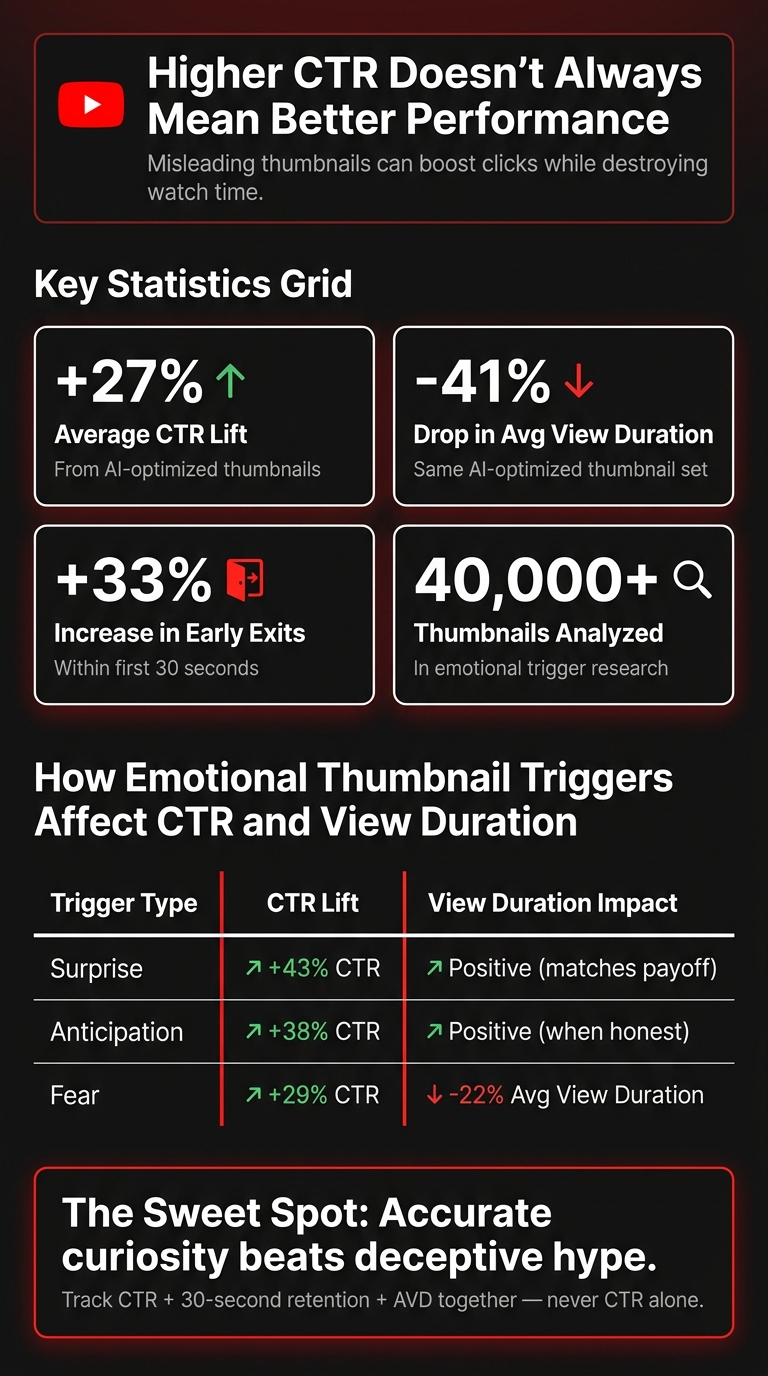
Clickbait Thumbnails: CTR vs. Retention Stats
The Pattern: Higher CTR, Lower Early Retention
The research points to a clear tradeoff. Thumbnails built to win more clicks often push CTR up, but they can hurt early watch time and retention.
One analytics report on AI-optimized thumbnails found a 27% average lift in CTR. But those same videos also had a 41% drop in average view duration and a 33% increase in early exits within the first 30 seconds.
Emotional triggers help explain why this happens. In an analysis of more than 40,000 thumbnails, fear-based designs drove 29% more clicks but also brought a 22% drop in average view duration. Surprise-based thumbnails beat neutral ones by 43% in CTR.
Why CTR Alone Does Not Tell the Full Story
CTR only means something when you look at it next to other signals. YouTube also weighs watch time, retention, likes, "Not Interested" actions, and subscriptions.
Channels that stay in the recommendation system usually don’t chase the highest click rate at any cost. They tend to keep retention above about 45% while still holding a solid CTR. Put simply, a click that ends in a fast exit often does less for a channel than a slightly lower CTR paired with stronger viewer satisfaction.
Thumbnail Visual Elements That Drive Clicks at Scale
The same visual choices that pull in clicks can also shape expectations in ways that hurt retention later. Eye-tracking research suggests viewers spend about 42% of their browsing time looking at thumbnails more than titles, so the image does a lot of the heavy lifting before anyone clicks.
A few thumbnail traits tend to help CTR at scale:
- Expressive faces
- Bright contrast
- 2–5 words of text
Those cues can work well, but only when they line up with what the video actually delivers. When the promise in the thumbnail doesn’t match the video, trust starts to slip, and recommendation signals can weaken with it.
Why Misleading Thumbnails Reduce Trust and Recommendations
How the First 30 Seconds Confirm or Break the Thumbnail Promise
Once someone clicks, the first 30 seconds do a lot of heavy lifting. This is where the thumbnail either delivers on its promise or falls apart. If people leave during that opening window, YouTube tends to read that gap between promise and video as weak packaging.
The fix is simple: show the payoff fast.
If the thumbnail shows a cracked phone and says "This Killed My Phone", the video should show that phone in the first 10 to 15 seconds and explain what happened right away. Don't make people wait, and don't bury the answer under a long intro. If the thumbnail made a clear claim, the opening needs to back it up.
How Repeated Mismatch Damages Channel Trust Over Time
One mismatch can frustrate a viewer. A pattern does more damage.
When thumbnails keep overpromising and the video doesn't match, viewers start leaving earlier and trusting the channel less. Over time, that behavior can become a habit. People click with less confidence, and some stop clicking at all.
That can hit growth from another angle too. Channels that keep making promises they don't pay off can see subscriber conversion drop by 20% to 30% and lose returning viewers, even when CTR looks similar on the surface.
Policy and Distribution Risks of Misleading Thumbnails
There are two problems here. One is audience trust over time. The other is what happens inside YouTube's systems.
Misleading thumbnails can lead to enforcement, including age restrictions, removals, and strikes. And even when a thumbnail sits in a gray area, it can still lose reach if it pulls clicks but leads to fast exits and "not interested" taps.
So in practice, misleading thumbnails come with two overlapping risks:
- Trust loss with viewers
- Distribution or policy penalties from YouTube
That’s why a thumbnail isn’t just about getting the click. It also sets an expectation the video needs to meet almost immediately.
How to Design Thumbnails That Lift CTR Without Hurting Retention
Use Curiosity, Emotion, and Text as Accurate Previews
The goal is simple: get the click without disappointing the viewer.
Research shows that surprise and anticipation are strong click drivers, while fear is more likely to hurt retention. Thumbnails that trigger surprise outperform other emotional triggers by 43%. Anticipation-based thumbnails drive 38% more clicks than neutral ones. Fear-based thumbnails can lift clicks by 29%, but they also come with a 22% drop in average view duration. And those gains only stick when the emotional cue lines up with what the video delivers. So the job isn't to make the thumbnail louder. It's to make it more tempting and honest.
A solid setup is one expressive face, one clear context object, and 3–5 words of high-contrast text that preview the video accurately.
Curiosity gaps tend to work best when the viewer feels the answer is close. A partial reveal or a real reaction gets 22% more clicks than hiding the information completely. And when you combine visual elements with text to create that gap, the result is 31% more effective than using either on its own. The sweet spot for mystery sits between 60% and 70% - enough to pull people in, but not so much that the thumbnail feels like bait.
Check readability at 320×180 pixels. More than 70% of YouTube views happen on phones, so if the face, text, or main object doesn't read instantly at that size, trim it down before you publish.
Track the Right Metrics After Every Thumbnail Change
Once the thumbnail goes live, the next question is whether it brought in the right viewers.
Changing a thumbnail without watching the right numbers is guesswork. After any thumbnail update, look at four metrics together in YouTube Studio:
- CTR
- 30-second retention
- average view duration (AVD)
- the retention curve
If CTR goes up while AVD and 30-second retention drop, the thumbnail is pulling in the wrong audience.
For videos under 5 minutes, the 30-second mark matters a lot. If fewer than 60% of viewers make it that far, YouTube may read that as weak early engagement.
Judge thumbnail variants by CTR and AVD together, not by either one alone. YouTube's systems react to watch time share and satisfaction signals, not clicks by themselves.
Use ThumbnailCreator for Controlled Thumbnail Testing
Use controlled tests to tell the difference between a stronger thumbnail and a misleading one.
ThumbnailCreator's AI generation, templates, face swapping, text editing, and object swapping features let you try different compositions while keeping the message tied to the actual video. You can change the expression, swap the context object, or tighten the text without drifting away from the video's payoff.
Start with your best baseline thumbnail. Let it run for at least 1–2 weeks or until it reaches a meaningful impression count. Then switch to a controlled variant that changes just one element at a time - the face, the text, or the contrast. After each change, compare CTR, 30-second retention, and AVD in YouTube Studio. Track the versions that improve both CTR and retention.
Conclusion: The Best Thumbnails Win the Click and Keep the Viewer
After you test thumbnails, look at the same three signals every time: CTR, 30-second retention, and AVD. That trio tells the real story.
If a thumbnail promises more than the video delivers, viewers tend to leave fast, often within the first 30 seconds. That early drop-off sends a low-satisfaction signal to YouTube's ranking system. In plain English: YouTube rewards quality CTR, not CTR by itself.
The practical rule is simple. An attention-grabbing thumbnail works only when it matches what the video actually gives the viewer. Accurate curiosity beats deceptive hype.
So when you review results, use this quick check:
- If CTR goes up and 30-second retention plus AVD stay strong, the thumbnail is doing its job.
- If CTR rises but the other two drop, the thumbnail is probably overpromising.
The best thumbnails win the click and keep the viewer.
FAQs
How can I tell if a thumbnail is hurting retention?
Check for a high CTR paired with a sharp audience retention drop in the first 15–30 seconds. That’s usually a sign that the thumbnail promised one thing, but the video opened with something else.
It also helps to scan the comments for phrases like misleading, clickbait, or not what I expected. Then compare thumbnail designs side by side. If one version pulls in more clicks but drags down average view duration, it may be hurting retention.
What retention rate should I aim for in the first 30 seconds?
Aim for 50% to 70% retention in the first 30 seconds. If that number falls below 60%, there’s a good chance your thumbnail is promising one thing while the video delivers another.
That mismatch can hurt fast. People click, feel let down, and leave.
ThumbnailCreator can help you make polished, accurate thumbnails that line up better with your content and help support stronger viewer retention.
How often should I test new thumbnails?
Run thumbnail tests for 7 to 14 days so you can factor in weekly shifts in viewer behavior. You might spot early signals after 48 hours, but if you stop the test too early, your read on the results can be off.
A good target is 1,000 to 5,000 impressions for each variation. If a video gets fewer than 10,000 impressions per week, let the test run for 1 month to get data you can trust.