

CTR vs. Ad Revenue: Thumbnail Role Explained
More clicks do not mean more money. I’d read thumbnail results like this: CTR shows if people click, RPM and CPM show if the views pay, and watch time decides whether those clicks turn into ad revenue.
If I wanted the short version, it would be this:
- CTR = how often people click after seeing the thumbnail
- RPM = how much I earn per 1,000 views
- CPM = what advertisers pay per 1,000 ad impressions
- Watch time and retention = what often separates a high-click video from a high-earning one
- Thumbnail fit = whether the image brings in the right viewer, not just more viewers
- Policy safety = whether the thumbnail keeps the video fully ad-eligible
A thumbnail can get a high CTR and still lead to low earnings if people leave early. On the other hand, a video with only average CTR can make more if viewers stay longer, ads keep running, and the topic has stronger advertiser demand. That’s why I’d judge thumbnails on clicks, retention, RPM, CPM, traffic source, and ad status together.
Quick comparison
| Metric | What it tells me | What it does not tell me |
|---|---|---|
| CTR | If the thumbnail/title got the click | If the video made money |
| RPM | How much I earned per 1,000 views | Why people clicked |
| CPM | What advertisers paid before YouTube’s cut | My final earnings |
| Watch time | If viewers stayed long enough to support revenue | Whether the thumbnail got enough impressions |
| Thumbnail quality | If the packaging stops the scroll | If the video itself pays off the promise |
I’d treat the thumbnail as the first filter in the revenue path: it can bring in more viewers, bring in better viewers, or hurt both if the promise is off. The article below breaks down how those trade-offs show up in analytics.
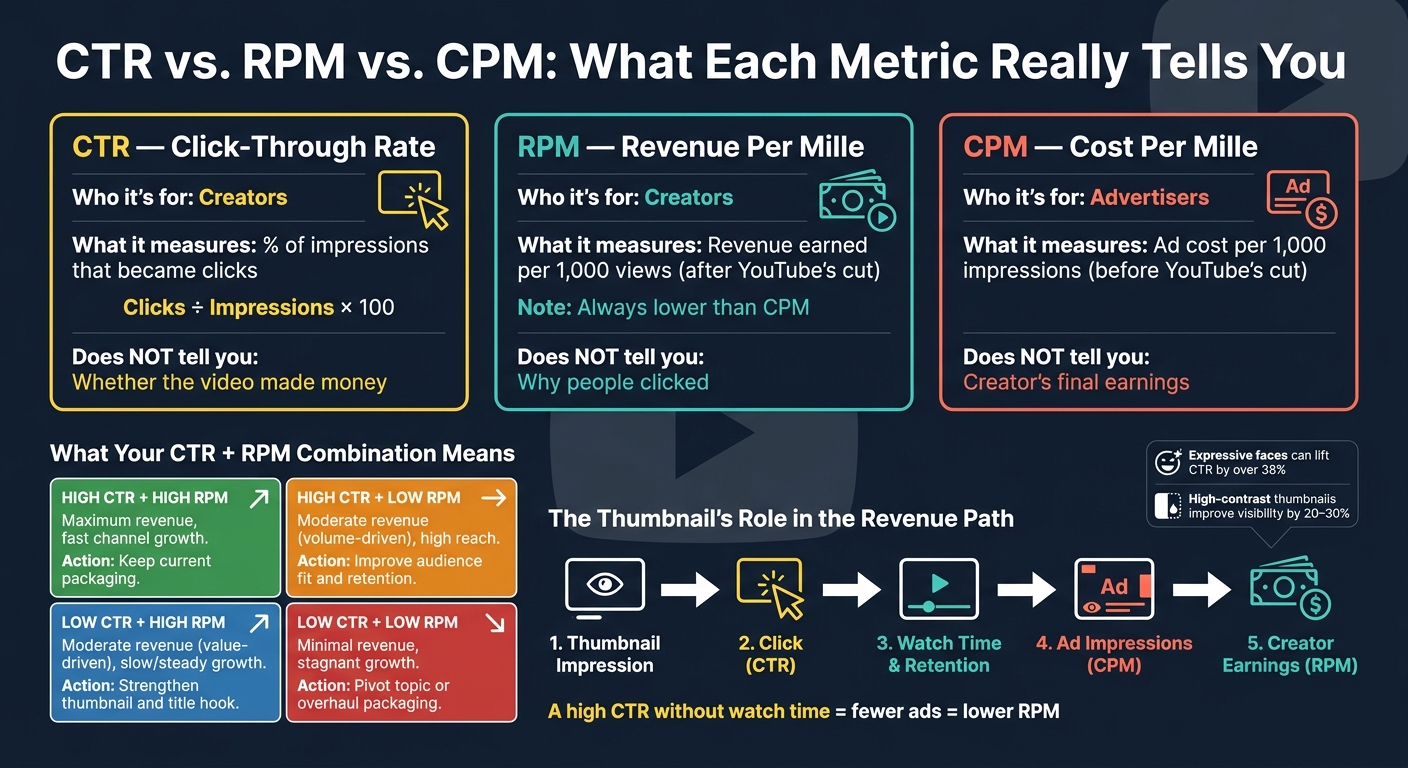
CTR vs. RPM vs. CPM: What Each Metric Really Tells You
CTR vs. Ad Revenue: The Core Metrics You Need to Know
CTR tells you who clicked. RPM and CPM tell you what those clicks were worth. That split matters. A thumbnail can push more people to click, but revenue depends on what happens after they land on the video.
CTR (Click-Through Rate) is the share of impressions that turn into clicks: clicks ÷ impressions × 100. On YouTube, an impression counts when at least half of your thumbnail is visible on a YouTube surface, like Home, Search, or Suggested, for at least one second.
CTR Measures Traffic; RPM and CPM Measure Money
CTR measures clicks. RPM measures revenue. CPM measures ad cost.
RPM (Revenue Per Mille) is the revenue you earn per 1,000 views after YouTube takes its share. CPM is what advertisers pay per 1,000 ad impressions before YouTube takes its share. RPM is lower than CPM because it comes after revenue share and counts all views, including views that did not show ads.
| Metric | Who It's For | What It Measures |
|---|---|---|
| CTR | Creators | % of impressions that became clicks |
| RPM | Creators | Revenue per 1,000 views after revenue share |
| CPM | Advertisers | Ad cost per 1,000 impressions before revenue share |
Why a High CTR Can Still Mean Low Revenue
A high CTR means your packaging did its job. It does not mean the video earned well. If viewers click and then leave fast, you get fewer chances to show ads, and RPM can drop. Low watch time also gives advertisers less data to work with when they decide what to bid on your content.
Niche and geography matter too. A video with high CTR in a lower-value region or a lower-CPM niche can earn less than a video with only average CTR in finance or tech.
Next, see how different YouTube thumbnail styles change CTR, views, and revenue together.
sbb-itb-b59debf
How Thumbnails Affect CTR, Views, and Revenue
Your thumbnail shapes the first click decision. In a few seconds, it decides whether someone stops or keeps scrolling.
Thumbnail Quality Affects Whether Viewers Stop Scrolling
Faces, high contrast, and 3–5 words of bold text tend to drive stronger CTR. Expressive faces can lift CTR by over 38% compared with thumbnails that don't use them, while high-contrast color pairings can improve visual visibility by 20% to 30%.
Most YouTube views happen on mobile, so your thumbnail needs to stay clear at about 120 px wide. If text gets muddy or key details disappear, you've lost the shot before the video even starts.
The thumbnail and title need to work together as one package. The thumbnail grabs attention. The title explains the idea. That promise helps revenue only when the video follows through.
More Clicks Can Expand Distribution, But Only If Viewers Stay
A higher CTR can put a video in front of more people. Strong early CTR can lead to broader distribution, more impressions, and more ad-eligible watch time.
But clicks matter only if they turn into watch time and ad-eligible views. YouTube now puts more weight on clicks that lead to meaningful watch time. If a thumbnail promises too much and viewers leave fast, that can cut future impressions.
The fix is simple: pay off the thumbnail promise in the first 30 seconds.
That’s why fast thumbnail testing matters.
Where ThumbnailCreator Fits Into the Workflow
If you need to test thumbnail ideas fast, the workflow gets easier. ThumbnailCreator helps creators try stronger thumbnail variations faster with AI generation, templates, face swapping, object swapping, and text editing.
CTR vs. Ad Revenue: How Different Combinations Play Out
CTR and RPM don't rise and fall together. A thumbnail can pull in a lot of clicks and still bring in weak revenue. Or it can get fewer clicks while earning more per view. That's why a thumbnail does more than win attention. It also acts like a filter for audience quality and revenue potential.
Use the combinations below to spot when a thumbnail is helping traffic, monetization, or both.
High CTR with Low RPM vs. Moderate CTR with High RPM
A broad thumbnail can push CTR up. But if people click and leave fast, the video makes less money because there are fewer chances to show ads. So even with strong click volume, RPM and total revenue can stay low.
On the flip side, a more specific, lower-pressure thumbnail may bring in fewer clicks but attract viewers who stick around longer and support stronger RPM.
| Combination | Revenue Pattern | Channel Growth Effect | Optimization Priority |
|---|---|---|---|
| High CTR / High RPM | Maximum | Fast growth | Keep the current packaging |
| High CTR / Low RPM | Moderate (Volume-driven) | High (Broad reach) | Improve audience fit and retention |
| Low CTR / High RPM | Moderate (Value-driven) | Slow / Steady | Strengthen the thumbnail/title hook |
| Low CTR / Low RPM | Minimal | Stagnant | Pivot topic or complete packaging overhaul |
How Audience, Niche, and Watch Time Change Revenue Outcomes
Two videos can post the same CTR and still earn very different RPM. The gap often comes down to niche, advertiser demand, viewer location, and watch time. And all of those are shaped by who the thumbnail brings in from the start. In plain English: the better fix is often better audience fit, not just more clicks.
Next, test these shifts against CTR, impressions, and RPM in analytics.
Thumbnail Safety and a Simple Analytics Review Process
Once a thumbnail starts pulling clicks, the next thing to check is simple: does it help protect monetization?
Policy-Compliant Thumbnails Protect Long-Term Ad Revenue
A good thumbnail should catch attention without tricking people. On YouTube, thumbnails and titles act like trust signals, and they can directly affect whether a video stays eligible for monetization. If a thumbnail crosses the line, the damage goes beyond a warning. It can cut ad revenue or wipe out monetization for that video.
Sexualized, graphic, or deceptive thumbnails can trigger limited ads, age restriction, strikes, or demonetization.
| Thumbnail Type | CTR Impact | Monetization Outcome |
|---|---|---|
| Policy-Compliant | Stable, sustainable | Full ad eligibility; stable RPM |
| Clickbait Mismatch | High initial spike | Limited ads; RPM drops due to low watch time |
| Sexualized/Graphic | High (short-term) | Age restriction; demonetization risk; YPP removal |
| Deceptive UI (Fake Play Button) | Moderate | High risk of channel suspension or strikes |
The good news is that safe thumbnails do not have to look bland. They can still stand out. The key is to use bold design that matches the video and pays off fast once the viewer clicks.
After that, look at whether the thumbnail is helping CTR, retention, and RPM at the same time.
Track Thumbnail Changes Against CTR, Impressions, and RPM
Change one thing at a time, then measure what happened.
Start with impressions and CTR. That tells you whether the thumbnail is the main bottleneck. Then break CTR down by traffic source, because Browse and Search often behave in different ways.
Next, look at first-30-second retention. If less than 60% of viewers make it past that point, the thumbnail is probably promising more than the video delivers. After that, open the Revenue tab and check RPM and CPM trends, along with any Limited Ads flags tied to that video’s performance window.
When deciding between A/B testing vs gut feeling, YouTube’s native Test & Compare tool is a smart option. As of 2026, it picks a winner based on watch-time share, not raw CTR. That matters because it pushes creators away from misleading thumbnails. Let each test run long enough to give you data you can trust - usually 3 to 14 days or about 1,000 to 5,000 impressions per variant.
A simple review flow looks like this:
- Check impressions and CTR
- Compare CTR by traffic source
- Review first-30-second retention
- Look at RPM, CPM, and Limited Ads status
- Keep the thumbnail only if clicks and revenue both hold up
Conclusion: Optimize Thumbnails for Clicks and Monetization Together
CTR brings traffic. RPM drives earnings. Thumbnails affect both, but only when they pull in the right viewers and stay inside policy rules. A click means very little if it leads to weak watch time, limited ads, or unstable RPM.
The best thumbnails bring in viewers who stay, watch, and keep the video ad-eligible. ThumbnailCreator can help speed up design, but the analytics should make the final call.
FAQs
Why can a high CTR still lead to low earnings?
A high click-through rate can still lead to low earnings if the thumbnail feels like clickbait. It may get the click, but if the video doesn't match what viewers expected, people leave fast.
That hurts watch time and audience retention. And because YouTube puts a lot of weight on viewer satisfaction and retention, videos with sharp early drop-offs may be shown less often. That can shrink both reach and ad revenue.
Which metric matters most for thumbnail testing?
There isn’t a single metric that matters most.
CTR tells you whether a thumbnail gets the click. But YouTube doesn’t judge a video on clicks alone. It cares more about whether viewers feel the video delivered once they started watching.
That’s why it helps to look at CTR next to Average View Duration (AVD) or watch time. A high CTR can look good at first glance, but if viewers leave after a few seconds, that number can give you the wrong read. On the other hand, steady or improving AVD is a strong sign that the thumbnail matches the video and sets clear expectations.
How do I know if my thumbnail hurts monetization?
A thumbnail can hurt monetization if it feels like clickbait and promises something the video doesn’t deliver. One of the first places to check is YouTube Studio, especially for early audience drop-offs.
A common red flag is high CTR paired with low watch time or weak average view duration. That usually means the thumbnail got the click, but the video didn’t match the promise. Your thumbnail should line up with the actual content, and your opening should back up that promise right away.