

CTR vs. Impressions: Thumbnail Metrics Explained
If you want to judge a YouTube thumbnail, I look at CTR and impressions together - not one without the other. Impressions tell me how often YouTube showed the thumbnail. CTR tells me how often people clicked after seeing it. A video can get lots of reach and still get few clicks, or get a high click rate with very little reach.
Here’s the short version:
- Impressions = reach
- CTR = clicks from that reach
- High impressions + low CTR often points to a thumbnail/title problem
- Low impressions + high CTR often points to a reach or topic limit
- Traffic source matters: a 2%–6% CTR on Home can be normal, while Search often runs 8%–15%
- I wouldn’t judge too early; I’d wait for about 500 to 1,000 impressions
- If CTR goes up but watch time drops, the thumbnail may be promising too much
A few numbers matter right away:
- YouTube counts an impression when a thumbnail is on screen for more than 1 second and at least 50% visible
- More than 70% of watch time happens on mobile, so small text can hurt clicks
- A Browse CTR under 2% after enough data can be a sign to test a new thumbnail
The main idea is simple: impressions show whether YouTube is giving your video a chance, and CTR shows whether viewers want it. I’d use both to decide whether to change the thumbnail, wait, or rethink the topic. If performance is low, you can test and improve CTR through systematic A/B testing.
YouTube Impressions & CTR Explained (Why Low Views Even with High CTR?)
sbb-itb-b59debf
Quick Comparison
| Metric | What I use it for | What it does not tell me by itself |
|---|---|---|
| Impressions | How much reach the video is getting | Whether people liked the thumbnail |
| CTR | How well the thumbnail + title got clicks | Whether the video can keep viewers watching |
So when I read thumbnail data, I ask two questions: Was the video shown enough? And did enough people click? This is where advanced thumbnail optimization becomes essential.
What Impressions Mean for Thumbnails
An impression counts when YouTube shows your thumbnail for more than one second and at least 50% of it is visible on screen. If one of those conditions isn't met, it doesn't count. Put simply, YouTube only counts impressions when the thumbnail is actually on screen long enough to be seen.
Impressions tell you about distribution, not interest. Someone can scroll past your thumbnail without caring at all, and YouTube will still count that as an impression. So if impressions are high, that means YouTube is putting your video in front of people. It does not mean those people wanted to click.
Where Impressions Come From and What They Leave Out
Impressions come from YouTube surfaces such as Home, Search, Suggested videos, Subscriptions, and Playlists.
They do not include exposure from:
- External websites and apps
- The mobile site (m.youtube.com)
- YouTube Kids and YouTube Music
- Cards
- End screens
- Email or push notifications
- Background tabs
- TrueView video discovery ads
That detail is easy to miss, but it changes how you read the data. Impressions only track exposure from YouTube's own surfaces. So if a video gets traffic from outside YouTube, that won't show up here.
How to Read High or Low Impression Counts
High impressions usually mean YouTube is showing the video to a lot of people, often through Home or Suggested videos. But that doesn't tell you if the thumbnail did its job. For that, you need to look at CTR.
Low impressions usually point to limited distribution. In many cases, the topic is narrow, or the video didn't perform well early on. That's why low impressions are often a topic issue, not a thumbnail issue.
Next, look at what happens after the thumbnail is shown: CTR.
What CTR Measures After the Thumbnail Is Shown
Once YouTube shows your thumbnail, CTR tells you what happened next: did people click?
CTR is the share of impressions that turn into views: (Views from Impressions ÷ Impressions) × 100. Put simply, it measures how well your thumbnail + title turned exposure into clicks. That’s why CTR is the main click signal to look at next to impressions.
CTR can swing a lot based on topic, audience, and traffic source.
What Raises or Lowers CTR
CTR tends to go up when the thumbnail is clear, high-contrast, and easy to read. The title should add context instead of saying the same thing as the image.
A few patterns show up again and again:
- Thumbnails with expressive human faces vs. faceless designs can get 15% to 30% higher CTR.
- Keep text to 3 words or fewer, and make sure it’s easy to read on mobile.
- More than 70% of YouTube watch time happens on mobile, so tiny text or clutter can drag CTR down.
Traffic source also changes the picture. YouTube Search often brings CTR in the 8% to 15% range, while Browse Features on the Home page usually sits around 2% to 6%. So if a video starts getting more Home page traffic instead of Search traffic, CTR may drop even when nothing is “wrong.” Raw CTR numbers only mean something when you know where the views came from.
Why a Strong CTR Can Still Be Misleading
Don’t judge CTR too early. It’s better to wait until a video has 500 to 1,000 impressions. With very low impression counts, CTR can look inflated because the video is still reaching a smaller, more loyal group of viewers.
High CTR paired with low watch time is a warning sign. In many cases, it means the thumbnail promised more than the video delivered. CTR gets the click. Retention shows whether the video paid off.
CTR on its own doesn’t tell the whole story - the next step is to read it alongside impressions.
CTR vs. Impressions: How to Read Both Metrics Together
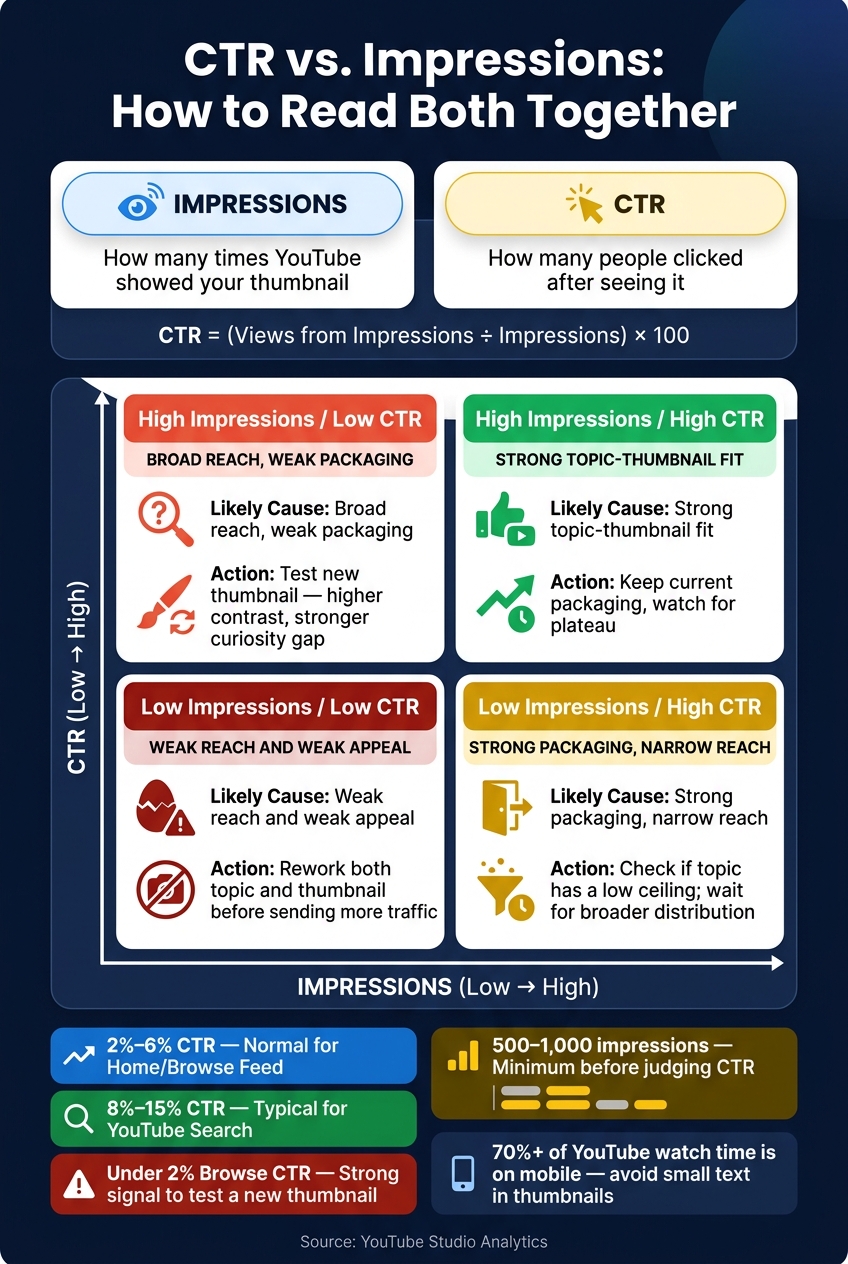
CTR vs. Impressions: YouTube Thumbnail Metric Combinations Explained
Impressions tell you how far a video is spreading. CTR tells you how many people click after they see it. Put those two numbers side by side, and you can tell if a video needs more reach, better packaging, or both.
Here’s the simple way to think about it: impressions show distribution, while CTR shows conversion. Impressions tend to grow when YouTube sees early interest. CTR, on the other hand, is the part you can influence more directly through your thumbnail and title. Read the patterns below to spot what’s helping growth and what’s getting in the way.
Common Metric Patterns and What They Mean
These two metrics work best as a pair. One without the other can send you down the wrong path.
| Pattern | Likely Cause | What to Do Next |
|---|---|---|
| High Impressions / Low CTR | Broad reach, weak packaging | Test a new thumbnail with higher contrast or a curiosity gap vs. direct value strategy |
| Low Impressions / High CTR | Strong packaging, narrow reach | Check if the topic has a low ceiling; otherwise, wait for broader distribution |
| High Impressions / High CTR | Strong topic-thumbnail fit | Keep the current packaging and watch for a plateau |
| Low Impressions / Low CTR | Weak reach and weak appeal | Rework both the topic and the thumbnail before sending more traffic |
A few patterns stand out fast:
- High impressions with low CTR usually means YouTube is giving the video a shot, but people aren’t sold when they see it.
- Low impressions with high CTR often means the packaging works, but the topic may be reaching a smaller audience.
That’s why CTR alone doesn’t tell the whole story. A strong click rate on low reach can still mean the video won’t scale. And a weak click rate on high reach often points straight to the thumbnail.
When to Update the Thumbnail Instead of Waiting
Don’t swap the thumbnail too early. Let the video collect a meaningful number of impressions first. Without enough data, you’re mostly guessing.
Once the video has that data, a CTR below 2% on Browse features is a strong sign that it’s time to act. In that case, the thumbnail is often the bottleneck, not the topic or YouTube’s reach.
Before you change anything, open the Reach tab and check the traffic source breakdown. This matters more than many creators think. A low overall CTR can simply reflect more Home Feed traffic, where 2%–6% is completely normal.
If CTR is still low after 500 to 1,000 impressions, refresh the thumbnail.
CTR vs. Impressions Comparison Table
This table turns the main combinations into fast thumbnail calls.
| Feature | Impressions | Click-Through Rate (CTR) |
|---|---|---|
| What It Reveals | Overall reach and algorithm confidence in the topic | How well your thumbnail and title turn exposure into clicks |
| Warning Sign | Plateauing despite high CTR - topic may have a low ceiling | High CTR paired with low Average View Duration - signals clickbait |
| Thumbnail Diagnosis Use | Measures distribution and market size | Measures packaging effectiveness and viewer interest |
If this comparison points to weak packaging, test a new thumbnail next.
How to Improve Both Metrics With Better Thumbnail Decisions
Use the pattern from the table to pick your next test. Then use source-level CTR to decide if the thumbnail needs work.
A Simple Workflow for Testing Thumbnail Changes
Start in YouTube Studio Analytics > Reach > Traffic Source. Compare each video's CTR with your channel's 28-day average for that same source. Don't lean on overall CTR by itself - a 2.5% CTR from Browse features can be a red flag, while that same 2.5% from External traffic may be fine.
If a video has high impressions and low CTR, start with a thumbnail redesign. Put the most attention on videos with strong AVD and weak CTR. That usually means the video itself is doing its job, but the thumbnail isn't getting enough people to click.
After you choose a video, change one or two elements at a time. Test clearly different ideas, not tiny color shifts. Go for a major visual change, not a small color tweak. Then wait for at least 500 new impressions before you judge the result.
One last check matters: if CTR goes up, make sure AVD didn't fall. If it did, the new thumbnail may be overpromising, and that can hurt reach.
Using ThumbnailCreator to Build Thumbnail Variations Faster
If you want to move faster, ThumbnailCreator can help you make new thumbnail versions in less time. It can speed up testing with AI generation, templates, face swap, object swapping, and text editing.
Conclusion: Read CTR and Impressions Together, Not Separately
Low CTR on a video with strong retention can be an opening that's easy to miss. Start with high-impression videos that also have strong retention. From there, decide if you need to fix the packaging, fix reach, or leave the current thumbnail as is.
FAQs
Why is my CTR high but impressions low?
A high CTR with low impressions usually means your thumbnail and title are doing their job with the people who do see them. The catch? YouTube still hasn’t shown the video to a lot of people yet.
In many cases, the platform is still testing the video. It may be waiting for more data, better audience retention, or stronger signals before it puts your content in front of more viewers. For now, keep making high-quality, relevant thumbnails with ThumbnailCreator as your exposure starts to grow.
When should I change a thumbnail?
Consider changing your thumbnail if your video gets high impressions but a low CTR. That usually means people are seeing the thumbnail, but it’s not getting enough clicks.
Give it 48 to 72 hours after upload before you judge performance. If you want a steadier read, try to get 1,000 to 2,000 impressions per version before you decide to switch.
Which matters more: CTR or watch time?
Watch time usually matters more for long-term channel growth. CTR gets people to click first, but watch time does a better job of showing whether viewers felt the video was worth their time.
A high CTR with low retention can point to clickbait, and that can hurt rankings. The goal is to pair a strong thumbnail that earns the click with content that actually delivers on the promise.