

CTR vs. Subscriber Growth: Thumbnail Role
A thumbnail should do more than get clicks. It should bring in people who watch, come back, and subscribe.
If I had to sum up the whole article in a few lines, it would be this:
- CTR shows how often people click after seeing a video
- Subscriber growth shows whether those clicks came from the right viewers
- A thumbnail can get a high CTR and still lead to low watch time and few new subscribers
- The best thumbnails balance clear click appeal with an honest match to the video
- On YouTube, I’d judge thumbnail success by CTR + retention + subscribers, not CTR alone
A few practical points stand out right away:
- Wait until a video has around 1,000 impressions before reading too much into CTR
- Thumbnails often work best when they use one clear subject
- Keep text short: 2 to 5 bold words
- Use strong contrast so the image still works on a phone screen
- Keep your look steady across uploads with 2–3 main colors and 1–2 fonts
- Watch Browse and Home traffic, where thumbnails have the most impact
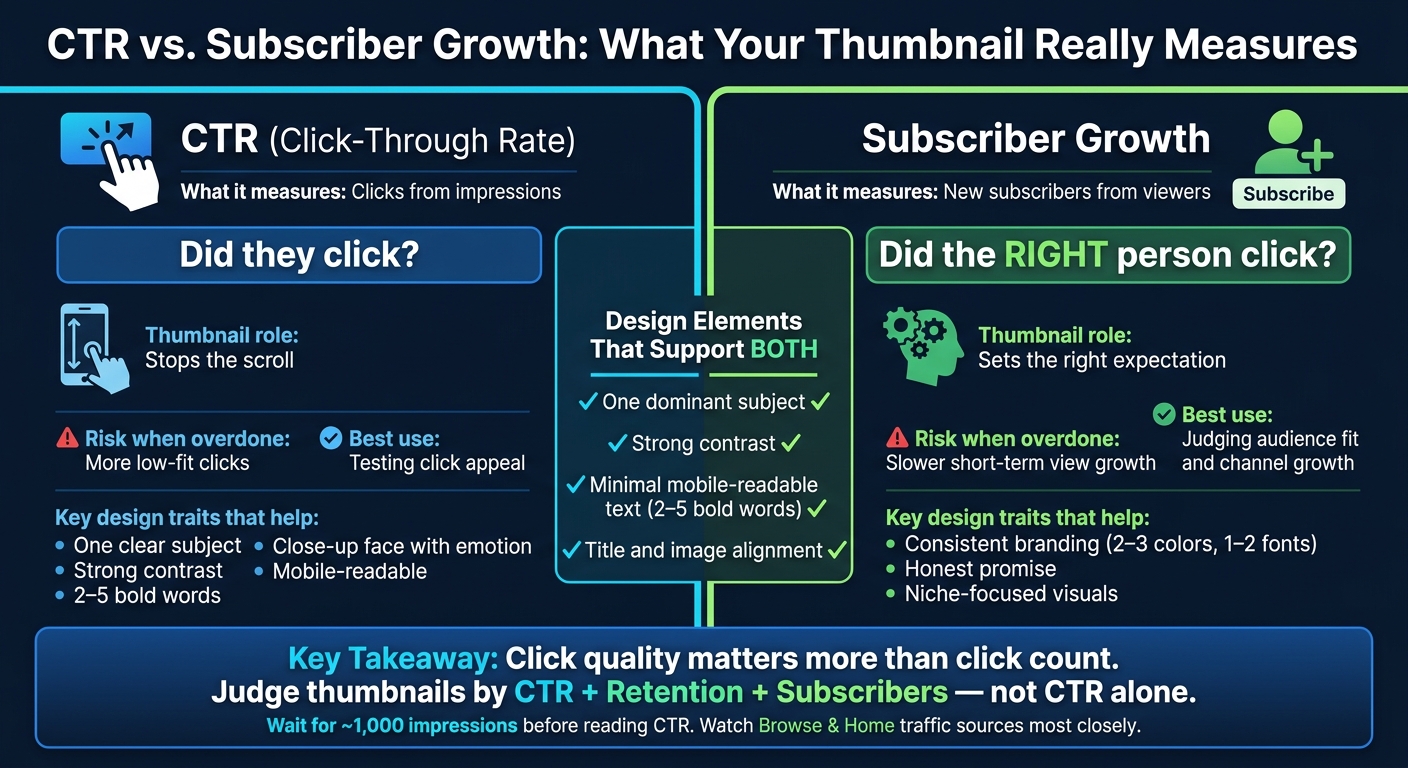
CTR vs. Subscriber Growth: What Your Thumbnail Really Measures
YouTube Thumbnail CTR Strategy
sbb-itb-b59debf
Quick Comparison
| Metric | CTR | Subscriber Growth |
|---|---|---|
| What it measures | Clicks from impressions | New subscribers from viewers |
| Main question | “Did they click?” | “Did the right person click?” |
| Thumbnail role | Stops the scroll | Sets the right expectation |
| Risk when overdone | More low-fit clicks | Slower short-term view growth |
| Best use | Testing click appeal | Judging audience fit and channel growth |
In short, click quality matters more than click count. A strong thumbnail earns attention, matches the video, and helps turn views into long-term channel growth.
CTR: What Thumbnails Do for the First Click
A thumbnail has one job at the start: stop the scroll and win the click. But that click is only step one. A high CTR helps only if it brings in the right viewer.
Design Traits That Tend to Improve CTR
Better CTR usually starts with instant clarity. People glance at a thumbnail, lock onto one main element, and then take in the rest.
A close-up face with a clear emotion - surprise, curiosity, concern, or joy - tends to grab attention because people notice expressions fast. Strong contrast between the subject and the background helps the main element stand out, which matters even more on a small phone screen. Minimal text - two to five large, bold words - supports the video's promise without forcing viewers to squint or slow down.
Clutter usually works against you. If a thumbnail has multiple subjects, stacked text blocks, or a subject that fades into the background, people often skip past it. Thin fonts are hard to read on mobile. And when one image tries to say too many things at once, viewers may not know what the video is about.
| Trait | High-CTR Thumbnails | Low-CTR Thumbnails |
|---|---|---|
| Focal point | One clear, dominant subject | Multiple competing subjects |
| Contrast | Strong subject–background contrast | Subject blends into background |
| Text usage | Minimal, large, bold (2–5 words) | Small, thin text |
| Idea clarity | One concept | Several ideas |
| Emotion | Close-up face with visible expression | No face or neutral expression |
| Mobile readability | Legible on small screens | Key details disappear on mobile |
Before you publish, check your mobile thumbnail optimization on your phone. What looks fine on a desktop can fall apart on mobile. ThumbnailCreator can help speed up the process with templates, background removal, and face emphasis.
How to Find CTR in YouTube Studio
After the thumbnail goes live, check whether it actually improves CTR. In YouTube Studio, open Content, pick the video, then go to Analytics > Reach to find Impressions click-through rate. You can also look at channel-level CTR under Analytics > Reach for any date range you want.
It helps to wait for about 1,000 impressions before judging CTR. When you review thumbnail performance, pay close attention to CTR from Browse and Home traffic sources, since those views depend heavily on the thumbnail.
CTR tells you who clicked. Subscriber growth tells you whether that click led to the right kind of view.
Subscriber Growth: What Thumbnails Do After the Click
Subscriber growth depends on more than getting someone to tap your video. The bigger question is who clicked. A thumbnail helps channel growth when it brings in people who want more of what your channel already does, not people who were pulled in by a one-off tease.
Why a High-CTR Thumbnail Does Not Always Bring Subscribers
A high-CTR thumbnail can look like a win and still do little for channel growth. One of the biggest reasons is a gap between the promise in the thumbnail and what the video delivers. When people feel like they were led in the wrong direction, they leave early and usually don’t come back.
Shock-based, meme-heavy, or overpromising thumbnails often pull in curious viewers from outside your niche. That can boost clicks at first. But if the video doesn’t match what they expected, those viewers bounce.
And that gap has a cost. It can hurt watch time and make recommendations less likely, even when CTR looks strong on the surface.
Thumbnail Signals That Support Return Viewers and Subscriptions
Thumbnails that help build a loyal audience usually share a few traits. They represent the video honestly, speak to a clear niche, and fit the channel’s visual style.
That visual pattern matters more than many creators think. When colors, fonts, and layout stay fairly steady, returning viewers can spot your videos fast in a crowded feed. Over time, that kind of recognition builds trust. If people know what your thumbnails usually mean, they’re more likely to click again and later subscribe.
Once the thumbnail lines up with the niche, visual consistency makes recognition even easier. Using 2–3 signature colors and 1–2 fonts helps keep thumbnails aligned from one upload to the next. ThumbnailCreator’s brand-aligned templates can make that easier to keep up over time.
| Aspect | Thumbnail Mainly for CTR | Thumbnail Supporting Subscriber Growth |
|---|---|---|
| Primary goal | Maximize clicks on one video | Attract viewers likely to watch more and subscribe |
| Promise style | Bold, vague, or extreme claims | Clear, specific topic aligned with channel niche |
| Audience breadth | Broad, general curiosity | Narrow, niche-focused audience |
| Visual style | Trend-driven or inconsistent with other videos | Consistent branding across the channel |
| Expectation match | Higher risk of mismatch | Accurate representation of the video content |
Strong hooks should bring in the right viewers, not just more viewers.
CTR vs. Subscriber Growth: How to Balance Both
Once you treat CTR and subscriber growth as two different goals, the next move gets a lot clearer: make one thumbnail support both. Your thumbnail and title work as a single promise, requiring a balance between clickbait and authentic thumbnails. If that promise lines up with what the video gives people, trust grows. And when people trust what they’re getting, they’re more likely to subscribe.
When to Focus on Clicks and When to Focus on Subscriber Growth
Use CTR-first thumbnails when reach matters more than loyalty. Use subscriber-first thumbnails when long-term audience fit matters more.
That balance changes based on the kind of video you’re publishing. Trend or news videos can lean more into click appeal. Bold visuals and curiosity-driven design fit when the goal is fast reach.
Evergreen content needs a steadier hand. Educational series, product reviews, and small business videos usually get more from accuracy and consistency. A clear, honest thumbnail helps the right viewers spot your video fast.
| Content Type | Prioritize CTR | Prioritize Subscriber Growth | How to Avoid Over-Optimizing |
|---|---|---|---|
| Trend/News Reaction | Bold emotion, high contrast, curiosity-driven visuals | Keep the topic accurate and recognizable | Watch early retention; a sharp drop often means the thumbnail overpromised |
| Evergreen Educational Tutorial | Clear benefit-focused imagery, concise text | Accurately represent the steps or value | Test slightly bolder designs without exaggerating the outcome |
| In-Depth Product Review | Highlight a key product feature visually | Show the real product with realistic expectations | Avoid overstating results or performance |
| Small Business/Local Service | Friendly, bold visuals that stand out locally | Clearly identify the service and brand | Monitor subscriber feedback for signs of trust issues |
| Series or Playlist Content | Make each episode easy to recognize as part of the series | Keep a consistent style and clear topic focus | Vary emphasis, not accuracy |
Design Elements That Support Both CTR and Subscriber Growth
The same core rules still hold up across formats. Some design choices pull double duty: they help earn the click and bring in viewers who are more likely to stay.
One dominant subject - whether that’s a face, product, or scene - makes a thumbnail easy to read at a glance and cuts down on mental clutter. Strong contrast between the subject and background helps it stand out in the feed and makes your channel easier to remember over time. Minimal text, usually 2 to 4 bold words, reads well on mobile and tells people the value of the video fast.
Title-image alignment does the heaviest lifting. When the title and image point to the same idea, the video feels clear before someone even clicks. That sense of clarity builds trust, and trust is what turns a casual viewer into a subscriber.
| Design Element | Helps CTR | Helps Subscriber Growth |
|---|---|---|
| One dominant subject | ✓ | ✓ |
| Strong contrast | ✓ | ✓ |
| Minimal, mobile-readable text | ✓ | ✓ |
| Title and image alignment | ✓ | ✓ |
| Consistent branding (colors, fonts) | - | ✓ |
| Extreme emotional expressions | ✓ | Only if content matches the emotion |
| Vague curiosity hooks | ✓ (short-term) | ✗ |
ThumbnailCreator lets creators generate and test thumbnail variations fast, which makes it easier to balance click appeal with audience fit on every upload.
Conclusion: Judge Thumbnails by Click Quality, Not Clicks Alone
The main point is simple: a thumbnail shouldn't be judged by clicks alone. It should be judged by the kind of viewers it brings in, and whether those viewers stick around.
A high CTR matters. But subscriber growth tells you whether the thumbnail drew in the right people. If a thumbnail pulls in viewers who bounce fast, it’s not helping your channel much, even if the early numbers look strong.
So look at click quality. High CTR only pays off when retention and subscriptions stay strong too. If CTR goes up but subscribers and watch time stay flat - or fall - that’s usually a sign the thumbnail promised more than the video gave.
Clicks matter most when they turn into watch time, repeat views, and subscriptions. High CTR with weak retention can drag down long-term results. On the flip side, honest thumbnails that get fewer but better-matched clicks can win over time.
In practice, thumbnails with one clear subject, an honest promise, and consistent branding tend to hold up better over time. That’s the metric that matters for steady channel growth.
ThumbnailCreator can help you move faster through thumbnail iterations, so you spend less time testing blindly and more time comparing what drives both clicks and subscribers in YouTube Studio. The goal isn’t more clicks. It’s better ones.
FAQs
Can a lower CTR still grow my channel faster?
Yes. A lower CTR can still lead to faster channel growth if viewer retention is strong.
Here’s why: YouTube looks closely at expected watch time. That metric blends two things:
- how many people click
- how long they keep watching
So a thumbnail that gets fewer clicks can still work better if it attracts the right viewers. When those viewers stay longer, that extra watch time sends a good signal to YouTube.
On the flip side, a high CTR might look good at first glance. But if people click and leave almost right away, that can hurt long-term reach.
How do I know if my thumbnail is attracting the wrong viewers?
Compare your click-through rate (CTR) with average view duration or watch time in YouTube Studio.
If CTR is high but view duration is low, or people leave in the first 30 seconds, that's usually a red flag. Your thumbnail may be making a promise the video doesn't keep.
That kind of mismatch can pull in the wrong viewers. And over time, it can hurt your reach and reduce how often YouTube recommends your video.
Should I change a thumbnail if clicks are high but subscribers are low?
Not automatically. First, check average view duration and audience retention in YouTube Studio.
A high CTR paired with low subscriber growth often means the thumbnail promises more than the video delivers. People click, realize it’s not what they expected, and leave fast.
That’s where ThumbnailCreator can help. Use it to make thumbnails that line up with the video’s actual value and tone, so viewers are more likely to stay, engage, and later subscribe.