

Facebook Video Posts vs Links: What Works Better
If you're trying to drive engagement on Facebook, native videos outperform YouTube links by a huge margin. Here's why:
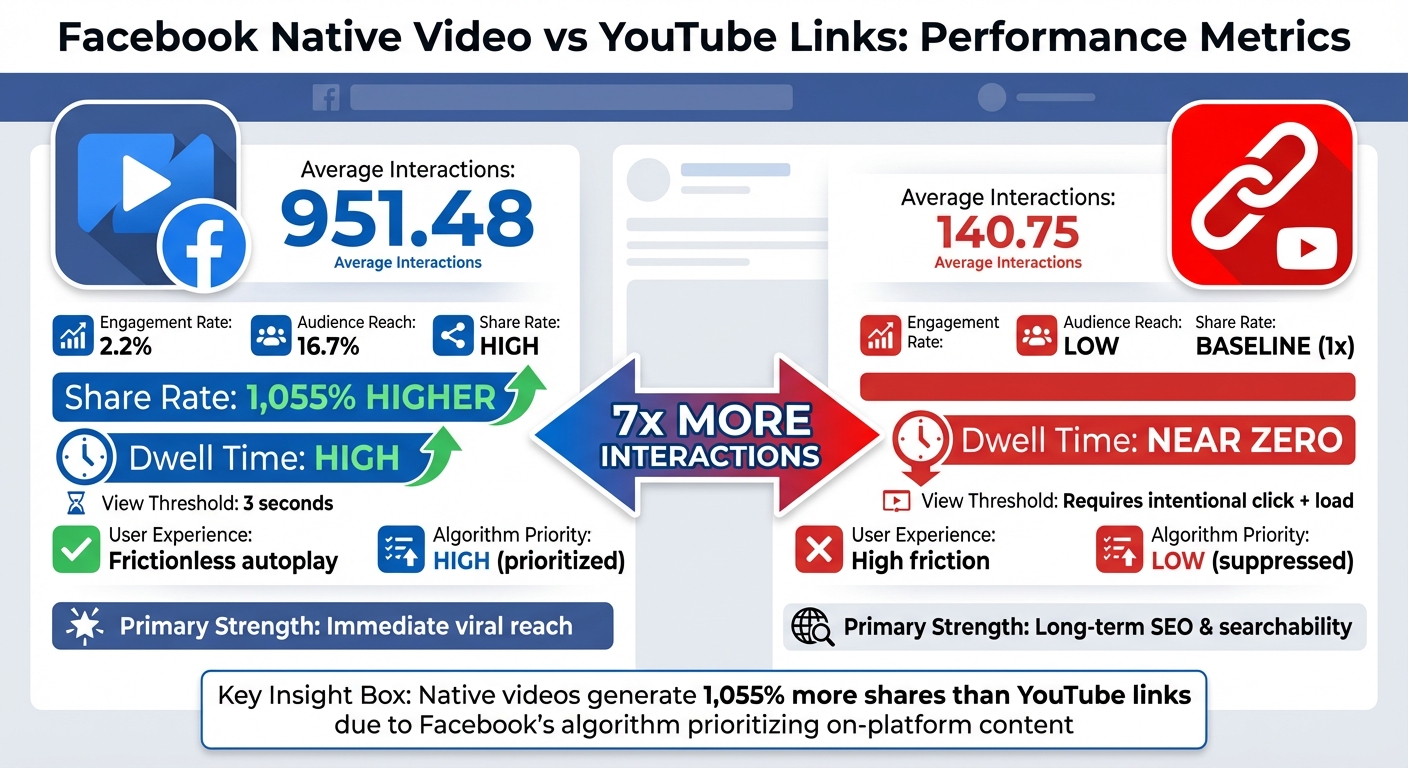
- Native videos average 951.48 interactions per post - 7x more than YouTube links (140.75 interactions).
- They also generate 1,055% more shares than YouTube links.
- Facebook's algorithm prioritizes native videos because they keep users on the platform, while YouTube links are penalized for directing users away.
To maximize results, use native video teasers to grab attention and improve your thumbnail CTR benchmarks and include YouTube links in captions or comments for long-term traffic. Combining both approaches balances immediate engagement with lasting visibility.
Want to Grow on Social Media? Post Native Video Content. Here's Why...
sbb-itb-b59debf
How Facebook Video Posts Perform
Native Facebook videos excel at driving user engagement and ad impressions, thanks to autoplay features and mobile-friendly formats. Let’s break down why these videos perform so well and how Facebook's algorithm plays a crucial role.
How Facebook's Algorithm Treats Native Videos
Facebook thrives on keeping users within its platform, often referred to as a "Walled Garden." To achieve this, its algorithm prioritizes native content over external links, ensuring users stay engaged without leaving the app.
As of 2026, Meta has streamlined its video content into Reels, emphasizing vertical (9:16) and square (1:1) formats that dominate mobile screens. Native videos autoplay as users scroll, instantly catching attention. This smooth, uninterrupted experience boosts "dwell time" - the amount of time users spend interacting with your content - which, in turn, leads to greater reach.
On the other hand, sharing YouTube links creates obstacles. Users must click the link, wait for YouTube to load, and leave Facebook entirely. This process results in minimal dwell time and reduced visibility for such posts.
Engagement Numbers for Native Facebook Videos
The algorithm’s preference for native videos translates directly into better engagement metrics. Here’s what the data shows:
- Native Facebook videos average a 2.2% engagement rate and reach about 16.7% of the audience.
- They generate an astounding 1,055% more shares compared to posts with YouTube links.
- Facebook Live videos perform even better, boasting a 4.3% engagement rate, nearly twice that of standard native uploads.
Facebook also defines a "view" as just three seconds of watch time, giving native videos a head start. If your content grabs attention within those first few seconds, the algorithm amplifies its reach significantly. Fail to hook viewers, and they’ll scroll past just as quickly. This dynamic gives native videos a clear edge over external links, which struggle to achieve the same level of visibility and engagement.
How YouTube Links Perform on Facebook
YouTube links tend to underperform on Facebook. While native videos often dominate in terms of reach and engagement, links to external platforms like YouTube face significant challenges.
Why YouTube Links Struggle on Facebook
Facebook is designed to keep users on its platform as long as possible. This approach maximizes ad impressions and data collection. Sharing a YouTube link does the opposite - it directs users away from Facebook to a competing platform. Because of this, Facebook's algorithm deprioritizes such posts, making them less visible.
On top of that, YouTube links disrupt the smooth user experience Facebook aims to provide. Clicking a link means users must pause their scrolling, leave Facebook, and wait for YouTube to load. This added friction often results in minimal engagement. When users spend little to no time interacting with the post, Facebook interprets it as uninteresting content, further reducing its visibility.
These factors also hurt click-through rates and sharing activity, as shown in the data below.
Click-Through Rates and Traffic Data
The difference in engagement is striking. Native Facebook videos generate up to 1,055% more shares compared to posts featuring YouTube links. This disparity highlights the convenience of native videos - they autoplay, stay within the Facebook ecosystem, and are easy to engage with. In contrast, YouTube links require extra effort and lack in-feed previews, making them less appealing. In a mobile-first world where vertical videos dominate, external links often fail to meet user expectations for a smooth, engaging experience.
Direct Comparison: Facebook Video Posts vs YouTube Links
Facebook Native Video vs YouTube Links Performance Comparison
Native Facebook videos dominate YouTube link posts in performance metrics on the platform. On average, native videos generate 951.48 interactions per post, a staggering seven times higher than the 140.75 interactions for YouTube links. Even more striking, native videos lead to 1,055% more shares compared to YouTube links. This disparity boils down to Facebook's algorithm. Native videos keep users engaged within Facebook, earning them a broader reach. In contrast, YouTube links direct users away from the platform, triggering an algorithmic penalty that drastically limits their visibility.
This comparison underscores how Facebook's preference for native content translates into clear performance advantages. The table below breaks down these differences:
Metrics Comparison Table
| Metric | Facebook Native Video | YouTube Link on Facebook |
|---|---|---|
| Reach & Impressions | High (Algorithm-prioritized) | Low (Algorithm-suppressed) |
| Average Interactions | 951.48 | 140.75 |
| Share Rate | 1,055% higher than links | Baseline |
| User Experience | Frictionless (Autoplay in feed) | High friction (Requires click/load) |
| Dwell Time | High (Keeps users on platform) | Near zero (Users exit platform) |
| View Threshold | 3 seconds | Intentional click + load |
| Primary Strength | Immediate viral reach & targeting | Long-term SEO & searchability |
The dwell time difference is especially critical. When users watch a native video, Facebook interprets that time as meaningful engagement, boosting the post's reach. Conversely, clicking on a YouTube link often means users either scroll past it or leave Facebook altogether - both outcomes signal to the algorithm that the content isn't worth promoting further.
How to Drive More YouTube Traffic from Facebook
Facebook's algorithm isn't exactly a fan of YouTube links, often burying them in feeds. But there’s a way around this: use native teasers with clear calls-to-action to guide viewers to your YouTube videos. By aligning with Facebook's preferences, you can still direct traffic to your channel. Let’s break down two effective strategies to make this happen.
Post Native Video Teasers
Instead of dropping a YouTube link on Facebook, upload a short teaser video (30–60 seconds) directly to the platform. Make it a self-contained preview that grabs attention and showcases a key moment from your YouTube video. Wrap it up with a clear call-to-action, like “Watch the full video on YouTube,” and place the link in the caption or first comment.
Why native teasers? Facebook prioritizes native content, so these clips are more likely to reach your audience. To maximize engagement, format your teaser for mobile: use vertical (9:16) or square (1:1) layouts, hook viewers in the first three seconds with striking visuals, and add text overlays since many people watch videos without sound.
Here’s what this looks like in action:
- Adobe used 45-second teaser videos to promote their Experience Cloud demos. These teasers successfully funneled high-intent traffic to their longer YouTube content.
- Liquid Death took a creative approach by breaking a 3-minute YouTube video into 15-second native clips for Facebook and Instagram. The result? Their core video racked up 3.6 million views, while the teasers boosted brand awareness and contributed to their $1.4 billion valuation.
Once you’ve caught your audience’s attention with native teasers, make sure your YouTube content is ready to convert clicks with an eye-catching thumbnail.
Create Better Thumbnails with ThumbnailCreator
When viewers click your YouTube link, your thumbnail becomes the ultimate deciding factor - it’s like the "storefront window" of your video. A strong thumbnail can significantly increase your click-through rate (CTR), which in turn encourages YouTube to promote your video even more. For example, JackSucksAtLife saw a 978% increase in views after updating an old thumbnail.
To create thumbnails that convert, tools like ThumbnailCreator (https://thumbnailcreator.com) can be a game-changer. This AI-powered tool simplifies the design process with features like face swapping, text editing, and pre-made templates. You can quickly generate multiple thumbnail options and test which one resonates most with your audience - a crucial step when driving traffic from Facebook.
"The thumbnail is the storefront window of your video, and its effectiveness directly determines whether your content gets surfaced widely in recommendations."
- Nadica Naceva, Writer, Influencer Marketing Hub
For best results, focus on these key elements:
- Human faces: Research shows viewers are naturally drawn to expressive faces. Make them prominent in your thumbnail.
- Bold colors: Use bright, saturated backgrounds - reds, yellows, and blues - to stand out in crowded feeds.
- Text simplicity: Keep text minimal (under 5–6 words) for clarity.
- Visual experimentation: Test intrigue-driven visuals (like reaction shots or blurred objects) against clarity-driven ones (like product images) to see which style gets more clicks.
Conclusion: Which Method to Use
Native Facebook videos offer instant reach, while YouTube links provide lasting search authority. As noted earlier, Facebook's algorithm tends to penalize external links, which significantly limits the visibility of YouTube links. This results in a striking 1,055% share advantage for native videos, making them ideal for quick engagement and viral campaigns.
That said, completely ignoring YouTube comes at a cost. You'd be sacrificing a powerful long-term tool - search authority. YouTube videos remain searchable for years, while Facebook posts often disappear from feeds within hours or days. This creates a clear trade-off: immediate engagement versus enduring visibility.
A combined approach can help you achieve both short-term and long-term goals. Consider posting short, native teaser clips on Facebook - 30 to 60 seconds long - to grab attention quickly. These clips should include a strong hook and a clear call-to-action that directs viewers to the full video on YouTube. Meanwhile, use YouTube links for content designed to stay relevant over time, like tutorials, guides, or webinars.
This hybrid strategy lets you take advantage of each platform's strengths. As Advids wisely advises:
"Stop choosing between reach and authority, and start building a system that strategically achieves both".
Focus on creating cornerstone content for YouTube to build search authority. Then, repurpose that content into native Facebook clips to expand your reach. By combining these methods, you can enjoy the benefits of both immediate engagement and long-term value.
FAQs
How do I get YouTube clicks without hurting Facebook reach?
To get more YouTube clicks without losing Facebook reach, focus on a balanced approach. Facebook’s algorithm favors native videos, so uploading directly to the platform will boost engagement. However, to guide viewers to your YouTube channel, include clear and enticing YouTube links in the video description or comments. This way, you can tap into Facebook’s engagement power while still driving traffic to YouTube.
What teaser length works best for Facebook to drive to YouTube?
Short teasers are perfect for getting Facebook users to click through to YouTube. Keep the text super brief - think three words or less. Pair that with expressive facial expressions and bold, high-contrast visuals. These elements grab attention instantly, making your content stand out and driving engagement. The trick? Keep it simple and make an impact in less than a second.
Where should I place the YouTube link - caption or first comment?
When sharing a YouTube video on Facebook, it's better to place the YouTube link in the first comment instead of the caption. Facebook's algorithm prioritizes native videos, offering perks like auto-play and better engagement. By keeping the link in the comments, you can preserve your post's reach while still encouraging viewers to visit your YouTube channel.