

How Competitor Thumbnails Impact Audience Preferences
Your video’s thumbnail can make or break its performance. Thumbnails, combined with titles, drive up to 90% of a video's click-through rate (CTR). If your CTR dips below 3%, YouTube may stop recommending your video. Competitor analysis is key to designing thumbnails that grab attention.
- Average words on thumbnails dropped 40% (5.8 to 3.4).
- Face size increased by 35%, with 28% higher color saturation.
- 90% of top-performing videos use custom thumbnails.
This article reviews four tools to improve thumbnails using competitor data:
- ThumbnailCreator: AI-generated designs based on trends.
- VidIQ: Tracks CTR trends and offers data-backed recommendations.
- TubeBuddy: Heatmaps and competitor comparisons for better optimization.
- Thumbler: Highlights trending layouts and visual patterns.
Each tool offers unique features to help you refine designs, test variants, and boost engagement.
Everyone Gets Thumbnails Wrong Until They Learn This
sbb-itb-b59debf
1. ThumbnailCreator
ThumbnailCreator simplifies thumbnail design by using competitor insights to craft visuals that work. Instead of starting from scratch, this tool analyzes successful trends in your niche and uses its AI-driven generator to create polished thumbnails in seconds. By tapping into data-backed trends, it eliminates the guesswork and ensures your thumbnails align with what audiences already respond to. The AI doesn't just design - it connects your visuals to viewer preferences identified through competitor analysis.
AI Features
The AI generator focuses on key visual trends like larger faces, bolder colors, and uncluttered backgrounds. Tools for background creation and subject isolation make it easy to move away from busy designs, leaning into simpler styles that perform better. Face recognition is another standout feature, emphasizing expressive emotions that can increase engagement by up to 35%. Meanwhile, color enhancement tools tweak brightness and contrast, making your thumbnails pop.
Customization Options
While the AI sets a strong foundation, the editor lets you take control. You can decide whether to include faces, switch between light and dark color schemes, or adjust text overlays to see what resonates most with your audience. Even a small improvement - like a 0.5% boost in click-through rate (CTR) - can lead to noticeable traffic gains. The platform also supports rapid iteration, allowing you to create multiple versions based on competitor styles. You can then test up to three variants using YouTube's "Test & Compare" feature.
Analytics Integration
Designing a great thumbnail is just the first step - testing is where the real insights come in. ThumbnailCreator integrates seamlessly with YouTube's A/B testing tools, so you can measure which design drives the most watch time and highest CTR. For reliable results, test each version for at least two weeks (or one month for smaller channels). Keep a log of successful patterns, like specific colors, fonts, or layouts, based on both competitor research and your own tests. Focus on the variant that maximizes watch time, as this shows your thumbnail is meeting viewer expectations.
2. VidIQ
VidIQ helps creators fine-tune their thumbnail designs by tracking CTR (Click-Through Rate) trends. Instead of guessing what might work, creators can rely on data to see which visual styles are performing well in their niche right now. The platform uses AI to analyze performance data, offering specific recommendations based on patterns observed in successful videos. This allows creators to understand the reasons behind a thumbnail's success.
CTR Improvement
With VidIQ, you can dive into detailed thumbnail histories of top-performing videos. This feature lets you observe what competitors are testing and tweaking over time. Real-time feedback helps uncover emerging trends. For example, in August 2025, VidIQ conducted an A/B test on an AI-related video, finding that a simple image of an AI robot boosted watch time by 59.7% and tripled the number of views. Their research also highlights that thumbnails featuring expressive faces can increase CTR by 20–30%, while maintaining consistent visual branding can raise click rates by up to 38%. These insights make it easier to implement practical design changes that deliver results.
Customization Options
VidIQ offers tools like reference thumbnails, which allow creators to guide the AI by selecting "Recommended thumbnails" from similar creators or "Trending thumbnails" currently performing well. Smart Commands simplify the editing process - just type prompts like "brighten" or "recolor" to align with trending styles without needing in-depth design skills. Features like Face Swap and Likeness ensure consistent branding while adapting high-performing styles. Additional tools, including the Text Tool, Image Tool, and Sticker Tool, let you adjust fonts, add logos, or include visual markers like arrows to emphasize key elements. One essential tip: avoid placing critical elements in the bottom right corner, as YouTube's timestamp will obscure them.
Analytics Integration
VidIQ takes thumbnail optimization further by integrating advanced analytics. It complements YouTube’s data by identifying which specific thumbnail elements - such as fonts or facial expressions - drive higher engagement. It also helps you gauge your CTR performance: 1–2% is considered low, 5–7% is solid, and anything above 10% is outstanding. Beyond CTR, VidIQ ensures your thumbnails align with your content by avoiding misleading clickbait. High CTR paired with strong Average View Duration indicates that your thumbnail accurately reflects the video. By combining data insights and customization tools, VidIQ empowers creators to design thumbnails that boost audience engagement while staying competitive.
3. TubeBuddy
TubeBuddy allows you to compare your channel with up to 10 competitors using its Competitor Scorecard. This feature evaluates metrics like average views per video and engagement trends, helping you pinpoint which visual strategies resonate most in your niche. Pay close attention to "Average Views Per Video" to identify standout content. These insights set the stage for more targeted improvements using TubeBuddy's suite of tools.
CTR Improvement
Using competitor insights, TubeBuddy's Click Magnet tool dives into what drives clicks - analyzing factors like color schemes, layouts, and the interplay between faces and text. Its A/B testing process is thorough, requiring 95% statistical significance before determining a winner. Additionally, each thumbnail must hit at least 500 impressions to meet this benchmark. This method ensures decisions are backed by reliable data rather than guesswork.
AI Features
TubeBuddy's AI-generated heatmaps show precisely where viewers focus on a thumbnail, guiding you to position text and faces for maximum impact. The Thumbnail Analyzer predicts performance before publishing by using eye-tracking data to generate a score. Carla Marshall, TubeBuddy's Content Marketing Manager, highlights the tool's value:
"TubeBuddy AI presents a heatmap on your thumbnails, allowing you to see what your audience sees. The result: better thumbnails, which means more clicks, more subs, and more of every metric that matters".
Analytics Integration
Real-time alerts notify you when competitors release new content, enabling immediate analysis of emerging thumbnail trends and experimental designs. The Thumbnail Analyzer also lets you compare your designs against top-performing thumbnails in your niche. Additionally, monthly competitor data tracking uncovers shifts in thumbnail styles and identifies content gaps that could be quick wins for your channel.
4. Thumbler
Thumbler transforms competitor research into actionable visual strategies by identifying winning design patterns in thumbnails. With this tool, you can search keywords in your niche and sort results by metrics like "most viewed in the past 30 days." This feature highlights what's currently working in your market, whether it's the use of faces, specific color schemes, or bold text instead of minimalist designs. By pinpointing these trends, Thumbler helps you create thumbnails that are more likely to grab attention and increase click-through rates (CTR).
CTR Improvement
Thumbler's AI engine dives into hundreds of trending videos to uncover high-performing visual patterns, such as “The Shocked Face,” “The Fat Red Arrow,” and “Before/After” layouts. These designs leverage psychological cues proven to drive clicks. By identifying which layouts succeed in your niche, you can apply these strategies to your own thumbnails, boosting their effectiveness.
Customization Options
Thumbler takes these insights further by offering tools to fine-tune your designs. You can adjust details like face size, color saturation, and brightness to align with top-performing trends. This level of control ensures your thumbnails not only reflect high-performing patterns but also cater to your audience’s preferences.
Analytics Integration
Thumbler also enables side-by-side comparisons of your thumbnails against top-performing ones. This feature highlights areas where your designs might fall short - whether it's the size of faces, the vibrancy of colors, or the placement of text. By using these comparisons, you can make data-driven adjustments that resonate with your audience and eliminate guesswork from the design process.
Pros and Cons
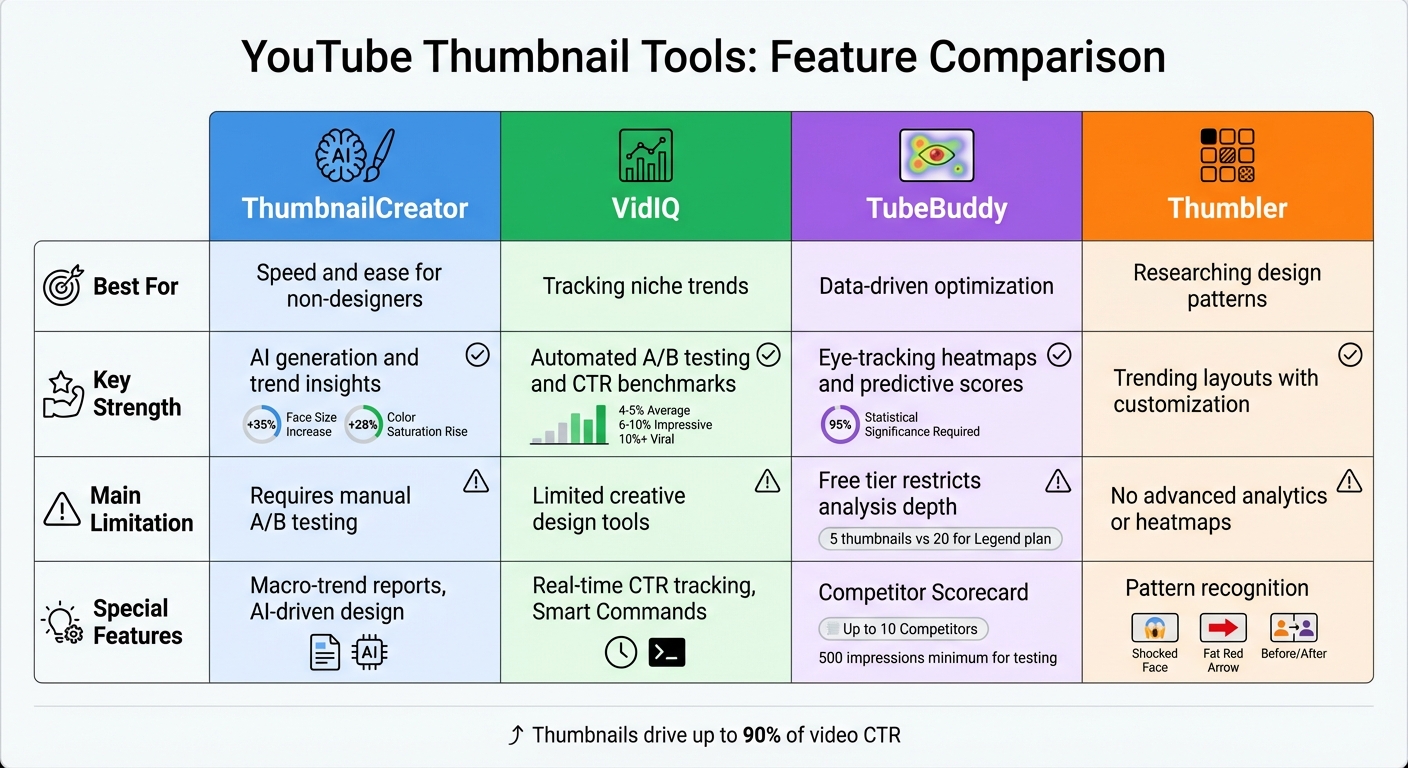
YouTube Thumbnail Tools Comparison: Features, Strengths and Limitations
When it comes to thumbnail design, each tool has its own strengths and drawbacks. By understanding these, creators can better leverage competitor analysis to craft effective thumbnails. Here's a breakdown of what each tool brings to the table - and where they fall short.
ThumbnailCreator is perfect for creators who need quick results without design expertise. Its AI-driven approach can churn out professional thumbnails in seconds. Plus, its macro-trend reports, like the 35% increase in face size and 28% rise in color saturation projected between 2020 and 2025, help align designs with audience preferences. The downside? Users must rely on YouTube's native tools for manual A/B testing.
VidIQ shines in tracking trends and offering AI-powered suggestions based on click-through rate (CTR) data. It simplifies A/B testing and provides clear benchmarks: 4–5% CTR is average, 6–10% is impressive, and anything above 10% suggests viral potential. However, it focuses more on optimization than creative design, which might not suit creators starting from scratch.
TubeBuddy offers powerful analytics, including AI-generated heatmaps that predict where viewers' eyes will land first. Its Thumbnail Analyzer provides predictive CTR scores and allows Legend plan users to compare up to 20 thumbnails per video. Free users, however, are limited to analyzing only 5 thumbnails, which can hinder more extensive testing.
Thumbler is great for identifying trending design patterns and offers customization options to tweak layouts. However, it lacks advanced features like predictive analytics and eye-tracking, which limits its appeal for data-focused creators.
To make things easier, here's a quick-reference table comparing these thumbnail tools by their best use cases, key strengths, and limitations:
| Tool | Best For | Strength | Limitation |
|---|---|---|---|
| ThumbnailCreator | Speed and ease for non-designers | AI generation and trend insights | Requires manual A/B testing |
| VidIQ | Tracking niche trends | Automated A/B testing and CTR benchmarks | Limited creative design tools |
| TubeBuddy | Data-driven optimization | Eye-tracking heatmaps and predictive scores | Free tier restricts analysis depth |
| Thumbler | Researching design patterns | Trending layouts with customization | No advanced analytics or heatmaps |
Each tool has its place, whether you're looking for speed, trend insights, or deep data analysis. The key is choosing the right one based on your specific needs.
Conclusion
When it comes to creating thumbnails that grab attention, staying in tune with competitive trends is a game-changer. Combining insights from competitors with your unique creative style is the secret to crafting thumbnails that truly engage viewers.
If you're just starting out and need professional-looking thumbnails without diving into design tools, ThumbnailCreator is a solid pick. Its AI-driven features generate visuals in seconds, and its trend insights help you stay aligned with what your audience wants.
For creators who want to take a more data-focused approach, tools like VidIQ and TubeBuddy are invaluable. They not only track your thumbnail performance but also provide optimization tools to avoid common mistakes and boost results.
On the other hand, if your focus is on experimenting with niche design trends, Thumbler offers plenty of customization options. While it doesn't offer advanced analytics, it’s a handy tool for tweaking layouts and designs.
Ultimately, the right tool depends on your needs - whether you’re starting from scratch, fine-tuning your designs, or studying competitors. Considering that thumbnails and titles can influence up to 90% of a video's click-through rate, selecting the right tool is critical. Use these insights to elevate your thumbnails, keep your audience intrigued, and drive engagement.
FAQs
How do I analyze competitor thumbnails without copying them?
Instead of mimicking competitor thumbnails, focus on why they work. Pay attention to key elements like color schemes, expressive faces, bold text, and their overall branding style. These details can reveal what grabs attention and connects with viewers.
Use analytics tools to track patterns in their performance. For example, which colors or text styles seem to get more clicks? Once you understand these trends, apply them in a way that aligns with your brand. The goal is to create thumbnails that are distinctively yours while still appealing to your audience.
What thumbnail changes usually raise CTR the fastest?
To quickly improve your click-through rate (CTR), tweak your thumbnails with a few simple changes. Use high-contrast colors, include expressive faces, keep bold text under 12 characters, and experiment with design adjustments like color schemes or face placement. Studies reveal that high-contrast designs can boost CTR by 39%, and larger face sizes tend to grab more attention. These small tweaks can make your thumbnails more eye-catching and drive more clicks.
How long should I A/B test a new thumbnail?
When running an A/B test for your video thumbnails, aim to let the test run for at least two weeks. However, if your video receives fewer than 10,000 impressions per week, extend the test to a full month. This ensures you collect enough data to determine which thumbnail resonates better with your audience. Reliable data is key to making smarter decisions.