

Why Pinterest Boosts YouTube Thumbnail Visibility
If more people don’t see your thumbnail, more people can’t click your video. That’s the core issue - and Pinterest helps fix it by giving your thumbnail more places to show up, more time to stay visible, and more ways to send viewers straight to YouTube.
Here’s the short version: YouTube often gives smaller channels limited early reach, while Pinterest can keep a video pin in search, home feeds, and related results for months or even years. With 600 million+ monthly active users and a search-first setup, Pinterest gives your thumbnails extra exposure beyond YouTube. I’d use vertical pins (1,000 x 1,500, 2:3), add a play icon, write titles and descriptions around search terms, and track clicks with UTM tags to see what gets traffic.
What matters most:
- More visibility: Pinterest extends thumbnail exposure after upload day
- More room on mobile: Vertical pins stand out better than small landscape previews
- More traffic paths: Each linked pin can send viewers to a specific YouTube video
- More testing data: Pinterest click data can help guide future thumbnail choices
- More shelf life: Many creators start seeing referral traffic in 30 to 90 days with steady posting
A simple workflow works best: make one main thumbnail, perhaps using AI thumbnail generation to speed up the process, export a 16:9 version for YouTube and a 2:3 version for Pinterest, then watch which pin styles get the most clicks and use those lessons in your next video.
Get More YouTube Views Using Pinterest (Even With a Small Channel)
sbb-itb-b59debf
Quick Comparison
| Area | YouTube Only | YouTube + Pinterest |
|---|---|---|
| Thumbnail lifespan | Often short at the start | Can last for months or years |
| Discovery source | Mostly YouTube feed and search | YouTube plus Pinterest search and recommendations |
| Best format | 16:9 landscape | 16:9 + 2:3 vertical |
| Thumbnail A/B testing | YouTube CTR only | YouTube CTR + Pinterest clicks + UTM data |
| Reach | Limited to YouTube users | Adds Pinterest’s 600M+ monthly users |
If I wanted more chances for a thumbnail to work after publish day, I wouldn’t rely on YouTube alone.
How Pinterest Gives YouTube Thumbnails More Chances to Be Seen
Pinterest keeps thumbnails visible long after you upload them. It works like a visual search engine, so people go there looking for tutorials, how-tos, and ideas with clear intent. With over 600 million monthly active users, Pinterest gives YouTube creators a big search-driven audience. That extra shelf life is a big part of why Pinterest works for thumbnail promotion.
Pinterest Search, Recommendations, and Longer Pin Lifespan
Pins can keep showing up in search, home feeds, and Related Pins for months or even years. Pinterest's Related Pins feature surfaces content based on visual similarity and user interest. So if your Pin uses a strong thumbnail, it can keep appearing next to popular content long after the original publish date.
Most creators start seeing steady referral traffic from Pinterest to YouTube within 2 to 4 months of posting on a regular basis. The next piece is simple: the thumbnail has to fit the way Pinterest's feed works, which is a key part of any YouTube thumbnail beginners guide.
How Linked Pins Send New Viewers to YouTube Videos
Every Pin can include a direct link to a specific YouTube video URL. That means Pinterest discovery can send people straight to your video, including viewers who never looked for it on YouTube.
Skip the default "Share to Pinterest" button from YouTube when you can. It creates a small landscape preview, and that tends to get lost in Pinterest's vertical feed. A custom vertical Pin gives your thumbnail more room and makes it easier to notice.
Use:
- a 2:3 ratio
- 1,000 x 1,500 pixels
That format makes the thumbnail easier to see and lets it take up more screen space. Adding a play button overlay also helps. It tells people the link leads to a video, sets the right expectation, and can lower bounce rates.
One YouTube video can also turn into more than one Pin. Each Pin becomes another path into Pinterest search and recommendations.
Once the thumbnail is discoverable, the design has to earn the click.
Pinterest Tactics That Improve Thumbnail Click-Through Rate
Use Vertical Pin Graphics That Show the Thumbnail Clearly
A Pin that gets seen still has to earn the click. Use a custom 1,000 x 1,500 format with one clear focal point so the thumbnail stands out fast. Place your main image about 60% down the canvas. Keep text short - three words or fewer - and use a bold, sans-serif font with strong contrast between the text and background. Add a play icon and a "Video" label so people can tell right away that the Pin leads to a video.
Once the Pin is easy to read, relevance becomes the next big factor in whether Pinterest shows it to the right people.
Match Boards, Titles, and Descriptions to Search Intent
Use board names, titles, and descriptions that line up with the terms your audience types into Pinterest search. Put the main keyword in the first sentence, then add one or two related terms. When your wording matches the way people search, the Pin is easier to surface - and easier to click. You should also claim your YouTube channel in Pinterest settings so your Pins connect back to your account.
After that, the numbers can tell you which visual choices are doing the heavy lifting.
Track Pin Clicks and Apply Winning Designs Back to YouTube
Use Pinterest as a testing ground to spot which thumbnail styles get clicks before you make the next YouTube thumbnail. Add UTM tags to each YouTube link, then compare Pinterest click data with your YouTube Studio traffic data. If certain colors, layouts, or dramatic & intense thumbnails win, carry those same elements into your next YouTube thumbnail.
You can also bring the top-performing Pin elements into ThumbnailCreator to move through the next batch of thumbnail work with less guesswork.
Using ThumbnailCreator in a Pinterest-First Thumbnail Workflow
Once Pinterest starts showing you which visuals get clicks, you can turn those signals into a repeatable thumbnail workflow. That’s where ThumbnailCreator comes in. It’s made for YouTube creators who need fast, polished thumbnails for both YouTube and Pinterest.
Create Thumbnails Faster with AI Templates and Editing Tools
ThumbnailCreator helps you generate a thumbnail draft from a text prompt, which means you’re not staring at a blank canvas every time. Then you can fine-tune the draft with tools like face swapping, object swapping, and text editing to match your video’s topic, style, or mood.
That speed matters. Pinterest rewards fast testing, so each version needs to stay clean, readable, and easy to understand at a glance.
ThumbnailCreator’s editor also keeps key elements near the center of the frame, which helps them stay visible in mobile feeds.
Adapt One Thumbnail for Both YouTube and Pinterest Formats
Start with one core visual, then shape it for each platform. If you share a YouTube link straight to Pinterest, it often shows up as a small landscape preview that can disappear in Pinterest’s vertical feed. A better move is to build one main visual and export two versions: a 16:9 YouTube thumbnail and a 2:3 Pinterest image.
For Pinterest, place the hero shot at about 60% down the vertical canvas, add a play button overlay, and include a short CTA like "Watch Full Video" in the lower third. These signals help show that the pin leads to a video, and they can help with click-through. It also makes scaling thumbnails across both channels much simpler.
Choose the Plan That Matches Your Output
Pick a plan based on how often you publish and how many thumbnails you need each month. If you’re just getting started with Pinterest as a traffic source, the free plan gives you enough to begin testing. As your posting volume grows, upgrading gives you more room to make and refine variations without slowing your workflow.
YouTube-Only Promotion vs. YouTube Plus Pinterest
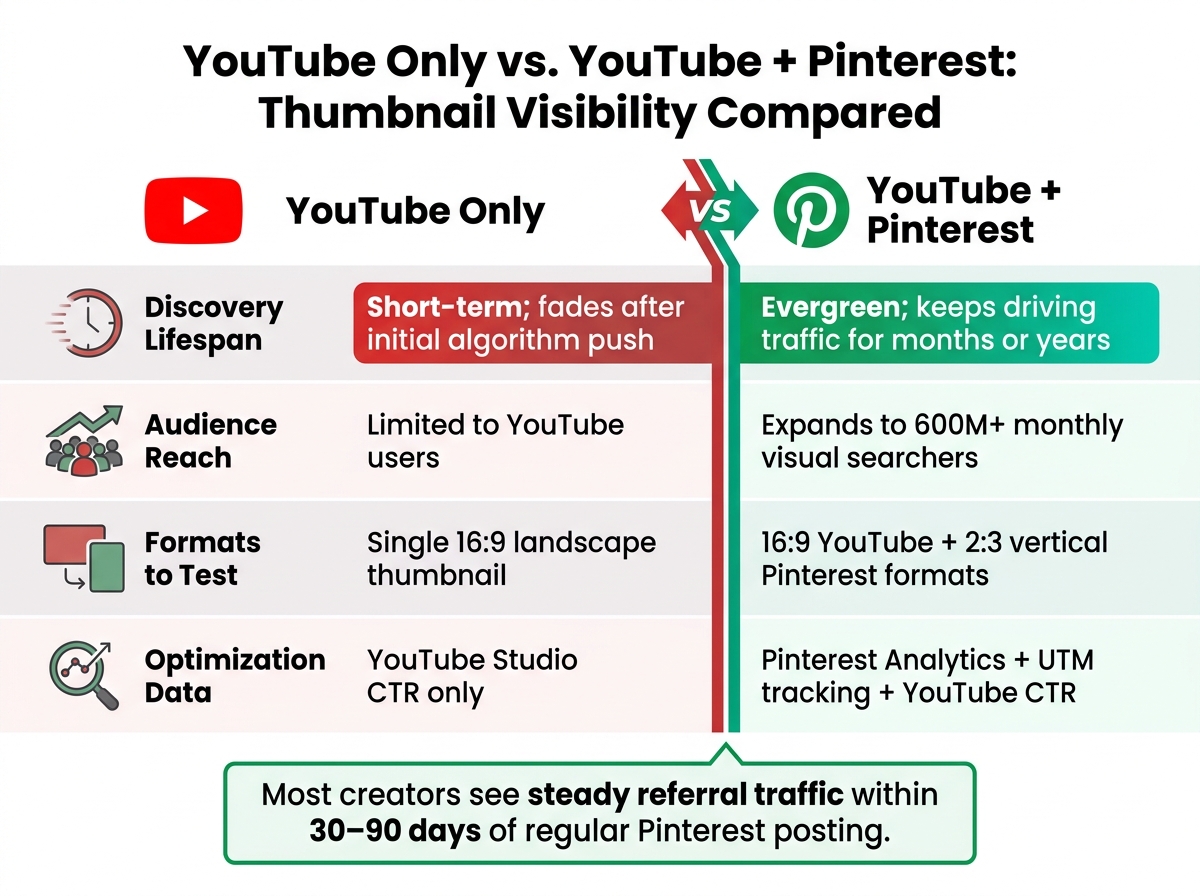
YouTube Only vs. YouTube + Pinterest: Thumbnail Visibility Compared
Once the thumbnail is done, the next question is simple: how long does it keep working?
On YouTube, discovery usually leans on an early algorithm push or search traffic. If a video slows down at the start, it can fade out fast. Pinterest plays by a different set of rules. A well-optimized pin can stay in front of people long after upload day, which means your thumbnail can keep getting impressions for months or even years.
That shift affects both reach and testing. Here’s what changes when Pinterest becomes part of your promotion workflow:
| Feature | YouTube-Only | YouTube + Pinterest |
|---|---|---|
| Discovery Lifespan | Short-term; dependent on initial algorithm push | Evergreen; keeps driving traffic over time |
| Audience Reach | Limited to YouTube's platform | Expands to 600M+ monthly visual searchers |
| Formats to Test | Single 16:9 landscape thumbnail | More formats to test |
| Optimization Data | YouTube Studio CTR | Pinterest Analytics + UTM tracking |
Adding Pinterest usually takes about an hour a week for scheduling and design. Most creators start seeing steady referral traffic within 30 to 90 days of regular activity.
Conclusion: How Pinterest Increases Thumbnail Visibility and Clicks
Pinterest gives each thumbnail more time to do its job. More lifespan means more impressions, and more impressions mean more chances to earn clicks. Tools like ThumbnailCreator can speed up the process of building and resizing those visuals for both platforms, so one upload has more room to keep driving click-through rate growth.
FAQs
Does Pinterest help small YouTube channels grow faster?
Yes. Pinterest can help small YouTube channels grow faster because it works as a search-based discovery engine.
Unlike many social platforms, where posts disappear fast, Pins can keep sending views for months or even years. When you use relevant keywords and link straight to your videos, your channel can show up in front of people who are already looking for that topic.
That matters a lot for small channels. Instead of depending only on the YouTube algorithm, Pinterest gives you another path to more visibility, video views, and subscribers.
How often should I post Pins for each YouTube video?
You don’t need to post every day, but posting on a steady schedule matters. Instead of chasing daily uploads, stick to a plan and publish a few well-optimized Pins each week.
For each YouTube video, make several different vertical Pin designs and space them out over a few weeks. It also helps to reshare Pins from time to time and test new designs. That can keep your content in front of people and send traffic your way for months, or even years.
What should I track to know if Pinterest is working?
Track key metrics in Pinterest Analytics, like repins, saves, and click-through rate (CTR), to see how people interact with your pins.
For YouTube, add UTM tracking to the video URLs you share and review the results in YouTube Studio analytics. You can also pull pin data into a reporting dashboard to spot incremental views, long-term conversion trends, and the pin designs that perform best.