

Predicting Thumbnail CTR with AI
Your thumbnail can make or break your video's performance. Click-through rate (CTR) measures how often viewers click after seeing your thumbnail, and improving it can significantly boost your visibility on YouTube. AI tools now predict CTR with 82% accuracy, helping creators choose effective thumbnail designs before uploading. This saves time, ensures better performance, and prevents wasted impressions.
Key takeaways:
- CTR = (Clicks ÷ Impressions) × 100.
- Thumbnails with faces can increase CTR by up to 30%.
- High-contrast designs and bold text improve performance by 23%.
- Use AI tools like ThumbnailCreator for instant CTR predictions and actionable feedback.
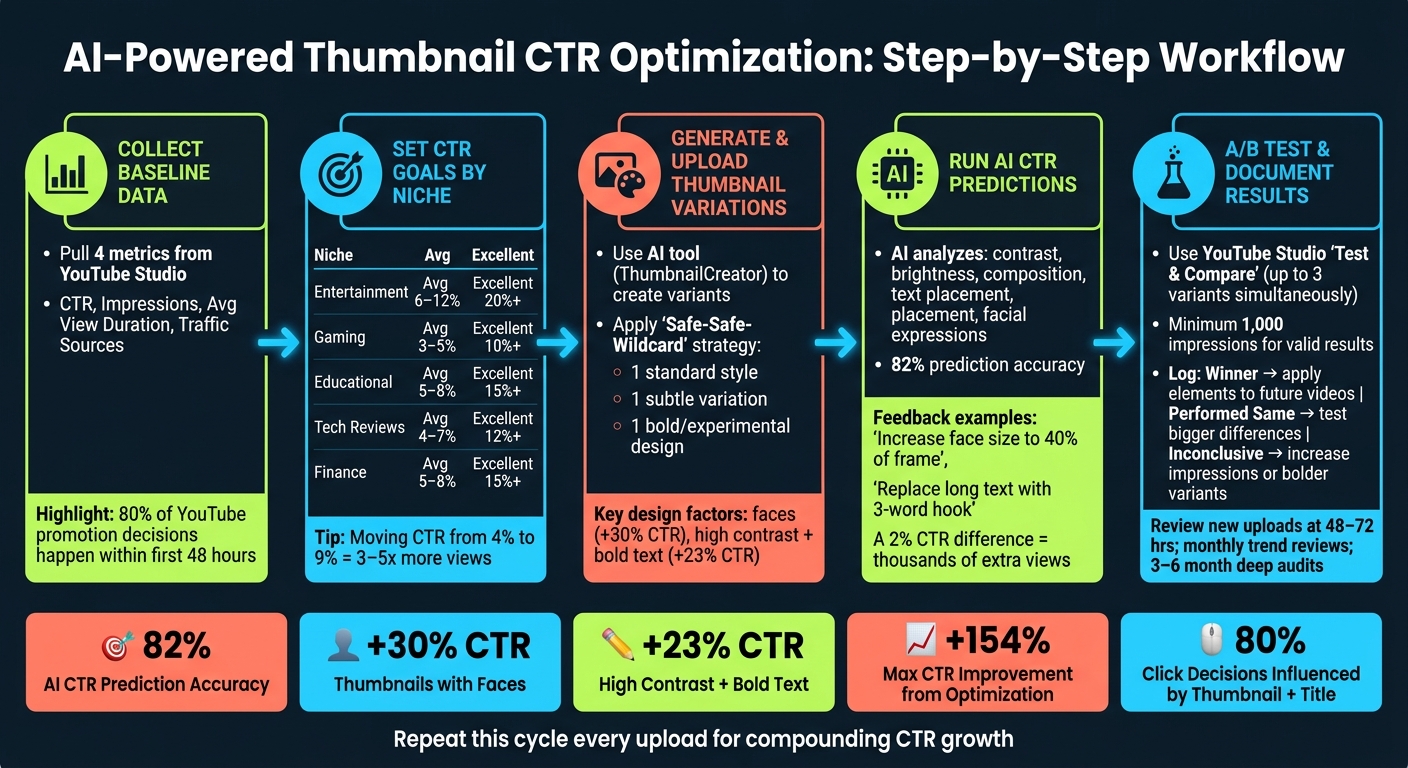
AI-Powered Thumbnail CTR Optimization Workflow
How I Use AI to Create High-CTR YouTube Thumbnails Fast
sbb-itb-b59debf
Preparing Your Data for AI-Powered CTR Prediction
To get accurate AI-driven CTR predictions, you need to start with well-prepared data. This groundwork is essential for ensuring reliable results when using AI tools in the next stages.
Collecting Baseline Metrics from YouTube Studio
Start by pulling these four key metrics from YouTube Studio:
- CTR (Click-Through Rate): Your current click-through rate.
- Impressions: The number of times your thumbnail has been shown.
- Average View Duration (AVD): How long viewers actually stay and watch.
- Traffic Sources: Where your impressions originate (e.g., Browse, Search, Suggested).
CTR performance can vary greatly depending on the traffic source. For instance, Search traffic tends to favor thumbnails that promise clear answers, while Browse traffic often responds better to emotional hooks and bold visuals. Combining these metrics thoughtfully is key to establishing a clear baseline.
It's also important to correlate CTR with AVD. Thumbnails that overpromise but underdeliver can lead to penalties from YouTube's algorithm over time.
Setting Clear CTR Goals
Establish specific, measurable targets based on your niche. CTR benchmarks vary widely depending on the type of content you create. Here's a quick breakdown:
| Niche | Average CTR | Good CTR | Excellent CTR |
|---|---|---|---|
| Entertainment/Vlog | 6–12% | 12–18% | 20%+ |
| Gaming | 3–5% | 6–8% | 10%+ |
| Educational/Tutorial | 5–8% | 8–12% | 15%+ |
| Tech Reviews | 4–7% | 7–10% | 12%+ |
| Finance/Business | 5–8% | 8–12% | 15%+ |
For example, moving a thumbnail's CTR from 4% to 9% can lead to a 3–5x increase in total views, thanks to algorithmic amplification. Keep in mind that YouTube makes about 80% of its promotion decisions within the first 48 hours of a video's release, so hitting your CTR targets early is crucial.
Set realistic goals - aim for one level above your current performance. If your CTR is at 4%, focus on improving it to 6–7% first, rather than jumping to 15%. Incremental progress allows for more focused and effective testing.
Once your goals are set, organize your historical data to train your AI tool effectively.
Organizing Past Thumbnail Data for AI Analysis
Create a spreadsheet (e.g., Google Sheets) to log every thumbnail you've published. For each entry, include both performance metrics and visual details. Document your brand's key elements - color hex codes, fonts, logos - separately to help AI tools like ThumbnailCreator generate on-brand yet experimental variations.
| Data Category | What to Track |
|---|---|
| Performance | CTR, Impressions, AVD |
| Visual Style | Minimalist, Cinematic, Meme, Exaggerated |
| Human Element | Face present (Y/N), Emotion type (e.g., curiosity, shock) |
| Text Elements | Word count, font style, contrast level |
| Composition | Focal point, background contrast, dominant color palette |
Thumbnails featuring faces can boost CTR by up to 30%, while text-heavy vs minimal text overlays often improve viewer engagement. By tracking these elements and their performance, AI tools can identify patterns and make predictions more effectively.
When your data is well-organized, AI tools like ThumbnailCreator can provide more accurate and actionable CTR predictions.
Using AI Tools to Predict and Optimize Thumbnail CTR
Once your data is organized and your CTR (Click-Through Rate) goals are clearly defined, it's time to put AI tools to work. The quality of your inputs directly impacts the accuracy of AI predictions, so all that preparation ensures the process runs smoothly. This step bridges the gap between raw data and actionable insights, helping you refine your thumbnail designs.
Creating and Uploading Thumbnail Variations with ThumbnailCreator
The first step is generating a variety of thumbnail designs. ThumbnailCreator simplifies this process with a few key features:
- AI generation: You can either type a text prompt or upload a reference image to create thumbnail designs in seconds. The tool also takes care of background removal and touch-ups automatically.
- Customization options: Experiment with different facial expressions, text layouts, and font styles. For instance, swapping a long 7-word description for a concise 3-word hook can often result in better AI ratings.
The idea is to create multiple distinct variations - some subtle, some bold - to uncover designs that could lead to noticeable improvements in performance.
Running AI-Based CTR Predictions
After uploading your thumbnail variations, the AI analyzes each design based on factors like contrast, brightness, composition, text placement, and facial expressions. It assigns a predictive CTR score by comparing your designs to patterns found in millions of successful thumbnails.
The feedback goes beyond just numbers. For example, you might see suggestions like "increase facial expression size to cover 40% of the frame" or "replace long text with a shorter, punchy hook." These explanations help you understand the reasoning behind the scores, making the insights far more actionable.
Here’s a useful benchmark: thumbnails with high contrast and bold text tend to perform about 23% better than those without. The AI scoring reflects this trend, giving you a clear sense of what works.
Armed with this predictive feedback, you can confidently choose the best designs to move forward with.
Choosing the Best Thumbnails for Testing
To narrow down your options, consider using the "Safe-Safe-Wildcard" strategy. This involves selecting:
- One thumbnail that sticks to your usual style.
- One variation of that style with slight adjustments.
- One completely different design that steps outside your comfort zone.
"A 2% CTR difference between two thumbnails can mean thousands of extra views on the same video." - CreatorSkills.co
When reviewing AI predictions, focus on thumbnails that differ conceptually - like a close-up face versus a product shot - rather than minor tweaks like background color. Conceptual differences often yield more meaningful insights during testing. Once you've identified your top two or three designs, you're ready to move on to live testing using YouTube's built-in tools.
This approach demonstrates how AI can guide you toward smarter, more impactful thumbnail decisions.
Validating AI Predictions with Testing and Data
AI predictions can set you on the right path, but they need real-world data to prove their accuracy. Live testing is the key to verifying predictions and ensuring reliable outcomes.
Setting Up A/B Tests with YouTube's Test and Compare Feature
YouTube Studio offers a handy Test & Compare feature that allows you to test up to three thumbnail variations for a single video at the same time. Instead of rotating thumbnails one after another, this tool shows different versions to separate viewer groups simultaneously. To find it, open YouTube Studio on your desktop, select a video, head to the thumbnail section, and click "Test & Compare." Keep in mind, this feature works only for long-form videos - Shorts, "Made for Kids" content, and private videos are excluded.
One important detail: YouTube evaluates thumbnails not just by click-through rate (CTR) but also by watch time share. This means thumbnails that attract viewers who stay engaged are more likely to win. As YouTube explains:
"Great thumbnails don't just get viewers to click. They also help viewers understand what the video is about, so that they can make informed decisions about what to watch." - YouTube
For accurate results, avoid making changes to the video's title or thumbnail during the test - doing so will stop the experiment. If you're hesitant to experiment on new uploads, try testing on older videos first to reduce any potential risk. Once the test concludes, you can compare A/B testing vs gut feeling by checking AI predictions against actual performance data.
Comparing Predicted vs. Actual CTR Performance
After the test ends - usually within a few days to two weeks - you’ll have the data to see if the AI's predictions aligned with the real-world results. Pay close attention to whether the elements flagged by AI, such as contrast, text length, or facial expressions, matched the factors that drove performance during the test. This comparison is where you gain real insights.
For meaningful results, make sure your test reaches at least 1,000 impressions. And instead of relying on generic benchmarks, compare the CTR to your channel's average, as "good" CTR rates differ by niche. That said, here’s a rough guide:
- CTR below 4%: Needs improvement
- CTR between 4–6%: Decent
- CTR between 6–10%: Strong
- CTR above 10%: Outstanding
By documenting these findings, you create a bridge between AI predictions and practical application.
Document Your Results for Ongoing Refinements
Keep track of your tests in a simple spreadsheet, noting the video ID, thumbnail variations, the specific changes made, and the final results. This log becomes a valuable resource for refining your approach over time.
The goal isn’t just to optimize one thumbnail - it’s to uncover patterns that can guide future designs. For instance, if "surprised" facial expressions consistently outperform "neutral" ones on your channel, you’ve found a design principle to apply moving forward. As Caleb Leigh, Founder of CreatorSkills, puts it:
"The real win isn't just finding the better thumbnail for one video. It's understanding the pattern." - Caleb Leigh, Founder, CreatorSkills
Even if a test comes back as "Inconclusive" or "Performed Same", it’s not a failure. It often means the change was too minor to make a difference. Use this as a cue to test more dramatic variations next time.
| Result Type | Meaning | Next Step |
|---|---|---|
| Winner | One thumbnail clearly outperformed the others. | Use the winning design elements in future videos. |
| Performed Same | No clear statistical leader between variations. | Test a bigger or more noticeable design difference. |
| Inconclusive | Not enough data or no measurable impact difference. | Run a new test with more impressions or bolder thumbnail variations. |
Building a Repeatable Thumbnail Optimization Workflow
Once you've identified what works through testing, the next step is to turn those insights into a structured process. A consistent workflow ensures steady growth by building on earlier data preparation and testing efforts, leading to ongoing improvements.
Creating a Step-by-Step Thumbnail Workflow with ThumbnailCreator
Dedicate 30 minutes each week to refining your thumbnails. Start by using ThumbnailCreator's AI tools and templates to design a base thumbnail. Combine an engaging facial expression with bold, clear text. From there, create 2–3 variations by tweaking just one element at a time - such as color, expression, or text. This helps pinpoint what drives better performance.
Run each variation through ThumbnailCreator's AI analysis to assess factors like contrast, readability, and emotional impact. Once you’ve uploaded the thumbnails, follow the testing protocols outlined earlier. Implement the top-performing option and document the results. This cycle - concept creation, variation, prediction, testing, and documentation - forms the backbone of your workflow.
Adapt this process to fit the unique needs of your content type.
Adjusting Thumbnail Strategies for Different Content Types
Not every video requires the same thumbnail approach. For example, educational content often benefits from a clean, professional design with calm, focused facial expressions and simple layouts. On the other hand, entertainment content tends to perform better with brighter colors and higher emotional contrast. Your thumbnail’s tone should match the emotional energy of the video itself.
Keep text short - three words or fewer - to ensure it remains readable on mobile screens. Use this text to create curiosity rather than simply repeating the video title. Additionally, there's been a shift away from exaggerated "shock faces" in favor of subtle micro-expressions, like genuine curiosity, intense focus, or even vulnerability. These nuanced emotions can help build trust with your audience.
Reviewing and Updating Your Strategy Over Time
Your thumbnail strategy should evolve regularly, not just when performance starts to drop. For example, monitor new uploads 48–72 hours after posting to analyze early click-through rate (CTR) data. Schedule monthly reviews to identify recurring trends, and every 3–6 months, conduct a deeper audit to refresh thumbnails on your top evergreen videos.
"Data-driven design for thumbnails moves the process from subjective artistic choice to objective performance optimization." - ReelMind
During monthly reviews, ensure your thumbnails maintain consistent branding. This includes using the same fonts, color schemes, and emotional styles so your content is immediately recognizable. Use insights from your tests and AI analysis to fine-tune your workflow. If your channel branding feels inconsistent, adjust your default settings in ThumbnailCreator and standardize your templates for future designs.
Conclusion
Using AI for CTR prediction takes the guesswork out of the equation. The process is straightforward: gather baseline data, create and test variations with ThumbnailCreator, leverage AI-based predictions, validate results with real A/B testing, and fine-tune your strategy over time.
The stats speak volumes. Thumbnails and titles influence around 80% of click decisions, and optimizing thumbnails can increase CTR by as much as 154%. Even a small 2% improvement can translate into thousands of additional views over time. These aren’t just small wins - they directly impact your algorithmic visibility in a big way. It’s a clear case for prioritizing data-driven design.
Every test provides insights into why something works - whether it’s a color contrast, an engaging facial expression, or a concise three-word text hook. With each upload, you refine your approach, leading to compounding improvements. This ongoing learning ties back to earlier discussions on data preparation and A/B testing, reinforcing the value of iteration and analysis.
FAQs
How accurate are AI thumbnail CTR predictions for my channel?
AI tools such as ThumbnailCreator leverage machine learning models trained on vast datasets of thumbnails to predict and improve click-through rates (CTR). These tools analyze patterns to identify which designs are likely to perform better, enabling creators to make smarter, data-backed decisions for their thumbnail designs.
What data do I need before using ThumbnailCreator for CTR predictions?
To get started with ThumbnailCreator, you'll need a few essentials: your thumbnail image (accepted formats include JPG, PNG, or WebP) and the YouTube video URL if you're analyzing an existing thumbnail. Having access to key metrics like impressions, clicks, and CTR can also add valuable context to your analysis.
Some tools go a step further by examining visual elements like color contrast, facial expressions, and the effectiveness of text to estimate how likely the thumbnail is to grab attention and drive clicks. These insights can help you refine your thumbnail design to maximize its potential.
When should I trust the AI score vs YouTube A/B test results?
Trust the AI score to gain fast, data-driven feedback on your thumbnail design before hitting publish. Once your video is live, use YouTube A/B testing to gather performance data based on actual viewer behavior. These tools work hand-in-hand, each serving a unique role in helping you fine-tune your thumbnails for maximum click-through rates.