

A/B Testing Thumbnails: Best Practices
A/B testing thumbnails can dramatically improve your video’s performance by identifying which design drives more clicks and keeps viewers engaged. Here’s what you need to know:
- What It Is: Test multiple thumbnail designs to see which performs better using YouTube’s “Test & Compare” tool.
- Why It Matters: Thumbnails directly impact click-through rates (CTR) and viewer retention. Misleading designs can hurt long-term performance due to YouTube’s updated algorithms.
- How to Test: Upload up to three thumbnail variations, run tests for 3–14 days, and review metrics like CTR, impressions, and watch time.
- What to Test: Experiment with bold changes like facial expressions, colors, or text placement to identify what resonates with your audience.
- Common Mistakes: Avoid testing minor tweaks, ending tests too early, or changing multiple variables at once.
Key takeaway: A/B testing helps you make data-driven decisions to optimize thumbnails, boost CTR, and improve overall video performance.
YouTube A/B Thumbnail Testing EXPLAINED!
sbb-itb-b59debf
How to Run A/B Thumbnail Tests on YouTube
Getting your test setup right is crucial if you want to use viewer data to fine-tune your thumbnail performance.
Setting Up Tests in YouTube Studio
Start by opening YouTube Studio on your desktop. Make sure you have Advanced features enabled. Then, go to the Content section to either upload a new video or select an existing one.
Under the Thumbnail section, click on the A/B testing option and pick the type of test you want to run. You can upload up to three different thumbnail variations. Once you've uploaded your options, click Done or Publish test to kick off the experiment. YouTube will then show these thumbnails to different audience groups at the same time, and it determines the winner based on watch time share - not just clicks.
A couple of important notes: If you change the title or thumbnail during the test, it will cancel the experiment. Also, this feature doesn’t work for Shorts, "Made for Kids" videos, private videos, or Premiere videos until the Premiere ends.
After setting up, decide on the duration of your test and the sample size needed to get accurate results.
Choosing Test Duration and Sample Size
For YouTube's built-in tests, the typical duration ranges from 3 to 14 days. If you're running manual tests, aim for at least 1,000 impressions per thumbnail, though 5,000+ impressions are ideal for more reliable outcomes. A study by the NoteLM Team, conducted between August 2025 and January 2026, analyzed 127 controlled A/B tests across 15 YouTube channels. They found that tests with 2,000–5,000 impressions per variant achieved an 85–95% confidence level.
Newly uploaded videos often see a spike in impressions during the first 24–72 hours. This can help your test reach statistical significance faster. On the other hand, evergreen videos with slower traffic may take weeks to gather enough data. Be patient - don’t end the test early just because one thumbnail appears to be leading. Wait for YouTube to officially declare a Winner or let the test run its full course to ensure the results are reliable. Also, steer clear of using thumbnails that look too similar, as this can slow down the process of reaching statistically significant results.
How to Design Thumbnails for Testing
When designing thumbnails for testing, create variations that focus on changing one element at a time. This approach helps you pinpoint what works and what doesn’t.
What to Test in Your Thumbnails
The key to effective testing is isolating a single variable so you can clearly see its impact. Here are some elements worth experimenting with:
- Background Colors: Try contrasting options, like a vibrant red versus a deep blue, to see which grabs attention more effectively.
- Text: Play around with different wording, fonts, sizes, and placements. For example, test bold fonts against regular ones or compare a short, catchy phrase to a longer, more descriptive one.
- Facial Expressions: See how different emotions perform - shocked expressions might resonate better than neutral or smiling ones.
- Overall Layout: Rearrange elements like hand gestures, product shots versus people, arrows or graphic overlays, and even logo placement to find the most eye-catching design.
Start with a hypothesis, such as, "A shocked expression will drive more clicks because it evokes stronger emotions." Testing like this can lead to significant improvements - optimized thumbnails have been shown to boost click-through rates (CTR) by as much as 300%. Top-performing videos often achieve CTRs between 4% and 10%.
Using ThumbnailCreator for Test Designs
Creating multiple thumbnail variations by hand can be tedious, but tools like ThumbnailCreator simplify the process with AI-powered features.
For instance, its face-swapping tool lets you test different expressions without needing to reshoot footage. You can quickly swap in looks of surprise, curiosity, or excitement to see what resonates. The text editing tools make it easy to try out various fonts, colors, and placements, while the template library offers a solid starting point that aligns with your brand’s style. Additionally, the object-swapping feature lets you experiment with different props or background elements, helping you build the 2–3 variations typically needed for a standard A/B test efficiently.
How to Analyze Your Test Results
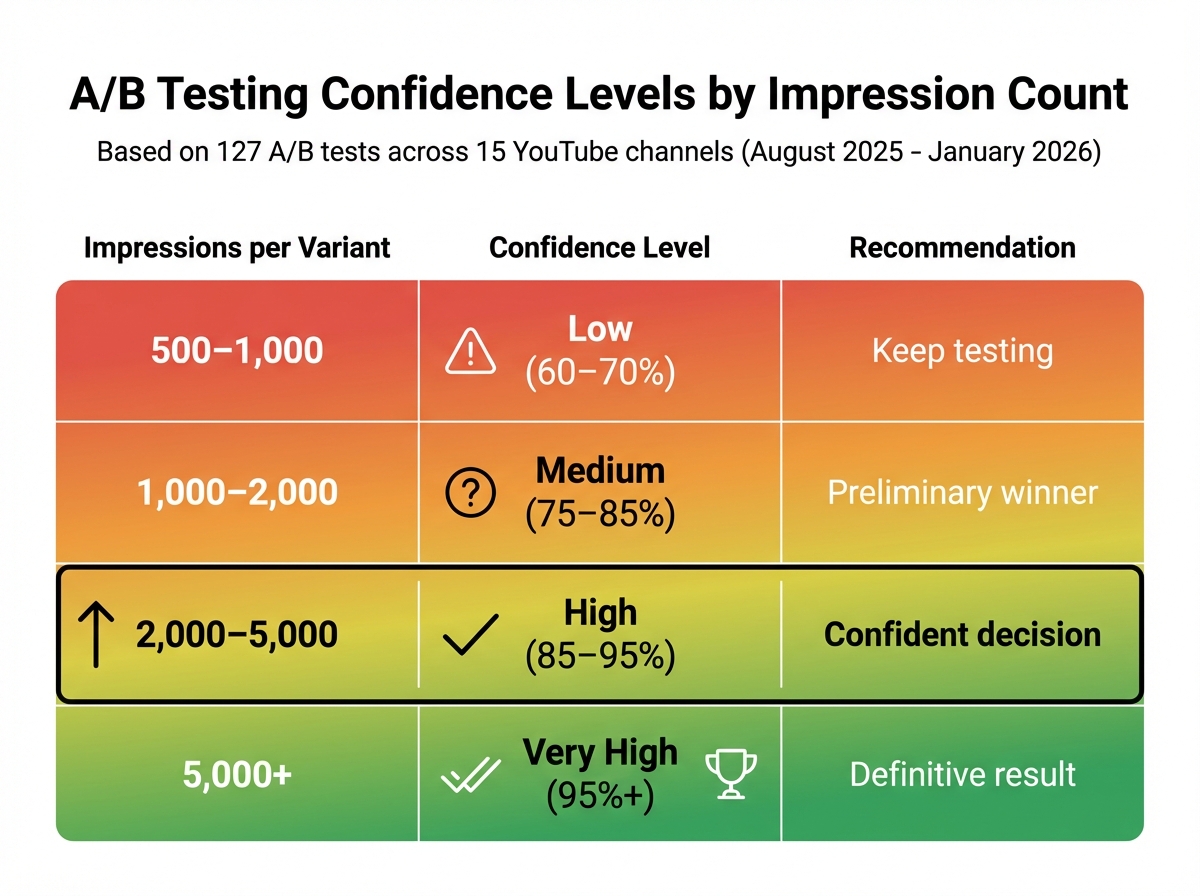
A/B Testing Confidence Levels by Impression Count
After setting up your test and creating variations, it’s time to dig into the results and figure out which thumbnail works best. But don’t stop at just counting clicks - your goal is to attract viewers who stick around and engage with your content.
Metrics to Track
The first metric to keep an eye on is Click-Through Rate (CTR). This tells you what percentage of people clicked on your video after seeing the thumbnail. A CTR between 4% and 10% is generally where successful videos land. That said, CTR alone doesn’t give you the full picture.
Impressions are also important. You need enough data to make a reliable decision. Each thumbnail variation should reach at least 1,000 impressions to ensure your findings aren’t just random. If your impressions are low, your results might not be trustworthy.
Average View Duration (AVD) and Watch Time show whether your thumbnail aligns with the video’s content. A higher CTR is great, but not if it leads to shorter watch times. Misleading thumbnails might boost clicks initially but can hurt your channel in the long run. The ideal thumbnail increases CTR while maintaining or improving watch time.
Here’s an example: Between August 2025 and January 2026, the NoteLM Team ran 127 A/B tests across 15 YouTube channels, ranging in size from 5,000 to 500,000 subscribers. In one case, a tech tutorial video saw its CTR jump by 74% (from 4.2% to 7.3%) just by switching a neutral face to a surprised expression. Across all tests, 70% found a clear winner, with an average CTR improvement of 37%.
| Impressions per Variant | Confidence Level | Recommendation |
|---|---|---|
| 500–1,000 | Low (60–70%) | Keep testing |
| 1,000–2,000 | Medium (75–85%) | Preliminary winner |
| 2,000–5,000 | High (85–95%) | Confident decision |
| 5,000+ | Very High (95%+) | Definitive result |
Once you’ve reviewed these metrics, you can confidently choose your winning thumbnail.
Choosing the Winner and Applying What You Learned
A CTR difference of more than 20% between two thumbnails usually indicates a clear winner. If the difference is smaller - say, less than 5% - the change you tested probably isn’t meaningful to your audience. In that case, try testing something more dramatic.
Be cautious about thumbnails with high CTRs if they lead to reduced watch time. This could mean the thumbnail overpromised, which can hurt both your audience’s trust and your standing with YouTube’s algorithm. Always prioritize watch time over clicks.
To improve future tests, keep a detailed log. Record the video title, what you tested (e.g., “surprised face vs. neutral face”), and the CTR improvement percentage. Over time, you might notice patterns. For instance, you could find that high-contrast warm colors like yellow and black consistently outperform cooler shades like blue and white. In fact, studies show warm colors can boost CTR by about 23%.
Once you’ve found a winning thumbnail, use it as your new starting point. Then test a different element, like the text overlay or background colors. This step-by-step approach helps you build on previous successes, often leading to CTR gains of 20–40%.
Lastly, remember that what works for one type of video might not work for another. A thumbnail style that excels for tutorials might fail for entertainment content. Tracking these patterns allows you to tailor your designs to fit each video category, ensuring your entire channel benefits from thoughtful, data-driven decisions. By refining your thumbnails, you’re not just boosting metrics - you’re showing your audience that you care about delivering engaging, high-quality content.
Common A/B Testing Mistakes to Avoid
When relying on data to drive your decisions, steering clear of common A/B testing missteps is just as important as crafting eye-catching thumbnails. Recognizing these errors ensures your tests genuinely enhance your channel's performance.
Testing Small Changes Only
Making minimal adjustments - like slightly altering colors or facial expressions - often leads to inconclusive results. These subtle differences are usually too minor for viewers to notice, making it difficult to achieve statistical significance. According to NoteLM Team tests, 30% of experiments failed to show any difference when only minor tweaks were made, such as adjusting color tones.
The key? Test bold, distinct variations. For example, instead of comparing a slight smile to a bigger one, try testing a surprised expression against a happy one. Swap out subtle color changes for entirely different palettes - like comparing warm tones (yellow and black) to cool ones (blue and white). Experiments focusing on facial expressions had an 82% success rate, often boosting click-through rates (CTR) by an average of 42%.
Start with high-impact elements like facial expressions, text hooks, major color schemes, or deciding whether to include a face at all. Once you’ve optimized these, you can move on to tweaking smaller details like logo placement or font styles. By prioritizing dramatic changes, you’ll get clearer insights into what resonates with your audience.
Changing Tests After They Start
Modifying or ending a test too soon can compromise your results. Early data can be deceptive - 23% of tests that appear conclusive at day three show different outcomes by day seven. Audience behavior shifts throughout the week, meaning a thumbnail that works on a Tuesday might flop on a Saturday.
"Poor-quality tests generate false conclusions that actively harm decision-making." - Marcus Chen, YouTube Optimization Consultant
To ensure reliable results, YouTube's "Test & Compare" tool generally requires about 14 days to achieve statistical significance. For manual tests, aim to run them for at least 7 to 14 days, ensuring each variation receives 1,500 to 2,000 impressions before drawing conclusions.
Another common mistake? Changing multiple variables at once. For instance, if you adjust both the background color and the text hook, how do you know which one influenced the outcome? To avoid this confusion, always test one variable at a time. This approach makes it easier to pinpoint what’s driving performance shifts.
Conclusion
Key Takeaways
A/B testing is a powerful way to understand which thumbnail designs resonate with viewers and drive clicks. Even a small improvement - like a 0.5% increase in click-through rate (CTR) - can translate into thousands of extra views over the lifetime of a video.
To get actionable results, test only one variable at a time - whether it’s the background color, the facial expression, or the text overlay. This approach helps you pinpoint exactly what’s influencing performance. While CTR is important, YouTube’s "Test & Compare" tool also focuses on watch-time share, ensuring your thumbnail attracts viewers who stay engaged with your content.
If you want to simplify the process, tools like ThumbnailCreator can help. It uses AI to quickly generate multiple thumbnail variations with different styles, colors, and layouts. Instead of spending hours tweaking designs manually, you can create 2–3 distinct options that focus on a single variable - perfect for effective A/B testing. This efficiency allows for more frequent testing and helps you build a playbook of thumbnail designs tailored to your audience.
Armed with these strategies, you're prepared to take practical steps to improve your thumbnails and grow your channel.
Next Steps
Start by exploring YouTube Studio’s free "Test & Compare" feature. Run your tests for at least 14 days to gather enough data for reliable results. Once you identify a winning thumbnail, take a closer look at which specific change - like brighter colors, larger text, or a new facial expression - made the difference. Use that insight to guide your future designs.
For even faster results, leverage ThumbnailCreator to refresh older videos with updated thumbnails or create test-ready designs for upcoming uploads. With AI-driven tools, you don’t need design expertise to produce professional-quality thumbnails. Consistently applying these methods can help boost your channel’s performance over time.
FAQs
Should I optimize for watch time or CTR when picking a winner?
When deciding on a winner, prioritize watch time over click-through rate (CTR). Watch time share offers a clearer picture of how viewers engage with your content and reflects the long-term success of your videos. It's a more dependable metric for understanding meaningful interaction and fine-tuning your strategy.
How many impressions do I need per thumbnail for reliable results?
To get dependable results, aim for each thumbnail variation to gather at least 1,000 impressions. This amount of data allows for accurate comparisons and helps pinpoint which design performs best in boosting engagement.
What should I do if YouTube doesn’t show a clear winner?
If YouTube doesn’t reveal a clear winner, let the test run for the full recommended period of 7–14 days. During this time, dive into performance metrics to pinpoint which thumbnail performs better. Another option is to test individual elements - like text or images - one at a time. This method gives you more focused insights, helping you make smarter, data-backed choices to boost your video’s engagement.