

Why Action Thumbnails Boost Gaming Channel Views
Your thumbnail is the first thing viewers see, and it can make or break their decision to click. For gaming channels, action thumbnails - featuring dynamic gameplay moments, expressive faces, and bold colors - are proven to drive more clicks than static screenshots. Here’s why they work:
- Thumbnails drive 70–80% of video clicks: Static images often fail to grab attention, leading to click-through rates (CTR) below 1.5%. Action thumbnails can boost CTR by up to 189%.
- Emotional and visual appeal: Thumbnails with intense gameplay or strong emotions connect with viewers, increasing engagement by up to 50%.
- Mobile optimization is key: Over 70% of YouTube views come from mobile devices, so thumbnails must stand out even at small sizes.
Switching to action-packed thumbnails can improve CTR, grow your audience, and help YouTube’s algorithm recommend your videos more often. Tools like ThumbnailCreator simplify the process, letting you design eye-catching thumbnails in minutes. Start upgrading your thumbnails today for better results.
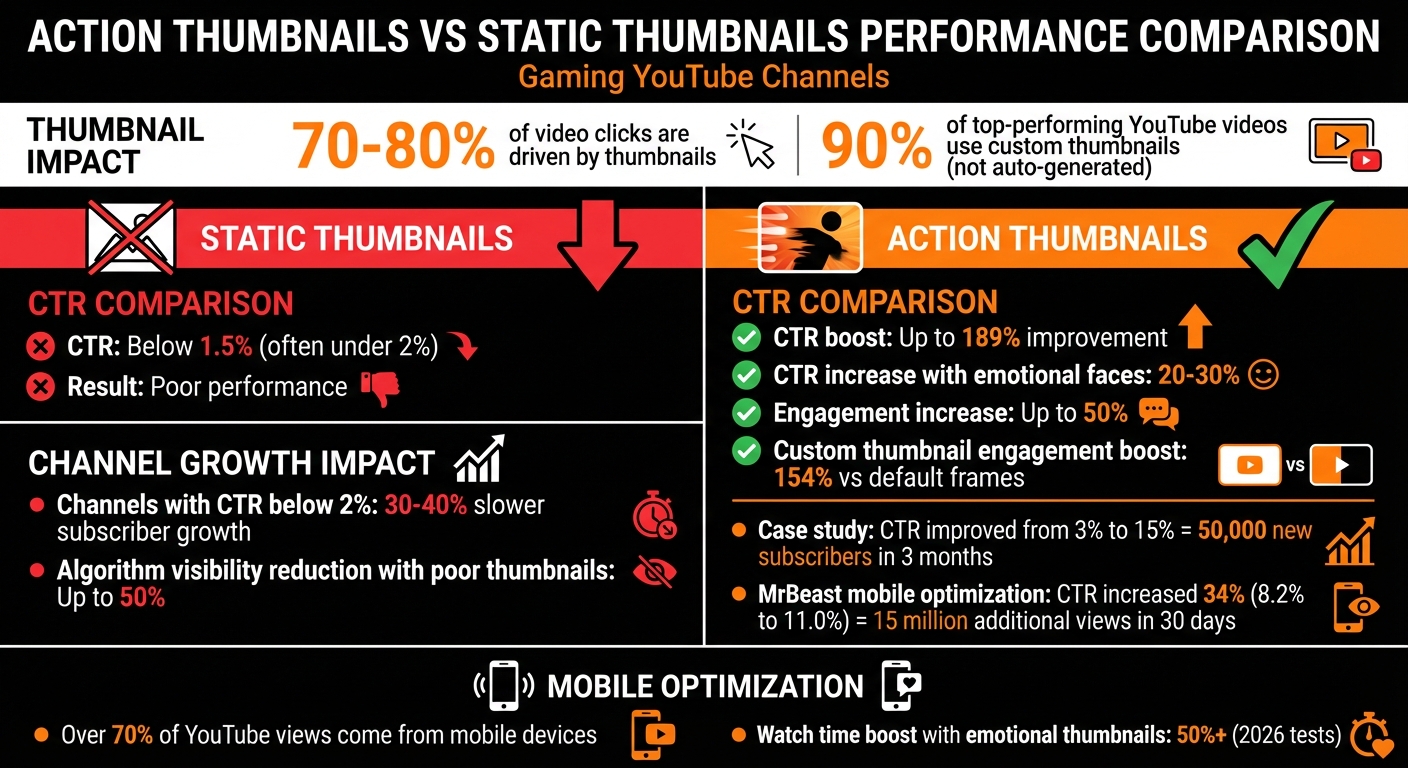
Action Thumbnails vs Static Thumbnails: Gaming Channel Performance Statistics
The Problem: Static Thumbnails Reduce Viewer Engagement
Why Static Thumbnails Don't Capture Attention
Static thumbnails are essentially unedited images or screenshots taken directly from gameplay footage. They’re often chosen by creators because they’re quick and easy to use. But here’s the issue: these plain visuals fail to showcase the energy and excitement that make gaming content stand out.
Picture this: a viewer scrolling through their YouTube feed sees an idle Fortnite character or a dull menu screen from Call of Duty. This lack of visual interest is especially prevalent in mobile gaming, where screen real estate is limited. Chances are, they’ll keep scrolling. These static images don’t spark curiosity or create a sense of urgency to click. They simply lack the dynamic appeal that grabs attention.
The impact is clear in the numbers. Thumbnails are responsible for driving 70–80% of clicks on YouTube videos. Gaming channels that rely on static screenshots often see click-through rates (CTR) fall below 1.5%, far below the average range of 2–5%. This drop in engagement directly affects the channel's ability to grow, as fewer clicks mean fewer opportunities to attract new viewers.
How Poor Click-Through Rates Slow Channel Growth
Low CTR doesn’t just mean fewer clicks - it also signals to YouTube’s algorithm that your content might not be worth recommending. When static thumbnails fail to engage viewers, YouTube may reduce your video’s visibility by up to 50%. This creates a vicious cycle: fewer recommendations lead to fewer impressions, which stunts subscriber growth.
For gaming channels with CTR below 2%, subscriber growth can slow by 30–40% over time. Take this example: a mid-tier channel that improved its CTR from 3% to 15% by switching to action-packed thumbnails gained 50,000 subscribers in just three months. Meanwhile, an FPS channel that stuck with basic screenshots saw its views plateau at 5,000 per video. Since 2024, algorithm updates have made it even harder for channels using plain thumbnails to compete in crowded gaming niches. If your thumbnails aren’t pulling in clicks, YouTube won’t promote your videos - and your channel’s growth will come to a standstill.
sbb-itb-b59debf
Why Action Thumbnails Increase Views
Building Visual Tension with Action Shots
Using an authentic screen grab of a high-stakes moment can instantly convey conflict and intrigue - a sniper's trigger pull, a character mid-explosion, or a clutch play about to unfold. These frozen moments create a sense of urgency and curiosity, drawing viewers in to see how the story unfolds.
"Action shots are great for grabbing attention. Create a thumbnail that freezes a key moment of the action, whatever the action is." - Andrew Moore-Crispin, TubeBuddy
Sticking to real gameplay captures also keeps your thumbnail feeling genuine and avoids the trap of clickbait. This authenticity not only encourages viewers to stick around longer but also signals YouTube’s algorithm to promote your video. The emotional appeal of these visual hooks enhances engagement, making your content more likely to succeed.
Triggering Emotional Responses with Dynamic Visuals
Human faces displaying strong emotions - whether it’s shock, focus, or joy - immediately connect with viewers. Thumbnails with expressive faces have been shown to increase click-through rates by 20–30%.
In tests conducted in early 2026, thumbnails featuring emotional expressions boosted watch time share by over 50% compared to generic screenshots. This trend highlights the shift toward thumbnails that tell a story. By hinting at excitement, danger, or triumph, creators can entice clicks and keep viewers engaged. Pairing these visuals with carefully chosen colors further amplifies the thumbnail’s appeal.
Using High-Contrast Colors to Stand Out
Bright, contrasting colors make your thumbnail pop in a crowded YouTube feed. Pairing complementary hues - like bold yellow text on a dark background or vibrant reds against blacks - ensures your thumbnail stands out, whether viewers are using light or dark mode. This approach also guarantees readability across both mobile and desktop screens.
"Thumbnails are the first thing viewers evaluate when deciding whether to click on a video. A stronger thumbnail means a higher click-through rate (CTR), which signals YouTube's algorithm to show the video to more people." - Rutvik Shirude, Co-Founder, GrowthOS
The numbers speak for themselves: 90% of YouTube’s top-performing videos use custom thumbnails rather than auto-generated frames. Custom thumbnails with optimized contrast and color schemes can boost viewer engagement by up to 154% compared to default frames. Combining high-contrast designs with action-packed and emotionally charged visuals creates thumbnails that not only attract clicks but also deliver on your channel’s promise of exciting gaming content. This, in turn, encourages YouTube to share your videos with a broader audience.
The Gaming Thumbnail Secret (Stop Getting 0 Views)
How to Create Action Thumbnails That Work
Thumbnails are your video's first impression, and to make them work, you need to blend visual tension with emotional appeal. Here's how to craft thumbnails that grab attention.
Selecting Peak Gameplay Moments
The best thumbnails capture the most intense moments: a narrow escape, a dramatic win, or an explosion mid-action. Look for scenes that scream excitement - think high-stakes combat, fast-paced chases, or close-ups of characters showing raw emotion like shock or triumph.
Another effective approach is using "Before and After" comparisons. For example, highlight a character's transformation or showcase contrasting game elements. These visuals instantly spark curiosity and make viewers want to click.
"A great thumbnail is like a billboard for your video; make it count."
– Andrew Moore-Crispin, TubeBuddy
To ensure top-notch quality, capture high-resolution screenshots or plan dedicated photo sessions. Once you've nailed the moment, use editing to make it pop. You can also use AI thumbnail generation tools to streamline this process.
Applying Editing Techniques to Emphasize Action
Editing is where your thumbnail goes from good to great. Use bold, contrasting colors to make your image stand out on YouTube’s busy interface. Bright subjects against dark backgrounds - or vice versa - create a striking effect that grabs attention.
Keep the design focused. Avoid clutter by sticking to a clear focal point and limiting text to 3–4 impactful words that add to your title rather than repeating it.
"Your thumbnail and title should work as a team. The thumbnail creates curiosity, the title gives context."
– Lydia Sweatt, Blog Manager, vidIQ
Gaming thumbnails often use gradient accents (like orange or red) and bold typography to convey energy and movement. These details can transform a simple screenshot into a visually compelling hook that promises action and excitement.
After editing, make sure your thumbnail looks great across all screen sizes.
Optimizing Thumbnails for Mobile Screens
With over 70% of YouTube traffic coming from mobile devices, designing for small screens is non-negotiable. Try the "Squint Test" - shrink your thumbnail to about 10% of its size. If the action or text isn’t clear, it won’t perform well on mobile.
Position key elements in the top-left corner, as this is usually where viewers' eyes go first on a phone. Avoid the bottom-right corner, which is often obscured by UI elements like timestamps. For example, in early 2026, creator MrBeast boosted his click-through rate by 34% (from 8.2% to 11.0%) by optimizing thumbnails for mobile, adding 15 million views in just 30 days.
Stick to a resolution of 1,270 x 720 pixels for a 16:9 aspect ratio, and keep the file size under 2MB for faster loading. To ensure your text and action elements stay visible, add a bold black stroke or drop shadow. Finally, test your thumbnail by shrinking it to a postage stamp size - if it’s still clear and engaging, you’ve got a winner.
Using ThumbnailCreator to Design Action Thumbnails
ThumbnailCreator simplifies the process of designing action-packed thumbnails, making it accessible even if you lack design skills or expensive software. This AI-powered platform helps gaming creators craft eye-catching thumbnails in just minutes. Trusted by 2,847 gaming YouTube channels, it blends automation with customization to enhance click-through rates.
Here’s how ThumbnailCreator can turn your gameplay screenshots into attention-grabbing visuals.
Features for Gaming Content
ThumbnailCreator is tailored for gaming creators, offering AI styles specific to popular games like Minecraft, Fortnite, and Call of Duty. These styles ensure your thumbnails align with the visual themes that resonate with your audience. Key features include:
- Reaction Faces: Add expressions like shock, excitement, or intensity to amplify the emotional appeal of your thumbnails.
- Object Swapping: Enhance in-game elements like weapons or explosions while keeping your content authentic.
- Stream Highlights: Apply dramatic lighting effects to static gameplay frames, making them pop with energy.
The AI also works with simple text prompts. For example, if you input “Epic Minecraft build reveal with excited gamer reacting,” ThumbnailCreator will generate multiple thumbnail variations in seconds. This allows you to test different approaches without starting from scratch.
How to Create Thumbnails with ThumbnailCreator
Getting started is quick - just 60 seconds. You can either upload a gameplay screenshot or describe your video topic by specifying the game, the key action moment, and the desired emotion. The AI then creates several thumbnail options optimized for gaming audiences.
Once you have your options, the built-in editor lets you refine the design. Adjust text, enhance colors for better mobile visibility, and position reaction faces for maximum impact. For instance, you could upload a Fortnite battle royale screenshot, select a shocked reaction, and overlay bold text like “INSANE WIN” to grab attention. You can even preview how your thumbnail will look on mobile versus desktop before exporting the final version.
Time and Cost Savings with ThumbnailCreator
Creating thumbnails the traditional way often involves hiring a designer, which can cost $15–$50 per thumbnail, or spending 15–30 minutes editing each one yourself. If you’re uploading three to four videos a week, that could mean $180–$600 a month in designer fees or countless hours of editing time.
ThumbnailCreator cuts this process down to minutes, requiring no design expertise. Plus, it offers a free trial with no strings attached, so you can cancel anytime.
For creators who upload frequently, this tool ensures you can deliver professional, action-filled thumbnails without falling behind on your schedule. By saving time and money, you can focus on what matters most - creating engaging, high-energy content that keeps your audience coming back. With ThumbnailCreator, you can effortlessly combine creativity with efficiency to boost viewer engagement.
Wrapping It Up
Static thumbnails often blend into the noise of crowded feeds, making it tough to grab attention and leaving click-through rates (CTR) stuck in the low single digits. On the other hand, action thumbnails create visual drama, spark emotional reactions, and use bold, high-contrast colors to stop scrollers in their tracks. Gaming channels that use action-packed thumbnails often report a 20–50% boost in CTR, which can lead to algorithmic advantages and faster subscriber growth.
The process is simpler than you might think: pick standout gameplay moments - like intense mid-battle shots or thrilling jumps - enhance them with bold overlays and smart cropping, and ensure they’re mobile-friendly by keeping the key action within the central 60% of the frame. As expert Derral Eves highlights, high-energy thumbnails create a sense of FOMO (fear of missing out) that drives engagement. These strategies show how action thumbnails can transform your channel's performance.
If design feels intimidating, ThumbnailCreator makes it easy to create these dynamic visuals in just minutes. With AI-powered tools like gaming-specific templates, face swapping, and object swapping, you can skip the need for costly designers and lengthy edits. Start applying these techniques today to give your channel a boost.
Take a moment to review your last 10 thumbnails. Replace static images with dynamic, action-filled shots using these tips or ThumbnailCreator’s tools, and aim for at least a 10% CTR improvement. Even big names like PewDiePie have seen massive benefits from this approach - one study found that switching to mid-game action shots helped his CTR jump from 5% to 12%. Keep an eye on your analytics and thumbnail data, and you’ll likely see noticeable results in just a few weeks.
Dynamic, action-driven thumbnails could be the game-changer your channel needs. The tools and strategies are ready - put them to work and start seeing those views climb.
FAQs
What makes a thumbnail “action-packed”?
An action-packed thumbnail grabs attention by combining bold visuals, expressive facial expressions, vibrant high-contrast colors, and dynamic layouts. These features work together to create a sense of energy and urgency, making viewers feel compelled to click. The key is to emphasize movement and excitement, ensuring your thumbnails pop and demand attention.
How can I improve CTR without becoming clickbait?
To improve your click-through rate (CTR) without resorting to clickbait, focus on creating thumbnails that grab attention and genuinely reflect your content. Use high-contrast colors, expressive faces, and bold, minimal text (keep it under 12 characters for better readability). Stay away from misleading images or over-the-top claims - your thumbnails should match the video's tone and message to build trust with viewers.
Want to know what works best? Try A/B testing to see which designs connect with your audience while keeping things honest and authentic.
How can I tell if my thumbnails work on mobile?
Making sure your thumbnails grab attention on mobile devices is all about simplicity and clarity. Here’s how you can do it:
- Keep it bold and readable: Thumbnails should be clear and easy to understand, even on smaller screens.
- Use high-contrast colors: These make your thumbnails pop and stand out in crowded feeds.
- Limit text: Stick to fewer than 12 characters to ensure readability.
- Include expressive faces: Faces with strong emotions can draw attention and connect with viewers.
Always test your thumbnails on actual mobile devices to see if the key elements are noticeable. Tools like ThumbnailCreator can simplify the process by helping you design mobile-friendly thumbnails and run A/B tests to discover what resonates most with mobile audiences.