

How AI Predicts YouTube Video Performance
AI can estimate YouTube performance - not promise it. I’d start with a clear target, such as 7-day views, and compare each forecast with the median of your last 10 similar uploads. You can also compare these against industry CTR benchmarks to see how you stack up.
Models use titles, thumbnails, channel history, and trends before publication. After release, they can also use clicks, views, and watch time. <u>Those are different prediction tasks</u>: a forecast using early results isn’t a pre-release prediction.
Here’s what I look for before using an estimate:
- A fair test: Does the model beat a simple channel baseline on newer uploads?
- The right score: Reported classification accuracy of about 83%–84% in one trending-video study does not mean view forecasts are that accurate.
- A clear decision: Use estimates to guide topic, packaging, and timing tests - not replace them.
- Known limits: Check uncertainty, privacy, audience differences, and whether future data slipped into training.
I’ll review the research, explain the metrics, and show how to test thumbnails and track forecast errors without treating patterns as proof of cause and effect.
Prediction Data, Models, and Metrics
Video, Audience, and Content Data
What a model learns depends on the data it receives. YouTube’s Data API supplies public metadata and statistics. Owner-authorized YouTube Analytics adds viewing and audience data that public sources don’t provide. Historical performance from Analytics can also help forecast results for unpublished videos.
Timing matters, too. Some inputs are available before upload; others appear only after publication. These inputs become features - the measurements a model uses to make predictions.
| Input signal | What it measures | Typical data source | Prediction risk |
|---|---|---|---|
| Channel size and past views | Audience reach and historical baseline | Public Data API counts; authorized Analytics reports | Growth, niche shifts, and viral outliers disrupt patterns |
| Video duration | Planned or actual runtime | Data API content details; creator metadata | Effect depends on topic and audience |
| Publication timing | Date, time, day, and seasonality | Data API snippet; creator schedule | Confounded by time zones, holidays, news, and algorithm changes |
| Title and description text | Topic, wording, and entities | Public metadata; creator drafts | Wording may poorly represent content |
| Thumbnail and visual content | Composition, faces, objects, colors, and branding | Public thumbnail URL; creator assets | Thumbnails may change after upload |
| Views, likes, and comments | Public engagement counts | YouTube Data API | Counts depend on video age |
| Watch time and average view duration | Viewing depth | Authorized YouTube Analytics API | Unavailable for unrelated channels |
| CTR and impressions | Impression-to-view rate and thumbnail exposure | Creator-owned Analytics data | Depends heavily on YouTube distribution |
| Comments and sentiment | Viewer reactions and language | Data API comments; text processing | Comments do not represent all viewers |
| Captions or transcripts | Spoken topics and language features | Data API captions; permitted transcript access | Availability and accuracy vary |
| Audience demographics and traffic sources | Viewer characteristics and discovery paths | Authorized Analytics API | Private and creator-specific |
Models for Predicting Counts and Categories
Regression predicts a number; classification predicts a category. A numerical target might be views or watch time over a fixed period. Popularity classification sorts videos into low-, medium-, and high-performance groups using thresholds set in advance. Sentiment classification labels language as positive, negative, or neutral - it doesn’t forecast performance. Results should be reported by study, task, and prediction horizon.
Before training, researchers remove duplicates, flag missing values, encode categories, and sometimes log-transform skewed counts. Feature engineering converts raw inputs into measurements a model can use, such as thumbnail text area or comments per 1,000 views. Embeddings turn text or images into numerical patterns that reflect similarity.
Pre-release features must stay separate from post-release signals. How researchers score the predictions matters, too.
How Researchers Measure Prediction Accuracy
For numerical forecasts, MAE measures the average absolute error. Median absolute error gives the middle error, making it less sensitive to viral outliers. MSE squares errors, while RMSE takes the square root of MSE and expresses the result in the original units.
MAPE reports error as a percentage but becomes unstable or undefined near zero. R² compares predictions against using the sample mean; its value can be negative. Always check whether a score applies to raw outcomes or log-transformed ones.
For classification, accuracy is the share of labels predicted correctly. Precision measures how many predicted positives are correct; recall measures how many actual positives the model finds. F1 balances precision and recall. When groups are imbalanced, look for per-class results and preferably macro-F1 - not accuracy alone.
Give more weight to studies that train on older uploads, test on newer ones, hold out entire channels, and beat simple baselines.
Studies should report fixed prediction horizons, sample details, and uncertainty estimates. A prediction interval describes possible outcomes. A confidence interval around an evaluation score describes uncertainty in that score. Neither means the results will apply to every channel. Even with similar data, the choice of score can change how strong a study’s results appear.
sbb-itb-b59debf
What Research Shows About Video Performance
Findings on CTR, Watch Time, and Sentiment
Research often finds that watch time predicts performance better than clicks alone. A click may lead to a short visit, while a video with a lower CTR may deliver more watch time. These findings apply to specific systems and study periods. High CTR points to strong packaging; it doesn't establish causation. Creators must distinguish between clickbait and authentic thumbnails to ensure high CTR translates into actual watch time. Creators need forecasts tied to the decisions they're making.
Findings on sentiment also differ. One study links negative comments to longer viewing, while another links positive sentiment to longer watch time. Treat sentiment as a dataset-dependent signal, not a general rule. Sarcasm, language, and local references can change how comments get labeled.
Study Results and Their Limits
The studies below show how inputs and time horizons affect what AI can predict. They also separate forecasts from correlations.
| Study and source | Dataset | Outcome / horizon | Methods | Evaluation metric and reported result | Limit |
|---|---|---|---|---|---|
| Predicting popularity of online videos | Nearly 24,000 YouTube and Facebook videos; random and top-video samples | 30-day popularity ranking using the first 6 days of signals | Support Vector Regression combining changes in counts over time, social interactions, and visual features | Spearman correlation: 0.9071 ± 0.0043 for random videos; 0.9353 ± 0.009 for top videos | Results may not apply to current YouTube traffic, other topics, or ordinary channel uploads |
| A Data-driven Study of View Duration on YouTube | Random web-crawled videos and participant viewing data | Viewing duration/proportion watched; no forecast horizon | Statistical analysis of views, likes per view, and sentiment | Statistically significant positive associations with view count and likes per view; no comparable forecast-error score supplied | Association does not establish cause and effect |
| Video WatchTime and Comment Sentiment | YouTube videos with comment sentiment and consumption measures | Sentiment–watch-time relationship; no forecast horizon | Sentiment and correlation analysis | Positive sentiment associated with longer watch time; no comparable forecast-error score supplied | Conflicts with another dataset's negative-sentiment finding |
| PAK VIDEOS framework | Pakistan top trending videos from 2021–2023; 22,188 videos in the reported train/test split | Popularity classification | Random forest, stochastic gradient descent, gradient boosting, and XGBoost | Reported accuracy of about 83%–84%, depending on the model summary | Regional, trending-only sample may not represent U.S. audiences or non-trending uploads |
When using engagement to forecast performance, check the dataset, forecast horizon, and available signals before applying the result to thumbnail mistakes to avoid, title, or timing decisions.
Building an AI to Predict My Next Post Performance-10102026
How Creators Can Use Predictions
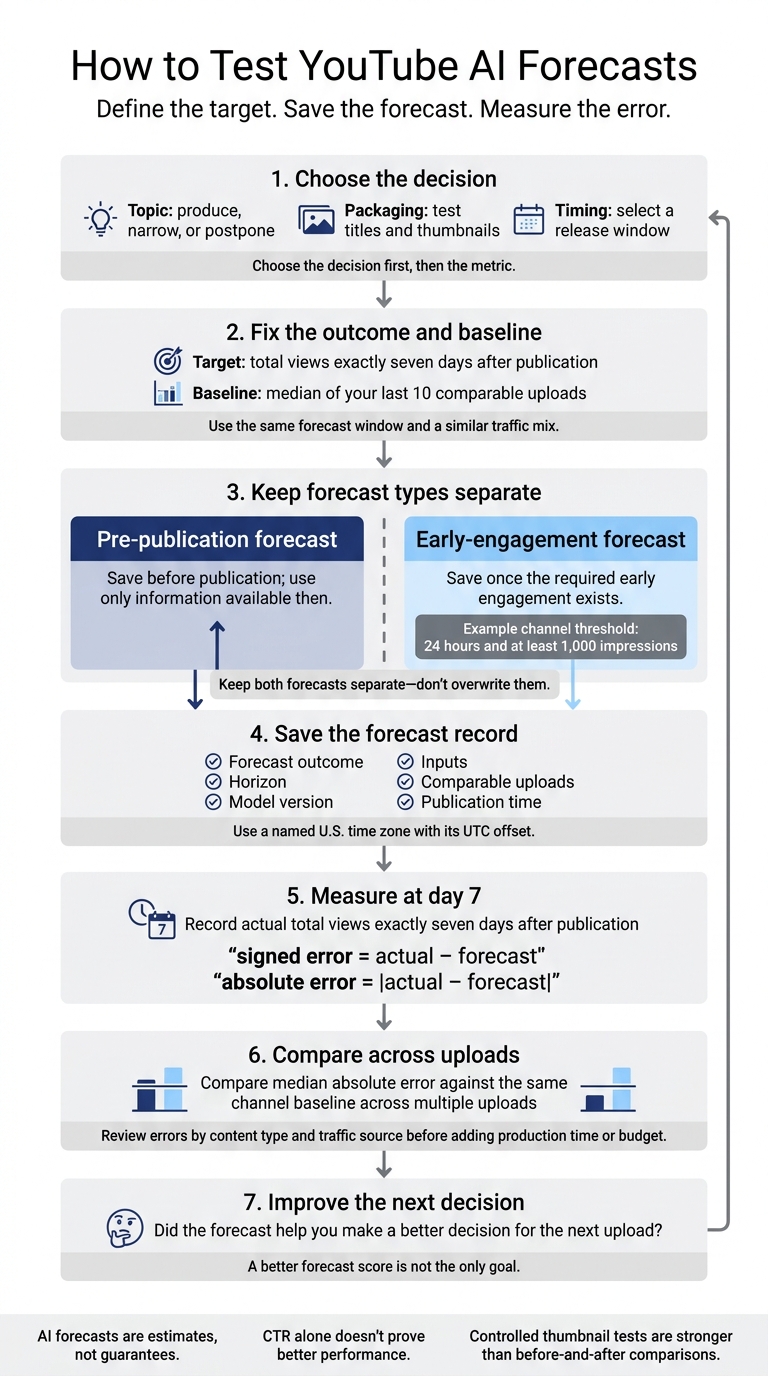
How to Test YouTube AI Forecasts
Turn each forecast into a decision, then track whether it helped.
Match Each Forecast to a Decision
Choose the decision first, then the metric. For your baseline, use the median of your last 10 comparable uploads, measured over the same forecast window with a similar traffic mix. Set early-momentum thresholds for your channel - for example, 24 hours and at least 1,000 impressions.
Match the forecast type to the video’s stage.
| Prediction use | Appropriate decision | Supporting metric | Main caveat |
|---|---|---|---|
| Topic demand | Produce, narrow, or postpone a topic | 7-day views, returning viewers, search or browse traffic | Execution and changing interests can affect demand |
| Title and thumbnail appeal | Choose packaging before publication | Impressions, CTR, average view duration, watch time | CTR varies by traffic source and audience breadth; don’t judge it alone |
| Release timing | Select a release window | Early impressions, first-24-hour views, returning viewers | Timing can’t make up for weak topics or packaging |
| Retention review | Find problems with the opening, pacing, or explanations | Average percentage viewed, audience-retention curve, average view duration | Retention data can take 1–2 days to process |
| Post-release review | Compare results with forecasts and decide what to repeat | 7-day views, watch time, subscribers, traffic sources, forecast error | Recommendations, seasonality, promotions, or external traffic may affect results |
Create and Test Thumbnails
Use ThumbnailCreator for production, not prediction. AI generation and templates help you build concepts without advanced design skills. Text editing, face swapping, and object swapping let you make different versions. Keep each version true to the video. YouTube’s Test and Compare feature supports up to three thumbnail options for eligible videos.
Favor A/B testing vs gut feeling by using controlled tests over before-and-after comparisons. Audience mix, traffic sources, and video age can change between measurements. Read test results alongside Analytics metrics for CTR, retention, average view duration, and watch time. Don’t assume YouTube reports every metric separately for each version: a higher CTR alone doesn’t prove better performance.
Log each test result to give future thumbnail decisions a baseline.
Log Forecasts and Track Errors
A prediction’s worth depends on how it holds up across uploads, not just one video.
Define the outcome as total views exactly seven days after publication. Save the forecast at its stated observation point: before publication or once the required early engagement exists.
Record the forecast outcome, horizon, model version, inputs, comparable uploads, and publication time. Use a named U.S. time zone with its UTC offset. Keep pre-publication and early-engagement forecasts separate - don’t overwrite them.
At the 7-day mark, calculate signed error = actual − forecast and absolute error = |actual − forecast|. Compare median absolute error against the same channel baseline across multiple uploads. Before putting more production time or budget into the model, review errors by content type and traffic source. Focus on whether it helps you make a better decision for the next upload, not just whether it earns a better forecast score.
Conclusion: Use Predictions as Estimates
AI forecasts are estimates, not guarantees. Results vary by dataset, forecast horizon, and channel. Use reviewed research and your channel’s history to judge whether a forecast fits the decision. Report uncertainty when available, and label each estimate with its prediction date and horizon. Forecasts help you make decisions; they don’t provide certainty.
Data Limits and Responsible Use
Model quality can change with training data, audience mix, or platform behavior. Trends, recommendation changes, and policy updates can weaken a model fast. Record its training period and reassess it when errors increase.
Prevent data leakage: keep future comments, views, and watch time out of pre-publication tests. Test the model on videos published after its training period.
Samples drawn mostly from large English-language channels may not reflect smaller channels or multilingual audiences. Collect only the personal data you need, and restrict access. Comments, faces, and audience traits can expose private information or increase bias. Check errors across languages and audience groups rather than assuming sentiment scores work equally well for everyone.
Research Gaps and Next Steps
Research still needs more reproducible datasets, clear methods, cross-channel benchmarks, and forecasts based only on pre-publication data. Thumbnail research also needs stronger controlled tests for different use cases. A pattern among successful videos doesn’t prove that a visual choice caused more views.
Keep three steps central: define the outcome and horizon, compare forecasts with channel baselines, and audit errors consistently.
Treat thumbnail production as one step you can test - not a replacement for strong content, accurate promises, or viewer satisfaction.
FAQs
Can AI predict views for a new channel?
Yes, AI can help predict a new channel’s performance by analyzing thumbnails before publication. ThumbnailCreator uses machine learning models trained on millions of successful thumbnails to estimate click-through rate (CTR) scores.
It checks contrast, facial expressions, and text placement against niche-specific benchmarks, then offers feedback to help make thumbnails more clickable. New creators can use these estimates to make data-driven choices, even without a performance history.
How many uploads do I need to evaluate AI forecasts?
You don’t need a set number of uploads to assess AI forecasts. Focus on impressions from live A/B tests: aim for 1,000 to 5,000 per thumbnail variation to get meaningful, statistically significant results. Tests generally run for 7 to 14 days.
Smaller channels may need to wait until they reach 1,000 to 3,000 impressions. Larger channels should aim for 20,000 or more to check AI predictions against actual performance.
What should I do when AI forecasts keep missing?
When AI forecasts miss the mark, treat them as estimates and check them against actual performance data. Use YouTube’s Test and Compare to run A/B tests, changing just one element at a time - text, background color, or facial expression - so you can see what drives results.
Aim for 1,000–5,000 impressions per variant for statistical significance. Record your findings to spot patterns and improve future ThumbnailCreator designs.