

CTR Trends in YouTube Thumbnails 2026
Thumbnails now make or break your YouTube success. In 2026, thumbnail click-through rates (CTR) are driven by data-backed design strategies and AI insights. Here's what you need to know:
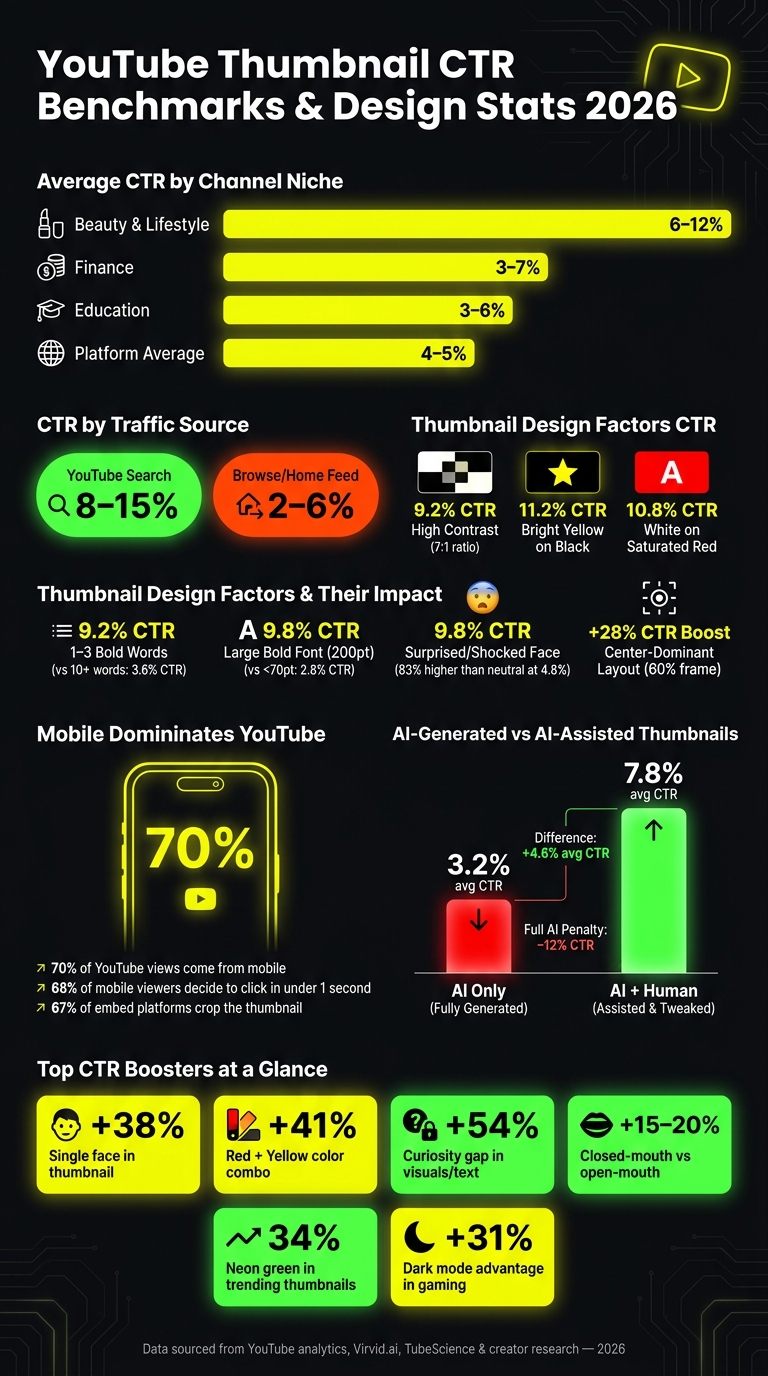
- Average CTRs: Most videos fall between 4–5%, with top niches like beauty hitting 6–12%.
- Top Design Elements: High contrast (7:1 ratio), 1–3 bold words, and emotional imagery (e.g., surprised faces) boost CTR.
- Mobile Optimization: With 70% of views on mobile, thumbnails must work at small sizes and avoid clutter.
- AI's Role: Tools like ThumbnailCreator enhance designs but require human tweaks for best results.
Key takeaway: Simple, bold designs paired with AI insights and human creativity are the formula for higher CTRs. Let’s dive deeper into benchmarks, trends, and tools shaping thumbnail success in 2026.
YouTube Thumbnail CTR Benchmarks & Design Stats 2026
Current CTR Benchmarks and Influencing Factors
CTR Benchmarks in 2026
In 2026, the average click-through rate (CTR) across YouTube hovers around 4–5%. According to YouTube, half of all channels and videos fall within a broader range of 2–10%, showcasing the differences between niches and audiences.
Performance varies significantly depending on the niche. For example:
- Beauty and Lifestyle channels: Typically see CTRs of 6–12%.
- Finance channels: Average between 3–7%.
- Education channels: Land around 3–6%.
Channel size also plays a big role. Smaller channels with fewer than 1,000 subscribers often achieve 6–10% CTR thanks to their highly engaged and specific audiences. On the other hand, larger channels with over 100,000 subscribers tend to see lower CTRs, around 3–5%, as their content reaches a broader, less targeted audience.
Traffic sources make a noticeable difference as well:
- YouTube Search: Yields the highest CTR, ranging from 8–15%.
- Browse traffic (home feed): Typically falls between 2–6%.
Instead of focusing solely on platform-wide averages, it’s more useful to compare these numbers to your channel’s historical performance.
Next, let’s dig into the design elements that influence these CTR benchmarks.
Design Elements That Drive Higher CTR
Research in 2026 highlights visual contrast as the most impactful factor, accounting for 73% of CTR performance variance. Thumbnails with a contrast ratio of 7:1 or higher average a CTR of 9.2%, while those below 4.5:1 drop to about 2.9%. Popular high-contrast color pairings include:
- Bright yellow on black: 11.2% CTR
- White on saturated red: 10.8% CTR
Text content also plays a major role. Thumbnails with 1–3 words average a CTR of 9.2%, but adding more than 10 words can drop the rate to roughly 3.6%. Similarly, large, bold sans-serif fonts (200pt size) achieve a 9.8% CTR, compared to 2.8% for smaller fonts under 70pt.
Another key factor is emotional imagery. Thumbnails featuring surprised or shocked expressions average a CTR of 9.8%, which is 83% higher than neutral expressions at 4.8%. Composition matters too. Center-dominant layouts - where the subject occupies the central 60% of the frame - average a CTR of 8.8%, slightly outperforming the traditional rule of thirds, which comes in at 7.2%. Using 40–60% negative space also helps draw attention to the focal point while avoiding visual clutter.
With these design principles in place, it’s essential to consider how device and screen type impact CTR.
How Device and Screen Type Affect CTR
Since 70% of YouTube views come from mobile devices, thumbnails must be optimized for smaller screens and quick decision-making. Mobile viewers decide whether to click in under one second about 68% of the time. To succeed on mobile, thumbnails should:
- Feature fewer than three focal points.
- Use exaggerated facial expressions that remain clear when scaled down.
Thumbnails also face cropping challenges. Around 67% of platforms where videos are embedded crop the original thumbnail image. If critical elements like text or faces are near the edges, they risk being cut off. To avoid this, keep key elements centered and preview thumbnails at 120×90 pixels to ensure they remain effective.
| Device Context | Key Challenge | Optimization Strategy |
|---|---|---|
| Mobile (70% of views) | Less than 1-second decision window | Use high contrast and focus on a single clear idea |
| External platforms/embeds | 67% crop the image | Keep critical elements centered |
| Desktop | More detail visible | Prioritize simplicity for consistency |
sbb-itb-b59debf
Emerging Thumbnail Design Trends in 2026
Popular Thumbnail Styles Right Now
In 2026, neo-minimalism is taking over thumbnail design. This style focuses on clean, single-focal designs with plenty of negative space, moving away from the cluttered, reaction-heavy thumbnails of the past. The once-dominant "YouTube Face" - featuring exaggerated open-mouth expressions - is fading. Instead, closed-mouth micro-expressions like subtle curiosity, quiet confidence, or a restrained smile are outperforming their louder counterparts by 15–20% in tests. Tools like ThumbnailCreator have highlighted this shift, favoring designs that feel more authentic and understated.
"Every A/B test, less cringe expression won. ... once I started closing my mouth and smiling and making it a little less cringe, a lot of other creators started switching over." - Jimmy Donaldson (MrBeast)
Another emerging trend is proof-of-human authenticity. Thumbnails featuring candid, slightly imperfect images signal genuine content, which resonates better with viewers. Fully AI-generated thumbnails, on the other hand, come with a –12% performance penalty, likely due to viewer skepticism. However, combining real faces with AI-enhanced backgrounds has seen a +67% increase in usage. For channels without a human presence, hero object shots and bold, typography-first layouts are becoming the preferred styles.
These changes in visual trends are also influencing how creators approach text and color in their thumbnails.
Text and Color Strategies That Work
When it comes to text, less is more. Using 3–5 words can boost click-through rates (CTR) by 28%, and 78% of top creators now rely on bold sans-serif fonts like Impact or Bebas Neue. Adding outlined text improves readability by 40%, especially on smaller screens. Additionally, YouTube's Gemini AI now cross-references thumbnail text with video transcripts - if the two don't match, the video could be deprioritized in recommendations.
Color choices are becoming more niche-specific. Here's how different combinations are performing in 2026:
| Color Combination | Best Use Case | Avg. CTR |
|---|---|---|
| Yellow + Black | Tutorials, high-energy content | 8.2%–11.2% |
| Red + White | News, urgency, importance | 7.6%–10.8% |
| Neon Green + Black | Gaming, entertainment | 10.1% |
| Blue + Orange | Tech, business, professional | 7.1% |
Neon colors are on the rise, with usage increasing by 156% this year. Neon green alone is featured in 34% of trending thumbnails. Since 82% of users now browse YouTube in dark mode, thumbnails with dark backgrounds have a 31% advantage, especially in gaming content.
Technical Specs for Effective Thumbnails
Getting the technical details right is just as crucial as the design itself. Thumbnails need to render perfectly across all devices, and YouTube has introduced some updates for 2026. While the standard resolution remains 1280 × 720 px, creators can now upload 4K thumbnails, with the maximum file size increased to 50MB. However, for most creators, sticking to 1280 × 720 px in JPG or PNG format under 2MB remains the most practical choice.
| Specification | 2026 Recommendation |
|---|---|
| Standard Resolution | 1280 × 720 px |
| Aspect Ratio | 16:9 |
| File Formats | JPG, PNG, GIF (static), BMP |
| Max File Size | 50MB |
| Safe Zone Margin | 6–8% from all edges |
| Focal Points | Fewer than 3 |
| Face Size in Frame | 30–50% of the frame |
To ensure thumbnails look sharp, use the squint and grayscale tests to check clarity at smaller sizes and contrast performance. Also, avoid placing critical elements in the bottom-right corner, as YouTube's duration badge will overlap that area. These technical adjustments help ensure your designs are as effective as possible.
The Role of AI in Thumbnail Optimization
How AI Predicts Thumbnail CTR
AI tools are transforming the way thumbnails are optimized for performance. These tools analyze visual elements such as color contrast, facial expressions, and text placement, comparing them against massive datasets of past performance to predict which designs will attract the most clicks. By targeting emotional triggers and leveraging high-contrast visuals, AI taps into click psychology. For example, thumbnails featuring shocked expressions can boost click-through rates (CTR) by up to 45%, while using curiosity gaps can lead to a 54% increase.
Interestingly, a study by Virvid.ai revealed that fully AI-generated thumbnails achieved an average CTR of just 3.2%. However, when creators combined AI-generated designs with manual tweaks, the CTR jumped to 7.8%. This highlights how AI-driven insights can significantly enhance results when paired with human creativity.
Using ThumbnailCreator in Your Workflow
ThumbnailCreator offers a hybrid approach, blending AI-driven efficiency with human decision-making. Its Smart Analysis feature identifies issues like low contrast, unclear text, or insufficient focus on faces, and provides one-click Auto-Optimization to address these problems before publishing. Additionally, the Trending Thumbnail Browser lets you explore real-time data from YouTube, filtered by niche and region, so you can see which styles are performing well in your category.
One standout feature is the Clone Style tool, which allows you to replicate the visual framework of a trending thumbnail while creating entirely original content.
"AI nails the science, but can miss the art. Brand nuance, emotional storytelling, and cultural relevance give humans the edge in competitive niches." - Cassandra Lee, Head of Content, Sprout Social
ThumbnailCreator’s recommendations are based on insights from over 50,000 analyzed thumbnails and feedback from more than 15,000 creators. This ensures that while you benefit from AI's data-driven suggestions, you can still preserve your brand’s unique voice. That said, understanding the limitations of AI is equally important.
Limitations and Practical Considerations for AI Tools
While AI provides a solid foundation, it’s not without its flaws. One major issue is context blindness; most AI tools offer a single CTR prediction, even though performance varies by placement. For example, Browse Features generally see CTRs between 3–7%, Suggested Videos range from 5–10%, and YouTube Search can hit 8–15%.
Another challenge is how AI-optimized thumbnails can sometimes oversell the content, leading to shorter watch times. A TubeScience study analyzing 210 million impressions found that videos using AI-generated thumbnails experienced a 5% lower average watch time compared to manually optimized ones. This is because YouTube’s algorithm penalizes videos with high CTRs but poor retention, often ranking them lower than videos with modest CTRs but strong engagement.
To avoid these pitfalls, always cross-check AI-predicted CTRs with metrics like average view duration (AVD). If a thumbnail drives high clicks but low watch time, it might be drawing in the wrong audience. Think of AI as a rapid prototyping tool - it’s a great starting point, but the final design should blend data insights with human creativity. This balanced approach reflects the ongoing shift toward data-informed thumbnail strategies, where AI and human judgment work hand in hand to achieve the best results.
Conclusion and Key Takeaways
2026 Thumbnail Design Insights at a Glance
The average platform CTR hovers between 4–6%, but stronger channels push this to 8–10%, and the top-tier performers surpass 12%. Achieving these results requires a thoughtful mix of smart design, clear content signals, and the strategic use of AI tools to refine decisions.
Here are some standout stats to remember: thumbnails featuring a single face outperform faceless designs by 38%. Closed-mouth micro-expressions deliver a 15–20% edge over open-mouth shock, and keeping text concise - around 3–5 words - boosts performance by 28%. However, fully AI-generated thumbnails tend to underperform, with a -12% CTR penalty, while AI-assisted designs - where human input remains critical - consistently deliver better results.
| Design Element | Impact on CTR |
|---|---|
| Single face in thumbnail | +38% advantage |
| Red + Yellow color combination | +41% boost |
| Curiosity gap in visuals/text | +54% increase |
| Closed-mouth vs. open-mouth expression | +15–20% for closed-mouth |
| Full AI-generated thumbnail | -12% penalty |
These insights offer clear direction for creators looking to refine their thumbnail strategies.
Actionable Steps for Creators
Start by conducting a thumbnail audit. Review your last 20 videos, focusing on the top 5 and bottom 5 performers based on CTR. Pay attention to factors like text length, brightness, and facial expressions. This analysis will help pinpoint trends that resonate with your specific audience.
Once you've identified patterns, shift your focus to optimizing for mobile. With over 70% of YouTube views happening on mobile devices, it's essential to test thumbnails at a reduced size - 120px wide - to ensure the focal point remains clear. If it doesn’t, simplify the design. Tools like ThumbnailCreator can help you create 2–3 variations. Manually refine the strongest option and test it using YouTube's "Test and Compare" feature for a week.
AI can streamline the process, but it’s human creativity that brings everything together.
The New Thumbnails Dominating YouTube in 2026
FAQs
What CTR should I aim for in my niche in 2026?
In 2026, the average YouTube click-through rates (CTRs) fall between 4% and 5%, though they can differ significantly by niche. Here's a quick breakdown:
- Entertainment/Vlogs: 6–12%
- Gaming: 3–5%
- Educational/Tutorials: 5–8%
- Tech Reviews: 4–7%
- Finance/Business: 5–8%
Instead of aiming for perfection right away, work on gradually improving your current CTR. Tools like ThumbnailCreator can make a big difference. They offer AI-powered templates, easy-to-read text placement, and high-contrast designs that help your videos stand out and attract more clicks.
How can I optimize a thumbnail for mobile without losing clarity?
To make your thumbnail stand out on mobile devices, simplicity is key. Stick to a single subject and a clear message. Aim for the subject to occupy about 30%-50% of the frame, and choose high-contrast colors to grab attention. Keep any text short and bold - 3 to 5 sans-serif words work best - and avoid placing text in the bottom-right corner, where it might get obscured.
A quick trick: shrink your thumbnail down to 10%-20% of its original size to see if it’s still clear. If it looks cluttered or hard to read, simplify it further. Tools like ThumbnailCreator can help you with mobile-friendly templates and even provide design feedback.
How can I use AI thumbnail predictions without hurting watch time?
To make the most of AI thumbnail predictions, ensure your thumbnails genuinely reflect your video's content. Tools like ThumbnailCreator can assist in crafting eye-catching designs, but steer clear of clickbait. Misleading thumbnails can cause viewers to drop off early, which can hurt your channel's growth over time. Instead, aim for designs that provide an honest preview of your content. Keep an eye on audience metrics to confirm that your video lives up to the thumbnail’s promise, especially within the first 30% of the runtime.