

AI Thumbnail Analysis vs Manual Review
Want better YouTube thumbnails? AI tools are fast and cheap, but manual designs drive higher click-through rates (CTR). A study found AI-generated thumbnails average a 3.2% CTR, while manual designs hit 8.7% - a 171% difference.
Here’s the breakdown:
- AI Pros: Quick (under 3 minutes), low-cost ($0.10–$0.50), scalable for high-volume creators.
- Manual Pros: Focuses on psychological triggers (contrast, emotions), achieving higher CTRs.
- Hybrid Approach: Combines AI speed with manual tweaks for a strong 7.8% CTR in just 10–15 minutes.
For creators posting daily, AI saves time and money. But for high-impact videos, manual design or a hybrid workflow is worth the effort. Below is a quick comparison of all methods.
Quick Comparison
| Method | Avg. CTR | Time Needed | Cost per Thumbnail | Best For |
|---|---|---|---|---|
| AI Only | 3.2% | < 3 minutes | $0.10–$0.50 | High-volume testing |
| Manual | 8.7% | 60+ minutes | $50–$150 | Flagship videos |
| AI + Manual (Hybrid) | 7.8% | 10–15 minutes | ~$5 (time + AI) | Balanced performance/speed |
Bottom line: AI is great for speed, but manual design delivers higher engagement. Use a hybrid workflow to save time while boosting results.
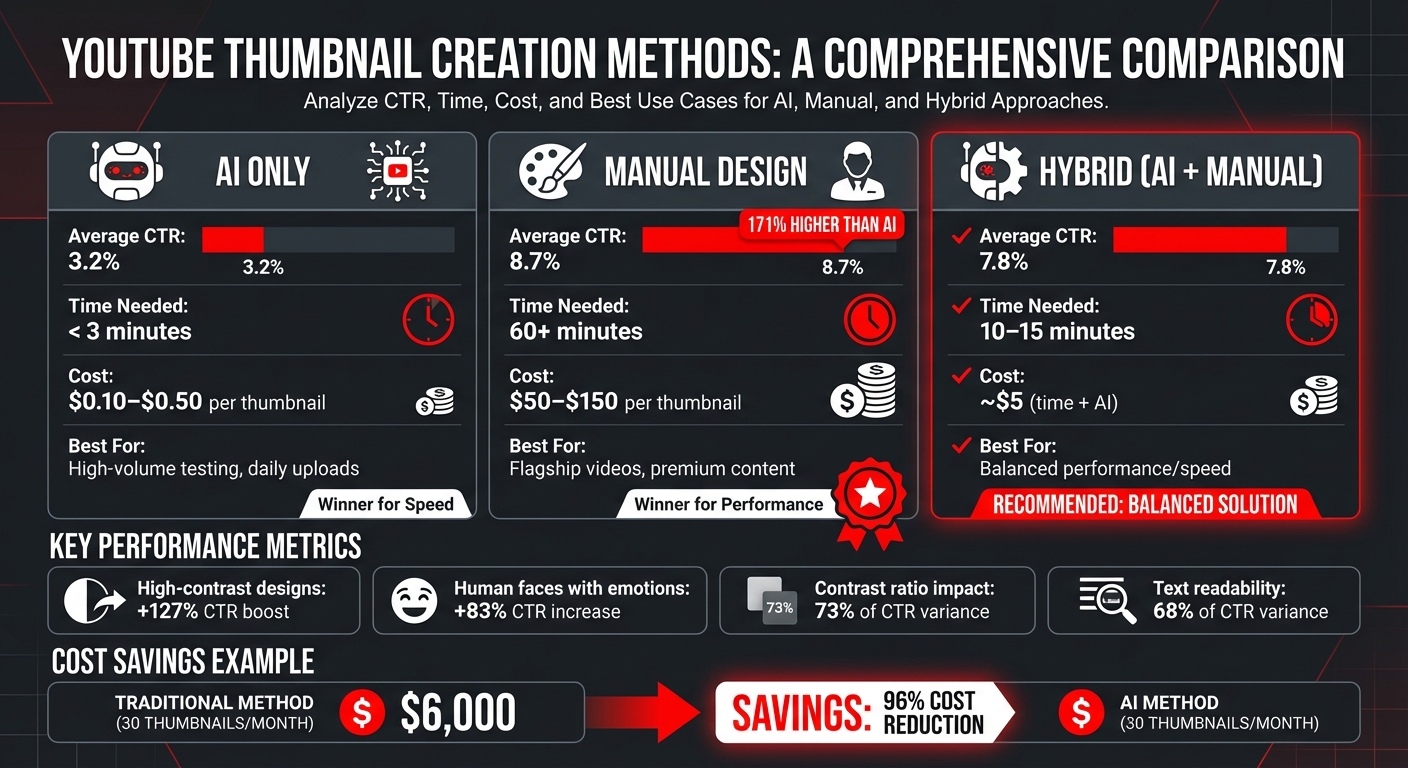
AI vs Manual vs Hybrid YouTube Thumbnail Methods: CTR, Cost & Time Comparison
How to Pick the Best YouTube Thumbnails Using TubeBuddy Ai
sbb-itb-b59debf
Speed and Efficiency Comparison
For YouTube creators uploading frequently, success isn't just about quality - it’s also about how fast you can produce thumbnails without exhausting yourself.
How AI Tools Save Time
AI tools can whip up a base thumbnail in under 3 minutes - about the time it takes to grab a coffee. Compare that to creating one from scratch in Photoshop or Canva, which can take hours. A hybrid approach works even better: AI generates the base, and a human refines it, cutting the process down to just 10–15 minutes. Here’s how it breaks down: 3 minutes for AI generation, 2 minutes for cropping and layout, 3 minutes for contrast adjustments, and 2 minutes for adding text. Tools like ThumbnailCreator make the AI part instant, leaving creators free to focus on strategic tweaks to boost click-through rates. By using category-specific templates - like "Shocked Face" or "Bold Text" designs - creators can cut production time by up to 66%, slashing it from 15 minutes to just 5 minutes. Having 5–10 of these templates on hand not only speeds things up but also eliminates decision fatigue, ensuring every thumbnail is optimized to drive clicks. This helps creators avoid common thumbnail mistakes that often kill performance.
Scaling Analysis for High-Volume Channels
For high-volume YouTube channels, these time savings are a game-changer. AI tools can generate multiple thumbnail variations in seconds, making A/B testing styles a breeze. While manual designs can achieve great click-through rates, they’re too slow for channels with daily uploads. AI bridges the gap by quickly producing thumbnails that maintain emotional impact while meeting the demands of high output. Many AI platforms also come with built-in rules for optimizing click-through rates, consistently delivering thumbnails that perform in the 7–9% CTR range. This combination of speed and effectiveness makes AI a powerful ally for scaling content production.
Accuracy and Insights: Data-Driven AI vs Human Judgment
AI and human reviewers approach thumbnail analysis from different angles, each addressing gaps the other might miss.
AI's Performance Metrics
AI relies on computer vision to evaluate elements like clarity, legibility, face detection, and contrast. By analyzing thousands of successful images, AI predicts click-through rate (CTR) potential based on factors such as visual balance, realistic lighting, and detailed textures. However, AI often prioritizes polished aesthetics over practical clickability. For instance, it creates visually "complete" scenes with realistic shadows and evenly distributed text, but these designs can lose their punch when scaled down to a 120×90 pixel size on mobile screens.
Human Context in Manual Review
While AI focuses on visual data, human reviewers bring strategic and emotional insights to the table. They use bold simplicity, exaggerated emotions, and deliberate gaps in information to grab attention and drive clicks. Humans also understand the "peripheral vision factor" - the way users scrolling quickly are drawn to high-contrast edges and clear facial expressions, rather than subtle gradients.
A 90-day test by Louis Vick of Virvid.ai revealed the difference in results: human-optimized thumbnails achieved an 8.7% CTR, compared to just 3.2% for AI-generated designs. Human reviewers also excel in text readability, which accounts for 68% of CTR variance. They know that bold, sans-serif fonts with 3–6 large words are far more effective on mobile screens than longer, cluttered text.
Accuracy Comparison Table
| Feature | AI-Driven Analysis | Manual Human Review |
|---|---|---|
| Primary Focus | Aesthetic beauty and realism | Psychological triggers and clickability |
| Contrast Approach | Subtle contrast, often too low | High contrast (ratios of 7:1 or more) for visibility |
| Composition Style | Balanced, polished scenes | Simple, curiosity-driven, center-focused designs |
| Text Handling | Decorative, often small text | Bold, minimal text tailored for small displays |
| Emotion Detection | Pattern-based face recognition | Strong emphasis on emotional cues (shock, fear, etc.) |
| Average CTR | 3.2% | 8.7% |
Data shows that contrast alone can explain 73% of CTR variance. Thumbnails featuring human faces with intense emotions - like surprise or fear - boost CTR by 83%, while high-contrast color pairings, such as bright yellow on black, can increase performance by 127%. These findings underscore the value of combining AI's analytical power with human creativity to achieve the best results.
Cost and Accessibility Comparison
Creating thumbnails the old-fashioned way can cost anywhere from $50 to $150 per image, with a turnaround time of a few days. AI tools, on the other hand, slash costs dramatically to just $0.10–$0.50 per image. Freelancers typically need 2–3 days to deliver a thumbnail. For creators producing 30 videos a month, outsourcing thumbnails could rack up a bill of $6,000 monthly. With AI tools, that same workload can cost less than $100.
Affordable AI Tool Pricing
AI thumbnail tools often use subscription pricing that scales with your needs. Basic plans usually start at $10–$19 per month, offering around 100 thumbnails. For those needing more, mid-tier plans range from $40–$49 monthly, covering 150–300 images. Take ThumbnailCreator as an example: it provides AI-powered thumbnails with pre-designed templates and features like face swapping, perfect for creators who lack advanced design skills. High-output creators can opt for enterprise plans at around $250 per month, which handle large-scale production while keeping costs predictable. This pricing model highlights how AI tools simplify production and keep expenses manageable compared to traditional methods.
Time Investment in Manual Review
Cost isn’t the only factor - time is another big consideration. Traditional thumbnail creation takes around 45 minutes per image. If you value your time at $25 per hour, that’s an additional $18.75 in labor per thumbnail, not including software costs, which can add $20–$50 per month. By contrast, AI tools can create a thumbnail in just 18 seconds, potentially saving you up to 28 hours a week.
Cost Comparison Table
| Method | Financial Cost | Time Investment | Turnaround Time |
|---|---|---|---|
| AI Tools | $0.10–$0.50 per image | 18 seconds | Instant |
| Manual (Self) | $0 (direct) + software fees | 45 minutes | Same day |
| Freelance Designer (outsourced) | $50–$150 per image | Minimal (outsourced) | 2–3 days |
| High-End Production (Premium Services) | Up to $10,000 per image | Weeks (with testing) | Extended |
Here’s a real-world example: MrBeast’s team reduced their monthly thumbnail costs from $7,500 to just $299 by switching from manual creation to AI workflows - a staggering 96% cost reduction. The takeaway is simple: if you’re spending more than $10 or an hour per thumbnail, it’s time to rethink your approach.
Creative Control and Customization Options
AI tools and manual design take very different approaches when it comes to creative freedom. AI platforms like ThumbnailCreator rely on pre-made templates and layer-based systems to streamline production while maintaining consistent designs. On the other hand, manual design offers full control over every detail, from custom typography to intricate compositing of personal photos and branded graphics.
Which approach fits your needs better: comparing thumbnail design methods like fast, templated designs or precise, pixel-perfect control? For creators juggling daily content production or testing multiple ideas, AI's template-driven system delivers the quick turnaround you need. But for flagship campaigns, brand updates, or sponsored content - where every detail counts - manual design is often the better choice. This highlights the trade-off between speed and precision.
AI Templates and Design Options
AI thumbnail tools are built for speed and ease of use. They rely on pre-made templates and layer-based editing to create designs quickly without requiring advanced skills. For example, ThumbnailCreator, used by over 15,000 YouTube creators, includes a feature called AI Layer Splitting. This tool automatically separates uploaded images into foreground, background, text, and object layers, allowing you to edit each part independently. You can, for instance, replace a background while keeping your branded text or subject intact - offering a middle ground between speed and customization.
AI tools also ensure mobile readability by incorporating safe zones and high-contrast designs, though this can limit complex artistic choices. Instead of manually positioning elements, you guide the AI using text prompts or descriptions. While this speeds up the process, achieving exact brand standards may still require additional tweaking. The upside? AI can generate 5–10 variations in just minutes, making it perfect for quick iterations.
Full Customization with Manual Review
Manual design, by contrast, gives you complete control over every aspect of your project. Tools like Adobe Photoshop, Figma, or Canva's advanced features allow you to position elements precisely, composite personal photos with screenshots, and apply custom typography that aligns perfectly with your brand’s guidelines - even down to the kerning. This level of detail is essential for creators working within strict brand systems or producing high-end content where every pixel matters.
However, manual design requires proficiency in design software and a solid understanding of design principles, which may not be skills every creator has.
Creativity Comparison Table
Here’s a quick comparison of how AI tools and manual design stack up when it comes to creative control and customization:
| Feature | AI Tools (e.g., ThumbnailCreator) | Manual Design Methods |
|---|---|---|
| Best For | Speed, ideation, high-volume testing, mobile-friendly layouts | Premium campaigns, detailed compositions, strict brand storytelling |
| Customization | Template-based or layer-based AI prompts; may need minor edits for brand precision | Full control with custom illustrations and detailed retouching |
| Speed | Seconds to minutes | 30 minutes to several hours |
| Skill Level | Low (no design expertise needed) | High (requires software knowledge) |
| Brand Consistency | Good for basic consistency; AI can reposition elements or swap backgrounds | Excellent; supports deep brand alignment and custom typography |
| Uniqueness | May feel generic with popular templates | High (offers unique compositions) |
Many creators now use a hybrid workflow to get the best of both worlds. They start by generating 3–6 AI variations, select the most promising ones, and then refine them manually. This approach balances the speed of AI with the polished finish that audiences expect.
Using AI and Manual Review Together
When it comes to designing thumbnails, combining AI with human input creates a powerful workflow. This hybrid method merges the speed of AI with the strategic insight of manual adjustments, consistently outperforming either approach on its own. On average, this process takes about 10–15 minutes per thumbnail and delivers impressive results.
Recent tests revealed that AI-generated thumbnails achieved an average click-through rate (CTR) of 3.2%, while the hybrid approach reached 7.8%. Some of the best-performing designs even hit a CTR of 12.3%.
"AI can create the raw visual, but CTR optimization requires strategic human intervention."
- Louis Vick, Virvid.ai
The hybrid approach works so well because AI can quickly generate striking visuals, but it often focuses on aesthetics rather than the simplicity and bold contrast that drive clicks. For example, AI might create overly complex designs unsuitable for mobile screens (120×90 pixels) or use fonts that are too decorative or small. These are areas where manual refinement shines, ensuring the thumbnail is clear, impactful, and optimized for performance.
Step-by-Step Hybrid Workflow
The 10-Minute Hybrid Process:
This approach begins with AI doing the heavy lifting, followed by targeted manual tweaks to enhance effectiveness.
- Minutes 0–3: Use ThumbnailCreator's AI generation tool to create a base image with clear prompts like "extreme close-up of shocked face, high contrast, dark background."
- Minutes 3–5: Crop the AI-generated image to focus on the main subject and remove unnecessary distractions.
- Minutes 5–8: Adjust the contrast manually, boosting it by 40–60% to ensure a contrast ratio above 7:1. High-contrast designs are critical - thumbnails with these adjustments averaged a 9.2% CTR compared to 2.9% for low-contrast designs.
- Minutes 8–10: Add 3–6 words of bold text using a heavy sans-serif font like Impact or Bebas Neue, sized at 200+ points. Choose high-contrast color combinations, such as bright yellow text on a black background with a bold outline, to maximize readability. Text clarity alone accounts for 68% of CTR variance.
- Final Check: Zoom out to 20–30% to simulate how the thumbnail will appear on mobile screens and confirm its clarity.
Performance Results from Combined Methods
The hybrid method combines the efficiency of AI with the precision of manual design, cutting production time while delivering strong results. With this approach, thumbnails achieve an average CTR of 7.8% in just 10–15 minutes.
Key insights from testing include:
- High-contrast color combinations (e.g., bright yellow on black) improved CTR by 127% compared to pastel palettes.
- Thumbnails featuring human faces with strong emotions like surprise or shock drove an 83% higher CTR than those with neutral expressions.
For videos that underperform within the first 24–72 hours, you can use ThumbnailCreator to quickly generate 3–6 AI variants, then manually refine the most promising option. This A/B testing vs gut feeling approach allows for quick adjustments without starting from scratch.
| Method | Average CTR | Time Investment | Best For |
|---|---|---|---|
| Pure AI Generation | 3.2% | < 2 Minutes | Rapid ideation and testing |
| AI + Manual (Hybrid) | 7.8% | 10–15 Minutes | Standard high-performance workflow |
| Pure Manual Design | 8.7% | 60+ Minutes | Flagship videos and full brand refreshes |
Conclusion
When comparing AI and manual thumbnail creation, each has its strengths, and combining the two can be a game-changer. AI tools like ThumbnailCreator can churn out 5–10 thumbnail options in just minutes at a low cost, making them perfect for high-volume channels. On the other hand, manual design offers unmatched creative precision, achieving the highest click-through rate (CTR) of around 8.7%. Interestingly, a hybrid approach - using AI for quick drafts and refining them manually - achieves a strong CTR of about 7.8% in just 10 minutes, delivering nearly the same impact as manual design but in a fraction of the time.
AI excels at creating visually balanced designs but can sometimes overlook bold contrasts and emotional triggers (often driven by human faces) - key elements that can boost CTR by as much as 127%. By manually tweaking these AI-generated designs, creators can ensure these impactful features aren’t missed.
This comparison highlights that while AI simplifies and speeds up the process, human expertise is essential for maximizing engagement. For creators posting daily, a smart workflow might involve starting with AI to generate thumbnails, then manually enhancing contrast to a 7:1 ratio and adding 3–6 bold, heavy sans-serif words. Save fully manual designs for flagship content where every pixel matters.
FAQs
When should I use AI-only thumbnails vs manual design?
When you need a quick, budget-friendly, and scalable option, AI-generated thumbnails are the way to go. These tools can whip up optimized designs in no time, handle repetitive tasks like background removal, and even predict how well a design might perform - all while saving you a ton of time.
On the flip side, manual design shines when you want complete creative control, maintain consistent branding, or evoke a strong emotional connection with your audience.
Many creators find the sweet spot by combining both approaches: they use AI tools to create drafts and then refine them manually for a perfect mix of efficiency and personalization.
What’s the fastest hybrid workflow to boost CTR?
Want to supercharge your click-through rates? A hybrid approach combining AI-generated thumbnails with manual adjustments is the way to go. Tools like ThumbnailCreator can whip up optimized thumbnails in under 60 seconds. This can save you up to 80% of design time while potentially boosting your CTR by up to 35%.
Here's the strategy: start with AI to generate multiple thumbnail options quickly. Then, step in manually to fine-tune the details. Focus on enhancing your branding, adding emotional appeal, and tweaking visual elements. This blend of speed and personalization ensures your thumbnails are both efficient and engaging.
How do I check if my thumbnail works on mobile?
When designing a thumbnail, it's crucial to test how it looks on smaller screens. Start by previewing it on a mobile device or using tools that mimic mobile views. Pay close attention to the clarity of key elements - like text, faces, and objects - and ensure they stay within the "safe zone" to avoid cropping or distortion.
Using high contrast and a clean design can make your thumbnail more noticeable on mobile. Before hitting upload, always give it a final check on an actual mobile device to confirm everything is clear and visually appealing.