

AI in Thumbnail Feedback: What To Know
AI-driven tools are changing how YouTube creators design thumbnails by offering instant feedback on elements like contrast, text clarity, and emotional appeal. With 70% of YouTube views happening on mobile, these tools ensure thumbnails are optimized for smaller screens. Studies show creators using AI improve click-through rates (CTR) by 25–40%, with predictions aligning 85% of the time with actual performance.
Key takeaways:
- AI analyzes thumbnails for factors like brightness, facial expressions, and text readability.
- Tools like ThumbnailCreator provide actionable edits, such as text placement and color adjustments, reducing revision time by up to 80%.
- CTR insights include optimal design choices: high-contrast visuals, 1–3 words of text, and expressive faces (e.g., surprise boosts CTR by 83% over neutral expressions).
- Mobile testing ensures thumbnails remain effective at smaller sizes (120×90 pixels).
For creators, AI feedback simplifies design, enhances efficiency, and helps produce thumbnails that better engage audiences.
How to Use AI to Make Thumbnails That ACTUALLY Work!
sbb-itb-b59debf
How AI Analyzes Thumbnails
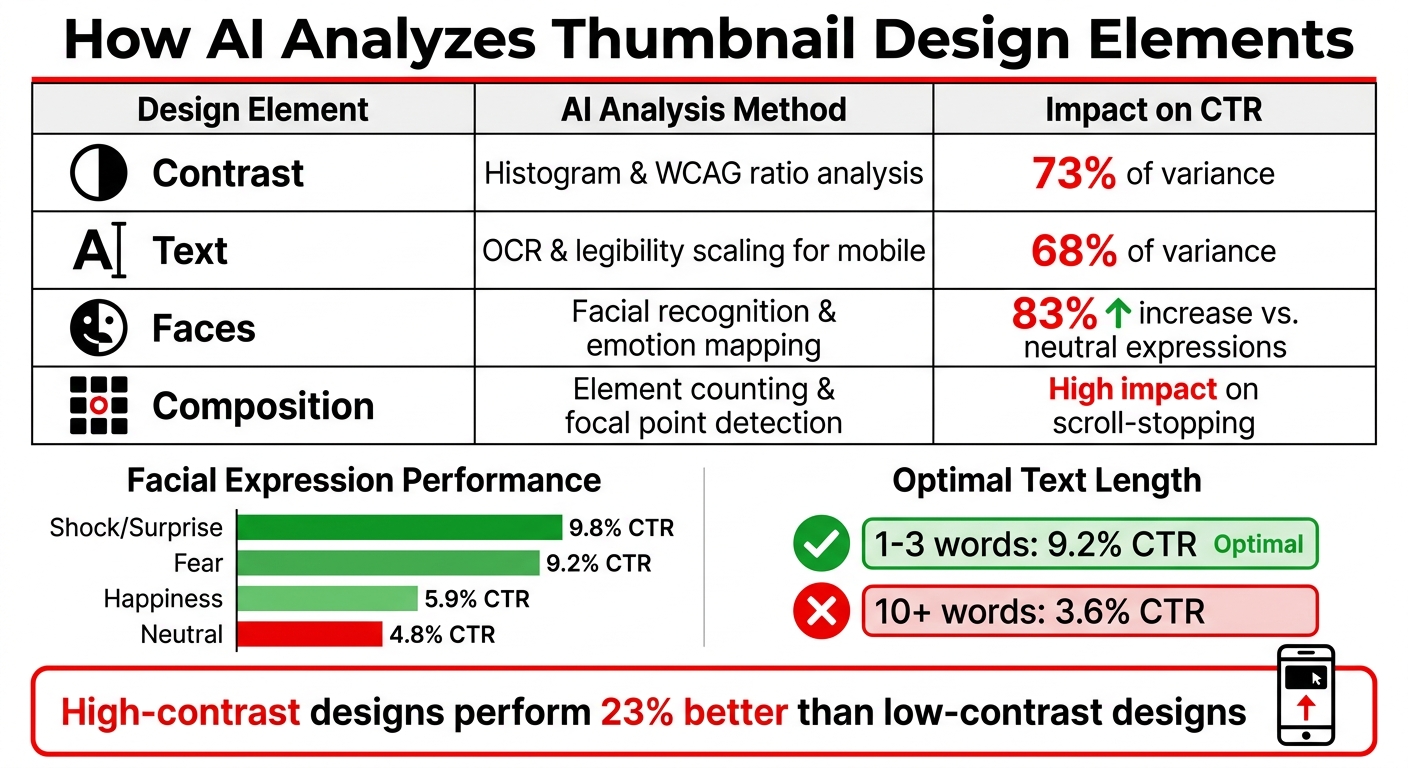
AI Thumbnail Design Elements Impact on Click-Through Rates
AI-powered tools like ThumbnailCreator rely on advanced analysis to refine thumbnail design using data-driven insights. By leveraging computer vision trained on millions of successful examples, AI examines every element of a thumbnail. The process begins with assessing technical details like brightness, color contrast, and composition. Facial recognition technology evaluates micro-expressions - such as shock or excitement - to gauge potential viewer engagement. Simultaneously, text analysis ensures readability even on the smallest mobile screens (as tiny as 120×90 pixels).
AI doesn’t stop at surface-level aesthetics. It benchmarks thumbnails against historical performance and current trends within specific niches, assigning a predictive click-through rate (CTR) score. This ensures your design choices are informed by detailed data, breaking down how each design element contributes to engagement.
Design Elements AI Evaluates
AI dissects thumbnails into measurable components, starting with grid-based composition. By applying the Rule of Thirds vs. centered compositions, it divides an image into nine equal parts and checks whether key subjects align with the intersections - commonly called "power points." Placing subjects at these intersections enhances visual appeal. The system also assesses visual balance by analyzing the distribution of light and dark areas, ensuring a single dominant light source guides the viewer’s eyes seamlessly across the frame.
Color ratios are another major factor. AI evaluates the balance of warm and cool colors, with a 2:1 ratio often yielding the best results for visual harmony. For thumbnails featuring people, the technology examines how eyes align with horizontal grid lines and bodies with vertical lines. It also checks for adequate "lead room" (space in front of a subject) to avoid cramped layouts. Horizon placement matters too - aligning it with the top or bottom third of the image prevents a divided look.
Contrast plays a massive role in CTR, accounting for 73% of its variance. Meanwhile, text readability explains 68%, and expressive faces - like those showing surprise or excitement - can boost CTR by as much as 83% compared to neutral expressions.
| Design Element | AI Analysis Method | Impact on CTR |
|---|---|---|
| Contrast | Histogram & WCAG ratio analysis | 73% of variance |
| Text | OCR & legibility scaling for mobile | 68% of variance |
| Faces | Facial recognition & emotion mapping | 83% increase vs. neutral |
| Composition | Element counting & focal point detection | High impact on scroll-stopping |
AI Prediction Models for CTR
AI also uses predictive modeling to estimate click-through performance. Trained on millions of thumbnails, these models compare your design against historical data and trends. Essentially, they simulate A/B testing, allowing you to predict performance before publishing.
Convolutional Neural Networks (CNNs) analyze over 100 facial indicators, such as eyebrow position and lip curvature, to identify emotional triggers. For example, thumbnails featuring shock or surprise expressions average a 9.8% CTR, while fear-based expressions achieve 9.2%. On the other hand, happiness yields a 5.9% CTR, and neutral faces drop to 4.8%. Text analysis reveals that thumbnails with 1–3 words perform better, averaging a 9.2% CTR, whereas those with 10 or more words see a steep decline to 3.6%.
AI also prioritizes mobile-first design, ensuring thumbnails look effective on smaller screens. It evaluates "curiosity gap modeling", which involves visual elements that spark curiosity and encourage clicks. High-contrast designs with bold text perform 23% better than low-contrast ones, helping you pinpoint and refine effective elements.
This level of analysis gives you the tools to optimize thumbnails with precision, ensuring your design decisions are supported by reliable data and insights.
Benefits of AI Feedback for Thumbnails
AI feedback takes the guesswork out of thumbnail design by offering insights grounded in data rather than subjective opinions. Instead of relying on personal preferences or trial and error, AI analyzes designs using principles backed by extensive datasets. With computer vision, it evaluates elements like color saturation, contrast, and expression intensity, identifying visual patterns while minimizing bias. This approach delivers actionable recommendations that creators can trust.
The results speak for themselves. AI-driven thumbnail analysis has been linked to an average 47% improvement in click-through rates (CTR).
One of the most immediate benefits of AI feedback is how it speeds up the revision process.
Faster Revision Cycles
AI dramatically shortens the time it takes to refine thumbnails - from hours to mere seconds or minutes. Traditional workflows often involve tedious back-and-forth communication, lengthy email exchanges, and manual edits. In contrast, AI feedback systems create an instant feedback loop. You upload a design, receive immediate input (like a "thumbs up" or "thumbs down"), and the system learns from your preferences. Over time, the AI adjusts its suggestions based on your feedback, tailoring them to your style. Specific feedback categories - such as "small text", "busy background", or "poor lighting" - help the AI identify and resolve design issues with precision. This streamlined process benefits solo creators and teams alike by cutting down on unnecessary revisions.
But speed isn’t the only advantage. AI feedback ensures every design decision is backed by hard data.
Data-Driven Improvement
AI provides recommendations rooted in performance metrics, offering insights that go beyond what manual reviews can achieve. For instance, it calculates "Click Potential Scores" by comparing your draft to high-performing thumbnails, giving you a clear benchmark based on real-world data. Saliency heatmaps further enhance this process by showing exactly where viewers' attention is likely to focus, eliminating the guesswork from layout design.
The AI also evaluates critical design elements, including face accuracy, typography, color schemes, text placement, and overall clarity. It flags issues like hard-to-read text, overly dark images, or cluttered backgrounds that distract from the main subject. Additionally, it ensures designs meet technical standards, such as keeping text coverage below 20% and ensuring legibility on mobile versus desktop screens. While occasional errors occur - like face accuracy mistakes in about 1 in 20 cases - these are quickly corrected through targeted feedback loops. The more feedback you provide, the better the AI becomes, creating a self-improving system that enhances your workflow over time.
These features integrate seamlessly with tools like ThumbnailCreator, making the entire design process smoother and more efficient.
Using ThumbnailCreator for AI Feedback
ThumbnailCreator simplifies the thumbnail revision process by combining design tools with AI analysis, making it easier to refine thumbnails without juggling multiple apps. Trusted by over 15,000 YouTube creators, it handles both the creative and analytical aspects of thumbnail improvement seamlessly.
The platform’s feedback system is interactive and collaborative. Users can rate AI-generated results with a "thumbs up" or "thumbs down." When giving a "thumbs down", you can pinpoint specific issues like face accuracy, text placement, color balance, lighting, style, or composition. This feedback is stored at the organizational level, so teams benefit collectively as the AI learns from everyone's input. Additionally, face accuracy is tracked separately to ensure precision.
Core Features of ThumbnailCreator
The tool is packed with features that cater to both creativity and efficiency:
- AI Thumbnail Generator: Create thumbnails using simple text prompts. For example, you can specify the subject, expression, text (3–5 words), and placement, such as "bold text in top left" for optimal results.
- Variation Generator: Generate 2–10 versions of a single concept to compare different emotional hooks and color palettes side-by-side before deciding on the final design.
- Face Swapping: Replace AI-generated faces with your own to maintain brand consistency.
- Natural Language Editing: Refine your designs with commands like "make colors vibrant" or "add bold white text".
- Background Removal: Isolate subjects effortlessly.
- Style Cloning: Recreate the aesthetics of successful thumbnails you’ve previously designed.
These tools work together to speed up revisions while incorporating feedback at every step.
AI Insights for CTR Optimization
ThumbnailCreator also provides actionable insights to optimize click-through rates (CTR).
- AI Thumbnail Analyzer: This tool scores thumbnails on a scale of 1–100 across seven dimensions: contrast, composition, text readability, face visibility, color appeal, clickability, and emotional impact. These scores help identify potential weaknesses before publishing.
- Attention Heatmaps: Visual overlays highlight where viewers’ attention is likely to focus first, ensuring that key elements like faces or important text occupy high-visibility areas.
- Niche-Specific Analysis: Tailors recommendations based on your content category, aligning with trends in your specific field.
For quick fixes, the Auto-Optimization Engine offers one-click enhancements for contrast, color vibrancy, and element placement. It also improves foreground-background separation to ensure critical details stand out. Each use costs 1 credit. Additionally, Mobile Visibility Testing simulates how your thumbnail looks at 120 pixels wide—the standard mobile size - the typical size for mobile screens - helping you catch readability issues before uploading.
These features combine to ensure your thumbnails are not only visually appealing but also strategically optimized for maximum performance.
Best Practices for AI Thumbnail Feedback
Tips for Using AI Effectively
To get the most out of AI feedback, start with a clear video promise. Think about the core message or experience your video offers - whether it’s revealing a surprising result, sharing a secret, or sparking an emotional reaction. This "promise-first" mindset ensures your thumbnail aligns with what viewers will actually see, steering clear of misleading clickbait.
When using AI, rate every generated thumbnail to help the system learn. Give a thumbs up for designs that work well, and when giving a thumbs down, specify the issue - whether it’s the accuracy of a face, text placement, color balance, or overall composition. Consistent feedback like this helps refine the tool over time.
Focus on testing one element at a time to understand what drives engagement. For example, change just the facial expression, background color, or text phrase. Running these experiments for 24–48 hours can reveal which changes have the most impact on click-through rates.
Before finalizing your thumbnail, check its contrast by converting it to grayscale. If the main subject doesn’t stand out, the contrast might be too weak to grab attention. Also, preview the design at 25% zoom to ensure it’s readable on mobile devices - where most YouTube views happen.
"Use the AI to handle structure, composition, contrast, and data-informed design choices, and then bring your own creative instincts to the brief you give it." - reviewraccoon, Tech Reviewer
By following these tips, you can combine AI efficiency with your own creative instincts to craft thumbnails that resonate with your audience.
Workflow Comparison: AI-Only vs. Hybrid
Here’s a comparison of AI-only and hybrid workflows to help you decide which approach suits your needs:
| Feature | AI-Only Workflow | Hybrid AI-Human Workflow |
|---|---|---|
| Speed | Extremely fast (seconds) | Moderate (15–30 minutes) |
| Design Basis | Historical performance data and engagement patterns | Human creativity combined with AI-driven insights |
| Quality | May feel generic or off-brand | Tailored to audience preferences and brand identity |
| Consistency | Technically consistent but may lack emotional appeal | Builds trust and brand recognition |
| Time Savings | ~15 minutes per thumbnail | ~15–30 minutes (includes refinement) |
| Best For | High-volume creators or those with limited design skills | Personal brands or unique content creators |
| Recommendation | Great for quick brainstorming | Ideal for long-term growth and audience trust |
The hybrid method tends to deliver better outcomes for most creators. Tech reviewer reviewraccoon shared that blending their creative instincts with AI’s data-driven suggestions boosted their click-through rate from 4.1% to 6.3% over 30 days. As they put it, "My thumbnails were made from taste. The AI thumbnails were made from taste plus data. And on YouTube, data wins." For creators posting three videos per week, AI tools can cut thumbnail creation time from 18 hours to just 3 hours a month - a huge time saver.
This comparison highlights how combining AI insights with human creativity can lead to more effective, audience-focused thumbnails while saving valuable time.
Conclusion
AI is revolutionizing how creators approach thumbnail feedback by replacing guesswork with instant, data-driven insights. It evaluates factors like color contrast, composition, and text-heavy vs minimal text thumbnails, while prediction models analyze patterns from successful thumbnails to estimate click-through rates (CTR). What was once a trial-and-error process is now a scalable, efficient strategy [29,30].
With AI, revisions move faster - allowing you to refine 5–10 thumbnails per hour - leading to noticeable CTR improvements with minimal effort [29,30]. For creators uploading three videos weekly, this means cutting thumbnail creation time from 18 hours to just 3 hours each month.
Tools like ThumbnailCreator take this even further, offering AI-powered features such as CTR predictions, face-swapping for stronger emotional impact, and a feedback system that adapts to your design preferences over time. This learning loop helps the AI align with your brand’s unique style, automatically applying those insights to future designs.
FAQs
How accurate are AI CTR predictions for thumbnails?
AI tools for predicting thumbnail click-through rates (CTR) boast an accuracy of about 68%. Platforms like ThumbnailCreator analyze elements like color saturation, visibility of faces, and composition patterns to estimate performance. By leveraging these insights, creators can fine-tune their thumbnails to draw in more viewers and boost engagement effectively.
Will AI-optimized thumbnails still match my brand style?
AI-powered tools for thumbnails can absolutely align with your brand's style - thanks to their customization options. These tools analyze your current designs and create thumbnails that fit seamlessly with your branding. What’s more, you’re in control: you can review, tweak, and approve designs, set style preferences, and give feedback to fine-tune the results. This approach combines consistency with the speed and scalability of AI.
How do I test a thumbnail for mobile readability?
To check how your thumbnail performs on mobile, preview it at smaller sizes - 280×157 pixels is a common dimension for YouTube on mobile. Make sure the text is easy to read, the images remain sharp, and the main elements are instantly recognizable. Use bold, high-contrast text and steer clear of clutter to keep things clear. Tools that allow you to resize or preview thumbnails at these dimensions can be a big help in ensuring they look great on smaller screens.