

AI Thumbnail Generators: Pros and Cons
If I want the short answer: AI thumbnail tools save time, but they do not win by default. The best workflow depends on what I care about most: speed, control, brand fit, and whether a higher click-through rate (CTR) makes the extra work or monthly cost worth it.
Here’s the article in one view:
- ThumbnailCreator is built for YouTube thumbnails, so it is often the best fit when I want fast drafts plus editing tools.
- Manual design gives me the most control, but it takes the most time.
- Generic AI tools are fast and low-cost, but the output can look generic and need cleanup.
- Hybrid workflows often land in the middle: AI for the first draft, human edits for the final version.
A few numbers matter right away:
- YouTube says many channels fall between 2% and 10% CTR
- AI tools can make draft thumbnails in 10 to 60 seconds
- Manual design can take 15 minutes to 2 hours
- A hybrid setup can cut thumbnail time to about 12 to 21 minutes
- Custom thumbnails can beat auto-picked video frames by up to 154%
So if I post often, AI can save a lot of time. But if I need tight brand rules, exact text, or a thumbnail that matches a trust-heavy topic like finance or health, I still need human review.
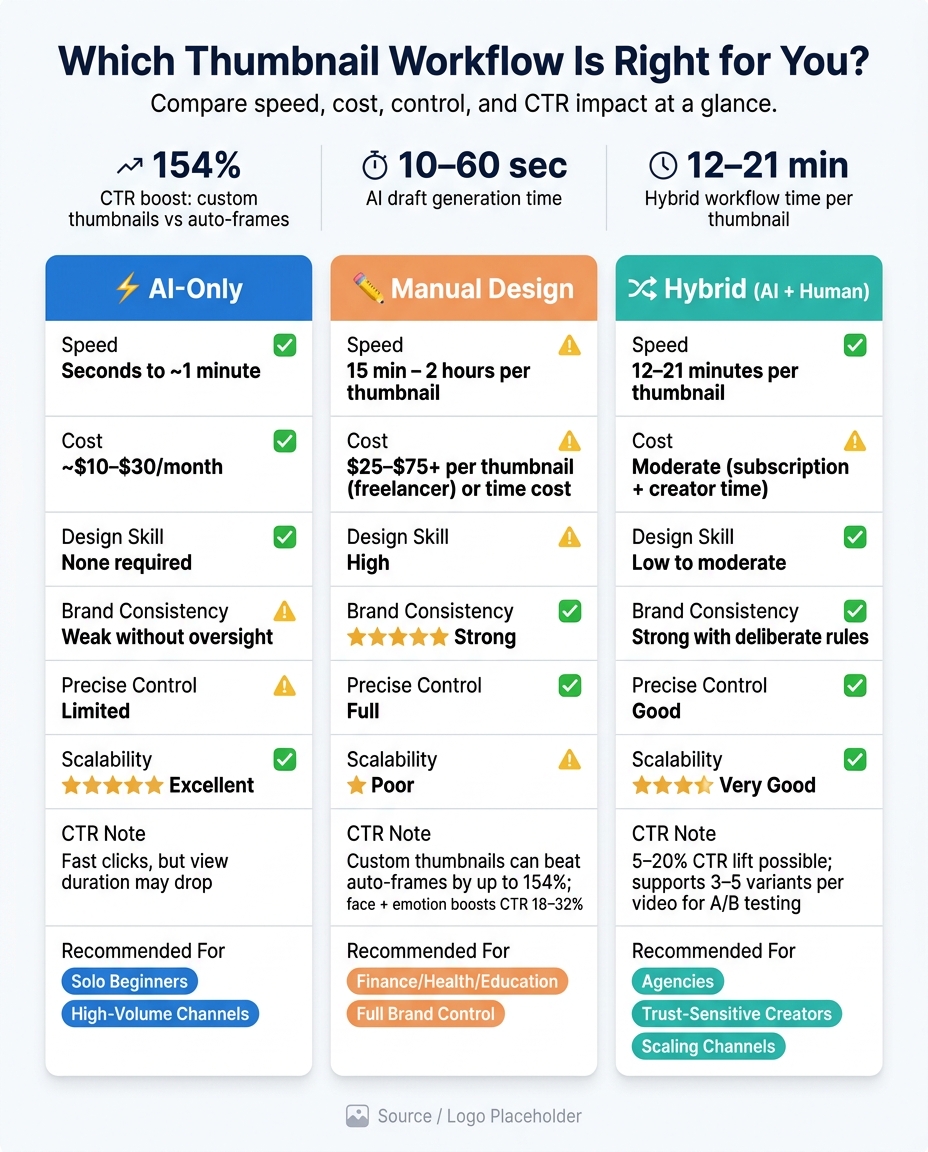
AI vs Manual vs Hybrid Thumbnail Workflows: Speed, Cost & CTR Compared
I Tested 3 AI Thumbnail Generators - This One Is the Best
sbb-itb-b59debf
Quick Comparison
| Workflow | Best For | Main Upside | Main Downside |
|---|---|---|---|
| ThumbnailCreator | YouTube creators who want fast drafts and built-in edits | Fast output with YouTube-focused tools | Less control than full manual work |
| Manual design | Channels that need full control | Best control over layout, text, and brand rules | Slowest option |
| Generic AI generators | Solo creators and small teams on a tight schedule | Low effort and fast idea generation | Generic results and weak brand fit |
| Hybrid (AI + human) | Channels that want speed without losing too much control | Good balance of time savings and polish | Still takes editing time |
My takeaway: if I need the best mix of time savings and control, the hybrid route is often the safest pick. If I want the fastest path, AI-only works. (See our AI thumbnail generation guide for tips.) If I want total control, AI thumbnails vs manual design still leads.
1. ThumbnailCreator
ThumbnailCreator is made for one job: YouTube thumbnails. That narrow focus shows up in the output. It tends to produce images that match YouTube’s click-heavy visual style, which is a big deal if you care more about speed, consistency, and a bit of hands-on editing than designing every thumbnail from zero.
Speed
You can paste in a YouTube link or just describe the idea. From there, the AI scans frames, pulls in transcript context, and gives you multiple thumbnail options in about 30 seconds.
For a lot of channels, that can shrink thumbnail work from 30–60 minutes down to about 5–10 minutes. That’s a pretty big time cut, especially if you publish often and don’t want thumbnail work eating up your whole editing schedule.
Creative Control
ThumbnailCreator isn’t just a one-click tool where you get what you get. Once the AI builds the first version, you can go in and tweak the text, fonts, color schemes, facial expressions through face swapping (leveraging the science of faces in thumbnails), and objects through object swapping.
It also includes layered editing, undo/redo, and selective inpainting, which means you can fix one part of the image without redoing the whole thing. That makes the workflow feel more like guided design than blind automation.
Brand Fit
If your channel has a set look, this part matters. Creators can build or adjust templates that keep recurring colors, typography, and logo placement in place. So instead of each thumbnail feeling like a random one-off, each new image can stay tied to a familiar visual style.
That kind of consistency helps a channel look more recognizable across uploads.
Cost-to-ROI
ThumbnailCreator uses subscription pricing, and there’s a free plan if you want to test it first. The bigger ROI play isn’t just saving time on design work. It’s avoiding common thumbnail mistakes that hurt CTR.
Even a small CTR bump can make the subscription worth it. The trade-off is simple: you gain speed and consistency, but you give up some of the control that comes with doing everything by hand.
2. Manual Thumbnail Design
Manual thumbnail design gives you full control over composition, color, text, and emotion. The trade-off is simple: it takes more time. In this workflow comparison, it’s the control-first option.
Speed
If you know your tools and work from templates, you can usually finish a thumbnail in 15–30 minutes. Start from scratch, though, and the timeline often stretches to 1–2 hours, especially if you test a few versions before picking a winner.
Creative Control
This is where manual design pulls ahead. You control the strategy behind the image: where the face goes, what emotion it shows, and how the text backs up the title instead of fighting with it.
That level of control matters. Thumbnails with one dominant face and strong emotion drive 18–32% higher CTR than neutral or no-face designs. And 3–5-word high-contrast text overlays can lift CTR by 11–22% in search-driven content.
In plain English, manual design lets you decide what the viewer notices first. That first glance can make or break the click.
Brand Fit
Manual workflows also make it easier to keep a steady visual identity. That matters most for channels where every upload should feel like it belongs to the same brand.
When you control each part of the thumbnail, you can set rules and stick to them:
- font choice
- color ratios
- logo placement
- subject framing
Once those rules are built into templates, you can carry them across every upload. That kind of consistency can improve CTR with returning subscribers. AI can copy a style to a point, but prompts shift, and layout drift tends to sneak in.
Cost-to-ROI
The main cost here is time, and that cost stacks up fast on a busy upload schedule. Still, the ROI case is strong. Custom thumbnails can increase CTR by up to 154% compared to auto-generated frames.
That means even a small lift in CTR can pay back the extra work over the life of a video.
3. Generic AI Thumbnail Generators
If manual design takes too long, generic AI tools give you a faster option, but you give up some control in the process. They sit in the middle: fast idea generation, less effort, and less precision.
Speed
Generic tools can generate multiple thumbnail concepts in 10–60 seconds. They also cut down the need for design skills by handling composition, background generation, text placement, and style variations for you.
That makes them a solid fit for solo creators and small teams. You can go from rough idea to draft in under a minute, which is hard to beat when you're publishing on a tight schedule.
Creative Control
The downside shows up once you want something exact. Fine control over composition, typography, and brand-specific choices is harder to get. Prompts can lead to generic layouts, weak text hierarchy, or visual artifacts that still need cleanup.
So while the tool may give you a starting point, it may not give you the right starting point. If your thumbnails depend on sharp visual structure or a very specific look, you'll still need hands-on edits.
Brand Fit
Keeping a channel visually consistent is also a challenge unless you reuse the same rules again and again. Template-led outputs can make different channels look too similar in search results, which can weaken brand identity.
That's the catch: AI can help you move fast, but speed alone doesn't build a look people remember.
Cost-to-ROI
Subscription plans usually cost $9–$29 per month. The return is strongest when AI saves time and the draft needs only light cleanup. But if every thumbnail still calls for heavy manual fixes, that monthly cost gets harder to defend.
Results also vary by niche. In practice, generic AI works best as a speed-first tool, not as a sure way to improve CTR while maintaining authenticity.
That trade-off is why many creators use AI for the first draft, then finish the thumbnail by hand.
4. AI-Assisted Hybrid Workflow
When generic AI gets fast but messy, a hybrid workflow gives you the best part of both: speed with guardrails. The idea is simple. AI is the starting point, not the finish line. You use it to spin up base concepts in under 30 seconds, then step in to tighten the copy, swap objects, and line everything up with your channel’s visual style. AI does the rough draft. You make the calls that matter.
Speed
A fully manual process can eat up 30–60 minutes for a single thumbnail. With a hybrid setup, that often drops to 12–21 minutes. In plain terms, 3–4 hours of weekly thumbnail work can shrink to about 1–1.5 hours.
That time savings changes what’s possible. Instead of making just 1–2 options per video, you can often produce 3–5 polished variants. And that makes steady A/B testing much easier to fit into a normal publishing routine.
Creative Control
AI can give you a stack of options, but you still pick the final text, layout, and swaps. That includes object swaps, text edits, and face swapping, so the thumbnail feels like your channel instead of a generic AI output.
Think of it this way: AI can hand you a pile of rough sketches. You’re still the one choosing what goes on the wall.
Brand Fit
Consistency comes from the rules you set, not from the tool itself. A smart move is to choose 2–3 base layouts and reuse them while letting AI generate background or scene variations. Keep your fonts, color palette, and face placement fixed. Let AI handle scene details and lighting shifts.
That mix helps thumbnails stay fresh without drifting off-brand. Viewers still recognize your style at a glance, and you still cut down production time.
Cost-to-ROI
A hybrid workflow cuts labor and gives you more chances to test what works. You’re making more variants without adding extra hands or extra hours. Even a modest CTR lift of 5–20% can stack up across a library of videos, which may improve watch time and revenue over time.
To measure it, track CTR before and after the switch. Then compare 2–3 variants per video over 48–72 hours.
Pros and Cons of AI Thumbnail Generators
This summary makes the trade-offs pretty clear: AI thumbnail tools save a lot of time, but human review still plays a big role. If you want the fast version, the table below compares the three main workflows side by side.
| AI-Only | Manual | Hybrid (AI + Human) | |
|---|---|---|---|
| Speed | Seconds to minutes | 30–60 min per thumbnail | Faster than manual, but slower than AI-only |
| Cost | Low (~$10–$30/month subscription) | High ($25–$75+ per thumbnail for freelancers) | Moderate (subscription + creator time) |
| Design skill required | None | High | Low to moderate |
| Brand consistency | Weak without manual oversight | Strong | Strong with deliberate rules |
| Precise control | Limited | Full | Good |
| Scalability | Excellent | Poor | Very good |
| Rights and trust risk | Moderate | Low | Low to moderate |
AI wins on speed and price. It can turn out thumbnail drafts in seconds or minutes, which is a big shift from the 30 to 60 minutes a manual design might take. ThumbnailCreator, for example, can generate several thumbnail drafts from a YouTube URL or a short prompt in seconds. That speed matters even more for busy channels. If you're posting often or testing different ideas to improve CTR, AI makes it much easier to produce multiple versions without slowing everything down.
Where things get messy is control. AI can move fast, but it doesn't always nail the details. A common complaint is that the output feels generic. Many tools fall back on familiar YouTube patterns like bold text, sharp contrast, and exaggerated facial expressions instead of matching a channel's own look. After a while, that can make thumbnails start to blur together. Human review helps fix that by applying clear brand rules around layout, colors, type, and tone.
Precise control is another weak spot in a fully automated setup. If you care about exact logo placement, locked brand colors, or specific text styling, you'll often need to step in and tweak the draft yourself. That's why the hybrid approach tends to be a sweet spot for many creators: AI handles the first pass, and a person cleans up the parts that need a more careful touch.
There are also legal and trust issues you can't brush aside. Face swapping should only be used with faces you have rights to use, like your own or a collaborator who has agreed to it. Using public figures or other people without permission can create U.S. right-of-publicity problems. And there’s the viewer side of it too. If a thumbnail promises something the video doesn’t deliver, trust can slip fast. In some cases, it may also run into platform rules if it's judged to be deceptive clickbait.
One detail stands out from the data: in a controlled YouTube Shorts experiment, AI thumbnails beat human-made designs on CTR, but average view duration fell. That’s a useful reminder. Getting the click is one thing. Matching the thumbnail to the actual content is another.
Which Thumbnail Workflow Fits Your Channel?
Pick the workflow that matches your upload pace, brand needs, and cost-to-ROI goals. The easiest way to decide is by creator type.
| Creator Profile | Recommended Workflow | Why It Fits | Trade-offs |
|---|---|---|---|
| Solo Beginners (under 10K subs, 1–3 videos/week) | AI-first using ThumbnailCreator | No design skill required, fast output, easy experimentation | Heavy template dependence, early brand inconsistency |
| High-Volume Channels (5–30+ videos/week) | AI or hybrid with preset brand frames | Batch-friendly, scales with output | Needs upfront template setup to avoid a generic look |
| Trust-Sensitive Creators (finance, health, education) | Hybrid (AI concepts + manual approval) | Better brand control, accurate messaging | Slower than pure AI, requires design oversight |
| Agencies (multi-client teams) | Hybrid with per-client brand templates | Consistent quality across clients | Requires a final designer review layer |
The notes below explain why each workflow fits that profile.
For new creators, speed usually matters more than perfect polish. If you're working alone, ThumbnailCreator helps you move faster and makes steady publishing much easier. You don't need design chops to get started, which is a big deal when you're juggling scripting, filming, editing, and posting. The catch? Early thumbnails can drift into a generic look unless you set tighter style rules from the start.
High-volume channels have a different problem: output. When you're publishing 5–30+ videos a week, you need a system that can keep up. That's where preset brand frames come in. They give AI a clear lane to work in, so you can turn out thumbnails fast without your channel looking all over the place.
For channels where trust is part of the product, speed takes a back seat. In finance, health, and education, a thumbnail doesn't just need clicks. It also needs to be accurate and on-brand. A hybrid workflow works well here: AI handles the first draft, then a person checks the message, tone, and fit before anything goes live. That cuts concepting time while keeping the final image dependable. That human review layer helps protect accuracy and tone in sensitive niches.
Agencies usually need a setup that works across many clients at once. Per-client brand templates keep the work consistent, and a final designer review adds one last check before delivery.
Across all profiles, the trade-off stays the same: AI wins on speed and cost, manual wins on precision and brand control, and hybrid lands in the middle.
FAQs
Should I use AI-only or a hybrid workflow?
Use a hybrid workflow: let AI make fast draft thumbnails and a few variations, then take a few minutes to tune them for brand fit, emotional tone, accuracy, and mobile readability.
That mix often beats an AI-only approach because you get AI’s speed plus human judgment. It can cut production time and improve CTR, with median gains of +16.8% for hybrid vs. 12.4% for manual and 7.1% for AI-only.
When is manual thumbnail design still worth it?
Manual thumbnail design still earns its place when you need full creative control and sharp attention to detail.
That’s especially true for flagship videos, brand overhauls, sponsored content, or emotional, story-driven topics where human judgment makes a big difference.
It also makes sense when you have time to fine-tune how the thumbnail looks on mobile and spot mismatches AI might miss. For high-priority uploads or major launches, those small edits can help improve CTR.
How can I tell if AI thumbnails are improving my CTR?
Use YouTube Studio’s Test and Compare feature to run A/B tests for your AI-generated thumbnails. Give the test 7 to 14 days, or wait until each version reaches at least 1,000 impressions.
A 10% to 20% relative CTR lift, with similar impression counts, is a strong sign that one thumbnail is doing better. Also check Average View Duration so you can see whether the thumbnail is bringing in the right viewers, not just more clicks.