

AI Thumbnail Tools vs Manual Design: ROI Comparison
AI thumbnail tools can save you time and money while improving YouTube video performance. Here's the key takeaway: AI tools generate thumbnails in seconds for $0.10–$0.50 each, compared to $50–$150 and up to 2 hours for manual designs. They also boost click-through rates (CTR) by an average of 37.2%, outperforming most manually created thumbnails.
Quick Facts:
- Time Savings: AI tools take under a minute per thumbnail, while manual design requires 45 minutes to 2 hours.
- Cost: AI subscriptions range from $10–$30/month, while outsourcing manual designs costs $18–$100 per thumbnail.
- CTR Impact: AI-generated thumbnails consistently outperform manual ones in A/B testing, with an average CTR improvement of 23%–47%.
- Scaling Benefits: Channels posting 3+ videos weekly can save over $6,800 annually by switching to AI tools.
For best results, combine AI's speed with manual fine-tuning to maintain a personal touch while leveraging data-driven insights.
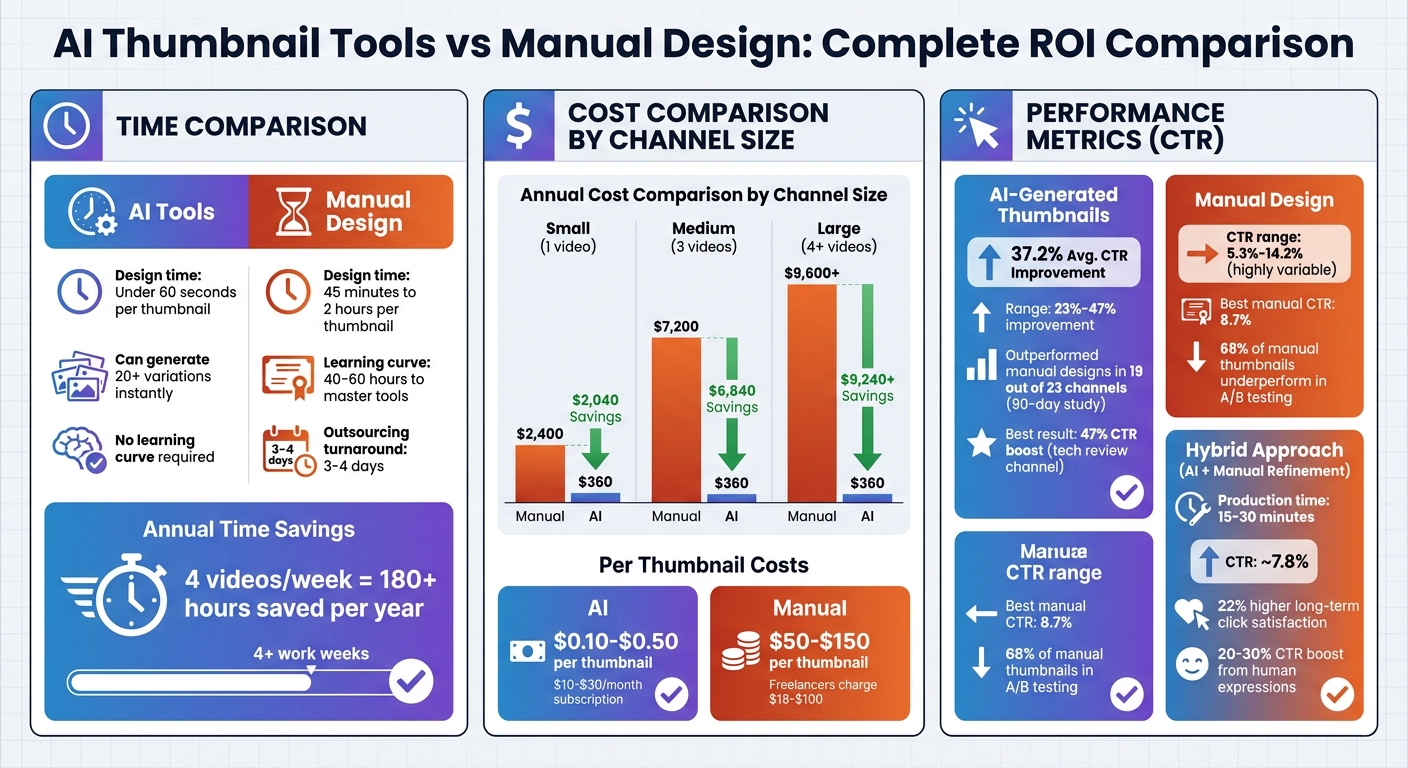
AI vs Manual Thumbnail Design: Cost, Time and Performance Comparison
Time Required: AI Tools vs Manual Design
How Much Time AI Tools Save
AI thumbnail tools like ThumbnailCreator streamline the design process into three simple steps: describe your concept, choose a variation, and make quick tweaks. Each step takes about 10 seconds, meaning you can create a polished, professional thumbnail in under a minute. Some creators have even managed to cut this process down to just 18 seconds per thumbnail.
"Instead of 20–30 minutes per thumbnail in Canva or Photoshop, you can generate professional, click-optimized thumbnails in under 60 seconds." – Jay Kim, Author
This speed advantage comes from eliminating technical hurdles. Plus, these tools can generate over 20 unique variations in the time it would take a person to design just one. This makes instant A/B testing not only possible but incredibly efficient.
How Long Manual Design Takes
Designing thumbnails manually can take anywhere from 45 minutes to 2 hours per thumbnail. This includes brainstorming ideas, working with tools like Photoshop or Canva, and refining the design through revisions. On top of that, mastering these tools demands a steep learning curve of 40–60 hours before you can produce high-quality results.
"I was spending anywhere from 45 minutes to two hours on thumbnails... From about 2 hours down to roughly 15 minutes per thumbnail. That alone was worth something." – reviewraccoon, Content Creator
When you compare hiring a designer vs DIY thumbnails, outsourcing doesn’t necessarily save time either. Freelancers on platforms like Fiverr charge $18–$19 per thumbnail and usually need 3–4 days to deliver the final product.
These time disparities highlight the efficiency of AI tools, especially when handling multiple projects.
Total Time Savings Over Multiple Videos
When scaled, the time saved with AI tools becomes even more impactful. A creator posting four videos a week might spend 3–8 hours per week designing thumbnails manually. With AI tools, that time drops to just a few minutes. Over a year, this shift can save more than 180 hours - equivalent to over four full work weeks.
For high-output channels, the impact is even greater. In early 2026, the MrBeast team reported optimizing their production with AI tools, cutting related costs by 96% and doubling their click-through rate from 14.2% to nearly 29%. Similarly, teams using AI plugins in platforms like Figma have reported saving 28 hours per week.
These numbers underscore how AI tools can revolutionize the workflow for creators, freeing up time to focus on the content itself rather than lengthy design tasks.
sbb-itb-b59debf
I Generated 1,000 Thumbnails with AI, I Wish I Knew This Sooner
Cost Analysis: AI Tools vs Manual Design
After reviewing the time savings AI tools bring to the table, let's break down how their monthly costs stack up against the rising expenses of manual design.
Monthly Costs of AI Tools
Most AI thumbnail tools follow a straightforward subscription model priced between $10 and $30 per month. For instance, ThumbnailCreator provides unlimited or high-volume thumbnail generation for a flat fee. This means you won't face extra charges no matter how many videos you produce. (See our AI thumbnail generation guide for workflow tips.)
On the other hand, traditional design software also comes with subscription fees. Adobe Photoshop costs $20.99 per month, while the full Adobe Creative Cloud suite is priced at $54.99 per month. Canva Pro is slightly cheaper at around $13 per month. But these prices don’t factor in the hours spent on manual design, which can add up significantly over time.
With manual design, you're also dealing with variable costs per thumbnail and potential delays in production.
Costs of Manual Design
If you outsource your thumbnails, the expenses grow with your content output. Freelancers on platforms like Fiverr typically charge around $18 per thumbnail, while seasoned designers might demand anywhere from $25 to $100 per thumbnail. A common price point for high-quality work is approximately $50 per thumbnail.
"Hiring designers costs $25–100 per thumbnail, quickly eating into your YouTube revenue." – Jay Kim
Beyond the financial aspect, manual design introduces logistical challenges. Coordinating with designers often results in a 3–4 day turnaround per thumbnail, which can slow down your publishing schedule.
Annual Cost Comparison by Channel Size
As your channel scales, the cost gap between manual design and AI tools becomes even more apparent. Here’s a comparison based on channel size:
- Small channels posting one video per week at $50 per thumbnail would spend about $2,400 annually. In contrast, a $30/month AI tool totals just $360 per year, saving $2,040.
- Medium-sized channels producing three videos per week would face annual costs of $7,200 for manual design versus $360 for AI tools - an annual savings of $6,840.
- High-volume creators uploading four or more videos weekly could spend $9,600 or more per year on manual design, compared to only $360 for an AI tool.
Here’s how the numbers break down:
| Channel Size | Videos/Week | Annual Cost (Designer @ $50) | Annual Cost (AI Tool @ $30/mo) | Annual Savings |
|---|---|---|---|---|
| Small | 1 video | $2,400 | $360 | $2,040 |
| Medium | 3 videos | $7,200 | $360 | $6,840 |
| Large | 4+ videos | $9,600+ | $360 | $9,240+ |
The savings are clear. By switching to AI tools, creators can cut costs dramatically while also enjoying the time-saving benefits discussed earlier. This makes AI tools a smart investment for maximizing returns on your thumbnail strategy.
Performance Results: Click-Through Rates and Engagement
The performance data highlights notable differences in how well AI-driven and manual designs perform.
CTR Improvements with AI Design
AI tools trained on performance metrics consistently deliver better results, outperforming manual designs by margins of 23% to 47% on average. For instance, a 90-day study spanning 23 mid-sized YouTube channels found that AI-generated thumbnails outperformed manual designs in 19 cases. The average click-through rate (CTR) improvement was 34%. One tech review channel saw an impressive 47% boost, while a cooking channel experienced a more modest 8% increase.
The secret lies in data-driven design choices. AI tools analyze millions of successful thumbnails to pinpoint elements that work. For example, high contrast ratios exceeding 7:1 can significantly improve CTR. Additionally, thumbnails featuring surprised facial expressions achieve CTRs of about 42%, compared to 23% for neutral expressions.
AI-powered tools like ThumbnailCreator take these insights and apply them to generate optimized thumbnails quickly, ensuring higher engagement rates with minimal effort.
Performance Issues with Manual Design
While AI tools show consistent results, manual designs often face challenges due to their reliance on intuition and trends. Skilled manual designs can achieve CTRs of up to 8.7%, but they demand in-depth knowledge of YouTube optimization. A study analyzing 240 thumbnails revealed a wide range of results for manual designs, with CTRs fluctuating between 5.3% and 14.2% - making outcomes less predictable.
Manual designs often focus on aesthetics, such as balanced compositions and realistic lighting. However, these elements don’t always translate well on mobile devices, where over 70% of YouTube views occur. Text that looks sharp on a desktop may become unreadable at smaller sizes (120×90 pixels), and subtle color schemes often fail to stand out in crowded feeds.
Interestingly, AI-generated thumbnails without any human input average a CTR of just 3.2%. The best results come from combining AI's speed and data-driven insights with manual adjustments. This hybrid approach - enhancing contrast and optimizing for mobile screens - can achieve CTRs of around 7.8%, while still saving significant time compared to creating thumbnails entirely from scratch.
These findings underscore how integrating AI into your design process can lead to better outcomes and improved efficiency.
Scaling Up and Maintaining Consistency
As your channel grows, the focus shifts from crafting a single eye-catching thumbnail to producing numerous ones while keeping your brand identity intact. This is where AI tools shine, offering time savings and efficiency that become even more valuable at scale.
How AI Tools Simplify High-Volume Production
AI tools are built to handle large-scale tasks with ease. They ensure consistency by using templates that automatically apply safe zones, bold typography, and high contrast - making every thumbnail optimized for mobile viewing by default. Plus, their speed is unmatched. AI generators can create 3–6 variations from a single prompt in just seconds. This allows creators to maintain a cohesive visual style while experimenting with different hooks to see what resonates most.
Some tools, like ThumbnailCreator, go a step further by leveraging data-driven insights to replicate successful visual trends in your niche. This keeps your branding competitive and aligned with current viewer preferences. Additionally, AI tools make A/B testing a breeze. With YouTube's "Test & Compare" feature, creators can compare A/B testing vs gut feeling to evaluate multiple thumbnail options, a process that would take significantly longer with manual design. This efficiency not only ensures brand consistency but also boosts overall channel performance, solidifying the value of AI in content creation.
Challenges of Manual Design at Scale
Manual design, on the other hand, struggles to keep up with the demands of scaling. Each thumbnail can take up to two hours to create, and outsourcing often leads to delays of several days. This makes it hard to maintain a streamlined, mobile-friendly brand image. Without the advantage of data-backed insights, manual designs often rely on guesswork, which can result in inconsistent visuals as your channel grows. These hurdles highlight the limitations of traditional design methods compared to the speed and precision AI tools offer.
Using AI and Manual Design Together
Many creators are blending AI's speed with the artistry of manual design to achieve efficient yet personalized results. Instead of comparing thumbnail design methods, the most successful creators in 2026 are combining AI and manual techniques. This hybrid method taps into AI's ability to handle repetitive tasks while preserving the human creativity that builds trust with audiences.
How to Balance Speed with Personal Touch
The key to success lies in letting AI handle the groundwork while you refine the details. Research suggests that AI can take care of time-consuming tasks like creating complex backgrounds, optimizing lighting, and establishing composition. Meanwhile, creators focus on adding those brand-specific details that connect with their audience.
For example, creators often use AI to generate several design options in seconds and then spend around 10–15 minutes fine-tuning the best one. AI handles tasks like pattern recognition and color adjustments, leaving you to focus on elements like real skin textures or authentic micro-expressions that enhance trust. Tweaks like adjusting text kerning or refining facial features can turn an AI-generated design into something truly unique. A quick check on mobile ensures the design looks sharp even at smaller sizes. This step helps you avoid common thumbnail mistakes that can negatively impact your click-through rate.
This mix of AI efficiency and personal input not only speeds up production but also delivers designs that perform better with audiences.
Performance Data from Combined Methods
Hybrid workflows have proven to save time and boost engagement. By combining AI and manual design, creators can cut production times from over 2 hours to just 15–30 minutes. Thumbnails that include authentic human micro-expressions see about 22% higher long-term click satisfaction. While AI-generated thumbnails might deliver an initial click-through rate (CTR) increase of 1.2 points, those without manual refinement often experience a drop of 0.7 to 2.3 points over time.
In A/B testing, 68% of manually designed thumbnails underperform compared to AI-enhanced ones. This approach also reduces costs significantly, offering creators an affordable alternative to outsourcing professional design work. Tools like ThumbnailCreator simplify this workflow by combining AI-powered generation with manual editing options, such as face swapping and text customization. This allows you to create designs that are both data-driven and uniquely yours.
Conclusion: Which Method Works Best for Your Channel
If you're spending over $10 or an hour on each thumbnail, it's time to rethink your approach. AI thumbnail tools offer a much faster and more cost-effective solution. They can cut design time from 45–120 minutes to less than 60 seconds and reduce costs from $25–$100 per thumbnail to as little as $0.10–$0.50 when averaged over a monthly subscription. That’s an immediate return on investment.
Beyond saving time and money, AI-generated thumbnails can significantly boost engagement. Studies show they increase click-through rates (CTR) by an average of 37.2%, while 68% of manually designed thumbnails tend to underperform in A/B testing. For creators uploading three or more videos per week, this can save 8–10 hours of design work each month. Plus, tools like [YouTube's "Test & Compare"] (https://www.thumbnailcreator.com/guides/thumbnail-testing-at-scale) become far more practical when you can generate three variations in just 90 seconds instead of 3–6 hours.
For even better results, consider a hybrid approach. Tools like ThumbnailCreator combine AI's speed with manual editing options, such as face swapping or text customization, to keep your brand's authenticity intact. Use AI for backgrounds, layouts, and effects, then spend 10–15 minutes fine-tuning the details - like overlaying real human faces and brand-specific elements. This mix of automation and personal touch can cut production time to 15–30 minutes while leveraging human expressions that can boost CTR by 20–30%.
Not sure if AI is the right fit? Start by testing it on older videos with underperforming thumbnails. Update a few, monitor the CTR over a week, and see how it impacts your channel. Always preview thumbnails at mobile size to ensure the subject and text remain clear - if they don’t, it’s worth revisiting the design. Even a small improvement in CTR, like moving from 3% to 5%, could mean 67% more clicks from the same impressions. Understanding these thumbnail metrics is key to long-term growth.
AI tools aren’t just about saving time - they can also drive better engagement and performance. The evidence is clear: AI outpaces manual methods in speed, cost, and results. The real question isn’t whether to use AI, but how quickly you can adopt it to maximize your channel’s potential.
FAQs
How do I calculate ROI for thumbnails on my channel?
To figure out ROI for thumbnails, start by comparing the benefits - like increased click-through rates (CTR) or views - to the costs of creating them. Monitor your CTR and revenue both before and after implementing the new thumbnails, whether they're AI-generated or manually crafted. Then, calculate ROI by dividing the revenue or view growth by the total cost of creating the thumbnails. This approach ties performance directly to financial and engagement outcomes, making it easier to evaluate success.
When should I use AI only vs a hybrid workflow?
When speed, affordability, and the ability to scale are your top priorities, an AI-only workflow is the way to go. Tools like ThumbnailCreator can generate professional, attention-grabbing thumbnails in just seconds. This approach not only saves time but can also cut costs by as much as 97%.
On the other hand, if you’re looking for a balance between AI’s efficiency and the need for manual adjustments to reflect your branding or add a unique flair, a hybrid workflow is the better choice. This method combines AI’s quick output with a human touch, ensuring a more polished and personalized result.
How can I A/B test thumbnails without hurting performance?
To test thumbnails effectively while maintaining your video's performance, run controlled experiments with real viewers. Aim for a testing period of 7–14 days and collect between 1,000–5,000 impressions per variation to ensure your results are reliable. Tools like YouTube's Test & Compare feature or AI-driven platforms can help you design and evaluate thumbnail variations quickly. This approach allows you to fine-tune your click-through rates without jeopardizing your video's visibility or engagement.