

How AI Simplifies Thumbnail Customization by Theme
Creating YouTube thumbnails is no longer a time-consuming task. AI tools now generate professional, tailored designs in seconds, helping creators boost video click-through rates and save hours of work. Thumbnails account for 90% of a viewer's first impression, and poor designs can cut views by 50–70%. Here's how AI tools, like ThumbnailCreator, make the process faster and more effective:
- Automatic Analysis: AI scans your video to identify key visuals and themes.
- Theme Alignment: It designs thumbnails to match your video’s genre (e.g., bold colors for gaming, clean layouts for education).
- Smart Templates: AI suggests layouts based on proven patterns, predicting higher click-through rates.
- Cost-Effective: Tools like ThumbnailCreator offer plans starting at $9/month for up to 50 thumbnails.
AI not only saves time but also improves performance by ensuring thumbnails align with viewer expectations and YouTube’s algorithm. Whether you’re a beginner or a pro, AI-driven tools make high-quality thumbnails easy to create.
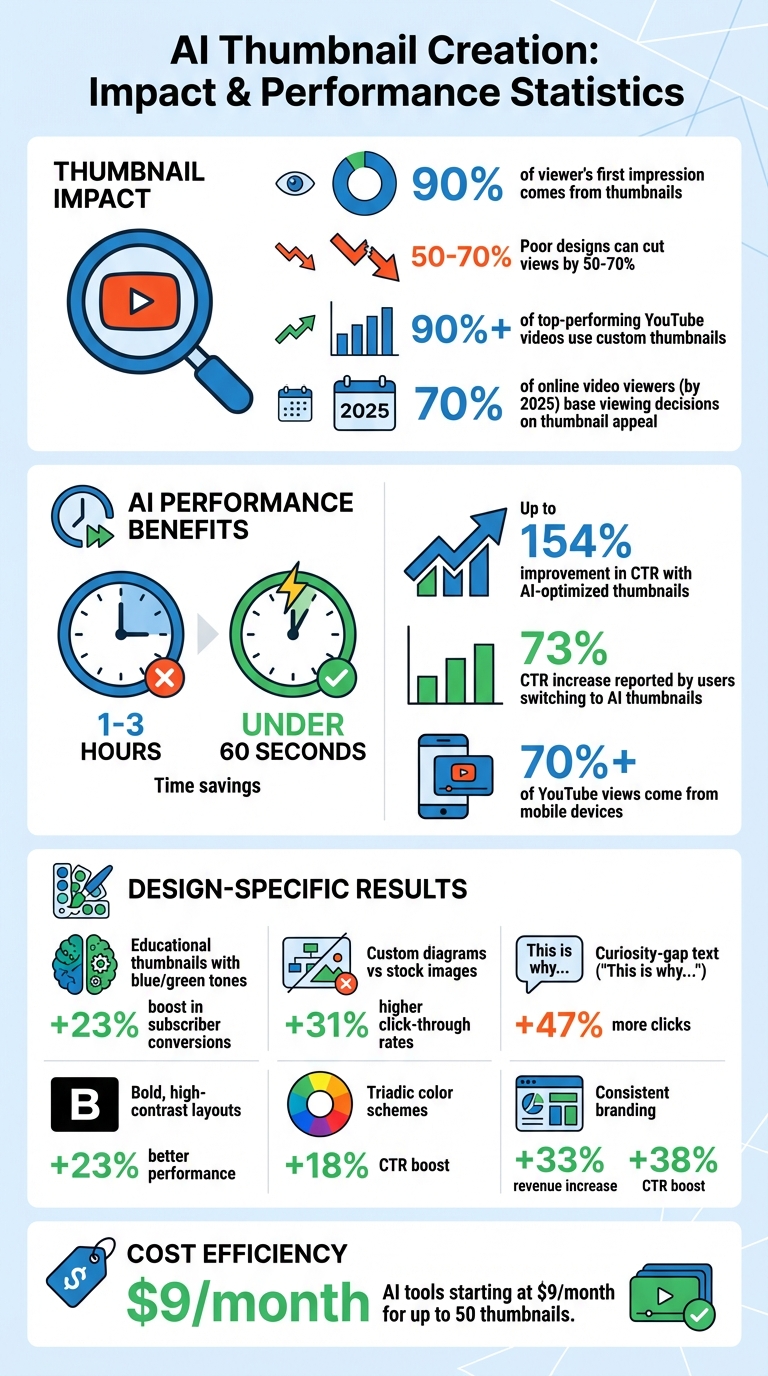
AI Thumbnail Creation: Key Statistics and Performance Impact
How to Make Viral YouTube Thumbnails with AI (Step-by-Step Tutorial)
sbb-itb-b59debf
What is Theme-Based Thumbnail Customization
Theme-based thumbnail customization means designing your video's thumbnail to match the style and tone of its content category - whether that's gaming, education, cooking, tech reviews, or vlogs. It’s about creating thumbnails that clearly represent the video’s genre. For example, a gaming thumbnail might use bold, vibrant colors and dramatic facial expressions, while an educational video often benefits from clean, organized layouts and calming blue or green tones.
Why does this matter? Thumbnails act as your video's "visual headline". They quickly communicate the essence of your content through images, colors, and layouts that align with what viewers expect. When scrolling through YouTube, people instinctively recognize patterns: a cooking video might feature warm lighting and close-ups of food textures, while a tech review might showcase sleek, minimalist visuals with sharp product shots. These tailored designs help grab attention and set the right expectations for your video.
The numbers back this up: over 90% of top-performing YouTube videos use custom thumbnails instead of auto-generated ones. By 2025, more than 70% of online video viewers are expected to base their initial viewing decisions on thumbnail appeal. Nailing the theme can be the difference between someone clicking on your video or scrolling past it.
Why Video Themes Affect Thumbnail Design
Different types of content spark different reactions from viewers, which is why your thumbnail design needs to match your video's theme. For instance, educational content often thrives on creating a curiosity gap vs. direct value strategy - thumbnails that make viewers ask, "What’s happening here?" Thumbnails with text like "This is why…" tend to get 47% more clicks compared to straightforward descriptions. On the other hand, vlogs or narrative content focus on emotional connections, often featuring consistent characters and expressive visuals to build familiarity with the audience.
The visual approach also varies across themes. Educational thumbnails with blue and green tones tend to perform better, boosting subscriber conversions by 23% due to their association with trust and authority. Including custom diagrams can increase click-through rates by 31% when compared to generic stock images. Gaming thumbnails, in contrast, often use bold colors and dramatic effects to enhance excitement and draw attention.
These choices aren’t just about aesthetics - they also influence YouTube's algorithm. Thumbnails that align with the video’s theme typically lead to stronger engagement metrics like higher click-through rates and longer watch times. Since YouTube prioritizes session time and discourages clickbait vs. authentic thumbnails, it’s critical that your thumbnail accurately represents your content.
How AI Identifies Video Themes
AI tools can analyze various elements of your video to determine its theme and suggest design elements that fit your niche. These tools examine factors like video scripts, metadata, and visuals - such as faces, emotions, and key scenes - to recommend typography, color schemes, and layouts that resonate with your audience. For example, ThumbnailCreator uses AI to pinpoint eye-catching visuals directly from your footage.
AI also learns from the success of similar content. By comparing your video to a database of high-performing thumbnails, it can recommend the best colors, subject placement, and font styles for your target audience. For instance, it might suggest warm tones like orange and gold for cooking videos or a clean, minimalist design with white, black, and red for tech reviews.
This process ensures your thumbnail accurately reflects your video’s content while maximizing its appeal. AI-driven tweaks - like enhancing emotional expressions or adjusting color palettes - can lead to 30% more initial impressions compared to static, generic designs. Tools like ThumbnailCreator make it easier to create thumbnails that are both visually appealing and data-driven, saving time while improving results.
How to Select and Customize Templates by Theme
Picking the Right Template for Your Video Theme
AI tools can analyze your video to identify its most engaging moments and central themes, helping you create thumbnails that resonate with viewers. ThumbnailCreator's Style Inspiration feature takes this a step further by tapping into niche trends, aligning your design with popular aesthetics. It draws from a database of millions of high-performing thumbnails, analyzing patterns in color, contrast, and composition across categories like gaming, tutorials, and vlogs.
When browsing templates, focus on options with a clear visual hierarchy. For gaming content, bold colors and dramatic subject placement tend to perform well. Educational videos benefit from clean layouts with structured text and calming tones like blue or green. For tech reviews, minimalist designs with sharp product images and strong contrast are ideal. To make the decision easier, the AI assigns each template a performance score based on its predicted click-through rate. This score helps you pick a design that’s optimized for success. Once you’ve chosen, you can refine the template to highlight your video’s unique appeal.
Adjusting Templates to Fit Your Content
After selecting a template, your first step is to identify a "moment sentence" that captures the core emotion or highlight of your video. For instance, instead of a generic title like "How to Cook Pasta", try something more specific, like "The exact moment the sauce comes together perfectly." This helps the AI focus on visuals and adjustments that reflect the right mood.
ThumbnailCreator's AI editor offers tools like inpainting and Lego Pixel adjustments to fine-tune your design. With inpainting, you can modify specific elements - like changing facial expressions or replacing background objects. Lego Pixel adjustments let you make precise visual tweaks, such as brightening eyes, enhancing focal points, or adding subtle glows to make your subject stand out. Research shows that using triadic color schemes instead of chaotic or monochromatic designs can boost click-through rates by 18%. These small adjustments can have a big impact on your thumbnail’s performance.
Adding Personal Branding While Keeping Theme Consistency
Incorporating your logo, colors, and fonts into thumbnails is crucial, but the key is to blend them seamlessly with the overall theme rather than letting them dominate the design. AI tools make this process easier by automatically integrating your branding elements into various layouts while keeping the main visual focus intact.
How to Balance Branding and Theme Requirements
A simple way to maintain balance is by following the 60-30-10 rule: dedicate 60% to theme visuals, 30% to brand elements, and 10% to your logo. This approach not only ensures harmony but also enhances performance - studies show that consistent branding can lead to a 33% increase in revenue and boost click-through rates by up to 38%.
Tools like ThumbnailCreator’s Brand Kit simplify this process by storing your logos, color palettes, and fonts in one place. The AI then applies your brand colors to themed templates without disrupting the layout optimized for your video type. For example, if you’re creating a tech review thumbnail with a minimalist design, the AI might subtly adjust your brand’s blue accent to complement the lighting and contrast of the product image. This ensures your branding feels natural and cohesive with the thumbnail's overall look.
"The solution isn't removing brand elements - it's integrating them naturally." - AIThumbnail.so
Advanced AI image harmonization takes this a step further by fine-tuning lighting, reflections, and shadows on your branded elements so they blend seamlessly with the theme. If your brand has a distinct visual style, you can even train the AI to apply that style consistently across different video categories. For instance, while your gaming thumbnails may feature bold, vibrant designs and your tutorial thumbnails lean toward clean, professional layouts, both will still reflect your brand identity.
To optimize visibility, ensure your logo occupies no more than 5–10% of the thumbnail space. Avoid placing branding elements in the bottom right corner, as YouTube’s timestamp overlay might obscure them. By striking this balance, you can create thumbnails that not only reinforce your brand but also resonate with your audience, maintaining a cohesive and professional look across your channel.
Testing and Improving Theme-Customized Thumbnails
Once you’ve customized your thumbnail to match your theme, the next step is critical: testing its performance. Designing a thumbnail is just the beginning - its effectiveness needs to be evaluated before it goes live. AI tools make this process smoother by simulating how your thumbnail will appear across platforms and predicting its success based on proven visual patterns.
Previewing Thumbnails on Different Devices
After creating your thumbnail, it’s essential to ensure it looks great on every device. Whether it’s displayed on a large desktop screen or a mobile phone during a quick scroll, your design needs to stay sharp and clear. Considering that over 70% of YouTube views come from mobile devices, testing how your thumbnail performs at smaller sizes is a must. AI-powered preview tools let you see exactly how your design appears in various contexts, like the YouTube Homepage Feed, Search Results, or Suggested Videos sidebar. This ensures that key elements, like text and visuals, remain clear and engaging.
AI also helps adapt your thumbnail to different aspect ratios - like 9:16, 1:1, or 4:5 - maintaining visual consistency across platforms. Advanced tools even use features like eye-tracking simulations and heatmaps to highlight areas needing adjustment, such as focal points or color contrast. By leveraging these tools, you can confirm that your thumbnail design works seamlessly across all devices.
Using AI to Test and Improve Designs
AI tools can take thumbnail testing to the next level by assigning a predictive click-through rate (CTR) score. These tools compare your design to millions of high-performing thumbnails and analyze factors like color contrast, text placement, facial expressions, and emotional appeal. Research shows that thumbnails with strong designs can boost CTR by up to 154%, and bold, high-contrast layouts perform 23% better than standard designs.
"AI thumbnail testers analyze elements like color contrast, facial expressions, text placement, and emotional triggers to predict CTR." - Reelmind.ai
Platforms like ThumbnailCreator make this process even easier by generating multiple variations of your design. You can test different emotional tones, color schemes, or text placements, and the tool ranks these variations based on predicted performance. Users have reported CTR increases of up to 73% after switching to AI-optimized thumbnails. For the most accurate results, conduct A/B testing by changing one element at a time and allow 5–7 days to gather meaningful data.
Conclusion
Creating theme-specific thumbnails no longer demands hours of manual work. AI tools like ThumbnailCreator have turned a process that once took 1–3 hours into something that can be done in under 60 seconds. By analyzing your video content, determining the ideal visual style for your niche, and generating multiple professional options, these tools eliminate technical challenges, making it easier than ever to produce eye-catching thumbnails. This time-saving approach not only streamlines your workflow but also boosts viewer engagement.
Thumbnails designed with AI don’t just save time - they deliver results. Studies show that effective thumbnails can increase click-through rates by an impressive 154%. By relying on proven visual strategies and automated optimization, AI ensures your thumbnails are crafted to grab attention and drive clicks.
What’s even better is the accessibility these tools provide. You don’t need to be a design expert to achieve professional-grade results. Features like automatic background removal, face swapping, smart text placement, and style cloning handle the technical details, freeing you up to focus on content creation. And with over 70% of YouTube watch time happening on mobile devices, AI ensures your thumbnails stay sharp and readable, no matter the screen size - a crucial detail often missed in manual designs.
AI levels the playing field, giving creators the tools to compete with top-performing videos. This combination of speed, precision, and professional quality has become essential for anyone looking to succeed on YouTube today.
FAQs
How does AI choose the right theme for my video thumbnails?
AI analyzes crucial elements like your video content, target audience, and trending design styles to choose the most effective theme for your video thumbnails. This process helps craft thumbnails that not only look great but also capture attention.
Using advanced algorithms, AI ensures your thumbnails match your video's theme while standing out from the crowd. The result? A greater chance of boosting click-through rates and audience engagement.
Can AI-designed thumbnails really boost my video's click-through rate?
Absolutely. AI-designed thumbnails have the power to make your videos stand out by crafting eye-catching, data-backed visuals. These tools dive into viewer preferences and current trends to create thumbnails that are more likely to grab attention and drive clicks.
Research backs this up - optimized thumbnails can boost click-through rates by as much as 35% or more. Plus, AI tools simplify the design process, allowing creators to produce professional, high-quality thumbnails without needing to be design experts. It's a game-changer for anyone looking to improve video engagement.
How does using AI save money on thumbnail creation?
AI-powered tools like ThumbnailCreator are a game-changer for content creators looking to save both time and money. Instead of dedicating hours to manually crafting thumbnails or shelling out $50 to $200 per design for professional graphic designers, creators can now produce high-quality, attention-grabbing thumbnails in just minutes. This streamlined process not only boosts productivity but also slashes labor costs.
On top of that, many AI tools come with budget-friendly subscription options. For example, ThumbnailCreator offers a plan for just $9/month, making professional-grade designs accessible even for creators working with limited funds. This affordability means creators can experiment with different thumbnail styles and update their content more frequently, all without stretching their budget. The result? More opportunities to engage audiences and drive growth.