

AI Thumbnail Workflow: Case Studies
AI cut thumbnail work from hours to minutes for many creators, and in some cases it also led to much higher CTR. From the examples here, the pattern is simple: make more thumbnail options, keep branding steady, and let the creator pick the final version.
Here’s the short version:
- Thumbnails drive a large share of clicks, with one source putting that number at 65%
- Many creators spend 30 to 60 minutes per thumbnail, and some spend 1 to 2 hours
- The main problems were:
- slow turnaround
- weak or uneven branding
- too few concepts to test
- limited design skill
- After adding AI to the workflow, creators could:
- make several concepts instead of just 1 or 2
- cut down editing time
- test versions before publishing
- keep the channel look more consistent
- Reported results included:
- CTR gains as high as 154%
- face-based thumbnails averaging 6.8% CTR vs. 4.1% for thumbnails without faces
What I take from these case studies is straightforward: AI works best as a first-draft and variation tool, not as the final decision-maker. The channels that got the most out of it used AI to move faster, then made small manual edits for text, contrast, layout, and focus.
If you want the same kind of workflow, the playbook is simple: start with the video hook, generate multiple versions, keep the design clean, and choose the clearest thumbnail at mobile size.
How Top YouTubers Create EPIC AI Thumbnails | David Altizer
sbb-itb-b59debf
Quick Comparison
| Creator Type | Main Problem | [Before AI | After AI](https://www.thumbnailcreator.com/compare/ai-thumbnails-vs-manual-design) | Main Shift |
|---|---|---|---|---|
| Gaming creator | Same-day turnaround | 1 to 2 hours, 1 to 2 concepts | Less time, several concepts | Faster output |
| Education creator | Branding all over the place | Manual drafts, uneven look | AI-assisted drafts, steadier look | Better brand consistency |
| Tech reviewer | Not enough options to test | 1 main concept | Several versions | More testing room |
| Small business owner | No design background | Basic tools, weak brand match | AI-assisted workflow | Easier polished output |
The main lesson: more options plus faster production gave creators a better shot at a higher CTR without adding more work.
Creator Profiles and the Problems They Needed to Solve
These creators worked in gaming, education, tech reviews, and small business. Each one hit a different wall, but the pain point was the same: thumbnails were either taking too long, underperforming, or both.
| Creator | Niche | Upload Frequency | Core Problem |
|---|---|---|---|
| Solo gaming creator | Gaming | Daily | Same-day thumbnail turnaround, busy thumbnails |
| Education creator | Education | 2× per week | Inconsistent branding, low CTR |
| Tech reviewer | Tech reviews | Weekly | Too few concept variations, inconsistent branding |
| Small business owner | Small business | Irregular | Limited design skills, thumbnails didn't match the brand |
Those issues shaped the workflow changes in the next section.
Before AI: How Long Thumbnails Took and Where the Process Broke Down
The gaming creator was uploading every day, so thumbnails had to be done the same day filming ended. The manual process took 1–2 hours per upload, which created a constant tradeoff: spend time polishing the thumbnail or get the video out on time.
The education creator faced a different problem. Each thumbnail looked fine on its own, but the channel as a whole felt all over the place. Fonts changed. Color treatments changed. Layouts changed. That lack of consistency made the brand feel weaker and harder to recognize at a glance.
The tech reviewer could make a polished thumbnail, but there usually wasn’t enough time to test more than one idea per video. So most videos went live with a single concept and very little room to compare options.
The small business owner had the hardest starting point. There was no design background and no budget for a freelancer. Thumbnails were made with basic editing tools, and it showed. They didn’t build trust, and they didn’t line up with the brand’s visual identity, which matters a lot for business content.
What Each Creator Was Trying to Achieve
The gaming creator needed to cut thumbnail production from hours to minutes without losing visual quality.
The education creator wanted every upload to look like it came from the same channel - same colors, same fonts, same layout system - so the brand felt consistent instead of random.
The tech reviewer wanted multiple thumbnail concepts for each video, not just one final version picked too early. More options meant more room to compare data-driven testing vs gut feeling to see what might earn the click.
The small business owner needed a simple way to make polished, on-brand thumbnails without hiring help or learning design software from scratch.
Their goals fell into two main buckets:
- Faster production
- Better click performance
Some creators needed both. That split shaped how each one used AI in the workflow below.
Case Studies: How the AI Thumbnail Workflow Changed
AI moved the bottleneck from coming up with ideas to picking the best final option. That change helped fix the same pain points mentioned earlier: slow turnaround, uneven branding, and not enough concepts to test.
Case Study Format: From Concept to Upload
Before AI, many creators started with a blank canvas, made one or two drafts, and spent a big chunk of time revising before they had something they could use.
After AI, the workflow looked different. Creators could generate several thumbnail concepts, pick the strongest layout, make a few manual edits, then export and upload or run thumbnail testing at scale. In plain English: thumbnail creation became a repeatable task that could often be done in one sitting.
Creators still handled the parts that need human judgment. They refined text, contrast, subject size, facial emphasis, and object placement so the final image matched the video and stayed on-brand. AI took care of the first pass on ideas, while the creator made the final call on clarity and fit. Some creators also used YouTube's Test & Compare to choose the strongest version.
That shift is what changed the time, output, and CTR results below.
Where ThumbnailCreator Fit Into the Workflow
ThumbnailCreator worked as the time-saving step inside the most time-heavy parts of the process. Its features lined up with what creators wanted:
- AI generation for speed
- Templates for brand consistency
- Text, object, and face swapping for faster variation testing
It also helped with the last edits needed before publishing. For non-designers, that meant fewer tool changes and a faster path from concept to upload.
The next section looks at whether that faster workflow led to stronger performance.
Results: Before vs. After Thumbnail Performance
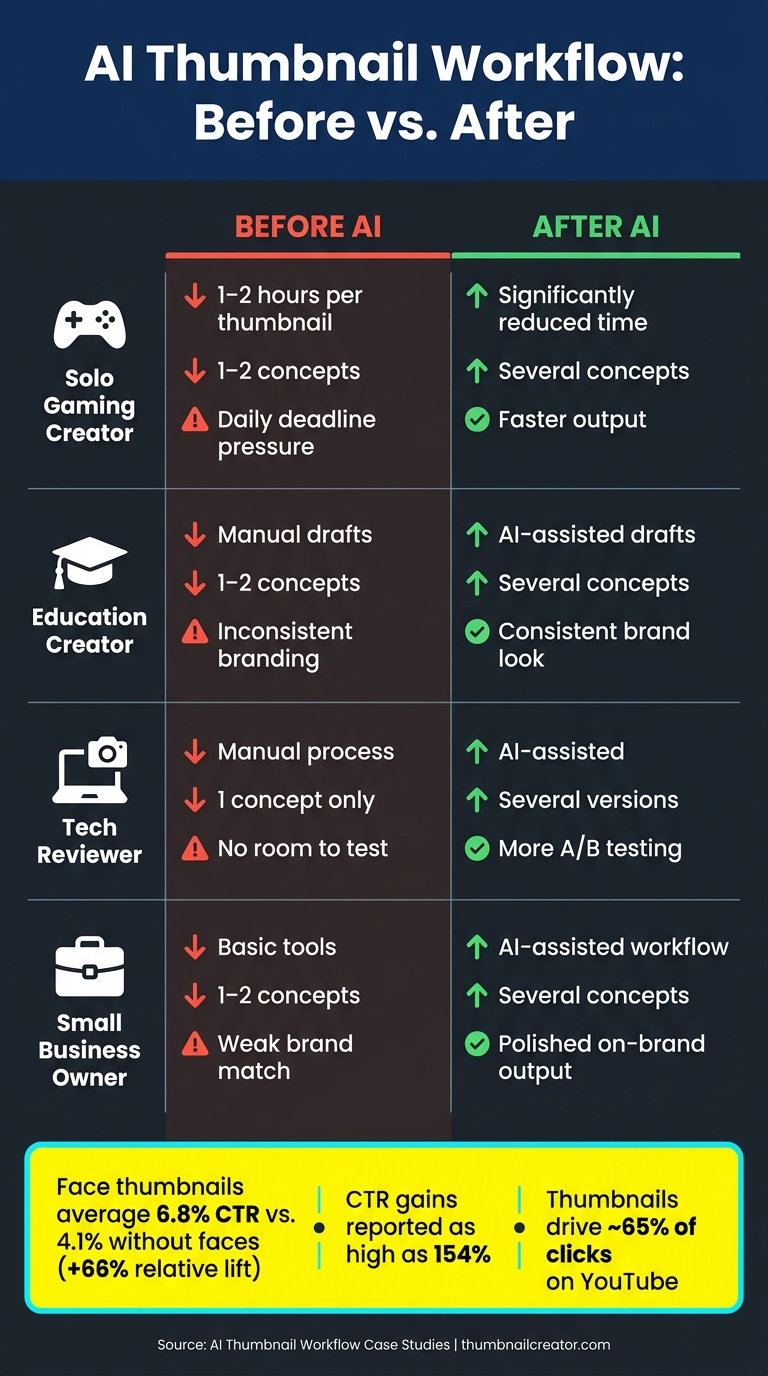
AI Thumbnail Workflow: Before vs. After Results by Creator Type
Once the workflow was set, the next thing to look at was simple: what changed day to day?
The clearest shifts were faster turnaround, more concepts per video, and higher click-through rates. And those gains showed up across very different use cases, from solo creators to small business owners.
Comparison Table: Time, Output, and CTR
| Creator | Bottleneck | Pre-AI Time | Post-AI Time | Concepts Before | Concepts After | CTR Change |
|---|---|---|---|---|---|---|
| Solo gaming creator | Daily turnaround pressure | 1–2 hrs | Reduced | 1–2 | Several | Higher CTR |
| Education creator | Brand inconsistency | Manual | AI-assisted | 1–2 | Several | Higher CTR |
| Tech reviewer | Too few concept variations | Manual | AI-assisted | 1 | Several | Higher CTR |
| Small business owner | No design background | Manual | AI-assisted | 1–2 | Several | Higher CTR |
Use directional labels only where exact numbers were not reported; CTR changes here reflect the thumbnail workflow, not the video itself.
What Drove the Gains
The biggest lift came from testing several concepts before picking one. That sounds obvious, but it changes a lot in practice. Instead of settling for a weak thumbnail because the deadline was closing in, creators had options. More shots on goal usually meant a better final pick.
Clearer focal points and better text hierarchy helped too. Small tweaks can make a thumbnail easier to scan in a split second, which is the whole game on YouTube.
There’s also data behind the face-first approach. Research on 1,000 thumbnails found that those featuring a human face averaged 6.8% CTR compared with 4.1% for faceless designs - a roughly 66% relative difference. That helps explain why face swapping and expression-focused layouts can work well when building and testing thumbnails at speed.
Revision count also dropped in almost every case. When creators could get to a usable concept fast, they spent less time going back and forth on rough ideas and more time choosing the strongest option.
Key Takeaways for Creators
Those results didn’t come from luck. They came from a handful of repeatable workflow habits.
Faster turnaround, more concepts, and higher CTR all came from the same shifts in how people worked. AI cut down production drag, but it didn’t replace human judgment. The creators who got the best lift used AI to move faster and spin up more options, then made the final choice themselves.
That’s the key idea here: AI is best for speed and variety, not for handing you the finished answer on the first try. These are the habits worth borrowing.
Workflow Habits Worth Copying
The pattern was pretty simple. The creators who saw the biggest gains kept coming back to the same process.
Start with the hook, not the design. Before you generate anything, get clear on the promise of the video and what should make someone click. That decision guides everything that comes next.
Generate several variants, then choose the clearest one. One concept usually isn’t enough. Try different compositions, facial expressions, and text placement. Doing that fast with a tool like ThumbnailCreator gives you options instead of one blind guess. And more options mean a better shot at finding the click-driving image.
Keep edits tight. Focus on alignment, contrast, and the main focal point. Big redesigns can eat up the time AI just gave back.
Pick the clearest thumbnail, not the busiest one. Research keeps pointing in the same direction: cleaner thumbnails with fewer elements, one main focal point, and limited text tend to get higher CTR than cluttered designs. If people have to stop and figure it out, it’s probably too complex.
Also, check every thumbnail at small size before you publish. Most people see thumbnails on mobile. So if the subject isn’t obvious and the text - if there is any - can’t be read at a glance, the thumbnail isn’t doing its job, no matter how polished it looks at full size.
FAQs
How many thumbnail versions should I test per video?
Test up to three thumbnail versions at a time. That’s the limit with YouTube’s Test & Compare feature, which allows only three live variants per video.
That said, you don’t have to stop at three ideas. It often helps to sketch out 5 to 8 concepts first, then narrow them down to the three strongest options for the live test.
For cleaner results, try to get at least 1,000 impressions per variant. In many cases, 5,000 to 10,000 impressions may be needed before the data starts to point in a clear direction.
Give the test enough time to breathe, too. Run it for at least 48 hours, and if needed, let it continue for 7 to 14 days.
When should I use a face in a thumbnail?
Use a face when you want a clear emotional cue. Expressive faces can boost click-through rates, and faces that show surprise or shock often beat neutral images.
For the best result, go with a close-up instead of a wide shot. Also, keep the face away from the bottom-right corner so the YouTube timestamp doesn’t cover it.
What should I manually edit after AI generates a thumbnail?
After AI generates your thumbnail, take a minute to fine-tune the parts that matter most for readability and click performance.
A simple way to check it: do a squint test. View the thumbnail at about 120 px wide and see if the text and main visual still read clearly. If you have to work to figure it out, viewers will too.
If readability feels weak, try a few small fixes:
- Cut the hook down to 3 to 5 words
- Make the font larger
- Move the text or main subject to a better spot
- Adjust colors for stronger contrast
- Swap objects if the image feels cluttered
- Refine facial expressions so they better fit your brand and testing goals
Sometimes a tiny change does the trick. A shorter hook, a cleaner layout, or a sharper expression can make the thumbnail much easier to understand at a glance.