

AI Tools for Gaming Stream Thumbnails
Your thumbnail has just 1.5 seconds to grab attention. With over 500 hours of video uploaded to YouTube every minute, standing out is critical for gaming streamers. AI tools like ThumbnailCreator, Thumbmagic, and Canva's Magic Media AI Thumbnail Maker help creators design professional thumbnails faster, without needing advanced design skills. These tools can improve click-through rates (CTR) by 18–32%, giving your content a competitive edge.
Here’s a quick breakdown of the tools:
- ThumbnailCreator: Fast (under 60 seconds), tailored for gaming, offers features like Reaction Faces and Style Cloning for consistent branding.
- Thumbmagic: Focuses on speed and gaming-specific templates, with Smart Face & Style Detection for reaction shots.
- Canva's Magic Media AI: Combines AI-assisted features with manual control, perfect for creators wanting flexibility and customization.
Each tool caters to different needs, from hobbyists to professional creators. Whether you’re just starting out or scaling your channel, these tools simplify thumbnail creation while boosting your channel’s visual appeal.
Create a Viral YouTube Gaming Thumbnail with AI (Step by Step)
sbb-itb-b59debf
1. ThumbnailCreator
ThumbnailCreator is tailored specifically for YouTube creators, with features designed to meet the needs of content producers. With over 2,847 gaming channels already using it, this tool has become a favorite for streamers looking to create eye-catching thumbnails without a steep learning curve.
Automation Features
The platform keeps things simple: paste a YouTube link or type in a description, and it generates several thumbnail options almost instantly. Its "Auto-Optimize" function handles adjustments like contrast, color vibrancy, and composition with a single click, eliminating manual tweaks. This automation helps creators avoid common thumbnail mistakes that often lead to low engagement. The AI is trained on millions of successful thumbnails, so the results are designed to boost click-through rates right out of the gate.
Gaming-Specific Customization
For gaming creators, ThumbnailCreator offers tools that cater to their unique needs. With AI models fine-tuned for gaming visuals, it provides styles tailored to popular titles like Minecraft, Fortnite, and Call of Duty. You can also add reaction faces - whether you want a shocked, intense, or excited expression - directly within the tool, skipping the hassle of separate photoshoots. Using natural language commands, you can make edits like "add fire effects" or "make the background more dramatic" to enhance your design. The Precision Inpainting feature allows you to fine-tune specific areas, such as a weapon or background, for even more control. Despite these detailed options, the tool remains fast and efficient.
Speed and Efficiency
The platform delivers initial thumbnail variations in under 30 seconds, and the entire process can be wrapped up in less than a minute. This quick turnaround is perfect for streamers who release multiple videos weekly and need thumbnails ready to go.
Consistent Branding
ThumbnailCreator also helps maintain a cohesive channel look. With Style Cloning, you can upload a successful thumbnail, and the AI will replicate its style for future content. The Face Swap feature ensures your personal branding stays consistent across thumbnails. Additionally, permanent Design Rules - like brand colors, fonts, and layouts - can be set up so every thumbnail aligns with your channel's aesthetic. This consistency is key to building a recognizable brand and boosting click-through rates.
2. Thumbmagic
Thumbmagic makes AI thumbnail generation straightforward. You can paste a YouTube URL, upload a video, or even provide a script. From there, its AI scans for key frames and generates multiple thumbnail options in seconds.
Automation Level
The AI pinpoints key moments in the video to create thumbnails, cutting production time in half compared to doing it manually. Nick Lauer, a user of Thumbmagic, shared his experience:
"I just paste a YouTube link and it instantly creates a thumbnail. It's honestly replacing thumbnail designers."
This speed is further enhanced by the tool’s ability to adapt its output to the vibrant and dynamic style often seen in gaming content.
Customization for Gaming
Thumbmagic's Smart Face & Style Detection focuses on optimizing facial expressions, which are critical for high-energy reaction shots that dominate gaming thumbnails. After the AI generates the initial design, users can tweak text, colors, backgrounds, and even expressions. The tool also provides specialized templates tailored to popular games like Fortnite, Minecraft, Valorant, Apex Legends, and Call of Duty. These templates are inspired by viral thumbnail designs from top creators, giving users a professional edge.
Turnaround Time
Need speed? Thumbmagic delivers 4K exports in just seconds, making it perfect for live streamers managing tight upload schedules.
Branding and Consistency
Thumbmagic doesn’t just stop at automation and customization - it also helps creators maintain consistent branding. Its Style Detection feature learns a creator’s unique aesthetic over time, ensuring thumbnails align with their branding. Plus, it allows users to generate multiple variations of a single concept, simplifying A/B testing and helping channels keep a cohesive visual identity.
3. Canva's Magic Media AI Thumbnail Maker
Canva stands out by offering a design suite that combines AI tools with manual control, rather than fully automating the thumbnail creation process. This approach gives creators the flexibility to customize every detail while benefiting from AI-assisted features.
Automation Level
Canva's tools - Magic Media, Magic Edit, and Magic Eraser - help simplify specific tasks like editing and cleanup but stop short of automating the entire design. The drag-and-drop interface allows users to tweak layouts and elements to their liking, ensuring the final look is entirely under their control.
"Canva won't produce Midjourney-quality images. The point is you never leave Canva. Generate, add text, resize, export - one tool, one workflow." - Memvers
This seamless integration of tools makes Canva ideal for creators who want control without sacrificing efficiency.
Customization for Gaming
Canva caters to gaming creators with art styles like Neon, Retrowave, Pixel Art, Anime, and Filmic, perfect for crafting vibrant, high-energy thumbnails. Features like glow effects, bold outlines, and drop shadows make text stand out, while the background remover is excellent for isolating key elements like a streamer’s face or a character render. These tools make it easy to layer and build dynamic scenes tailored to gaming content.
Turnaround Time
Creating a thumbnail in Canva takes less than 10 minutes. This is a massive time-saver compared to the 45-minute average for manual design. By keeping all tools in one platform, Canva eliminates the need to jump between apps or reformat files, streamlining the entire process.
Branding and Consistency
For $13/month, Canva Pro includes a Brand Kit feature that stores your channel’s fonts, colors, and logos. With just one click, you can apply your branding to thumbnails, ensuring a cohesive look across all your videos. For gaming creators, this is crucial for building recognition and viewer loyalty. Canva also supports A/B testing by generating 3–4 thumbnail variants per video, making it easier to see which design performs better in driving clicks.
Pros and Cons
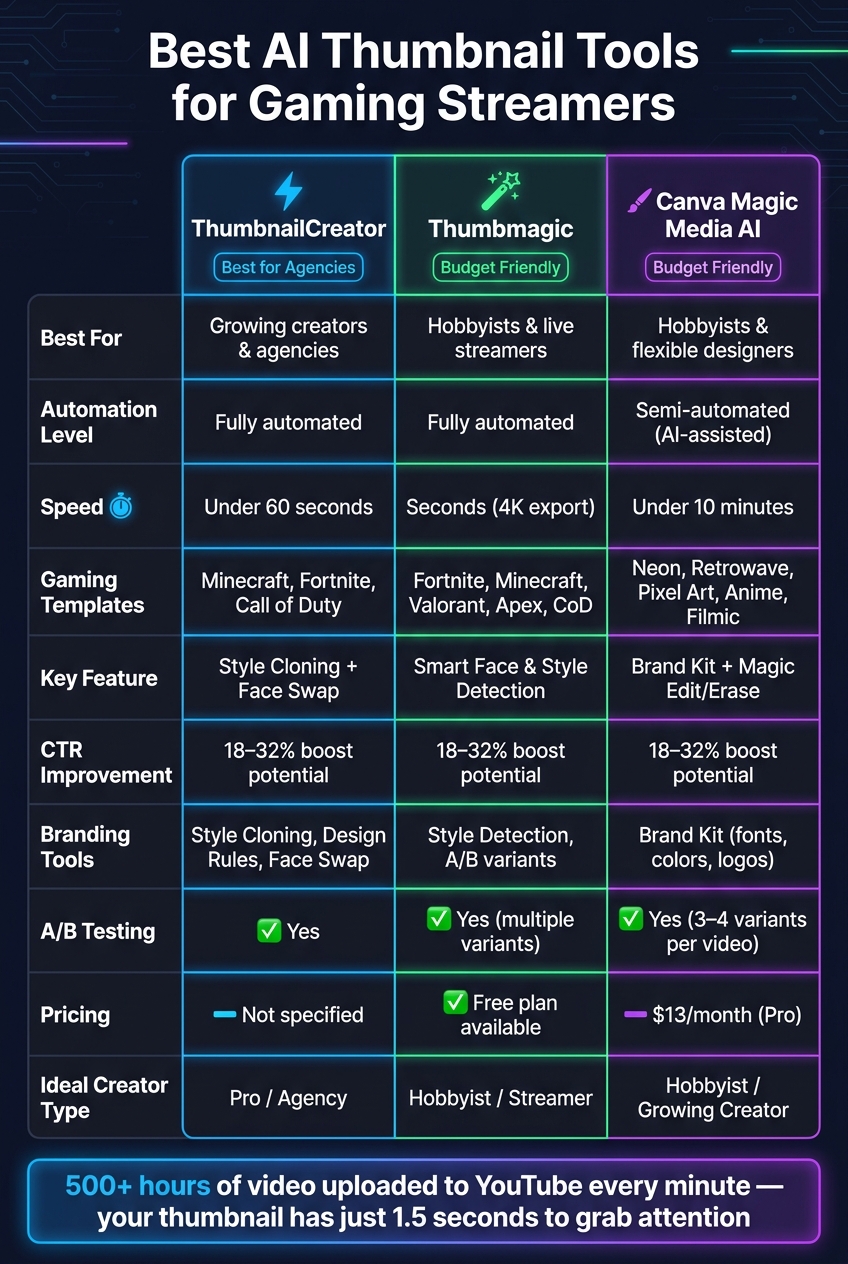
Best AI Thumbnail Tools for Gaming Streamers: Side-by-Side Comparison
ThumbnailCreator stands out for its speed, tailored gaming features, and ability to maintain brand consistency - making it a go-to tool for gaming streamers.
Strengths
- Lightning-fast creation: Produces gaming-focused thumbnails in under 60 seconds.
- Gaming-centric features: Includes tools like Reaction Faces and Design Rules to ensure thumbnails align perfectly with a gamer's brand.
- Fully automated process: Handles everything from generating initial designs to making final tweaks, cutting out manual effort.
- Consistency tools: Features like Style Cloning and Face Swap help maintain a unified look across all channel uploads.
Limitation
- Narrow scope: Designed exclusively for thumbnail creation, so it doesn’t cater to broader design needs.
With its specialized focus, ThumbnailCreator delivers a streamlined solution for gaming stream thumbnails. Its strengths make it a powerful tool for creators looking to enhance their channel's visual identity with fresh reaction thumbnail ideas.
Conclusion
Choosing the right AI thumbnail tool depends on where you are in your streaming journey. The tools discussed here each cater to different types of creators, offering features tailored to specific needs.
| Creator Type | Best Fit | Why |
|---|---|---|
| Hobbyist | Thumbmagic or Canva's Magic Media | Simple to use, free thumbnail tools available |
| Growing Creator | ThumbnailCreator | Offers automation, Face Swap, and Style Cloning |
| Agency or Pro Channel | ThumbnailCreator | ensures consistent branding and supports batch production |
For hobbyists, tools like Thumbmagic or Canva's Magic Media provide budget-friendly and user-friendly solutions. However, if you're looking to grow your channel and publish consistently, ThumbnailCreator stands out. It streamlines the process, creating a ready-to-use thumbnail from a URL in less than 60 seconds.
Agencies and professional channels often prefer ThumbnailCreator for its advanced team collaboration features and ability to maintain consistent branding. YouTube Ads Expert Aleric Heck highlighted its effectiveness:
"We recommend ThumbnailCreator to all our agency clients. The AI Optimize feature automatically improves thumbnails."
Ultimately, for faster production, cohesive branding, and better click-through rates, ThumbnailCreator is the go-to choice for serious creators and agencies.
FAQs
How do I keep my thumbnails consistent across my channel?
To keep your thumbnails consistent, focus on creating a recognizable style that aligns with your channel's branding. Tools like ThumbnailCreator can help you achieve this by offering features like style cloning and template customization. These tools make it easier to match your thumbnails with your channel’s overall aesthetic.
Stick to a cohesive design by using the same font, color palette, and placement for key elements across all your thumbnails. Consistent use of visual elements, colors, and even facial expressions strengthens your brand identity and makes your thumbnails instantly recognizable to your audience.
Can I create a thumbnail from a YouTube link in under a minute?
With ThumbnailCreator, you can create a thumbnail from a YouTube link in less than a minute. The tool scans your link and generates custom, professional-looking thumbnails designed to boost your video's visibility.
What’s the best way to A/B test thumbnail variations?
To test thumbnail variations effectively, start by creating multiple designs that vary in elements like colors and emotional appeal. Tools such as ThumbnailCreator can help you whip up as many as 10 options in just seconds. Once you've got your variations, upload them to your videos and monitor key performance metrics like click-through rates (CTR). Swap out any thumbnails that aren't performing well with those that are driving better results. This approach allows you to tweak and improve thumbnails based on real data, ultimately boosting engagement.