

AI Tools for Sponsored Video Thumbnails
Creating effective sponsored video thumbnails is crucial for grabbing attention, meeting sponsor expectations, and driving clicks. Thumbnails are responsible for 90% of a viewer's first impression, and optimized designs can boost click-through rates by up to 154%. AI tools now make this process faster and more efficient by analyzing trends, automating designs, and balancing sponsor branding with audience preferences.
Here’s a quick overview of six AI tools designed to simplify thumbnail creation for sponsored videos:
- ThumbnailCreator: Focuses on speed with tools like Face Swap, Style Cloning, and Mobile Preview. Ideal for creators prioritizing fast production and sponsor branding. Starts at $24/month.
- Canva: Offers 20,050+ templates and tools like Magic Media™ and Brand Kit for maintaining consistent designs. Free tier available; Pro starts at $12.99/month.
- CapCut: Combines video editing with AI-powered thumbnail creation, focusing on visual clarity and sponsor-friendly templates.
- VidIQ: Optimizes thumbnails with data-driven insights and A/B testing, tailored for engagement and mobile performance. Free and paid plans available.
- Fliki: Recent updates include AI Thumbnail Workflow v2, offering quick designs with multilingual support and branding tools. Free plan includes limited credits.
- VEED.io: Integrates thumbnail creation with video editing, offering text-to-image features and brand customization options. Free and paid versions available.
These tools streamline thumbnail design, ensuring faster workflows, mobile optimization, and better alignment with sponsor expectations.
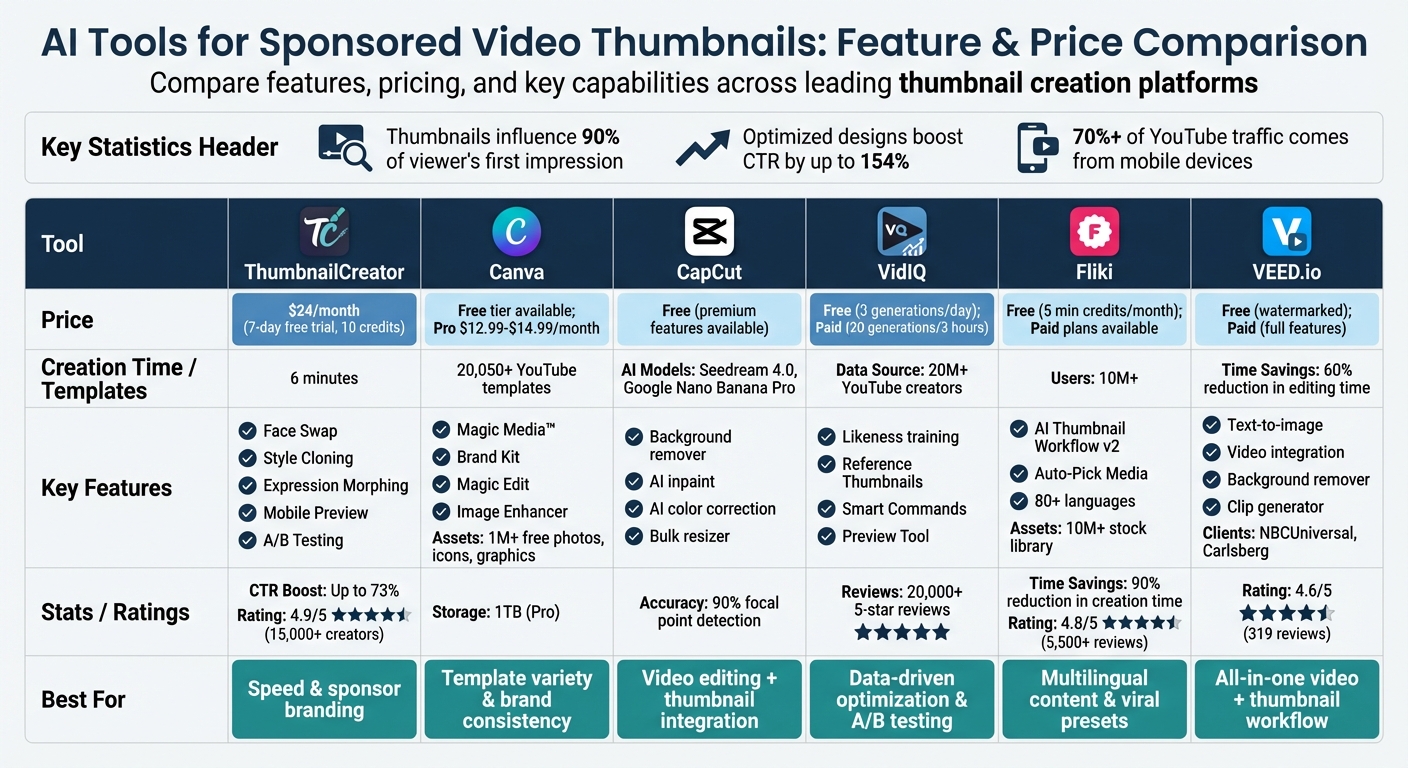
AI Thumbnail Tools Comparison: Features and Pricing
1. ThumbnailCreator
ThumbnailCreator is an AI-powered tool designed to create custom thumbnails in just 6 minutes - about 20 times faster than traditional Photoshop workflows. This speed is especially helpful for sponsored content, allowing you to test multiple designs quickly while keeping your sponsor’s branding and your audience’s preferences intact.
AI Generation Features
ThumbnailCreator simplifies the design process by letting you generate thumbnails either through your YouTube URL or a brief description. From there, the AI takes over, handling the heavy lifting. Features like Face Swap allow you to insert your face into any design, while Expression Morphing lets you tweak your facial expression - like switching from neutral to surprised or excited - to better align with the mood of your video.
For creators working on a series or sponsored content, Style Cloning is a game-changer. By uploading a previous thumbnail that performed well, the AI can replicate its visual style for new videos, ensuring a consistent look without starting from scratch. The Style Detection feature keeps your designs on-trend by applying popular visual elements automatically.
"The AI not only generates beautiful thumbnails, but it also understands what style works best for different types of videos." - Maria Reyes, YouTube Creator
These design tools are paired with strong branding options, making them ideal for creators managing sponsorships.
Brand Customization
Sponsored content often requires strict branding consistency, and ThumbnailCreator delivers with tools like Collections, which help you organize and manage campaigns efficiently. The Advanced Face Training feature ensures that your personal branding remains consistent across various projects, which is especially helpful when juggling multiple sponsors.
For quick tweaks, the platform’s AI Editing lets you make adjustments using natural language commands, removing the need to navigate complex menus. Before publishing, the Thumbnail Analyzer reviews your design for key elements like composition, color balance, and text readability, helping you avoid issues that might hurt your click-through rate.
These branding tools are complemented by features aimed at improving how thumbnails perform on mobile devices.
Engagement Optimization
With more than 70% of YouTube traffic coming from mobile devices, optimizing thumbnails for mobile is a must. ThumbnailCreator’s Mobile Preview feature ensures your designs look great on mobile by automatically applying high-contrast colors and bold text placement to grab attention. Combined with the Variation Generator, which creates multiple mobile-friendly versions, these tools can boost click-through rates by as much as 73%.
This combination of fast design, branding consistency, and mobile optimization makes ThumbnailCreator a valuable tool for growing your channel. Pricing starts at $24/month, with a 7-day free trial offering 10 credits to test the platform. With a 4.9/5 rating from over 15,000 creators, it’s clear that this tool is making a difference.
2. Canva
Canva blends AI-powered tools with a vast library of templates, making it easier than ever to create polished sponsored thumbnails. With more than 20,050 YouTube thumbnail templates at your fingertips, creators can find starting points tailored to niches like finance, technology, and product reviews - key areas for sponsored content success.
AI Generation Features
Canva’s Magic Media™ tool transforms text descriptions into thumbnail images, offering preset styles like Filmic, Neon, and Retrowave for added flair. Dream Lab takes this further by generating visuals based on reference photos, applying specific aesthetics while preserving the original composition. Other tools like Magic Edit, Magic Eraser, and Magic Grab allow users to swap backgrounds, tweak colors through text prompts, and isolate subjects for repositioning. However, some users have pointed out that AI-generated images featuring people can still appear noticeably artificial.
While Canva’s AI features are powerful, its extensive template library provides additional ways to craft thumbnails that resonate with audiences and sponsors alike.
Template Availability
With access to over 1 million free photos, icons, and graphics, Canva offers creators nearly endless customization options across high-earning niches, often outperforming other YouTube thumbnail tools. Custom templates can also be saved, ensuring a consistent style across campaigns.
This focus on templates is complemented by Canva’s tools for maintaining brand identity, which are essential for sponsored content.
Brand Customization
Consistency is key when working with sponsors, and Canva’s Brand Kit feature, available through Canva Pro, simplifies this process. It stores logos, fonts, and color palettes for quick application across designs. This feature is particularly useful for creators juggling multiple sponsorships, as it eliminates the need for constant manual adjustments. Canva Pro, priced at $12.99–$14.99 per month (approximately $120 annually), unlocks premium features like unlimited AI generations, exclusive assets, and 1 TB of storage. For those just starting out, the free tier includes basic templates and limited AI credits, which may be enough to get the ball rolling.
Engagement Optimization
To help creators boost click-through rates and meet sponsor expectations, Canva offers tools like Magic Write™, which generates captions, hooks, and SEO-friendly descriptions to improve visibility. The Image Enhancer feature adjusts focus, lighting, and saturation to make thumbnails pop visually. Considering thumbnails influence about 90% of a viewer’s first impression on YouTube, these enhancements can have a big impact.
For mobile viewers, who make up more than 70% of YouTube traffic, Canva suggests keeping text minimal (2–4 words) and using high-contrast colors for better readability on smaller screens. Testing 3–5 variations with different color schemes or text placements through A/B testing can also help pinpoint the most effective design.
"A thumbnail serves as the face of your video, enticing viewers to click and watch." - Toolify.ai
3. CapCut
CapCut combines video editing and thumbnail creation, offering a streamlined solution for cohesive sponsored content. With the help of Seedream 4.0 and Google's Nano Banana Pro, it can generate professional-quality thumbnails from simple text prompts, making it a powerful tool for content creators.
AI Generation Features
CapCut's AI tools go far beyond basic features. The background remover quickly isolates subjects, creating clean and professional product shots. The AI inpaint tool allows users to add brand-specific elements based on text prompts, while AI expand resizes images without distorting important details. To ensure the visuals are sharp and eye-catching, the AI color correction tool adjusts vibrancy and contrast, making subjects stand out against their backgrounds. CapCut claims its AI technology detects focal points with 90% accuracy, ensuring sponsored products remain the central focus.
"CapCut's AI thumbnail maker, powered by state-of-the-art models, Seedream 4.0 and Google's Nano Banana Pro, instantly generates professional YouTube thumbnails from a simple idea or prompt." - CapCut
Template Availability
CapCut provides an extensive library of templates tailored to popular content niches like business, gaming, vlogs, and product reviews. Its AI design agent automatically adjusts these templates to align with a video's theme and color palette, saving creators time on manual adjustments. For those managing multiple sponsorships, the ability to create and save reusable templates with specific brand colors and fonts ensures consistency across campaigns. This feature, coupled with CapCut's editing tools, makes the content creation process more efficient.
Brand Customization
CapCut simplifies brand consistency with its built-in photo editor, enabling creators to fine-tune lighting and contrast manually. Its bulk image resizer adjusts thumbnails for platforms like Instagram or TikTok without losing quality. Additionally, a library of custom fonts, stickers, and shapes allows users to incorporate sponsor logos or call-to-action elements seamlessly. Real-time color suggestions help maintain a cohesive brand style, balancing sponsor requirements with audience appeal.
Engagement Optimization
CapCut doesn't just focus on design - it also enhances engagement. By analyzing visual hierarchy and subject placement, it helps creators design thumbnails that stand out in crowded feeds and avoid common mistakes. The real-time preview feature ensures that the thumbnail aligns with the video’s message, providing a cohesive look. Even the free version of CapCut includes access to advanced AI thumbnail tools and high-quality exports, though some premium features require a subscription.
4. VidIQ
VidIQ takes sponsored thumbnail creation to the next level by combining advanced AI tools with data from over 20 million YouTube creators. This approach allows the platform to craft designs specifically optimized for real user engagement. With over 20,000 5-star reviews and an endorsement from entrepreneur Mark Cuban, who said:
"vidIQ has an awesome suite of services. I recommend all of my companies use it for YouTube."
it's clear that VidIQ has made a strong impression in the creator community.
AI Generation Features
VidIQ's AI is designed to simplify thumbnail creation by analyzing video files or YouTube URLs to pinpoint key scenes and emotional highlights. Its text-to-thumbnail feature lets you turn ideas like "A sunset beach with large title text" into thumbnail designs even before your video is finished. For sponsored creators, the paid Likeness feature uses 10–20 photos to train the AI, ensuring your on-screen persona remains consistent across thumbnails. Each video generates three distinct HD thumbnail options, giving creators flexibility and saving time.
Brand Customization
Balancing brand colors vs. optimized colors is key for branding, and VidIQ's Reference Thumbnails tool helps by analyzing your channel’s existing thumbnails - or even those of successful competitors - to match styles, colors, and layouts. You can upload custom logos or graphics in PNG or JPEG formats, and the platform’s background remover makes integrating these assets seamless. For more hands-on control, the thumbnail editor lets you tweak fonts, colors, brightness, and text outlines. A sticker tool is also available for adding attention-grabbing elements like arrows. If you need quick adjustments, Smart Commands allow you to refine designs with simple prompts like "make the background darker" or "recolor object".
Engagement Optimization
VidIQ doesn’t stop at design - it also ensures your thumbnails are optimized for engagement. The Thumbnail Preview Tool shows how your design will look across YouTube’s key areas: Home, Search, Suggested, and Mobile views. This feature helps ensure your thumbnails meet sponsor expectations and catch the audience's eye. You can even compare your design to trending content or competitors to make sure it stands out. VidIQ’s AI applies engagement-focused principles, such as using high-contrast colors for dark mode and bold text for mobile users, to improve visibility. With free plans offering 3 generations per day and paid plans allowing up to 20 generations every 3 hours, creators can test variations quickly to push beyond YouTube’s average 2% to 10% click-through rate range.
sbb-itb-b59debf
5. Fliki
Fliki introduced its AI Thumbnail Workflow v2 on January 30, 2026, specifically designed to create eye-catching thumbnails for platforms like YouTube and TikTok. With more than 10 million users and a 4.8/5 rating based on over 5,500 reviews on G2 and Capterra, it’s become a go-to tool for content creators working on sponsored projects. Users report a 90% reduction in content creation time and a fivefold boost in productivity. These impressive results come from Fliki's extensive suite of AI-powered tools, described below.
AI Generation Features
Fliki’s text-to-thumbnail tool can generate professional thumbnails in seconds using just your video title or topic. It leverages advanced AI models like FLUX Pro, FLUX 2, Nano Banana 2, GPT Image 1.5, and Qwen Image & Edit Plus to produce high-quality visuals. The Auto-Pick Media feature selects relevant visuals from a library of over 10 million stock assets, aligning them with your video’s context. For added ease, Fliki Pro allows natural language commands like "add text overlay here" to edit thumbnails effortlessly.
The tool also supports over 80 languages and 100+ dialects, making it a versatile choice for creators reaching global audiences. These features ensure not only speed but also quality and accessibility in design.
Brand Customization
Fliki’s Branding Feature simplifies maintaining a consistent look across your content. You can preset brand-specific colors, fonts, and watermarks, which are automatically applied during the "Magic Create" workflow. Additionally, the AI can adapt to your brand tone and audience preferences, ensuring thumbnails align with your overall messaging. For creators managing multiple channels, Fliki allows you to establish unique brand identities for each, complete with custom logos and graphics.
These tools make it easy to build a strong and cohesive brand presence, even when working on multiple projects simultaneously.
Engagement Optimization
To boost click-through rates, Fliki includes viral presets that align with trending styles on YouTube and TikTok. Its customization options let you tweak every detail - text (font, size, color, placement), media, and shapes - across up to 15 layers per design. Thumbnails can be exported in multiple formats (PNG, JPEG, WebP) and are automatically optimized according to the YouTube thumbnail size guide (1,280 x 720 pixels) for maximum clarity.
As Tim V., a Sales Director, shared:
"Fliki saves me so much time! It's 90% faster than other tools I've used for video creation".
Fliki offers a free plan that includes 5 minutes of credits per month. Paid plans unlock advanced AI models, remove watermarks, and provide commercial usage rights.
6. VEED.io
VEED.io's AI thumbnail maker boasts a 4.6/5 rating from 319 reviews and has been trusted by major names like NBCUniversal and Carlsberg Importers. Using a text-to-image approach, this tool allows you to describe the subject, emotion, and style you want, creating a thumbnail in just seconds. It eliminates the need for extensive searching or setup, streamlining the process.
AI Generation Features
With VEED.io, you can turn simple text prompts into high-quality images. Specify details like color palette, mood, and visual elements to guide the AI. The tool can even create custom backgrounds - whether you're looking for gradients, nature scenes, or abstract designs. Adding specifics to your prompts, such as particular colors or themes, helps refine the results.
What sets VEED.io apart is its integration of video editing, screen recording, and teleprompting with thumbnail creation. This seamless workflow allows you to move directly from recording your content to designing its thumbnail. Other handy features include a video background remover and a clip generator for pulling shareable highlights from longer videos. These tools make it easy to align your thumbnails with your brand's visual identity.
Brand Customization
Once the AI generates a base image, you can enhance it with personalized branding elements. Add logos, custom fonts, or captions using the platform's built-in editor. For mobile-friendly thumbnails, VEED.io recommends using high-contrast fonts and focusing on a bold central visual. Whether you're creating thumbnails for gaming, lifestyle, or business content, the platform offers style options to suit various industries.
Max Alter, Director of Audience Development at NBCUniversal, shares his experience:
"VEED has been game-changing. It's allowed us to create visually appealing content for social promotion and ad units".
These customization tools not only ensure your thumbnails meet brand standards but also help boost audience engagement.
Engagement Optimization
VEED.io is designed to create attention-grabbing thumbnails that reflect your video's tone. According to Nadeem L, Entrepreneur and Owner of TheCareerCEO.com:
"VEED is my one-stop video editing shop! It's cut my editing time by around 60%, freeing me to focus on my online career coaching business".
This focus on visually striking thumbnails can lead to higher click-through rates and better visibility for your sponsored content.
While VEED.io offers a free version for testing (with watermarked downloads), a paid subscription unlocks advanced features like the AI Playground, watermark-free downloads, the video background remover, and the clip generator. The platform also encourages transparency by advising users to disclose when images are AI-generated and prohibits the creation of harmful or infringing content.
Pros and Cons
After examining ThumbnailCreator's features for sponsored content, here's a breakdown of its strengths and areas that could use improvement.
Key Strengths:
- Speed and Efficiency: ThumbnailCreator simplifies the thumbnail creation process, cutting it down to about 6 minutes - a huge time-saver compared to traditional design methods.
- Boosted Engagement: With optimization tools, the platform can increase click-through rates by up to 73% when compared to standard DIY thumbnails.
- Brand Consistency: The Style Cloning feature helps creators align thumbnails with sponsor branding, ensuring a cohesive look across campaigns.
- Mobile-Friendly Design: With tools like mobile preview and high-contrast design options, thumbnails are tailored to perform well on smaller screens, which account for over 70% of YouTube traffic.
- Quality Checks: The Thumbnail Analyzer evaluates designs for composition, color balance, and text readability, reducing the risk of common design mistakes.
- Natural Language Editing: AI-powered commands make it easy to tweak designs without navigating complex menus.
Considerations:
- Template Variety: While ThumbnailCreator offers templates tailored for YouTube, its library is smaller compared to platforms with broader, general-purpose options.
- Narrow Focus: This tool is specialized for thumbnail creation and optimization, making it less suitable for creators who need a wider range of design capabilities.
| Feature Category | ThumbnailCreator Capabilities |
|---|---|
| AI Generation | Face Swap, Expression Morphing, Style Cloning, Natural Language Editing |
| Brand Tools | Collections, Advanced Face Training, Style Detection |
| Optimization | A/B Testing vs Gut Feeling, Thumbnail Analyzer, Mobile Preview, Variation Generator |
| Workflow | YouTube URL input, 6-minute creation time, 10 credits in 7-day trial |
ThumbnailCreator stands out as a valuable tool for creators aiming to balance sponsor requirements with audience engagement. It's particularly effective for those who prioritize speed, consistency, and measurable results in their sponsored content efforts.
Conclusion
Throughout this analysis, one thing is clear: creating effective sponsored thumbnails plays a huge role in achieving success on YouTube. ThumbnailCreator offers a powerful solution for creators aiming to boost click-through rates, with features like face swapping, style cloning, and built-in A/B testing. These tools not only cut creation time to under 6 minutes but also deliver up to a 73% higher CTR compared to do-it-yourself designs.
Considering that thumbnails influence 90% of a viewer's first impression, and with over 70% of YouTube traffic coming from mobile devices , it’s essential to have thumbnails that are instantly clear and engaging - even at smaller sizes. ThumbnailCreator is specifically designed to optimize for these challenges.
For creators of sponsored content, the platform excels in combining speed, consistency, and measurable results. Face swapping ensures your personal brand remains front and center, while style cloning keeps your campaigns visually cohesive. The A/B testing feature allows you to refine designs based on real performance data, ensuring every thumbnail aligns with sponsor expectations and audience preferences.
"We recommend ThumbnailCreator to all our agency clients. The AI Optimize feature automatically improves thumbnails, and the fully AI-generated options keep getting better" - Aleric Heck, YouTube Ads Expert
ThumbnailCreator simplifies the process of creating and optimizing thumbnails, cutting design time from hours to mere minutes. It ensures each thumbnail is tailored for mobile viewing and performs well with YouTube’s algorithm. By handling the technical aspects of thumbnail design, ThumbnailCreator lets you focus on producing great content while driving revenue growth for your sponsored videos.
FAQs
How do I keep sponsor branding consistent across thumbnails?
To keep sponsor branding consistent, stick to a clear visual identity. This means using the same colors, fonts, logos, and imagery styles throughout your thumbnails. Tools like ThumbnailCreator make this process easier by allowing you to replicate styles across multiple designs. Placing logos and key visuals in the same spot consistently not only improves brand recognition but can also increase click-through rates. By combining AI tools with a well-defined style guide, you can strengthen your brand identity across all thumbnails.
What makes a sponsored thumbnail work better on mobile?
A sponsored thumbnail tends to perform better on mobile when it includes a clear focal point - like an expressive face or a standout object - to grab attention quickly. High-contrast colors and bold text (kept under 4 words) make it easier to read on smaller screens. Keeping the design simple and uncluttered, while adding visual cues like arrows, helps viewers instantly grasp the message and feel encouraged to click. Thumbnails featuring emotional expressions can also drive higher engagement.
How can I A/B test thumbnails to improve click-through rate?
To improve your click-through rate (CTR) on YouTube, try A/B testing your thumbnails using the "Test & Compare" feature in YouTube Studio. This handy tool allows you to upload up to three different thumbnail designs, and it automatically evaluates their performance over time to determine which one resonates best with your audience.
For an extra edge, consider using AI tools like ThumbnailCreator. These tools can help you create and test multiple thumbnail variations quickly, making it easier to find the design that grabs attention and boosts engagement.