

Best Tools for Customizing Thumbnail Templates in 2026
Your YouTube thumbnail has less than half a second to grab attention. By 2026, creators are leveraging AI-powered tools to design thumbnails that boost click-through rates (CTR) by analyzing data and predicting performance. The tools below simplify the process, save time, and help maintain consistent branding - key factors for increasing engagement. Here's a breakdown of the best options:
- ThumbnailCreator: Focused on AI-driven customization, it cuts design time to 6 minutes and improves CTR by 73%. Features include face swapping, style cloning, and auto-optimization. Pricing starts at $24/month.
- Canva: Offers 1,000,000+ templates and tools like Magic Design for quick layouts. Pro plans start at $13/month.
- CapCut: Free with AI tools for text-to-image generation and video integration.
- Fotor: Budget-friendly at $8.99/month, with AI photo enhancers and batch editing.
Quick Comparison:
| Tool | AI Features | Templates | Branding Tools | Starting Price |
|---|---|---|---|---|
| ThumbnailCreator | Face Swap, Style Cloning | High | Brand Guidelines | $24/month |
| Canva | Magic Design, Text-to-Image | Very High | Advanced Brand Kit | $13/month |
| CapCut | Text-to-Image, Background Removal | Moderate | Basic Assets | Free |
| Fotor | Photo Enhancer, Batch Editing | Moderate | Brand Kit | $8.99/month |
For creators aiming to save time and improve results, ThumbnailCreator is a standout choice with its AI-driven efficiency and focus on YouTube-specific needs. Canva, CapCut, and Fotor cater to broader design needs and budgets.
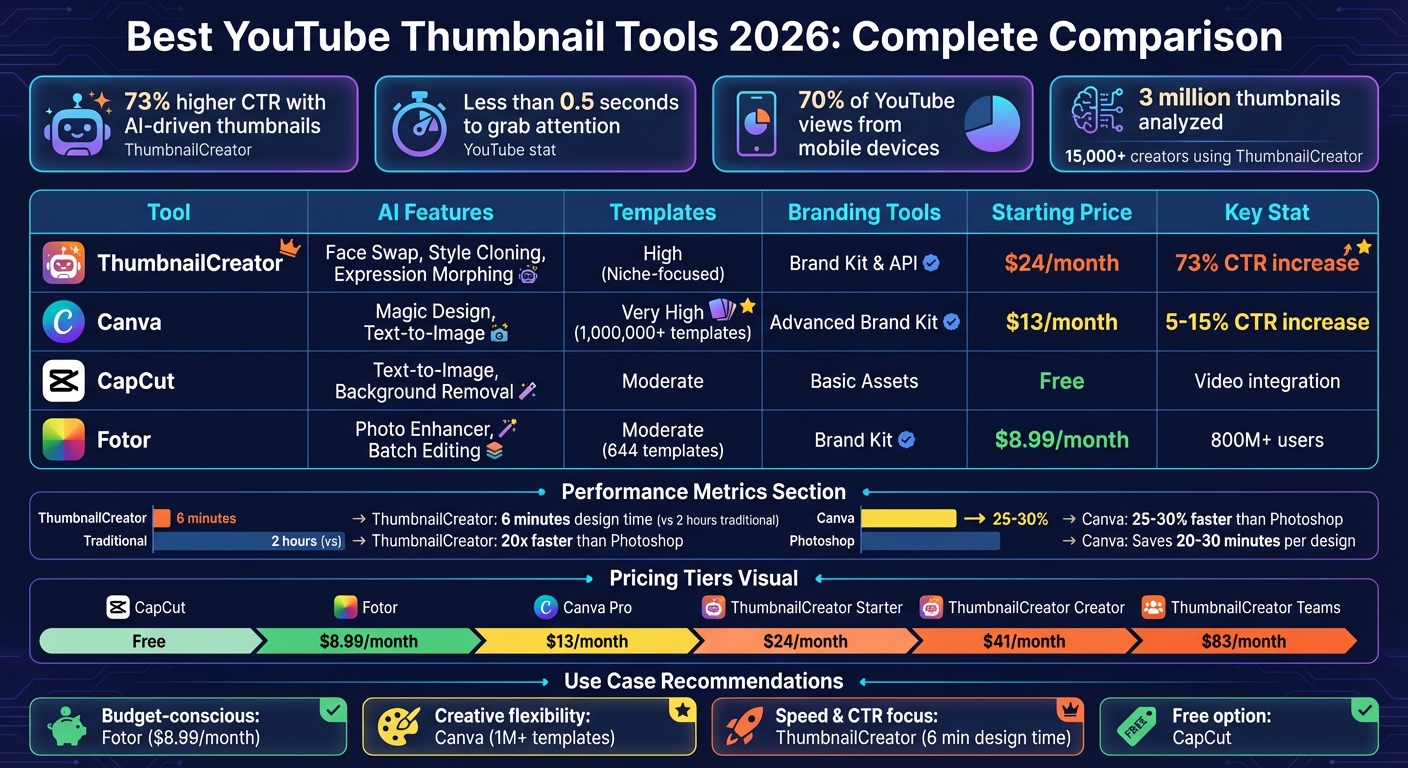
YouTube Thumbnail Tools Comparison 2026: Features, Pricing & Performance
Create Stunning YouTube Thumbnails in SECONDS with AI (ThumbnailCreator.com)
sbb-itb-b59debf
1. ThumbnailCreator
ThumbnailCreator, trusted by over 15,000 creators and backed by insights from analyzing 3 million high-performing thumbnails, delivers impressive results. It boasts a 73% increase in click-through rates (CTR) and slashes thumbnail creation time from 2 hours to just 6 minutes.
AI Customization
ThumbnailCreator’s AI tools make designing thumbnails fast and intuitive. You can either paste an unlisted YouTube URL to generate thumbnails automatically or use a text prompt to create a custom design. The "Edit with AI" feature allows you to refine thumbnails with simple instructions like "add bold white text" or "make colors more vibrant."
The Style Cloning option replicates popular thumbnail aesthetics, ensuring consistent branding. Plus, AI-powered face swapping and training features keep faces consistent across thumbnails. Advanced Face Training, available in premium plans, takes this a step further. The Auto-Optimize feature adjusts design elements based on data from millions of successful thumbnails, helping you enhance your CTR even before publishing.
“I used to spend 1-3 hours per thumbnail... Now, my thumbnails are finished within a few mins and they look (and convert) better as well.”
- Dave S Anderson
On top of these AI tools, ThumbnailCreator also provides customizable templates to elevate your brand’s visual identity.
Template Variety
ThumbnailCreator’s library of templates is tailored to specific niches like gaming, education, vlogs, and tech. These designs are fine-tuned for high click-through rates. With One-Click Remix, you can quickly personalize any template by adding your face, text, and brand colors. To maintain consistent branding, the Design Rules feature enforces your brand guidelines across all thumbnails.
Pricing
ThumbnailCreator offers flexible pricing options designed for creators at different levels of production:
| Plan | Price | Credits/Year | Key Features |
|---|---|---|---|
| Starter | $24/month | 600 | Basic face features and thumbnail extractor, ideal for 1–2 videos per week. |
| Creator | $41/month | 1,200 | Advanced face training, person swap, and access to trending thumbnail designs. |
| Teams | $83/month | 3,000 | Multiple face training, channel makeover, API access, and unlimited team members. |
Each plan includes a 7-day free trial with 10 credits, allowing you to explore all features risk-free. With a 4.9/5 rating from its user base, ThumbnailCreator has earned high praise from creators.
2. Canva
Canva is a popular design platform that provides access to over 20,000 YouTube thumbnail templates tailored to various niches like gaming, music, food, travel, finance, education, and vlogs. The free version includes a library of more than 250,000 templates, while Canva Pro offers an even larger selection, boasting over 1,000,000 templates.
AI Customization
One standout feature is Canva's Magic Design, which generates 10 unique thumbnail layouts from a single keyword, making the design process much faster. Another tool, Magic Media, creates images based on text prompts in different artistic styles. Canva also includes AI-powered tools like Background Remover (with 95% accuracy for simple backgrounds), Magic Eraser, and Magic Expand, all of which simplify and speed up the creative process.
Branding Tools
For those looking to maintain a cohesive visual identity, Canva Pro's Brand Kit is a game-changer. It allows you to store your channel's colors, fonts, and logos in one place, making it easy to apply your branding to any template with just one click. By dedicating 60–90 minutes to designing 4–8 thumbnails, creators can ensure a consistent and professional look for their videos.
Pricing
| Plan | Price | Key Features |
|---|---|---|
| Canva Free | $0 | 250,000+ templates, 5GB storage, basic editing tools |
| Canva Pro | $13/month ($156/year) | 1,000,000+ templates, 1TB storage, Brand Kit, Magic Design AI, Background Remover, and access to over 10 million stock images |
Canva Pro users often see a 5% to 15% increase in click-through rates compared to DIY designs. The platform is also estimated to be 25–30% faster than Photoshop for creating thumbnails, saving creators 20–30 minutes per design.
Next, discover how CapCut takes thumbnail design to the next level with its advanced editing tools.
3. CapCut
CapCut is a free thumbnail maker available across web, desktop, and mobile platforms. It offers flexibility in design without requiring a credit card.
AI Customization
CapCut's AI Design Agent uses advanced technology to analyze your video themes and create layouts, color schemes, and visuals that align with your style. With its text-to-image feature, you can generate professional thumbnails by simply typing a prompt. Additional tools like automatic background removal, image upscaling, and transparent image creation make it easy to keep your designs polished and high-quality. The AI provides a starting point, but you can tweak everything - fonts, colors, sizes, and effects - to ensure your thumbnails perfectly reflect your brand.
Template Variety
CapCut includes a collection of YouTube thumbnail templates sized at 1280 x 720 pixels (16:9). It also offers free stickers, shapes, filters, and stock images to enhance your designs.
Branding Tools
CapCut allows you to save your custom layouts, complete with preset text placements, shapes, and brand colors, as reusable templates for future projects. To boost click-through rates, the AI can create high-contrast visuals that draw attention. You can further refine these by adding concise and bold text (3–5 words) for better visibility on mobile devices. This blend of AI and manual customization ensures your thumbnails remain consistent and visually engaging.
Up next, discover how Fotor balances simplicity with powerful customization options for creating standout thumbnails.
4. Fotor
Fotor is a photo-editing platform trusted by over 800 million users worldwide. It combines advanced AI tools with a library of more than 500 YouTube-specific thumbnail templates, spanning categories like gaming, fashion, business, and education.
AI Customization
Fotor's AI features make photo editing quick and effective. The AI Photo Enhancer fine-tunes lighting and sharpens images, while the Background Remover isolates subjects from backgrounds in just 3 seconds. Additional tools like AI Replace and Image Extender let you swap objects or expand images to fit the 16:9 format seamlessly. Fotor also uses a multi-model pipeline to optimize images based on their subject type - whether it’s a portrait, product, or landscape. For even more creative options, you can generate custom AI art from text prompts, offering unique visuals beyond standard stock libraries. This supports designs that align with your branding needs.
Template Variety
With over 644 templates sized at the standard 1280 x 720 pixels, Fotor provides an array of options for creating striking thumbnails. The platform also features more than 100 stylish fonts and millions of stickers and icons for added personalization. Its drag-and-drop interface makes it easy to tweak templates - whether you’re adding logos, adjusting colors, or experimenting with fonts.
Branding Tools
Fotor’s Brand Kit feature is a game-changer for maintaining visual consistency. It allows you to save and apply logos, brand colors, and fonts across all your designs. For creators working on series-based content, the batch editor can apply consistent lighting and color adjustments to up to 500 images at once. Plus, you can resize a single thumbnail design into other formats like YouTube banners or Instagram posts, streamlining your workflow.
Pricing
Fotor offers a Free Plan with basic editing tools, although exports on this plan may include watermarks. For advanced AI features and extra design assets, the Individual Pro plan is available at $8.99 per month when billed annually. For teams or heavy users, the Pro+/Teams plan costs $19.99 per month.
"Fotor's photo editor makes editing a breeze even without prior knowledge. The speed and efficiency are remarkable, and the final results are top-notch."
- Mark, entrepreneur
Next, let’s dive into a comparison of these tools to evaluate their strengths and weaknesses.
Comparison: Strengths and Weaknesses
Let's dive into how these tools stack up in terms of their distinct advantages and drawbacks.
Each tool brings something different to the table. ThumbnailCreator focuses on AI-driven customization with features like Face Swap, Style Cloning, and Expression Morphing. These tools allow creators to craft standout, high-CTR thumbnails in just about 2 minutes. Designed specifically for YouTube creators, it prioritizes consistent branding across channels, which is key to improving click-through rates. On the other hand, Canva offers a massive library of over 10,000 templates and a Brand Kit that stores fonts, logos, and color palettes for quick application. However, Canva's general-purpose design workflow typically takes 5–15 minutes per thumbnail since it's not tailored exclusively for YouTube. Meanwhile, CapCut integrates video editing tools into its workflow, and Fotor stands out for its one-tap background removal and AI-powered photo enhancement, making it a great choice for polishing existing images.
When it comes to pricing, each tool aligns differently with its performance benefits. ThumbnailCreator cuts design time from 2 hours down to just 6 minutes and starts at $29/month. Canva Pro, at $12.99/month, offers a more affordable option but requires more manual effort. Fotor's Pro plan is even cheaper at $8.99/month, catering to budget-conscious users. For creators prioritizing speed, AI-native tools like ThumbnailCreator provide finished thumbnails up to 20 times faster than traditional options like Photoshop.
Here’s a quick comparison of the core features and pricing for each tool:
| Tool | AI Customization Focus | Template Variety | Branding Tools | Starting Price |
|---|---|---|---|---|
| ThumbnailCreator | Face Swap, Style Cloning, Expression Morphing | High (Niche-focused) | Brand Kit & API | $29/month |
| Canva | Magic Design (layouts), Text-to-Image | Very High (10,000+ templates) | Advanced Brand Kit | $12.99/month |
| CapCut | Video-to-thumbnail integration | Moderate | Basic brand assets | Varies by plan |
| Fotor | AI Enhancer, Background Remover | Moderate selection | Batch editing | $8.99/month |
This breakdown underscores the trade-off between specialized efficiency and broader creative flexibility. ThumbnailCreator is ideal for creators who need fast and consistent thumbnails, with users reporting a 73% higher CTR compared to DIY designs. Canva, while offering unmatched creative freedom, demands more manual effort. Meanwhile, Fotor delivers quality photo enhancements at a wallet-friendly price.
To stand out, advanced thumbnail optimization is crucial for creating effective thumbnails. Given that over 70% of YouTube views come from mobile devices, testing thumbnails at 168×94px resolution is a smart move for ensuring they perform well on smaller screens.
Conclusion
The insights shared above highlight how AI tools can revolutionize your thumbnail creation process, making it faster and more effective.
When selecting a tool, consider your priorities. If saving time and achieving professional-quality results without diving into complex design software is important, ThumbnailCreator stands out. It cuts the typical 2-hour design process down to just 6 minutes - making it 20 times faster than traditional tools like Photoshop. You can also compare thumbnail tools to see how different platforms stack up against each other. Plus, it ensures your channel maintains a consistent and polished visual identity across all content.
Users of ThumbnailCreator have reported a 73% increase in click-through rates compared to manually created thumbnails. Its AI has analyzed over 3 million high-performing thumbnails to identify what drives engagement, giving creators a significant edge. With over 15,000 creators already using the platform, it’s proven to be a reliable solution for maintaining consistent thumbnail branding.
ThumbnailCreator also offers a 7-day free trial, letting you explore its AI-driven features, including the Brand Kit and Series Consistency tools. These features ensure your thumbnails align perfectly with your channel's identity, making it especially useful for video series or playlists.
For creators looking to boost click-through rates and save hours of design time each week, ThumbnailCreator provides an AI-powered approach tailored specifically for YouTube. It handles the design elements - like layout, color emphasis, and text placement - so you can focus on delivering outstanding content.
FAQs
How do I keep my thumbnails on-brand across a whole series?
To keep your branding consistent throughout a series, focus on key elements like your color palette, typography, and logo placement to establish a cohesive visual identity. Tools like ThumbnailCreator can simplify this process by applying these elements to templates, ensuring everything stays aligned. Stick to a set style for images, text, and layouts - this not only strengthens your brand but also makes your content instantly recognizable to your audience.
What thumbnail elements most affect click-through rate (CTR)?
When it comes to boosting click-through rates (CTR), certain thumbnail features can make all the difference. Here are the key elements to focus on:
- Expressive Faces: Thumbnails with clear, engaging facial expressions naturally draw the eye and evoke curiosity or emotion.
- High-Contrast Colors: Bold color combinations help your thumbnail stand out, especially in crowded spaces like search results or social feeds.
- Readable, Bold Text: Adding text that is easy to read at a glance ensures your message gets across, even on smaller screens.
- Clear Focal Point: A strong, central focus in your thumbnail helps viewers quickly understand what your content is about.
These elements work together to grab attention and make your content more appealing, no matter where it’s being viewed.
How can I test a thumbnail for mobile before publishing?
When designing a thumbnail, it’s crucial to see how it looks on smaller screens. In ThumbnailCreator, switch to the 'Mobile' preview mode to view your thumbnail in a phone-sized frame. This helps you check if the text, visuals, and key elements remain clear and easy to read at reduced sizes.
Make sure your design has high contrast and is optimized for readability. If anything looks off, tweak your design and preview it again. Repeat this process until your thumbnail grabs attention and communicates effectively, even on mobile devices.