

CTR Data from Competitor Thumbnails: Common Mistakes
A competitor’s high CTR does not prove their thumbnail style will work for you. CTR only shows clicks divided by impressions, and that number can shift fast based on traffic source, niche, audience, and sample size.
Here’s the short version:
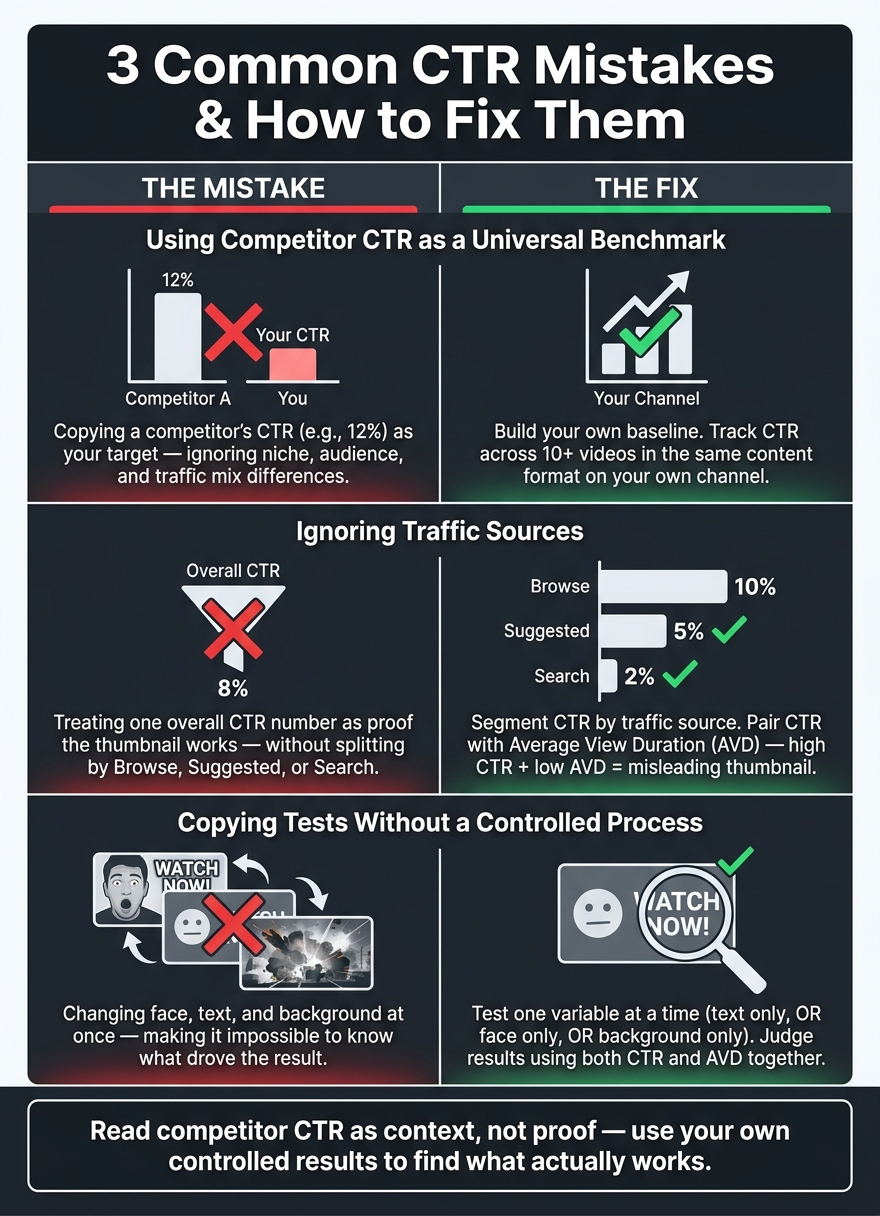
- Don’t use competitor CTR as your target. A 12% CTR on one channel can mean something very different on another.
- Check traffic source first. Browse, Suggested, and Search CTR measure different viewer behavior.
- Look at retention with CTR. High CTR + low average view duration often means the thumbnail or title set the wrong expectation.
- Build your own baseline. After about 10 videos in the same format, I can start spotting patterns with more confidence.
- Test one change at a time to isolate what impacts your CTR. If I change text, face, and background at once, I won’t know what moved the result.
If I want to learn from a competitor, I should treat their data as a starting point, not proof. The safer move is to study repeated patterns across top videos, segment results by traffic source, and judge thumbnails by both clicks and watch behavior.
| Mistake | What goes wrong | Better move |
|---|---|---|
| Using competitor CTR as a benchmark | I compare unlike channels, niches, and audiences | Use my own past videos as the baseline |
| Ignoring traffic source | I give the thumbnail too much credit | Split CTR by Browse, Suggested, and Search |
| Copying tests without control | I change too many things at once | Test one thumbnail variable at a time |
That’s the core idea of this article: read competitor CTR as context, not as an answer.
3 Common CTR Mistakes & How to Fix Them
16 YouTube Thumbnail Mistakes That Kill CTR
sbb-itb-b59debf
Mistake 1: Using Competitor CTR as a Universal Benchmark
A competitor's CTR only means something inside that channel's niche, audience, and traffic mix. The mistake is taking one channel's CTR and treating it like the goal for every other channel, which is one of many thumbnail mistakes to avoid.
Why Cross-Channel CTR Comparisons Break Down
A thumbnail style that works in one format can flop in another. Heavy text overlays can help tutorials by explaining the value fast. That same approach often hurts vlogs. Bright, specific backgrounds can work in gaming and underperform in finance.
Once you notice those gaps, the next step is pretty clear: compare videos against your own past uploads in the same format.
Thumbnail design only makes sense when you look at how YouTube distributes the video.
That is why the only benchmark that helps is your own channel history.
How to Build a Baseline From Your Own Channel
Use your own uploads to set the standard instead of borrowing someone else's CTR.
Track the thumbnail version, impressions, CTR, average view duration, and primary traffic source for every video. After about 10 videos in the same content type, you can start reading CTR patterns with more confidence.
CTR on its own doesn't tell the full story. Track retention alongside CTR, because clicks that don't hold attention are not a win.
CTR Patterns by Content Type
The table below shows why benchmark data needs to stay tied to format.
| Content Type | Design Element | Performance Trend |
|---|---|---|
| Tutorials | Heavy Text Overlays | Clarifies value fast |
| Vlogs | Heavy Text Overlays | Often lowers performance |
| Gaming | Bright/Specific Backgrounds | Can perform strongly in this niche |
| Finance | Gaming-style Backgrounds | Usually underperforms |
| Podcasts | Face Count | Needs a different face count than reviews |
| Product Reviews | Face Count | Face count needs to match the format |
Mistake 2: Ignoring Traffic Sources and Giving Too Much Credit to the Thumbnail
CTR can look VERY different based on where people found the video. That’s the catch.
A competitor’s CTR might look great on the surface, but traffic source can skew the picture. And even a solid CTR baseline falls apart when the traffic mix shifts.
Why Browse/Homepage, Suggested Videos, and Search CTR Mean Different Things
Not all clicks mean the same thing. Each traffic source tells you something a little different about why a person clicked.
Browse/Homepage CTR mostly shows how well the thumbnail stops the scroll and how broad the appeal is. Suggested videos CTR is more about fit. It depends on how well your video connects to the one the viewer just watched. Search CTR leans harder on query intent and title match, which means the thumbnail is only one piece of the puzzle.
So if CTR jumps from one source, that only proves the video worked well in that source. It doesn’t mean the thumbnail wins everywhere.
How to Separate Thumbnail Impact From Topic, Title, and Retention
A strong CTR doesn’t always come from the thumbnail itself. Sometimes the topic is doing most of the heavy lifting.
Instead of copying one thumbnail that did well, look at the top 20 videos in your niche and study repeated thumbnail patterns. Pay attention to things like:
- thumbnail styles
- Face count
- Text length
That gives you a better read on what keeps showing up, instead of chasing a single outlier.
You also need to pair CTR with retention. High CTR and low average view duration is a red flag. It usually means the click happened, but the video didn’t match what the viewer expected. In that case, the thumbnail may be pulling people in for the wrong reason.
Judge thumbnail performance through both CTR and retention, not CTR alone.
Traffic Source and Performance Factors: Comparison Tables
The table below shows what each traffic source mainly reflects and how to compare competitor performance more fairly.
| Traffic Source | What It Primarily Reflects | Comparison Step |
|---|---|---|
| Browse/Homepage | Thumbnail stopping power and broad appeal | Compare against your own channel's average Browse/Homepage CTR for similar topics |
| Suggested videos | Relevance to the video currently being watched | Check if the competitor's video is part of a specific series |
| Search | Alignment with viewer intent and title relevance | Evaluate whether the click was driven by the thumbnail or a highly specific search query |
This second table shows which factors hit which metrics the most, and where people tend to give the thumbnail too much credit.
| Factor | Metric Most Affected | Risk of Over-Crediting Thumbnail |
|---|---|---|
| Thumbnail Design | Click-Through Rate (CTR) | High; a high CTR may reflect a trending topic rather than the image |
| Topic/Hook | Impressions & Initial CTR | Moderate; a high-demand topic will get clicks regardless of thumbnail quality |
| Content Quality | Average View Duration (AVD) | Low; if CTR is high but AVD is low, the thumbnail is likely misleading |
The next mistake is copying competitor test results without controlling your own process.
Mistake 3: Copying Competitor Tests and Design Patterns Without a Controlled Process
The next mistake is simple: copying a competitor's test result without controlling your own variables.
A lot of creators change the face, background, and text all at once. Then, if CTR goes up, they have no clean way to know what caused it. Was it the new face? The text? The background? You got a better result, sure, but you can't point to the reason. And if you don't know why it worked, it's hard to do it again on the next video.
How to Use Competitor A/B Test Results as Starting Points, Not Rules
A competitor's test result should give you a starting idea, not a final answer.
Their audience is different. Their traffic sources are different. Their niche may react in a different way too. So a thumbnail style that works for one channel might do very little for yours.
The fix is pretty clear: test one visual variable at a time. Change only the text, only the face, or only the background. Then wait until you have enough impressions to judge the result. And don't look at CTR by itself. Check CTR and AVD together. If CTR jumps but retention drops, that's not a real win. It's a misleading one.
How to Study Thumbnail Patterns Without Copying Cosmetic Details
Instead of copying one thumbnail pixel for pixel, look for patterns you can repeat.
Study the top 20 videos in your niche and look for shared structure. In many cases, the same traits show up again and again:
- One focal point
- Short text
- Strong contrast
- Mobile legibility
That's what you should test on your own channel. Not the exact colors. Not the exact fonts. Those details often match a channel's style, and that style doesn't always carry over.
Also, keep key text out of the lower-right corner. On mobile, the timestamp covers that area.
Using ThumbnailCreator to Run Cleaner CTR Tests
Those are the variables worth testing, not the exact colors or fonts.
This gets a lot easier when your tool supports a clean testing process. ThumbnailCreator helps you make thumbnail variations fast. Its features - face swapping, text editing, and object swapping - are modular, so you can change one element while keeping everything else the same. That's the part many creators miss when they copy by hand. Each test stays isolated, which makes the result much easier to trust.
Conclusion: Read Competitor CTR as Context, Not Proof
Competitor CTR data can help. But only if you know what you're looking at.
If you don't have traffic source, retention, and niche context, competitor CTR doesn't tell you much about what will work on your channel.
So the better question isn't whether a CTR looks high. It's what caused it. That's where people get tripped up. Each of the three mistakes above comes from treating competitor results like proof instead of context. As Aleric Heck, Founder & CEO of ThumbnailCreator.com, puts it:
"When you see a creator with a completely different audience swearing by a specific style, understand that you're seeing what works for their niche and their traffic sources, not yours." - Aleric Heck, Founder & CEO of ThumbnailCreator.com
The fix is pretty simple:
- Use your own baseline
- Segment CTR by traffic source
- Test one thumbnail variable at a time
Competitor data can point you toward ideas to test. Your own controlled results are what show whether those ideas work.
FAQs
How many impressions are enough to trust CTR?
Aim for at least 1,000 impressions for each thumbnail variant as your starting line. Anything below that, and CTR is more likely to be random noise than a pattern you can trust.
If you want more confidence in the result, shoot for 2,000 to 5,000 impressions per variant. Let the test run for 7 to 14 days. If your channel gets fewer than 10,000 impressions per week, give it more time - up to 1 month.
What is a good CTR for my channel?
A “good” YouTube thumbnail CTR is usually around 4%–5% overall, with 6%+ seen as high-performing.
Here’s a simple rule of thumb:
- Below 2% is poor
- 2%–5% is average
- 5%–10% is strong
- 10%+ is elite
That said, CTR can swing a lot based on traffic source. A thumbnail might do well in one source and look weak in another. So compare performance within the right source, not just the top-line number.
And one more thing: a high CTR only helps if people keep watching. If watch time and retention drop, the thumbnail may be pulling in clicks that don’t turn into good viewing sessions.
Which thumbnail element should I test first?
Start with the Big Three: face vs. no face, bright vs. dark colors, and text vs. no text. Those changes tend to drive the biggest swings in performance.
Also, put your thumbnails side by side with top competitors. That makes it much easier to spot core problems like clutter, low contrast, or a subject that isn’t clear at a glance. Fix those first before you spend time testing smaller details.