

CTR Insights: Improve Thumbnails with Analytics
Low CTR alone isn’t a reason to replace your thumbnail. I first compare impressions, traffic sources, and watch time with 3–5 similar videos over the same period. That helps me check whether the thumbnail needs work - or the video is simply reaching more people.
Here’s the process I use:
- Check the baseline: Review CTR benchmarks, impressions, views, watch time, and retention in YouTube Studio.
- Make one change: Fix a specific issue, such as small text or an unclear subject. I can use ThumbnailCreator to build variants while keeping the title fixed.
- Test and review: Run a thumbnail-only A/B test when available, or treat manual before-and-after results with caution.
- Keep, revise, or retest: Use YouTube’s reported watch-time result, with CTR and retention as context.
My goal is <u>clicks that lead to viewing</u> - not a higher CTR at any cost.
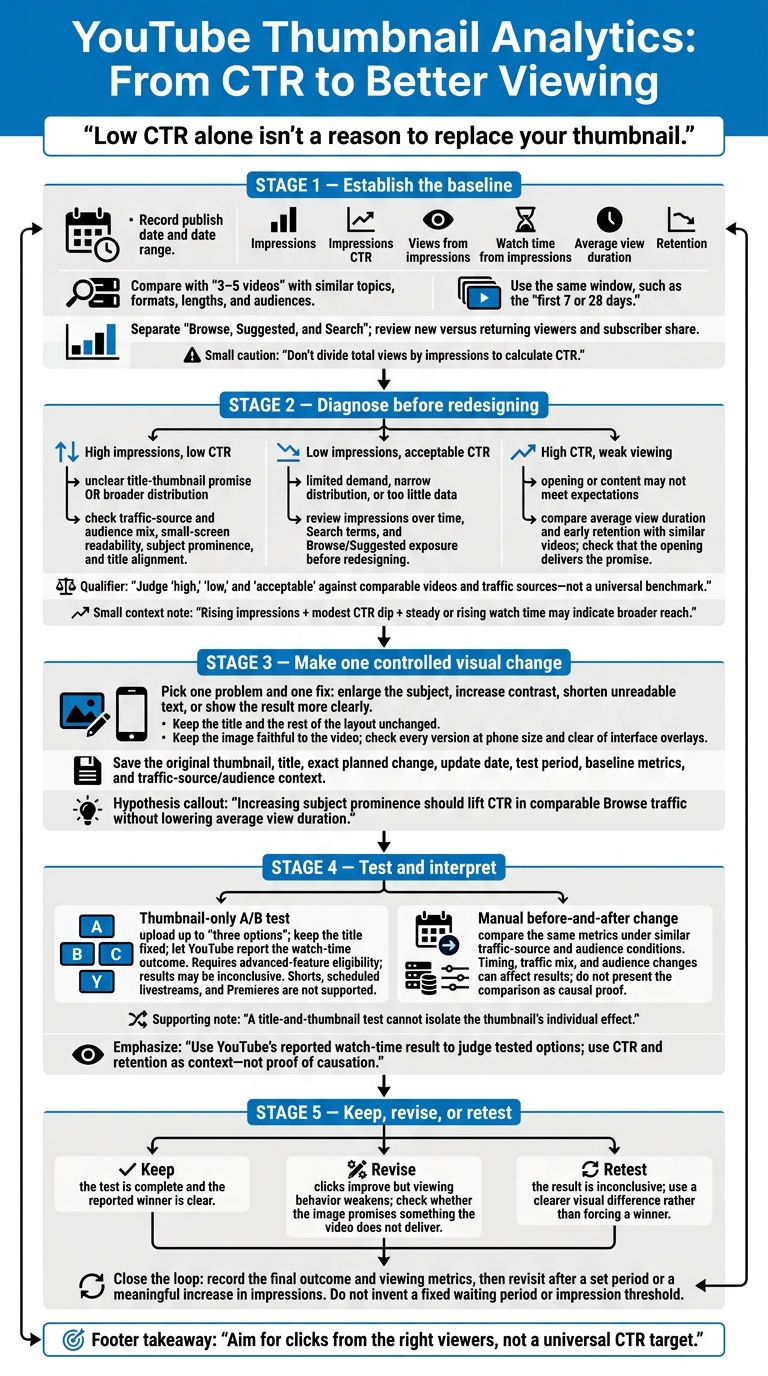
YouTube Thumbnail Analytics: From CTR to Better Viewing
Check Thumbnail Performance in YouTube Studio
Find Impressions, CTR, and Watch Time
Start with the video’s baseline numbers. In YouTube Studio, go to Content → video → Analytics → Reach. Open the “Impressions and how they led to watch time” card in Reach. Record the publish date, date range, and these four metrics.
| Metric | Meaning | Diagnostic use |
|---|---|---|
| Impressions | Counted thumbnail displays on YouTube. | Shows distribution scale and sample size. |
| Impressions CTR | Percentage of counted impressions that result in views. | Shows how well the title-thumbnail pair earns clicks. |
| Views from impressions | Views attributed to counted impressions. | Shows how many views those impressions generated. |
| Watch time from impressions | Viewing time attributed to counted impressions. | Shows whether clicks led to meaningful viewing. |
Don’t divide total views by impressions to calculate CTR. Not every view comes from a counted impression. External websites, notifications, and end screens can generate views without counted impressions.
Compare Videos, Traffic Sources, and Audiences
Compare your baseline with similar uploads - not unrelated content. Choose 3–5 videos with similar topics, formats, lengths, and audiences. Use the same time window for each, such as the first 7 or 28 days.
Check Browse, Suggested, and Search separately. Each puts the video in front of viewers in a different context.
Also review new versus returning viewers and subscriber share. A larger share of new viewers can change the results. If impressions rise, CTR dips modestly, and watch time holds steady or increases, the video may be reaching more people - not suffering from a worse thumbnail.
Identify the Likely Cause
Use those video and traffic-source comparisons to narrow down the likely cause and choose your next step. For those managing large catalogs, testing thumbnails at scale requires a systematic approach. Judge “high,” “low,” and “acceptable” against your comparison set and traffic sources, not a blanket benchmark.
| Observed pattern | Possible explanation | Next action |
|---|---|---|
| High impressions, low CTR | The title-thumbnail promise may be unclear. Broader distribution may also lower CTR. | Check the traffic-source and audience mix. Then review small-screen readability, how much the subject stands out, and how well the thumbnail matches the title. |
| Low impressions, acceptable CTR | Limited demand, narrow distribution, or too little data may be restricting exposure. | Review impressions over time, Search terms, and Browse/Suggested exposure before redesigning. |
| High CTR, weak viewing | The opening or content may not meet the expectations set by the title and thumbnail. | Compare average view duration and early retention with similar videos. Check whether the opening delivers the promised content. |
sbb-itb-b59debf
YouTube Thumbnail Impressions & CTR Explained | How Impressions Turn Into Views & Watch Time !!
Revise Your Thumbnail Based on the Data
Once you’ve identified the likely cause, make one controlled thumbnail change.
Change One Main Visual Element
Pick one problem and one fix. Use the traffic-source mix and watch-time pattern you found to guide the change. You might enlarge a hard-to-see subject, increase contrast between the subject and background, shorten unreadable text, or show the result more clearly.
Keep the title and the rest of the layout unchanged. If watch time is weak, check that the thumbnail matches the title, opening, and content before making it more attention-grabbing.
Changing just one variable lets you test whether better clarity - not a new concept - improves CTR. It also gives you a clean test for the next step.
Create Thumbnail Variants with ThumbnailCreator
Build variants around the same hypothesis. Use ThumbnailCreator to create versions quickly with AI generation or templates. Then refine them with text editing, object swapping, or face swapping. Keep products, people, and promised benefits faithful to the video.
Check every version at phone size. Viewers should be able to recognize the subject and read the text, with important details clear of interface overlays.
Document Your Baseline and Hypothesis
Save a baseline before publishing the new thumbnail. Include the original thumbnail, title, exact planned change, update date, and test period.
Record impressions, impressions CTR, views, watch time from impressions, and average view duration. This lets you compare the same metrics before and after the change. Note any traffic-source and audience changes, too.
Write a measurable hypothesis:
Increasing subject prominence should lift CTR in comparable Browse traffic without lowering average view duration.
Treat early changes as directional rather than firm results, and compare videos with similar exposure.
Test Thumbnail Changes and Measure Results
Test your thumbnail hypothesis against the baseline you recorded. Use that same baseline when comparing results.
Run a Thumbnail A/B Test
On desktop, go to YouTube Studio → Content → select your video → Video details. Open A/B Testing in the Thumbnail area.
Choose Thumbnail only, upload up to three options, and start the test. Keep the title fixed. Changing the title or thumbnail during the test can stop it and require a restart.
Let YouTube report the outcome. It evaluates watch time, and the test may end without a clear winner. You need advanced-feature eligibility to use testing. Shorts, scheduled livestreams, and Premieres aren’t supported.
Understand Manual Changes and Test Results
Choose your testing method before judging the results.
| Method | Use case | Evaluation metric | Limitation |
|---|---|---|---|
| Manual change | Make a quick fix when you can’t run a test or need to correct an obvious design problem | Compare the same metrics before and after the update | Timing, traffic mix, and audience changes can affect the result. |
| Thumbnail-only test | Test a visual hypothesis while keeping the title fixed | YouTube’s reported watch-time result, plus CTR and retention | Requires eligibility; results may be inconclusive. |
| Title-and-thumbnail test | Test the title and thumbnail together | Watch time for each title-and-thumbnail combination | Can’t isolate the thumbnail’s individual effect. |
Keep YouTube’s reported result separate from your supporting Analytics. Use the reported outcome to judge the tested options. Then review impressions, CTR, average view duration, and retention for context - not proof of causation. For manual updates, compare similar traffic sources and audience conditions rather than overall CTR alone.
Use the reported winner and your Analytics to decide what to do next.
Decide Whether to Keep, Revise, or Retest
Keep the reported winner when the test is complete and the result is clear. Revise when clicks improve but viewing behavior weakens. Does the image promise something the video doesn’t deliver? Retest an inconclusive result with a clearer visual difference between options instead of forcing a winner.
A brief CTR increase doesn’t prove success. A winning thumbnail also doesn’t guarantee future performance, since audiences and traffic sources change. Record the final outcome and viewing metrics in your testing log.
Conclusion: Repeat Your Thumbnail Review
Follow a repeatable cycle: baseline → diagnosis → one visual revision → test → measure again. Revisit the results after a set period or a meaningful increase in impressions.
Focus on videos with enough impressions to assess and unusually low CTR compared with videos in the same format and traffic source. Compare like with like: the same format, traffic source, and audience. Reaching a broader audience can lower CTR without making the thumbnail less effective.
Use this review loop whenever you revisit a thumbnail. Aim for clicks from the right viewers, not a universal CTR target. You can also compare thumbnail strategies to see which approaches yield the best results for your specific audience.
- [ ] Check the correct video’s impressions, CTR, views, watch time, and retention.
- [ ] Compare results within the same format, traffic source, and audience.
- [ ] Save the original thumbnail, write one hypothesis, and make one accurate visual change.
- [ ] Test the change. Once you have enough impressions to judge the results, measure again and decide whether to keep, revise, or retest.
FAQs
How many impressions do I need before testing a thumbnail?
Aim for 1,000 to 2,000 impressions per thumbnail variant, and wait until each variant reaches at least 1,000 before making an initial assessment. Tests with 10,000 total impressions generally give you the most reliable results.
Don’t call a winner too soon. Loyal subscribers can skew the data during the first 24 to 48 hours. For best results, run your test for 7 to 14 days to account for changes in audience behavior throughout the week.
How long should I wait between thumbnail changes?
Wait 2 to 3 days after uploading before testing a thumbnail so early subscriber views don’t skew your data. Run the test for at least 7 to 14 days to account for both weekday and weekend behavior.
Aim for 1,000 to 2,000 impressions per variant. A total of 10,000 impressions provides the most reliable results.
If you change a thumbnail outside an A/B test, allow at least 30 days to assess its long-term impact.
Should I test new thumbnails on older videos?
Yes - testing new thumbnails on older videos can bring back views and interest. Focus on evergreen content that gets steady traffic or has the potential for high impressions but a declining click-through rate (CTR). Older videos also give you a low-pressure way to learn how thumbnail testing works.
Track your changes and run tests for 7 to 14 days to gather reliable data. For videos with fewer than 10,000 weekly impressions, allow up to one month.