

How Faces in Thumbnails Impact Viewer Demographics
I’d choose a thumbnail that explains the video - not assume a face will attract a certain audience. Use a face when the person or reaction matters. Put the product, place, or result first when that’s the reason to watch.
Here’s how I’d compare the options:
- Face-led: Test expression, face size, and who appears.
- Subject-led: Make the main object, action, or outcome easy to see.
- Face and subject: Keep both readable without crowding the image.
I’d change 1 element at a time, then check clicks, watch time, and retention. More clicks don’t prove a change in who watches. This requires advanced thumbnail optimization to align performance with specific viewer segments. <u>Age, gender, and geography need a separate check</u> - and if audience data isn’t available for each version, I wouldn’t claim a demographic shift.
1. Face-Led Thumbnails
A face can draw attention, but composition matters just as much as who’s pictured.
When a Face Helps
Use a face when the person is central to the video or their reaction adds context the title can’t convey. Faces work best when emotion or the person’s credibility gives viewers a reason to watch.
For reviews, tutorials, recipes, travel, and explainers, keep the main subject visible if the face isn’t the topic.
A close-up shows the most emotion but leaves little room for context. Use the smallest crop that keeps the expression readable and the subject clear in a mobile feed. On a small screen, that clarity affects who notices your thumbnail.
Match Expression to Viewer Expectation
Match the expression to the video’s actual tone. Keep text away from the eyes and mouth, and use the person’s gaze or a gesture to point viewers toward the main object or subject. The person should have a clear connection to the content, not just a recognizable face.
What the Data Usually Shows
Recognizable people often work better for subscriber-focused videos. Clear actions and relatable emotions often work better for discovery.
Thumbnail appeal can vary with viewing behavior, not just audience makeup. Compare age, gender, geography, and retention separately before deciding whether a face-led design reaches your intended audience.
Use these face-led signals as a baseline when testing subject-led versions against them. For a structured approach, follow a thumbnail A/B testing guide to ensure your results are statistically significant.
sbb-itb-b59debf
2. Subject-Led Thumbnails Without Faces
Content Fit and Visual Focus
Put the main subject first. For a review, show the product. For a travel guide, show the location. For a transformation, show the finished result. Use a process image only when the action communicates the value better than the outcome.
Keep the most informative element centered and cut distractions. For locations, a recognizable foreground landmark can say more than a broad view packed with small details.
With the subject clear, test whether thumbnails without facial expressions attract the intended audience.
Emotional Cues and Audience Identity
Faces aren’t the only way to convey emotion. Damage, motion, scale, and transformation can do that, too. Match these cues to viewers’ interests: a visible result can suggest practical value, while an unusual object or unfinished action can build suspense.
Results by Audience Segment
Subject-led thumbnails may outperform face-led versions when the topic itself is the hook. Test clarity for search traffic and stronger visual impact for browse traffic using thumbnail testing systems.
Compare both versions on the same video. Where demographic data is available, use it before drawing conclusions about audience segments.
Use these subject-led cues as the baseline for tests of expression, subject, and layout.
Facial Expressions and Identity: What to Test
Once you’ve set the thumbnail format, test whether expression and identity change who responds.
Match Expressions to the Video's Message
An expression makes a visual promise, not a demographic prediction. Check it against the title and subject: Does the face match the experience the video will deliver?
| Expression | Possible viewer read | Audience response to validate |
|---|---|---|
| Neutral | Clear, reliable information | More returning viewers? |
| Happy | Approachable, upbeat content | More new viewers? |
| Surprised | An unexpected discovery | Different response by age range? |
| Concerned | A problem worth addressing | Better retention on problem-solving content? |
| Focused | Expertise and concentration | Better watch time? |
| Confused | A question to resolve | Stronger response from search viewers? |
For a clean test, change only the expression. Keep the title, subject, background, and text the same. Make the face large enough that viewers can read the eyes and mouth on mobile screens. Track demographics separately from traffic source and new-versus-returning viewers.
Next, test whether recognizing the person changes how viewers read the same face.
Compare Who Appears in the Thumbnail
A familiar face can feel relevant before viewers even read its expression. Treat the possibilities below as interpretations to test - not predictions based on appearance.
| Face type | Possible viewer read | Audience response to validate | Testing risk |
|---|---|---|---|
| Creator | A familiar guide | More returning viewers? | Familiarity may limit appeal to new viewers |
| Guest or expert | Specialist authority | Better watch time on expert-led content? | May imply unsupported expertise or endorsement |
| Multiple faces | Collaboration or disagreement | More clicks on group-led content? | Competing faces can obscure the message |
| Unfamiliar face or AI-generated face | An unknown person or synthetic face | Lower retention when identity is unclear? | May imply a real participant |
Vary roles, framing, or styling to fit the content, but don’t treat appearance as audience data. When comparing identities, keep expression and framing consistent. Label synthetic imagery clearly, and never imply real participation or endorsement.
Use these identity variables in your next A/B testing vs gut feeling in your next one-change-at-a-time thumbnail test.
Test Thumbnail Variants and Measure Audience Results
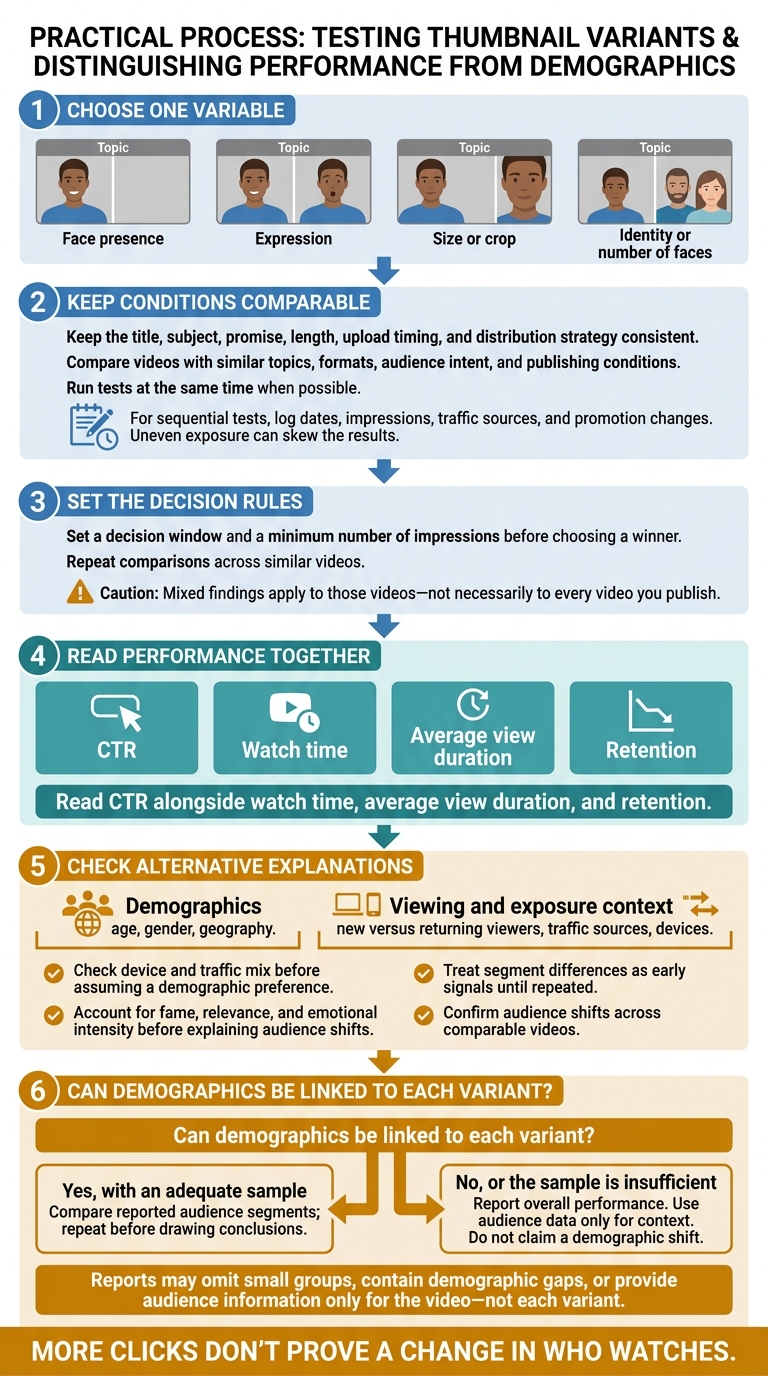
How to Test Thumbnails Without Misreading Audience Results
Change One Thumbnail Element at a Time
Compare videos with similar topics, formats, audience intent, and publishing conditions. Keep the title, subject, promise, length, upload timing, and distribution strategy consistent. Run tests at the same time when possible. For tests run one after another, log dates, impressions, traffic sources, and promotion changes. Uneven exposure can skew the results.
Use this matrix to track one variable per test.
| Variable | Control condition | Audience segment | Success metrics | Interpretation rule |
|---|---|---|---|---|
| Face presence | Keep the title, topic, layout, and text the same; compare a face with no face | New and returning viewers; age and gender groups where reported | CTR and average view duration | Confirm audience shifts across comparable videos. |
| Expression | Keep the person, crop, size, and background the same; change only the expression | Age, gender, geography, or device when samples allow | CTR and average view duration | Treat segment differences as early signals until repeated. |
| Size or crop | Keep the face, expression, text, and background the same | Mobile versus desktop; new versus returning viewers | CTR and average view duration | Check device and traffic mix before assuming a demographic preference. |
| Identity or number of faces | Keep the composition and message the same; change only the person or number of people | Relevant audience groups and traffic sources | CTR and average view duration | Account for fame, relevance, and emotional intensity before explaining audience shifts. |
Before choosing a winner, set a decision window and a minimum number of impressions. Repeat comparisons across similar videos. Mixed findings apply to those videos - not necessarily to every video you publish.
Separate Demographics from Viewing Behavior
After testing, assess clicks and audience makeup separately. Read CTR alongside watch time, average view duration, and retention. Check whether traffic sources, geography, or devices changed before attributing results to demographic shifts.
Reports may leave out small groups, have gaps in demographic data, or show audience information only for the video - not each variant. If you can't link variants to demographics, report overall performance and use audience data only for context. Say clearly when the sample doesn't support a demographic conclusion.
Build Consistent Variants with ThumbnailCreator
ThumbnailCreator lets you duplicate a base thumbnail and swap one element at a time. Measure each variant’s results, and compare demographics only when variant-level audience data is available.
Conclusion: Choose Thumbnails That Fit Your Audience
Match your thumbnail to the video’s hook. Pick the format that fits what makes viewers click, then check retention data to see whether it delivers.
| Strategy | Best use case | Main caution | What to check |
|---|---|---|---|
| Recognizable face | Personality-led content for returning viewers | A face can draw clicks without explaining the topic. | CTR, watch time, retention, and fit with the intended audience |
| Subject-led without a face | Topic-first content aimed at search intent or broader discovery | It can feel less personal. | CTR, average view duration, retention, and how clearly it conveys the video’s promise |
| Face and subject | Videos where both identity and outcome matter to viewers | Too much text or crowded visuals can hurt readability. | Controlled tests of face presence, face size, and subject emphasis; audience fit where measurable |
Familiar faces may appeal to returning viewers, while clear actions and emotions may help reach new viewers.
Favor the version that attracts the right viewers and keeps them watching - even with a lower CTR. Check CTR benchmarks alongside retention, and review demographics separately. A higher CTR alone doesn’t prove a better demographic fit.
FAQs
How many impressions do I need for a reliable thumbnail test?
Aim for 2,000 to 10,000 impressions per thumbnail variant for reliable results. Trends can start to show at 500 to 1,000 impressions, but more impressions improve accuracy. Wait until variants have similar impression counts before comparing them.
Smaller channels may need 1 to 2 weeks to hit these targets. Larger channels may get there in 24 to 48 hours. Use ThumbnailCreator to create variations quickly.
How can I assess audience fit without variant-level demographics?
Put your channel’s YouTube Studio data first, rather than relying on broad demographic averages. A/B test controlled thumbnail variables for 7–14 days, aiming for 2,000–10,000 impressions per variant.
Track click-through rate (CTR) by traffic source, along with average view duration and retention. These metrics help you see whether each design gets clicks AND brings in viewers who stick around.
ThumbnailCreator can help you generate variants quickly.
What if a face boosts clicks but lowers retention?
If a face in your thumbnail increases click-through rate (CTR) but lowers retention, your thumbnail may promise too much - or fail to match the video. Compare CTR with Average View Duration in your analytics’ Engagement tab.
Your thumbnail should make a promise your video delivers on. Use ThumbnailCreator to refine your designs, then run A/B tests to attract viewers who stick around - not just click.