

Fair Use vs. Copyright: Thumbnail Rules
If I use someone else’s image in a YouTube thumbnail, I should assume it’s protected. Fair use may help in some cases, but it is a limited legal defense, not a free pass. A crop, filter, text overlay, or small file size usually does not fix the problem.
Here’s the short version:
- Copyright is the default rule. If I didn’t make the image or get permission, I should treat it as protected.
- Fair use is judged later. In the U.S., courts look at 4 factors under 17 U.S.C. § 107.
- Thumbnails can get DMCA takedowns on their own. That can lead to video issues, lost ad income, or a channel strike.
- Small thumbnails are not auto-safe. Court cases about search engine thumbnails turned on different purpose and low market harm - not just image size.
- Risk is lower when the thumbnail supports review, criticism, or teaching.
- Risk is higher when I use a celebrity photo, poster, logo, or product image just to get clicks. Instead, focus on thumbnail strategies for your specific video type to drive engagement safely.
What I look at to avoid common thumbnail mistakes before I publish:
- Purpose - Am I commenting on the image, or just using it for attention?
- Type of source - Posters, album art, and game art often get stronger copyright protection.
- Amount used - Even a small crop can copy the “heart” of the image.
- Market harm - Could my thumbnail take the place of a licensed promo image?
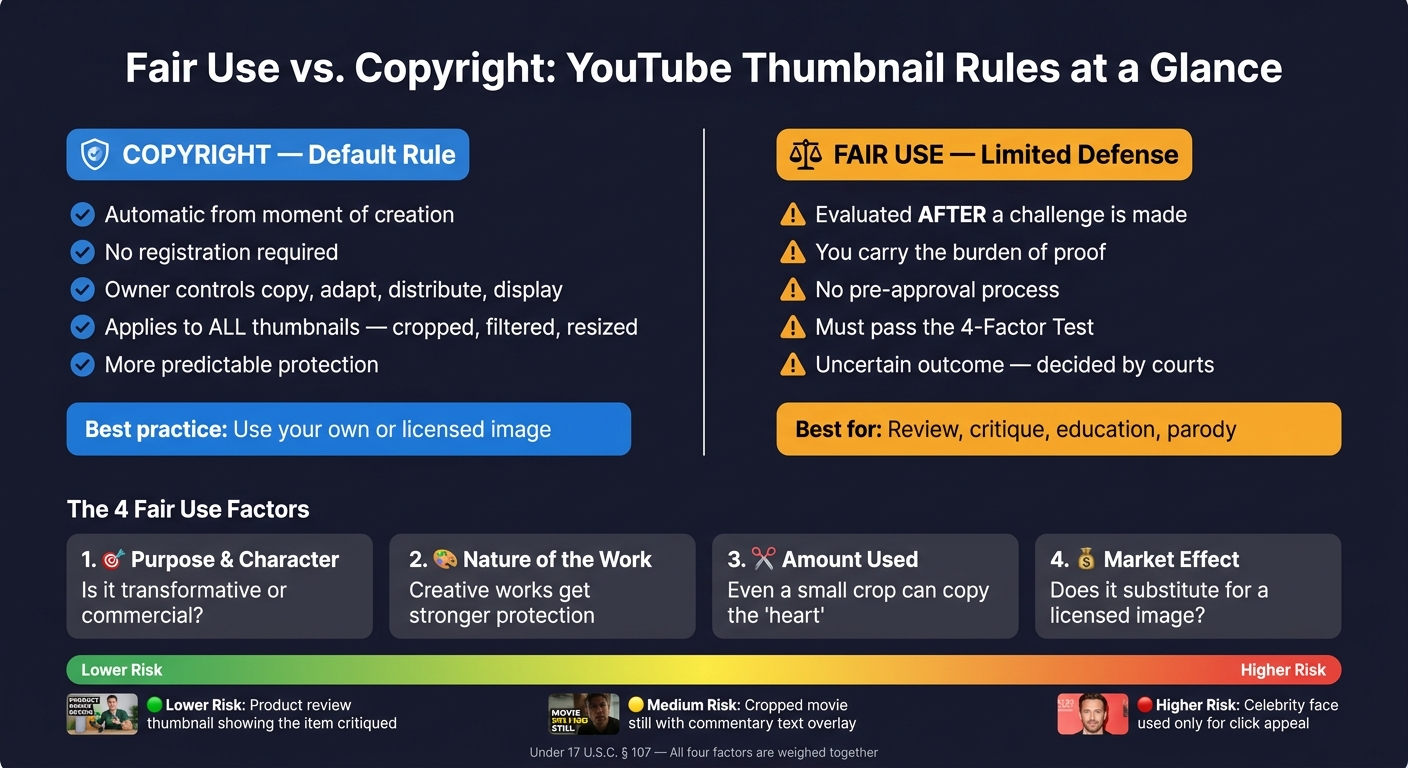
Fair Use vs. Copyright: YouTube Thumbnail Rules at a Glance
Thumbnail copyright strikes from using photos or even fonts (A4Q)
sbb-itb-b59debf
Quick Comparison
| Topic | Copyright | Fair Use |
|---|---|---|
| What it is | Automatic legal protection for original images | A limited defense to infringement |
| When it applies | From the moment the image exists | After someone challenges the use |
| Main rule for thumbnails | Permission is often needed | The use must fit the 4-factor test |
| Safe to rely on? | More predictable | Less certain |
| Best use case | Use my own or licensed image | Review, critique, teaching, parody |
My bottom line: the safest path is to use original or licensed visuals. I should treat fair use as a backup argument, not my first plan.
Fair Use vs. Copyright: Side-by-Side Comparison
Copyright as the Default Rule
Copyright kicks in automatically the moment an original image is fixed in a tangible form. Under U.S. law, the owner gets exclusive rights to copy, adapt, distribute, and display that image. And yes, that still applies to thumbnails. Cropping a movie poster, adding text to a celebrity photo, or resizing a product image still uses the original work.
That default rule matters. It means thumbnail edits don't get a free pass just because they're smaller or dressed up a bit. In most cases, you still need either a license or a strong fair use argument.
Registration is not required for copyright protection to exist. But it does give the owner extra enforcement tools, like statutory damages and attorney's fees. The plain-English takeaway is simple: if you didn't make the image and didn't license it, assume it's protected.
Fair Use as a Case-by-Case Defense
Fair use works very differently. It's a legal defense you raise after someone claims infringement. A court then looks at your specific use and decides, after the fact, whether it fits under the four statutory factors. There is no approval process before you publish.
That puts the burden on you. If you're relying on fair use, you have to show why it applies. That's a tough spot for routine thumbnails, which usually exist to get clicks, not to comment on the original image.
Here’s the side-by-side view:
| Aspect | Copyright (Default Rule) | Fair Use (Case-by-Case Defense) |
|---|---|---|
| Definition | Automatic exclusive rights in original images from the moment of creation. | Limited defense for criticism, commentary, education, and similar uses. |
| When it matters | Immediately, for virtually all original images used in thumbnails. | Only when a specific use is challenged and evaluated under the four statutory factors. |
| Who carries the burden | Rights holder must show ownership and copying. | The creator relying on fair use must justify the use under the four-factor test. |
| Permission required? | Yes, unless a license or exception applies. | No, but the creator bears the risk until a court accepts the defense. |
| Thumbnail impact | Pushes creators toward original or licensed visuals to avoid infringement. | May allow limited transformative use in critique or educational thumbnails, but the result is uncertain. |
That gap gets easier to spot when a thumbnail starts looking more like fair use - or more like infringement.
When a Thumbnail Is More Likely Fair Use or Infringement
Signs a Thumbnail Use May Lean Toward Fair Use
Thumbnail risk usually comes down to purpose and effect. Some uses help explain, critique, or teach. Others mainly borrow the pull of someone else’s image.
One of the clearest fair use signals is a thumbnail that changes the image’s job. If the image helps support criticism, review, or a lesson, the case is stronger than if it’s there just to make people click. That’s why review thumbnails tend to be in a better spot when the image is tied to clear critique instead of raw visual bait.
You can also see transformation in how creators put the thumbnail together. A common example is using AI-generated backgrounds instead of copyrighted location shots or movie stills. That cuts down reliance on protected images.
Amount matters too. Use only what the thumbnail needs. A small excerpt used to explain something is more likely to help a fair use argument than a thumbnail built around someone else’s image. These clues matter because they line up with the four fair use factors.
Signs a Thumbnail Use May Lean Toward Infringement
Risk goes up fast when the image is there for attention, not commentary. A celebrity face used only for click appeal, with no actual comment on that person, leans toward infringement. The same is true when a creator uses a celebrity’s likeness for that extra traffic boost even though the video is not actually about them.
Brand logos follow the same pattern. A logo used to borrow credibility in a thumbnail that has nothing to do with the brand is much riskier than a logo shown in a real review or news report.
Small edits don’t change the legal result. Cropping, filtering, or adding text does not make a copied image transformative. If the original image is still doing the visual heavy lifting, the edit is cosmetic - not legal cover.
| Thumbnail Scenario | Risk Level | Why |
|---|---|---|
| Product review showing the item being critiqued | Lower | Commentary purpose; serves a different function than the original |
| AI-generated background replacing a copyrighted location shot | Lower | Original visual; no protected image used |
| Tutorial thumbnail using an original diagram or graphic | Lower | Original visual created for the specific instructional context |
| Celebrity face used solely for click recognition | Higher | Attention-driven use without direct commentary |
| Brand logo as borrowed credibility unrelated to the video topic | Higher | Decorative use, not genuine review or criticism |
| Cropped or filtered movie still centered in the thumbnail | Higher | Surface-level edit; uses the heart of the copyrighted work |
These are clues, not automatic answers. The four fair use factors still decide the final call. If you use the most recognizable part of a work, that can weigh hard against fair use. And if the thumbnail acts as a substitute for the original, cropping or resizing won’t solve the problem.
The Four Fair Use Factors Applied to Thumbnails
Purpose, Nature, Amount, and Market Effect
U.S. copyright law applies a four-factor fair use test under 17 U.S.C. § 107. Courts look at all four factors together instead of letting just one decide the case. With thumbnails, the main issues are usually transformation and market harm, not file size.
Those warning signs can matter. But they do not settle the question. The four factors do.
| Factor | What Courts Ask | Thumbnail Implication |
|---|---|---|
| 1. Purpose and character | Is the use transformative? Is it commercial? | Commentary, review, and parody thumbnails usually do better here; purely promotional thumbnails usually do worse. |
| 2. Nature of the work | Is the source highly creative or more factual? | Movie posters, album covers, and game art are usually highly creative, so this factor usually leans toward the copyright owner. |
| 3. Amount and substantiality | How much was used, and was it the heart of the work? | Reproducing a recognizable central element of an image - even in a small thumbnail - can weigh against fair use. |
| 4. Market effect | Does the thumbnail substitute for or harm licensed uses? | Thumbnails that mimic official promotional art can compete with licensing markets, which weighs against fair use. |
The best way to read these factors is together: thumbnail fair use often turns on purpose and market harm.
Factor one often carries the most weight in thumbnail disputes. Say a review thumbnail uses game cover art alongside "Is It Worth $59.99?" and a skeptical expression. That points to criticism, not promotion. Many successful YouTube creators use this technique to stay within fair use boundaries while maintaining high engagement. The purpose has changed, and that helps the fair use argument. If the same cover art is used only to grab attention—falling into the trap of clickbait vs. authentic thumbnails—with no comment or critique tied to it, the argument gets much weaker.
Factor two still matters, but often less than factors one and four. If you're using a movie poster or album cover, it's safest to assume the source work is highly creative. That means the other factors need to do more of the heavy lifting.
Factor four is where many creators misjudge the risk. Rights holders often license posters, key art, and photos for promotion. So if a thumbnail closely tracks that art, it can compete in the same market. Courts often give this factor a lot of weight when the copying could cut into licensing revenue.
Why Small Size Alone Does Not Settle the Issue
Even then, size by itself does not decide the outcome.
A thumbnail's small size does not make it safe under U.S. copyright law. In Kelly v. Arriba Soft and Perfect 10 v. Amazon/Google, the Ninth Circuit held that thumbnail uses were fair. But those rulings rested on transformative function and limited market harm - not on pixel count. Search engine thumbnails helped users find content rather than consume the images themselves. That gave them a different purpose from the source works.
A YouTube thumbnail is not the same thing. It's an expressive, click-driven image meant to pull attention and often bring in ad revenue. That puts it much closer to a promotional image than to a neutral search index.
And a small image can still copy the heart of a work. Using the most recognizable part of an image can weigh against fair use, even in a tiny thumbnail. If you crop a movie still down to the lead character's face, that does not automatically lower legal risk. You may still be using the most recognizable part of the image. Size can help, but it rarely decides the case on its own, and it tends to matter most when the other factors already lean toward fair use.
Practical Thumbnail Rules for U.S. Creators
A Safer Thumbnail Workflow Before You Publish
Once the legal test is clear, the practical rule is pretty simple: build thumbnails from assets you own or license, then A/B test your designs to see what resonates.
Start with images you control. That can include original photos, frames pulled from your own footage, or graphics you made yourself. If you use licensed assets, keep proof of the license. And if you're tempted to use a celebrity photo because it might get more clicks, here's the plain truth: attention doesn't give you permission.
Using ThumbnailCreator to Build Original Visuals
If you want a faster way to stay on the safe side, use tools that begin with your own assets.
ThumbnailCreator helps you make original thumbnails from your own photo, a text prompt, or a YouTube link without pulling in third-party images.
Conclusion: The Core Rule for Thumbnail Image Use
That approach keeps your thumbnail in line with the copyright rules above. The safest rule is simple: use original or licensed images. Treat fair use as a narrow fallback, not a starting point.
FAQs
Can I use a screenshot from my own video in a thumbnail?
Yes. You can use a screenshot from your own video in a thumbnail. A real moment from your content can help build trust with your audience and keep you within YouTube’s guidelines.
ThumbnailCreator lets you pull video stills from a YouTube URL and edit them after that. That said, dedicated, high-quality photography can give you better lighting and sharper detail, which matters a lot on mobile.
Does giving credit make a thumbnail image legal to use?
No. Giving credit does not make a thumbnail image legal to use.
Some Creative Commons licenses do require attribution. But credit alone doesn't give you permission to use copyrighted material outside the license terms.
It also doesn't shield you from other legal issues, like publicity rights or limits on commercial use.
What should I do if my thumbnail gets a DMCA takedown?
A DMCA takedown means your thumbnail was flagged for alleged copyright infringement. And because thumbnails can trigger legal trouble or channel strikes, it’s smart to start with original designs or properly licensed assets.
You’ll also want clear commercial use rights for every image element you use, especially if the thumbnail includes recognizable people or brand logos. If that part feels easy to overlook, that’s where problems usually start.
Tools like ThumbnailCreator can help you make original thumbnail art and lower the chance of trouble later.