

How to Use Creative Commons Images Legally
Using Creative Commons images legally is all about understanding their licenses and following the rules. Here’s a quick guide:
- What is Creative Commons? It’s a licensing system that allows creators to share their work under specific conditions. These licenses clarify how you can use, modify, or monetize the content.
- Best Licenses for YouTube Thumbnails: For monetized channels, stick to CC0, CC BY, or CC BY-SA licenses. They allow commercial use and modifications.
- Where to Find Images: Use platforms like Openverse, Pixabay, Unsplash, and Pexels. Always double-check the license details.
- Attribution Rules: Use the TASL method - Title, Author, Source, License. Include this information in your video description.
- Avoid Common Thumbnail Mistakes: Don’t use NonCommercial (NC) images for monetized content, and avoid modifying images with NoDerivatives (ND) licenses.
Finding & using Creative Commons images on your website
sbb-itb-b59debf
What Are Creative Commons Licenses?
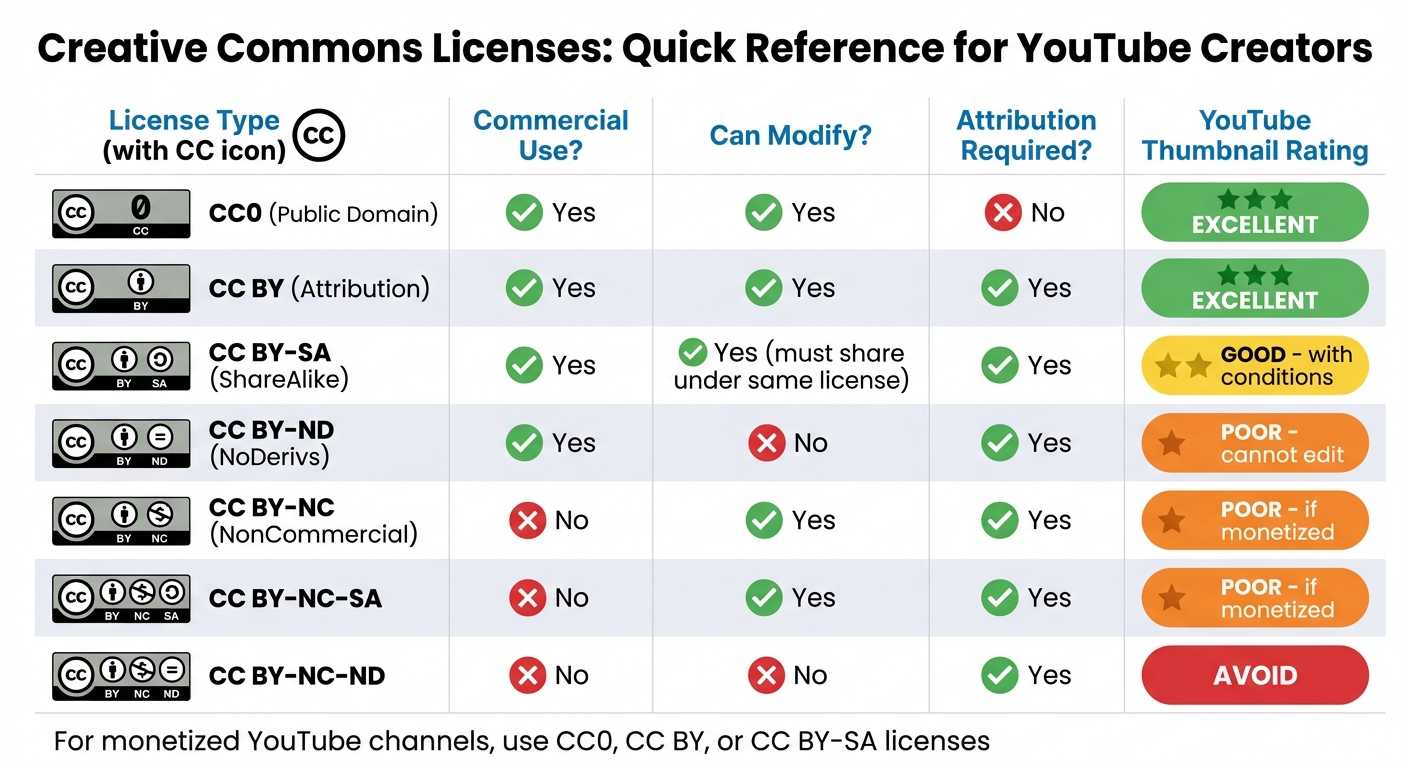
Creative Commons License Types Comparison for YouTube Thumbnails
Creative Commons (CC) licenses are legal tools that let creators share their work under specific conditions. These licenses operate on a "some rights reserved" basis, meaning creators keep their copyright but allow others to use their work without needing individual permissions.
Once a CC license is applied, it cannot be revoked for the duration of the copyright.
"Creative Commons licenses offer a standardized, legally-sound way to grant permission in advance, so that creators can clearly communicate how their work may be used, without negotiating individual permissions every time."
The framework is built around four core conditions: Attribution (BY), Non-Commercial (NC), No Derivatives (ND), and Share-Alike (SA). Along with the CC0 option, these conditions create six main license types, each with specific rules for usage. With billions of CC-licensed works available, they are a fantastic resource for creators looking to enhance their thumbnails using a YouTube thumbnail beginners guide.
The 6 Types of Creative Commons Licenses
Each CC license comes with its own set of rules, which is especially important for YouTube creators who may need to monetize their content or edit images for thumbnails.
-
CC0 (Public Domain Dedication):
Creators waive all rights, making the work completely free to use without attribution. This is ideal for thumbnails since it allows unrestricted modification and commercial use. -
CC BY (Attribution):
This license permits both commercial use and modifications, as long as the original creator is credited. It’s YouTube’s official Creative Commons option, making it a reliable choice when proper attribution is provided. -
CC BY-SA (ShareAlike):
This allows commercial use and modifications, but any derivative work must be shared under the same license. If you edit an image for a thumbnail, you’re required to license your new work under CC BY-SA as well. -
CC BY-ND (NoDerivs):
While commercial use is allowed, modifications are not. Since creating thumbnails often involves editing, this license is generally not practical. -
CC BY-NC (NonCommercial):
Modifications are permitted, but commercial use is restricted. For monetized channels, this license is not recommended, as any revenue generation is typically considered commercial use. -
CC BY-NC-SA:
This combines NonCommercial and ShareAlike restrictions, banning commercial use and requiring derivative works to carry the same license. It’s not suitable for monetized channels. -
CC BY-NC-ND:
The most restrictive license, it prohibits both commercial use and modifications. This makes it unsuitable for YouTube thumbnails.
License Comparison Table
| License Type | Commercial Use? | Can Modify? | Attribution Required? | Best for YouTube Thumbnails? |
|---|---|---|---|---|
| CC0 (Public Domain) | Yes | Yes | No | Excellent |
| CC BY (Attribution) | Yes | Yes | Yes | Excellent |
| CC BY-SA (ShareAlike) | Yes | Yes (must share under same license) | Yes | Good (with conditions) |
| CC BY-ND (NoDerivs) | Yes | No | Yes | Poor (cannot edit) |
| CC BY-NC (NonCommercial) | No | Yes | Yes | Poor (if monetized) |
| CC BY-NC-SA | No | Yes | Yes | Poor (if monetized) |
| CC BY-NC-ND | No | No | Yes | Avoid |
For YouTube creators with monetized channels, the best options are CC0, CC BY, or CC BY-SA licenses. These allow both commercial use and the flexibility to edit images for eye-catching thumbnails.
Up next, we’ll cover how to properly source and apply these licenses to your thumbnails.
How to Use Creative Commons Images Legally
If you now understand the different Creative Commons license types, here’s how to use CC images correctly for your YouTube thumbnails.
Step 1: Where to Find Creative Commons Images
Openverse (previously known as CC Search) is a great place to start. It gives you access to over 800 million photos, images, and audio files that are either public domain or CC-licensed. It searches multiple repositories at once, saving you time.
Other platforms like Google Images and Flickr also make it easy to find CC-licensed content. On Google Images, go to Tools > Usage Rights, and select Creative Commons licenses. On Flickr, use the "Any license" dropdown menu to filter for "All creative commons" or "Commercial use allowed" options.
Several stock photo websites also offer free, high-quality images under CC0 or similar terms. Check out:
- Pixabay: Over 1.1 million free stock photos, illustrations, and vector images.
- Unsplash: A collection of 200,000 high-resolution photos.
- Pexels: More than 30,000 stock photos, with thousands added monthly.
- Pikwizard: Features over 100,000 high-quality photos, including 20,000 exclusive images.
For more diverse representation, explore specialized platforms like Nappy (highlighting Black and Brown individuals), Disabled and Here (focusing on BIPOC with disabilities), and The Gender Spectrum Collection (featuring trans and non-binary models). Additionally, Wikimedia Commons, the Library of Congress, and the Smithsonian are excellent for educational or historical content.
Once you’ve found an image, it’s time to verify its license.
Step 2: How to Verify the Image License
Always double-check the license details on the original site to ensure the image is legitimate and to understand any specific requirements. On Google Images, after filtering for CC licenses, click the "License details" link to see the exact terms. On Flickr, look for the "Some rights reserved" link under the photo, which will take you to the specific license type (e.g., CC BY-SA 2.0).
Pay attention to phrases like "Some rights reserved", "License details", or "Creative Commons" near the image or in its metadata. These links will direct you to the official license deed, which explains terms like Attribution, Non-Commercial, No-Derivatives, or Share-Alike.
If your video is monetized, make sure the license doesn’t include a Non-Commercial (NC) restriction. Also, note the creator’s name or username and the title of the work - you’ll need these for proper attribution.
Step 3: How to Provide Proper Attribution
Attribution is required for all Creative Commons licenses except CC0. Use the TASL method: Title, Author, Source, and License.
For example, when reusing a CC-licensed image, you should include:
- Title of the work (if available)
- Author’s name (or their preferred pseudonym)
- Source URL (a direct link to the original)
- License type, with a hyperlink to its terms
For YouTube thumbnails, include this information in your video description. For instance:
"Sunset Beach" by Jane Photographer, licensed under CC BY 4.0 (source: https://example.com/photo, license: https://creativecommons.org/licenses/by/4.0/)
If you make edits, such as cropping or adding filters, note these changes in your attribution (e.g., "Cropped from original"). Always credit the original creator, not "Creative Commons" or the hosting site.
Step 4: How to Modify and Use Images in Thumbnails
The type of modifications you can make depends on the license. Images under CC0 and CC BY licenses allow unrestricted editing for commercial use, making them ideal for YouTube thumbnails. CC BY-SA also permits modifications, but any derivative work must carry the same license.
However, images with a CC BY-ND license don’t allow any modifications - no cropping, adding text, or applying filters - so they’re not suitable for thumbnails. Similarly, CC BY-NC, CC BY-NC-SA, and CC BY-NC-ND restrict commercial use, making them incompatible with monetized YouTube channels.
Stick to CC0, CC BY, or CC BY-SA images for monetized channels. Respect the creator’s work, even when modifications are allowed, and avoid edits that misrepresent the original intent. If using a CC BY-SA image, remember that your thumbnail becomes a derivative work and must also be shared under CC BY-SA. This ensures you stay within the legal boundaries while creating engaging thumbnail styles.
Common Mistakes When Using Creative Commons Images
Even seasoned creators can fall into traps when dealing with Creative Commons licenses. Overlooking key details can lead to copyright claims or legal trouble. Avoiding these missteps not only keeps you on the right side of the law but also ensures your thumbnails stay polished and professional. Let’s break down some common errors and how to steer clear of them using free thumbnail tools and resources.
Not Reading the License Terms
One of the biggest misconceptions is assuming "free" means "no strings attached." That’s not how Creative Commons works. Even images labeled as CC0 might come with restrictions, such as trademarked logos, the need for model releases for identifiable individuals, or property releases for private buildings. These issues fall outside the scope of the CC license itself.
Another important but often ignored detail is the license version. Creative Commons licenses come in multiple versions (2.0, 3.0, 4.0), with version 4.0 being the most current and widely applicable internationally. Always verify the specific version tied to the image, as the terms can vary slightly between versions.
Pay close attention to licenses marked "No Derivatives" (ND). These licenses prohibit any alterations - no cropping, filters, or text overlays - making them unsuitable for creating thumbnails.
Incorrect or Missing Attribution
Failing to provide proper attribution is a common mistake. Errors range from simply linking to the image to crediting the wrong person or, worse, writing something vague like "found on Google".
To comply with Creative Commons attribution requirements, include these details:
- Title of the work
- Author's name
- Source URL
- License type (with a clickable link)
If you’ve modified the image - like cropping, adding text, or changing colors - mention those changes in the attribution (e.g., "Cropped from original").
A smart practice is to save proof of compliance. Take a screenshot or save the license terms at the time you download the image. This documentation can be invaluable if a copyright claim arises later.
Using Non-Commercial Images for Monetized Videos
Monetized content creators often stumble when using images with NC (Non-Commercial) restrictions. If your channel earns money through ads, sponsorships, or affiliate links, it’s considered commercial use. In these cases, you cannot use images labeled with NC restrictions in your thumbnails or videos.
"Not all Creative Commons licenses allow commercial use - verify before monetizing a video using CC content." - FluxNote
To avoid issues, look for licenses like CC0, CC BY, or CC BY-SA, which allow commercial use. Always double-check for the "NC" tag (e.g., CC BY-NC, CC BY-NC-SA, CC BY-NC-ND) and steer clear of these for monetized projects.
Finally, remember that using a CC-licensed image doesn’t make you immune to YouTube’s Content ID system, which may still flag your video. Keeping proper documentation of your license rights can help resolve such disputes more efficiently.
Creating Thumbnails with ThumbnailCreator
Now that you’ve learned how to source and properly credit Creative Commons (CC) images, it’s time to put that knowledge to use with ThumbnailCreator. This tool simplifies the process by combining AI-driven design tools with the ability to work seamlessly with legally sourced images. It’s a great way to integrate licensing practices directly into your workflow.
ThumbnailCreator Features
ThumbnailCreator is packed with tools that make creating thumbnails easy, even if you don’t have a design background. Here’s what you can do:
- AI Thumbnail Generator: Create original visuals just by typing a description. This feature generates images from scratch based on your prompts.
- Extract Stills: Pull frames directly from your YouTube videos. This ensures you’re working with content you own, keeping things CC-compliant.
- Edit with AI: Use simple commands like “make colors more vibrant” or “add bold text” to tweak images effortlessly.
- Face Swap: Overlay your face onto Creative Commons–licensed backgrounds to maintain consistent branding.
All thumbnails are automatically exported at 1280x720 resolution, which matches YouTube’s recommended size. Plus, every new account comes with free credits, so you can explore the tool’s features before deciding on a paid plan. You can also check out our YouTube thumbnail guides for more design inspiration.
Using ThumbnailCreator with Creative Commons Images
ThumbnailCreator makes it easy to follow the legal steps for using Creative Commons images while designing your thumbnails. Here’s how it works:
- Verify the License: Before uploading, confirm that the image is labeled as CC0 or has a license allowing modifications and commercial use. Avoid images with NoDerivatives (ND) restrictions, as thumbnails are considered adaptations.
- Upload and Edit: Start by uploading your image in the Editor tab at the required resolution (1280x720). If the image requires attribution (like CC BY), use the Text Overlay Tool to add TASL details (Title, Author, Source, License) directly onto the thumbnail. This ensures compliance.
- Design Rules: Set up consistent attribution text by using the Design Rules feature. You can choose specific fonts and placements to make sure all your thumbnails have a unified look.
- Add CC Badges: For extra clarity, download and include official Creative Commons badges or icons in your design.
Once your thumbnail is complete, download it and include the full TASL attribution in your video description. This step ensures you stay legally compliant while using CC-licensed material.
With ThumbnailCreator, integrating attribution and design into one smooth process has never been easier!
Conclusion
To use Creative Commons images legally, follow these steps: locate images through CC filters, double-check the license terms (especially for commercial use and modifications), provide proper attribution, and keep records proving compliance.
One frequent error is assuming all Creative Commons images are free of restrictions. If your channel earns revenue, confirm the license allows commercial use before incorporating an image. Additionally, be aware that CC images with NoDerivatives (ND) restrictions cannot be altered, which means they’re unsuitable for edited thumbnails. These details highlight why thoroughly reviewing licenses is essential before starting your design work or researching current thumbnail trends.
"Attribution must include a clickable link to the original creator." - FluxNote
If you’re unsure, let the Creative Commons image serve as inspiration rather than directly using it. This approach encourages safer and more original creative practices, as mentioned earlier.
FAQs
Do I have to credit a Creative Commons image in a YouTube thumbnail?
You only need to credit a Creative Commons image in a YouTube thumbnail if the specific license requires it. For instance, images under a CC BY license must include attribution, while those with a CC0 license do not. Always review the terms of the image's license to determine if attribution is needed before using it.
Does monetization count as “commercial use” under CC licenses?
Monetization does fall under commercial use when it comes to Creative Commons licenses that allow it, like CC BY. These licenses let you use the content for commercial purposes, provided you give proper attribution. However, it's essential to carefully check the specific terms of the license to make sure you're following the rules.
What counts as a “modification” under a NoDerivatives (ND) license?
Under a NoDerivatives (ND) license, a "modification" refers to making changes to the original work. This includes activities like remixing, transforming, or creating something new based on it. However, any altered versions of the work cannot be shared or distributed under the terms of this license.