

5 Common Thumbnail Policy Violations
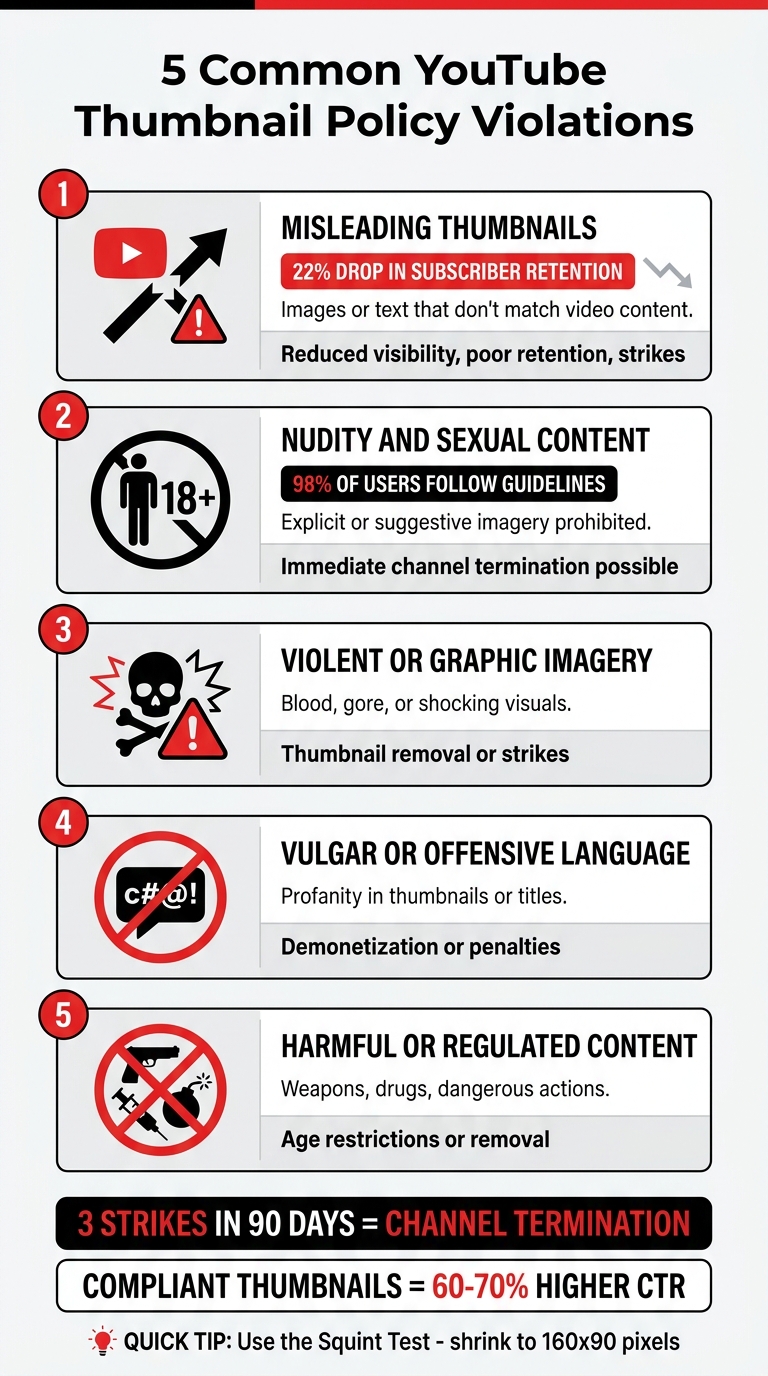
Thumbnails are critical for your video's success, but violating YouTube's policies can lead to serious consequences, including strikes, age restrictions, or even channel termination. Here are the top 5 thumbnail mistakes to avoid:
- Misleading Thumbnails: Using images or text that don't match the video content can mislead viewers. This leads to poor viewer retention, reduced visibility and click-through rates, and even strikes.
- Nudity and Sexual Content: Thumbnails with explicit or suggestive imagery, even without full nudity, are strictly prohibited.
- Violent or Graphic Imagery: Including blood, gore, or shocking visuals can result in thumbnail removal or strikes.
- Vulgar or Offensive Language: Profanity or offensive terms in thumbnails or titles can lead to demonetization or penalties.
- Harmful or Regulated Content: Avoid showcasing weapons, drugs, or dangerous actions prominently in thumbnails.
Key Tip: Ensure your thumbnails are truthful, clear, and compliant with YouTube's guidelines to avoid penalties and maintain your channel’s growth. Even minor violations can impact your standing. Always test thumbnails at smaller sizes to ensure clarity on mobile devices. For more professional results, follow an AI thumbnail generation guide to streamline your design process.
5 YouTube Thumbnail Policy Violations to Avoid
YouTube Thumbnails Policy Explained | What Is Allowed & What Gets Your Channel Banned (2026)
sbb-itb-b59debf
1. Misleading Thumbnails
A misleading thumbnail promises something the video doesn’t actually deliver. YouTube’s policies are clear: thumbnails that deceive viewers into expecting content that isn’t there are prohibited. This includes showing celebrities who never appear, products that aren’t mentioned, or hyping up dramatic moments that don’t exist in the footage. The result? Disappointed viewers and a hit to your video's performance.
When viewers realize the content doesn’t match the thumbnail, they leave - fast. This creates a "retention cliff", where clicks spike but viewer engagement drops sharply within the first 30 seconds. YouTube’s 2026 algorithm penalizes this pattern by reducing impressions and visibility. On top of that, misleading thumbnails can lead to a 22% drop in subscriber retention.
Some classic examples include claiming “$100K in one day” when the video only covers $50, using over-the-top facial expressions for mundane content, or highlighting a three-second clip as if it’s the centerpiece of a ten-minute video. While these tricks might temporarily boost your click-through rate, they hurt your channel’s long-term growth.
"A curiosity gap is not a lie. 'I Tested 5 Thumbnail Styles - Here's What Won' is honest and clickable. 'This Thumbnail Hack Gets 1M Views GUARANTEED' is not." - Thumbmentor
To fix this, use authentic screenshots or real moments from your video. Highlight the most engaging part of your content honestly - don’t create fake scenarios. Make sure any facial expressions or reactions in your thumbnail align with what actually happens in the video. This builds trust with your audience and keeps you within YouTube's guidelines. Up next, we’ll dive into other policy violations that could affect your channel’s success.
2. Nudity and Sexual Content
YouTube has strict rules against using thumbnails with pornographic imagery, depictions of sexual acts, sex toys, fetishes, or any material designed to provoke sexual arousal. This includes visuals of genitals (whether clothed or unclothed), as well as breasts or buttocks, if the intent is to arouse viewers.
Even without outright nudity, thumbnails can still face scrutiny. For example, YouTube may remove or age-restrict thumbnails where private body parts are the main focus of the image. Similarly, suggestive poses or revealing clothing like lingerie - if clearly intended to arouse - can trigger the same penalties. The platform also prohibits imagery that promotes unwanted sexualization, such as voyeuristic content, images shared without consent, or upskirting. Even subtle elements in a thumbnail can lead to removal or age-restriction, emphasizing the importance of clear and appropriate imagery.
Educational or documentary content isn’t exempt either. Thumbnails that use sexually explicit imagery purely to attract clicks violate YouTube's policies.
Violating these guidelines can result in serious consequences. For instance, in November 2024, the channel "MrTech", which had over 160,000 subscribers, was permanently deleted after switching its thumbnails to hardcore pornographic images. While most violations are handled through YouTube's three-strike system, posting explicit content can lead to immediate channel termination. Although about 98% of YouTube users adhere to the platform's Community Guidelines, those who break the rules face severe penalties.
YouTube enforces these policies rigorously, as highlighted in its guidelines:
"Thumbnails and other images that violate our Community Guidelines aren't allowed on YouTube. Images include banners, avatars, posts, and any other YouTube feature that has images." - YouTube Help
To avoid violations, ensure that private body parts are not the focal point of your thumbnails. For educational material, any nudity included must be presented in a strictly professional manner. This is especially critical when designing tutorial video thumbnails that feature sensitive subject matter. Following these guidelines not only helps you stay compliant but also supports the longevity of your channel.
3. Violent or Graphic Imagery
Thumbnails featuring violent or graphic content - like blood or gore - designed to shock or disgust viewers are prohibited. YouTube explicitly states:
"Don't post a thumbnail or other image on YouTube if it shows: ... Violent imagery that intends to shock or disgust [or] Graphic or disturbing imagery with blood or gore." - YouTube Help
YouTube doesn't just assess the image itself but also looks at metadata, such as the title, description, tags, and overlaid text. If these elements suggest an intent to shock, even borderline content could face enforcement actions.
Thumbnails that don't outright violate Community Guidelines but are deemed unsuitable for certain audiences might result in age restrictions or have the thumbnail removed. Clear violations, however, can lead to strikes against your channel. Receiving three strikes within 90 days could result in your channel being terminated.
There are limited exceptions for content with a legitimate educational or artistic purpose. For instance, YouTube may permit graphic imagery in thumbnails if it is part of an educational, documentary, scientific, or artistic effort - especially when it serves the public interest. However, this allowance only applies if the context is genuinely informative and not sensationalized.
To avoid common thumbnail mistakes, make sure your designs steer clear of focusing on blood, gore, or violence. Additionally, refrain from using shocking language in your titles or overlaid text, as YouTube evaluates all elements together when determining intent.
4. Vulgar or Offensive Language
YouTube has a strict policy against using vulgar or offensive language in thumbnails, particularly when it comes to strong profanity or sexually suggestive terms. Even though the platform updated its rules in July 2025 to allow strong profanity within the first seven seconds of video content, this flexibility does not apply to thumbnails. As Conor from Creator Insider clarified:
"Creators still can't use any swear words, strong or otherwise, in video thumbnails or titles. Swearing in those will get a video demonetized".
The policy isn't just about the words themselves - it’s about how they might influence viewer perception.
YouTube also evaluates whether the language is intended to shock or disgust. This means any profanity, from the F-word to milder terms like "hell" or "damn", could result in enforcement actions. These actions may include removing the thumbnail, placing age restrictions on the video, or issuing strikes.
To avoid these consequences, consider using alternative expressions that maintain the intensity of your message without crossing the line. Swap out offensive terms for descriptive, non-vulgar words like "intense", "shocking", or "unbelievable."
Another way to grab attention without using profanity is through visual storytelling. For example, close-up shots of dramatic facial expressions, bold typography with compliant language, and striking high-contrast visuals can create the emotional impact you're looking for while keeping your content within YouTube's guidelines for beginners.
Before hitting upload, ask yourself: Is this text designed to shock or offend? If the answer is yes, it’s worth revising. While YouTube may allow exceptions for educational, documentary, scientific, or artistic content, these exceptions don’t give creators free rein to use vulgar language. By keeping your language engaging but compliant, you ensure your content aligns with YouTube’s guidelines while maintaining credibility with your audience.
5. Harmful or Regulated Content
YouTube has strict rules against thumbnails that showcase dangerous actions or regulated items. This includes realistic images of weapons, controlled substances like drugs or alcohol, references to self-harm, and promotions of cosmetic surgery. These guidelines are rooted in YouTube's commitment to safety: "The safety of our creators, viewers, and partners is our highest priority". Here's how to stay within these boundaries.
The emphasis is on "realistic." For example, if your video discusses firearms for educational purposes, you can't use a close-up of a real gun as the main focus of your thumbnail. Similarly, thumbnails that glamorize risky behavior will be flagged, even if the video itself includes safety disclaimers or educational context.
While minor background elements might be acceptable, prominently featuring weapons, drug paraphernalia, or graphic injuries will likely trigger enforcement. Instead, opt for alternatives like text overlays, reaction shots, or symbolic icons. For instance, if your content is about firearm safety, consider using a thumbnail with yourself and text such as "Gun Safety Basics" rather than an actual weapon image.
Before uploading, try the "postage stamp test" by shrinking your thumbnail to a smaller size. At that scale, certain elements might resemble prohibited items or graphic content. YouTube also reviews your title, description, and tags alongside the thumbnail when assessing for violations. If anything appears questionable on a mobile-sized thumbnail, revise your design to ensure it aligns with an educational or documentary tone.
Although YouTube allows exceptions for content with educational, documentary, scientific, or artistic (EDSA) context, this doesn’t mean shocking imagery is permitted. Even thumbnails that technically follow the rules can still face age restrictions or removal if the focus is violent or disturbing. Keep your thumbnails professional and ensure they match the context of your content.
How to Avoid Violations and Stay Compliant
Make sure your thumbnail matches your content to stay on the right side of YouTube’s policies. Misleading thumbnails aren’t just bad for compliance - they also hurt subscriber retention. Starting in 2026, YouTube’s algorithm penalizes videos with high click-through rates (CTR) but low viewer retention (under 30 seconds). This happens when viewers feel tricked and leave quickly. Instead of using over-the-top imagery, try creating what experts call an "honest curiosity gap." For instance, opt for a title like "I Tested 5 Styles" instead of something exaggerated like "Guaranteed 1M Views". Also, make sure your design works well on mobile screens.
Before uploading, shrink your thumbnail to 160 x 90 pixels - this is often referred to as the "Squint Test". If your text or main subject isn’t clear at that size, you may need to increase contrast or simplify the design. Since over 75% of YouTube views come from mobile devices, your thumbnail has to be easy to read even when scaled down. Avoid placing critical details in the bottom-right corner, as YouTube’s time-stamp overlay can obscure them.
Stay updated by regularly checking the YouTube Help Center for any changes to policies or app features. Violations can lead to strikes, and three strikes within 90 days will result in channel termination. YouTube emphasizes:
"The safety of our creators, viewers, and partners is our highest priority".
For first-time violations, YouTube may offer policy training, enabling the warning to expire after 90 days. Staying vigilant about these rules supports all your compliance efforts.
To further reduce the risk of violations, consider using tools like ThumbnailCreator’s AI features designed for compliance. The AI Layer Splitting tool, for example, separates thumbnails into layers for text, background, and objects, so you can tweak specific elements without overhauling the entire design. The AI generation feature can swap out problematic graphics for compliant alternatives, while the "Edit thumbnails with natural language" tool lets you adjust visuals to better match your video content.
Finally, take advantage of YouTube’s "Test and Compare" feature to run A/B tests with up to three thumbnail variations. This allows you to identify which design resonates most with your audience while staying within policy guidelines. Custom thumbnails can boost click-through rates by 60–70%, so investing in professional, compliant designs is a smart move. Check out our YouTube thumbnail guides for more niche-specific design tips. A/B testing ensures your thumbnails perform well without resorting to sensational tactics.
Conclusion
Sticking to YouTube's thumbnail policies is essential for building a thriving channel. While misleading thumbnails may give your click-through rate a temporary boost, they ultimately hurt viewer retention and your video's visibility. With YouTube's 2026 algorithm update, videos with high CTR but poor retention are penalized, making deceptive tactics a losing strategy in the long run.
The risks of non-compliance are serious. Three strikes within 90 days can result in permanent channel termination, making it clear that following the rules isn't optional. On the flip side, compliant thumbnails not only build trust but also accelerate growth. Channels with consistent, policy-friendly thumbnail branding grow their subscriber base twice as fast as those with inconsistent designs. Additionally, systematic A/B testing has been shown to boost views by 2.3 times over time.
YouTube has made its stance on this clear:
"The safety of our creators, viewers, and partners is our highest priority. We look to each of you to help us protect this unique and vibrant community."
Custom thumbnails also deliver better performance. They generate 60–70% higher click-through rates compared to auto-generated images, and about 90% of top-performing videos rely on custom designs instead of YouTube's automatic screenshots. The secret lies in creating an curiosity gap vs. direct value - thumbnails that are both engaging and true to the video's content.
FAQs
How do I make an “honest curiosity gap” thumbnail?
Designing an effective thumbnail means grabbing attention without tricking viewers. The goal? Spark interest while staying truthful. Here’s how:
- Focus on clarity: Use a single, clear focal point to draw the eye immediately.
- Bold colors and contrast: Bright, contrasting colors can make your thumbnail pop, especially on crowded platforms.
- Keep it concise: Stick to 3-5 impactful words that hint at a benefit or reveal, but don’t give everything away.
- Choose expressive visuals: Faces with strong emotions or intriguing images can stir curiosity.
- Simplify the design: A clean, uncluttered layout ensures your thumbnail looks sharp on mobile screens, where most people are watching.
Avoid clickbait tactics or making promises you can’t deliver on. Instead, aim to create intrigue in a way that feels honest and engaging.
What thumbnail issues can get my video age-restricted or removed?
Thumbnails that mislead viewers, contain inappropriate content, or go against community guidelines can lead to serious consequences, like your video being age-restricted or removed entirely. YouTube has clear policies against harmful or offensive visuals, so make sure your thumbnails align with their rules to steer clear of any penalties.
Can I use weapons or medical content in thumbnails if it’s educational?
Yes, you can feature weapons or medical content in thumbnails for educational purposes, as long as they comply with YouTube's policies. Be cautious to avoid any imagery that could be seen as misleading, violent, or inappropriate. Always make sure the thumbnail accurately reflects the video’s content and context.