

Fix Thumbnail Upload Issues in YouTube Studio Mobile
I’d check channel access before retrying a failed thumbnail upload. For a regular video, use a JPG or PNG under 2 MB, aim for 1,280 × 720 pixels, and <u>tap Save after selecting it</u>.
Here’s how I’d narrow down the problem:
- No custom thumbnail option: Check the channel, edit access, and verification. Shorts have different thumbnail controls.
- Image rejected: Check the file’s format, size, dimensions, and any policy notice.
- Upload stuck: Try another connection, check photo permissions, and update or restart Studio.
- Old thumbnail still showing: Reopen the video in Studio to confirm it saved, then check the public page. A display delay doesn’t always mean failure.
- Still failing: Test another image and desktop Studio, then send feedback with the exact error and device details.
I’d avoid repeated uploads: YouTube has a daily custom-thumbnail limit.
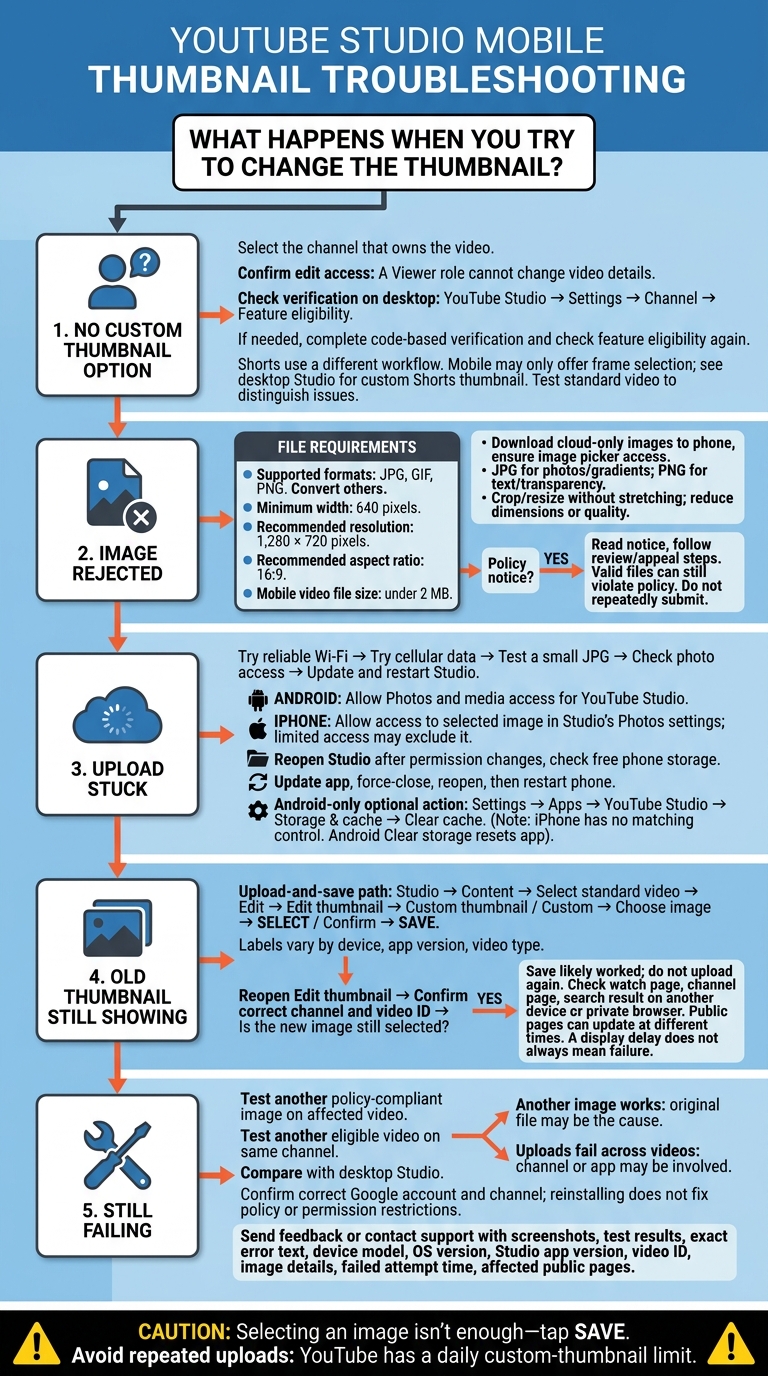
YouTube Studio Mobile Thumbnail Troubleshooting
Find the Custom Thumbnail Option
Check Channel Access and Verification
Open the account switcher and choose the channel that owns the video. Can’t edit it? Ask the channel owner for edit access. A Viewer role cannot change video details.
Your channel must be verified to use custom thumbnails. On desktop, go to YouTube Studio → Settings → Channel → Feature eligibility to check access. If the channel isn’t verified, complete YouTube’s code-based verification, then check Feature eligibility again.
Shorts use a different workflow. The mobile app may only offer frame selection. Add custom thumbnails for Shorts in desktop Studio. To narrow down the issue, test a standard video on the same channel. If Custom thumbnail appears there, the issue is with the Short - not your image.
If you see Custom thumbnail but the upload fails, check the file and connection next. Ensure your image meets the required thumbnail dimensions and file size limits.
Upload a Thumbnail in YouTube Studio Mobile
Open the YouTube Studio app and tap Content in the bottom menu. Select the standard video you want to edit, then tap Edit → Edit thumbnail.
Choose Custom thumbnail or Custom, then select an image stored on your phone. Check the preview and tap SELECT or the confirm button.
Tap SAVE to apply the change, then allow time for the thumbnail to appear across YouTube.
Labels vary by device, app version, and video type. If the thumbnail still won’t upload or save, the issue is usually the image file, connection, or app status.
sbb-itb-b59debf
Fix Rejected Images and Stalled Uploads
Check Image Format, Dimensions, and File Size
If you can see the Custom thumbnail option but the upload fails, check the file against YouTube’s upload limits first.
| File check | Requirement or recommendation | Correction |
|---|---|---|
| Format | JPG, GIF, and PNG are supported. | Convert unsupported formats, such as HEIC or WEBP, to JPG or PNG. |
| Minimum width | At least 640 pixels. | Check the exported image dimensions. |
| Recommended resolution and ratio | 1,280 × 720 pixels, 16:9. | Crop or resize without stretching the image. |
| Mobile video size | Keep the file under 2 MB. | Reduce the dimensions or lower JPG export quality in small steps. |
| Stored on the phone | The image picker must have access to the file. | Download cloud-only images before selecting them. |
Use JPG for photos and gradients and PNG for text or transparency. If your JPG is too large, lower its quality a little at a time. Before retrying, check the final dimensions and file size in your phone’s file details.
Prepare Your Image With ThumbnailCreator
Use ThumbnailCreator to refine your design. Export it as JPG or PNG, save it on your phone, and try uploading again.
If the file meets the requirements, check your connection and photo access next.
Check Your Connection and Photo Permissions
Try uploading over reliable Wi-Fi, then try cellular data. Test with a small JPG to help determine whether the problem is the file, connection, or app.
On Android, allow Photos and media access for YouTube Studio. On iPhone, open the Photos access settings for YouTube Studio and allow access to the selected image. Settings vary by OS version, and limited photo access may leave your thumbnail out.
Reopen Studio after changing permissions. Also check your phone’s free storage - a nearly full phone can interfere with downloads and temporary processing.
Update and Restart YouTube Studio
Update YouTube Studio through Google Play or the App Store. Then force-close the app, reopen it, and restart your phone.
On Android, try Settings → Apps → YouTube Studio → Storage & cache → Clear cache. This removes temporary files and normally keeps your sign-in and settings. iPhone has no matching per-app cache-clearing control.
Use Clear storage on Android only as a last step - it resets the app.
How to Change YouTube Video Thumbnail on Mobile | Update Thumbnail in YouTube Studio App
Check Saved Thumbnails and Persistent Errors
If your upload saved but the public thumbnail still looks wrong, check whether the change has reached the public pages.
Confirm the Thumbnail Saved
If Studio shows no upload error, reopen the video to check the saved image. In Content, select the video and open Edit thumbnail again. Confirm the channel and video ID. If the same image is still selected, the save likely worked. Exit without making changes - don’t upload the same image again.
Check the watch page, channel page, and search result on another device or in a private browser window. These pages can update at different times. If you still see the old thumbnail, check again later.
Review Thumbnail Policy Notices
If Studio shows a rejection, removal, warning, or strike, read the notice and YouTube’s thumbnail policy. Even a valid file can violate the policy; that’s separate from a file or connection problem. Follow the review or appeal steps in the notice rather than submitting the same image again.
If there’s no policy notice, try a different image to help identify the cause.
Test Another Image and Record Error Details
- Test another policy-compliant image on the affected video, then test another eligible video on the same channel.
- Compare the results with desktop Studio. If another image works, the original file may be the problem. If uploads fail across videos, the issue may involve the channel or app.
- Save the exact error text. Record the device model, operating system version, Studio app version, video ID, image format, dimensions, file size, and time of the failed attempt.
Before reinstalling, confirm that you’re using the correct Google account and channel. Reinstalling won’t fix policy or permission restrictions.
When using Send feedback, attach screenshots, test results, and the exact error details. If the image saved but the public thumbnail is still outdated, specify which pages are affected.
Conclusion: Confirm the Upload and Public Display
If the upload still fails after these fixes, run one last check. After each fix, confirm you’re editing the right video on the right channel, check that the image meets YouTube’s thumbnail requirements, and review both Studio and the public watch page.
Selecting an image isn’t enough; tap Save. Reopen the video in Studio to check that the thumbnail is still selected. Then open the public watch page in a signed-out or private window to see whether it appears. The public page may take time to update; YouTube doesn’t guarantee when thumbnail changes will appear.
If several images that meet YouTube’s requirements still fail, stop retrying. Repeated uploads can hit YouTube’s daily custom-thumbnail limit. Contact support with your saved error details if the problem persists.
FAQs
Will changing my thumbnail affect my video’s views?
Yes, changing your thumbnail can affect your video’s views. A well-designed thumbnail can improve your click-through rate (CTR), which influences your video’s visibility and performance.
ThumbnailCreator helps you create high-contrast, mobile-friendly thumbnails that can improve engagement and may increase views. YouTube’s Test and Compare feature lets you test different designs to see which works best with your audience, so you can base your changes on data.
Can I keep my video live while fixing its thumbnail?
You can change your thumbnail in YouTube Studio without taking your video offline. The update may take a few minutes to several hours to appear across all regions and devices.
Changing the thumbnail manually also ends any active A/B test running through YouTube’s Test and Compare feature. For best results, use ThumbnailCreator to design and preview your thumbnail before publishing the update.
When can I retry after hitting the thumbnail upload limit?
If you see the “Daily custom thumbnail limit reached” error, wait 24 hours before uploading more thumbnails.
ThumbnailCreator helps you simplify your workflow and tailor your designs for mobile. Use AI generation, popular templates, and easy text editing to make professional, click-worthy thumbnails in less time.