

Free vs. Paid YouTube Analytics Tools: Comparison
If I only need to track my own channel, free tools are often enough. If I need faster testing, competitor tracking, and less manual work, paid tools are easier to justify.
Here’s the short version:
- I’d use free tools for views, watch time, impressions, CTR, retention, traffic sources, likes, comments, and shares.
- I’d move to paid tools when I need:
- A/B testing for thumbnails or titles
- competitor alerts
- longer history
- bulk SEO edits
- scheduled reports
- Most paid plans land around $8 to $25+ per month, with some tools going $49+.
That means the choice is less about price alone and more about what slows me down. If I’m checking a small channel and making one-off updates, free works. If I’m stuck doing manual reports, tracking rivals by hand, or updating dozens of videos one by one, paid starts to make sense.
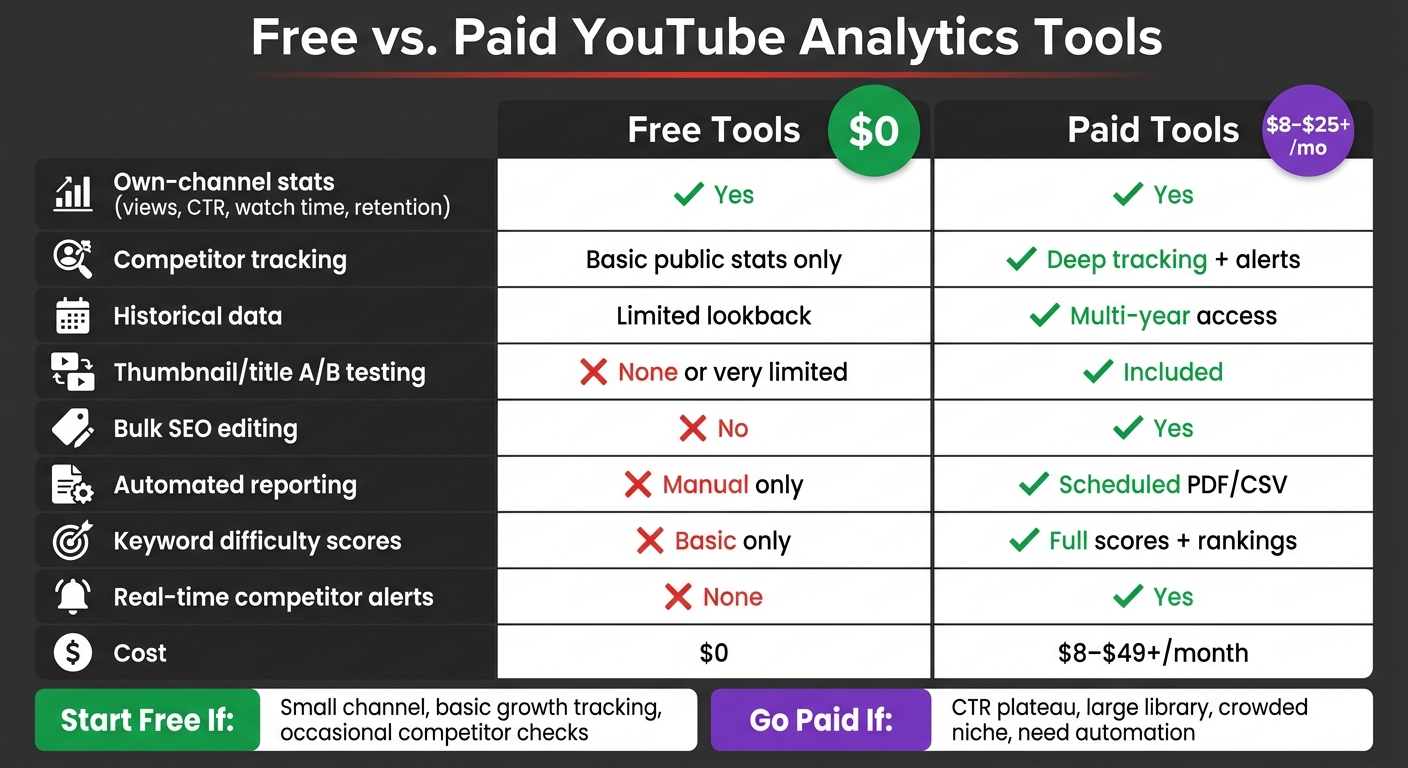
Free vs. Paid YouTube Analytics Tools: Feature Comparison
Quick Comparison
| Criteria | Free Tools | Paid Tools |
|---|---|---|
| Own-channel stats | Yes | Yes |
| CTR and retention tracking | Yes | Yes |
| Competitor tracking | Basic public stats | Deeper tracking and alerts |
| Historical data | Limited | Longer lookback |
| Thumbnail/title testing | Limited or none | Often included |
| Bulk SEO updates | No | Yes |
| Reporting | Manual | Scheduled |
| Cost | $0 | $8–$25+ / month |
My takeaway: start free, watch your CTR and retention, and upgrade only when missing data or slow workflows start costing you time or views.
Below, I break down where free tools do the job, where they fall short, and when paying gives you more than just extra charts.
Free YouTube Analytics Tools: What You Get and Where They Fall Short
Metrics Available at No Cost
YouTube Studio covers the core numbers most creators use day to day: impressions, CTR, watch time, retention, traffic sources, and top videos. Free SEO tools can also give you keyword ideas and tag extraction.
That setup is enough for basic channel management. But when you want to track competitors in a serious way, it starts to feel pretty thin.
Where Free Tools Work Well for Solo Creators and Small Channels
Free tools are best for small, steady gains. YouTube Studio’s retention curve shows the exact second viewers drop off, which makes it useful when you’re deciding what to cut, tighten, or change. The catch? Studio helps you confirm what happened only after your update is live.
Free tools also make sense when you mostly track your own channel and only check a few public competitor stats now and then. SocialBlade’s free tier can help with basic competitor watching. For example, if a competitor’s subscriber growth starts speeding up, that can hint at a topic taking off in your niche.
Manual tracking can work. It’s just slow.
Once you need faster competitor checks or deeper history, free tools stop being enough.
Limits of Free Tools for Competitor Tracking
The weak spots show up fast as your channel grows or your niche gets crowded. Free tools usually mean manual checking. They don’t give you automated alerts when a competitor’s video spikes, multi-channel dashboards, or deeper history and trend patterns.
| Feature | Free Tools | Paid Tools |
|---|---|---|
| Data Depth | Baseline metrics: views, CTR, watch time, retention | Deeper trend analysis and automated alerts |
| Competitor Tracking | Public stats only; manual checks | Automated tracking, alerts, and views per hour |
| Cost | $0 | Monthly subscription, often $9–$49+ |
Paid tools fix the tracking, alerts, and history gaps shown above.
Paid YouTube Analytics Tools: Deeper Data and More Competitor Insight
What Paid Tools Add Beyond Free Plans
The main upside is simple: less manual work and more depth. Paid tools like VidIQ and TubeBuddy give you multi-year historical data, real-time competitor alerts, keyword difficulty scores, and bulk SEO editing across a full video library. Some higher-tier plans also include scheduled reporting.
That matters when you're trying to spot patterns instead of guessing. If you want to know which thumbnails and titles are pulling more clicks, deeper history and competitor data can save a lot of back-and-forth.
| Feature | Free Tools | Paid Tools |
|---|---|---|
| History | Limited lookback | Multi-year historical data access |
| Tracked channels | Own channel only | Unlimited or tiered competitor tracking |
| Competitor Alerts | None | Real-time alerts on competitor breakout videos |
| Reporting | Manual reporting | Scheduled, custom PDF/CSV reports |
| Search and ranking data | Basic keyword search | Keyword difficulty scores and search rankings |
| Typical Monthly Cost | $0 | $8–$25+ USD |
Pros and Cons of Paying for Analytics
These features don't just save time. They also change how you work.
Bulk SEO editing and automated reporting reduce repetitive tasks, which helps a lot if you manage a big back catalog or more than one channel. A/B testing lets creators compare thumbnails and titles using data instead of hunches. Some tools also show where viewers drop off. That makes it easier to test what gets the click, not just what gets watched.
The tradeoff is that advanced tools can take time to learn and may pull your attention away from making videos. If you're a solo creator or running a very small channel, free tools may still do the job until you hit clear limits, like manual reporting or bare-bones keyword search.
When a Paid Subscription Makes Sense
A paid plan makes sense when the time you save is worth more than the monthly cost.
It's usually a good fit if you publish often, manage a large library, or need repeatable reports for a team or clients. Channels in competitive spaces like tech, finance, or gaming tend to get the most out of competitor tracking and ranking alerts.
Once basic stats and manual workflows start slowing you down, paying for deeper analytics becomes a practical move.
sbb-itb-b59debf
How Free vs. Paid Analytics Affect Thumbnail and CTR Decisions
After comparing tool depth, the next step is simple: what do you change on the thumbnail? Data only helps if it leads to action. For most creators, that action is improving CTR.
Using Free Analytics to Improve Thumbnails
In YouTube Studio, impressions and CTR help you figure out whether the issue is reach or packaging. If a video has strong average view duration but low CTR, the video itself is doing its job, but the thumbnail is likely the weak point.
That gap in CTR is one of the clearest free signals you can use. Once you spot it, the move is pretty direct: redesign the thumbnail and watch for a lift in CTR.
Using Paid Analytics to Study Competitor Thumbnail Patterns
Paid tools add competitor benchmarking, and that changes the decision-making process. Instead of throwing out ideas and hoping one lands, you can look at which thumbnail styles, color schemes, and title formats keep pulling higher views in your niche. Real-time stats also let you react sooner.
Turning Analytics Insights into Faster Thumbnail Production with ThumbnailCreator
Once you know the pattern, speed matters. Slow thumbnail production slows down testing too.
ThumbnailCreator is built for that part of the workflow. When your own CTR data or competitor research shows what's working, you can put those takeaways into action with AI generation, face swapping, text editing, and object swapping.
A few practical examples:
- High retention + low CTR (YouTube Studio): Redesign the thumbnail right away. The content is keeping viewers, but the first impression isn't doing enough.
- Competitor style outperforming (paid tools): Use style cloning to mirror the visual layout pulling more clicks in your niche.
- Low mobile readability (YouTube Studio): Swap objects or make text larger so it stands out better on small screens.
The goal is to generate and test thumbnail variations faster. In practice, that speed gap often separates a free workflow from a paid one.
Conclusion: Which Type of YouTube Analytics Tool Fits Your Channel
The choice comes down to one thing: will better data help you make better calls often enough to be worth paying for? That question matters most when you're deciding which thumbnails to swap out and which competitor signals are worth trusting.
When Free Tools Are Enough
Free tools work well when your main job is pretty simple: check CTR, watch growth, and see whether thumbnail changes are helping on a small channel.
When Paid Tools Are Worth the Cost
Paid tools make sense when your channel needs faster thumbnail testing, deeper competitor tracking, and less manual work.
If your CTR has leveled off, paid A/B testing can show which thumbnail style wins. If manual metadata updates or thumbnail testing are slowing down production, that's a clear sign it's time to move up. Paid tools add A/B testing, bulk SEO editing, deeper competitor tracking, and automation that cuts repetitive work. And if you need frame-by-frame drop-off detection to improve retention, that's another strong reason to pay for more depth.
Use the summary below to match your main bottleneck to the right tool level.
| Signal | Suggested Tool Level |
|---|---|
| New channel, basic growth tracking | Free |
| CTR plateau, need thumbnail testing | Paid |
| Large video library, manual SEO bottleneck | Paid |
| Crowded niche, need competitor insights | Paid |
| Need deeper retention analysis | Paid |
Start free. Upgrade when missing data slows decisions or costs views.
FAQs
When should I upgrade to a paid tool?
Upgrade when your channel outgrows free analytics and your budget can handle the extra cost. Free tools cover the basics. Paid tools can make it easier to scale without doing everything by hand.
It may be time to move up if you need competitor analysis, trend forecasting, more advanced thumbnail design features, support for multiple channels, team collaboration, or pre-publish testing.
Are free tools enough for a small channel?
Yes, free tools are often enough for a small channel.
YouTube Studio already gives you the main numbers you need, like subscriber count, watch time, and audience demographics. For basic tracking, that covers a lot.
Paid tools go deeper. They can show more detail and surface patterns you might miss on your own. But for many beginners, free tools handle the job just fine at the start.
That means your time and money are often better spent on the things that move the needle first: better content and strong thumbnails. Once your channel starts growing and you need more detailed analytics, paid tools may make more sense.
Can paid analytics actually improve my CTR?
Yes. Paid analytics tools can help improve CTR because they give you deeper behavior data than basic metrics alone.
That extra data can make a big difference. You can spot patterns, get AI-driven design feedback, and use predictive modeling to fine-tune your approach before small problems turn into missed clicks.
Tools like ThumbnailCreator can also help you improve thumbnails before you publish. And YouTube Studio’s A/B testing lets you measure what actually works instead of guessing.