

YouTube Studio vs. Third-Party Thumbnail Testers
When deciding how to test thumbnails for your YouTube videos, you have two main options: YouTube Studio's built-in "Test & Compare" feature or third-party tools like ThumbnailCreator. Each has its strengths and limitations:
- YouTube Studio: Free for creators in the YouTube Partner Program (requires 1,000 subscribers and 4,000 watch hours). It uses real viewer data to determine the best thumbnail based on watch time, not just click-through rates (CTR). However, it lacks design tools and limits testing to three thumbnails.
- Third-Party Tools: Paid platforms like ThumbnailCreator offer advanced design features (e.g., AI-generated thumbnails, face swapping, mobile previews) and allow more creative flexibility. Subscription costs start at $29/month. These tools, however, require YouTube Studio for actual testing.
Quick Takeaway: Use YouTube Studio for free, data-driven testing if you're eligible, or combine it with third-party tools to create better thumbnails. Smaller channels may find third-party tools more accessible, while established creators can benefit from using both approaches.
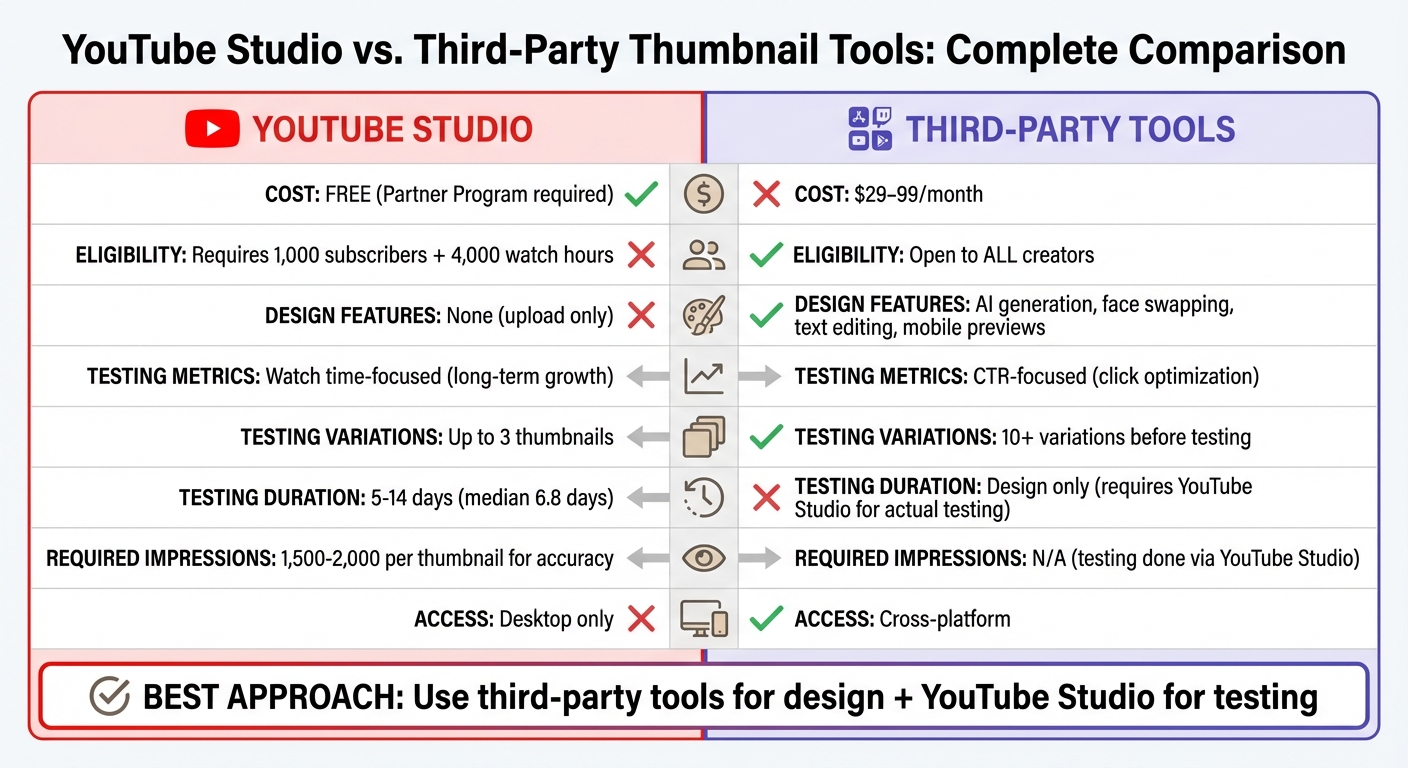
YouTube Studio vs Third-Party Thumbnail Tools Comparison
A/B Thumbnail Testing for SMALL Channels – Do THIS!
sbb-itb-b59debf
Quick Comparison
| Feature | YouTube Studio | Third-Party Tools |
|---|---|---|
| Cost | Free (Partner Program required) | Paid (from $29/month) |
| Eligibility | Requires 1,000 subs, 4,000 hours | Open to all creators |
| Design Features | None | AI tools, face swapping, etc. |
| Testing Metrics | Watch time-focused | CTR-focused |
| Testing Variations | Up to 3 thumbnails | More options before testing |
| Access | Desktop only | Cross-platform |
For the best results, test one variable at a time (e.g., face vs. no face) and ensure sufficient impressions (1,500–2,000 per thumbnail). Established creators can combine both tools to optimize designs and performance systematically.
YouTube Studio's Thumbnail Testing Features
Built-in A/B Testing
YouTube Studio offers a handy "Test & Compare" feature that allows creators to test up to three thumbnails - or title/thumbnail combinations - at the same time. Unlike many third-party tools that focus solely on click-through rates, YouTube evaluates the "winning" option based on watch time share. This ensures that the chosen thumbnail not only grabs attention but also engages viewers for longer periods.
To set up a test, log into YouTube Studio on a desktop, go to the thumbnail section of your video, upload up to three thumbnail designs, and start the test. YouTube runs these tests concurrently, presenting each variation to different viewers at the same time. The results are categorized as:
- Winner: A clear improvement backed by data.
- Performed Same: No significant difference between thumbnails.
- Inconclusive: Not enough data to determine a winner.
Once a winner is identified, YouTube automatically applies the best-performing thumbnail to your video. For accurate results, each variant typically requires 1,500–2,000 impressions over a testing period of 5–14 days. Using highly distinct thumbnail designs can speed up the process and lead to more definitive outcomes. This streamlined testing process integrates seamlessly into the YouTube Studio workflow.
Benefits of YouTube Studio
This testing tool is free for eligible creators and uses real viewer data from YouTube itself. Once the test concludes, the best thumbnail is applied automatically, saving you time.
Test results are conveniently displayed in YouTube Analytics, either on the video's Details page or under the Reach tab. Additionally, the concurrent testing feature eliminates the risk of skewed results caused by daily traffic variations.
YouTube Support highlights the importance of this approach:
"We believe that deciding a 'winner' by watch time will best support creators' growth."
By prioritizing watch time, the tool discourages clickbait tactics, ensuring your thumbnails attract viewers who are genuinely interested in your content.
While these features are incredibly useful, there are some limitations to keep in mind.
Drawbacks of YouTube Studio
The tool is available only to creators in the YouTube Partner Program, which requires at least 1,000 subscribers and 4,000 watch hours. Additionally, it’s only accessible on desktop and doesn’t support Shorts, videos made for kids, private videos, or mature content.
Another limitation is that YouTube Studio focuses solely on testing thumbnails, not creating them. If you need to design thumbnails, you’ll need separate software. The tool also restricts you to testing a maximum of three variations, and manually changing a thumbnail during the test will end the experiment immediately.
Tests can take up to two weeks to yield results, and subtle differences between thumbnails may lead to "Inconclusive" outcomes. Moreover, if any thumbnail in the test is below 720p resolution, all variations are automatically downscaled to 480p. This can be a problem since mobile devices account for about 70% of YouTube watch time.
These constraints highlight areas where third-party tools may offer more flexibility and functionality.
Third-Party Thumbnail Testing Tools
When YouTube Studio's built-in tools feel limiting, third-party platforms step in with more creative and analytical options.
What Third-Party Tools Offer
Third-party thumbnail tools go beyond YouTube Studio's basic upload functionality. These platforms allow you to create thumbnails from scratch using AI. For example, instead of just uploading a design, you can input a YouTube URL, video file, transcript, or even a simple text description, and the tool generates multiple thumbnail variations for you.
Some standout features include:
- AI-powered design tweaks: Adjust color palettes, tweak facial expressions to evoke specific emotions, or swap out objects and backgrounds dynamically.
- Style replication: Tools can "clone" the aesthetics of successful thumbnails or use style references to ensure brand consistency.
- Predictive scoring: Many platforms rate a thumbnail's potential effectiveness before you publish it.
These capabilities make these tools ideal for creators looking to elevate their thumbnail game, with platforms like ThumbnailCreator leading the charge.
ThumbnailCreator Features
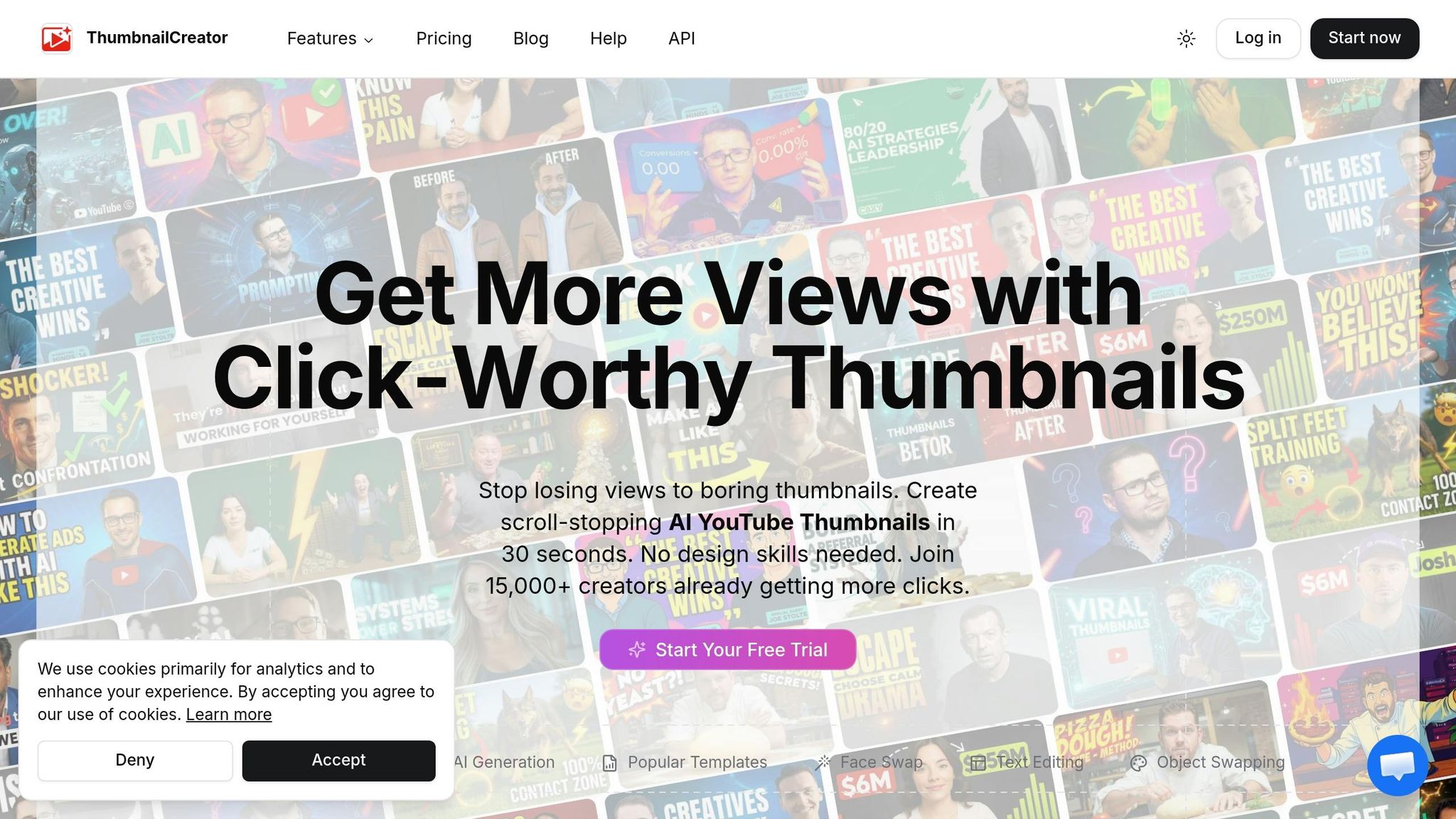
ThumbnailCreator is a popular choice among over 15,000 YouTube creators. It stands out for its ability to generate up to 10 unique thumbnail variations from a single prompt. This makes it easy to experiment with different emotional tones or layouts. Other features include:
- Face and object swapping: Quickly adjust visuals to test different hooks.
- Real-time text editing: Optimize text for better readability, especially on mobile devices.
- API access: Automate workflows, a major perk for production teams managing multiple channels.
Pricing starts at $29/month for 50 credits (one credit equals one thumbnail), $49/month for 100 credits, and $99/month for the Teams plan with 250 credits. Although the platform requires billing details for its 7-day trial, it’s a worthwhile investment for frequent uploaders or agencies managing client accounts.
Pros and Cons of Third-Party Tools
While these tools offer powerful features, they also come with some trade-offs:
| Aspect | Advantages | Disadvantages |
|---|---|---|
| Design Capabilities | AI tools enable features like face swapping, expression tweaks, and style cloning. | Advanced options might take time to master. |
| Workflow Efficiency | Quickly generate multiple variations and automate tasks with API access. | Credit-based pricing can complicate budgeting, especially with frequent iterations. |
| Performance Insights | Analyze trending designs and test thumbnail effectiveness before publishing. | Most advanced features are locked behind paid subscriptions, and free tiers are often limited. |
| Target Audience | Perfect for agencies and professional teams with collaborative tools and team plans. | Higher pricing may deter casual or occasional creators. |
The standout benefit of these platforms is their ability to generate multiple AI-driven options quickly, which you can then refine and test using YouTube Studio's built-in tools.
YouTube Studio vs. Third-Party Tools: Direct Comparison
Ease of Use
YouTube Studio’s "Test & Compare" feature is built right into the upload process, allowing creators to start testing thumbnails immediately without the hassle of switching platforms or learning additional tools. It automates the process by rotating thumbnails and selecting the best-performing one based on watch time share, eliminating the need for manual tracking.
On the other hand, third-party tools like ThumbnailCreator require you to design thumbnails on an external platform before uploading them to YouTube for testing. While this adds an extra step, these tools offer helpful features such as mobile previews, face-positioning guides, and version history, which can streamline the design process.
The takeaway? YouTube Studio excels in simplicity and integration, while third-party tools focus on enhancing the design experience before testing even begins.
Design Capabilities
YouTube Studio doesn’t include design tools, meaning creators need to rely on external software or AI tools to prepare thumbnails. In contrast, third-party platforms offer a suite of design features. For example, ThumbnailCreator allows creators to generate multiple thumbnail variations from a single prompt. It also provides advanced options like face swapping, real-time text editing, and object swapping - none of which are available in YouTube Studio.
Consider this example: Ibrahim Mohmed, who manages a tech review channel with 287,000 subscribers, used ThumbnailCreator to design two thumbnail versions - a product-only image and a "Face + Product" version. He then tested these through YouTube Studio’s "Test & Compare" feature over a seven-day period, with each variant receiving roughly 28,800 impressions. The results? The "Face" thumbnail achieved a 9.19% click-through rate (CTR), outperforming the product-only version’s 7.32% CTR.
While YouTube Studio limits creators to three thumbnail variations per test, third-party tools allow for generating and refining more options before selecting which to test.
Performance Tracking and Analytics
When it comes to performance metrics, each tool takes a different approach.
YouTube Studio prioritizes watch time share over CTR to evaluate thumbnail performance. This aligns with its philosophy that thumbnails reflecting the video’s content drive better long-term growth. The platform uses concurrent A/B/C testing, meaning all variations are tested simultaneously, which helps determine a clear winner.
As YouTube Creators explains:
"We optimize tests for overall watch time over other metrics, like click-through rate... we believe that deciding a 'winner' by watch time will best support creators' growth."
Third-party tools, however, focus more on CTR and design-related metrics. These tools often run tests sequentially, which can introduce timing variability and potentially skew results.
YouTube Studio tests usually take anywhere from a few days to two weeks to reach statistical significance. For instance, in a study of 127 videos, the median time to achieve significance was 6.8 days. However, tests with fewer than 1,000 impressions per variant showed a 43% false positive rate, highlighting the importance of sufficient data.
Cost Analysis
For creators in the YouTube Partner Program, YouTube Studio’s "Test & Compare" feature is entirely free, with no limits on the number or duration of tests. In contrast, tools like ThumbnailCreator operate on a subscription model, offering different pricing tiers tailored to individuals or teams.
The choice between the two often comes down to weighing cost against functionality. YouTube Studio provides a no-cost solution for testing, while ThumbnailCreator adds AI-driven design tools at a price. Deciding which is best depends on your channel’s specific needs and priorities.
Conclusion
The tools you choose - YouTube Studio or a third-party platform - depend on your channel's size, budget, and design needs. For creators already generating consistent traffic, ideally with 3,000–5,000 impressions per video, YouTube Studio's "Test & Compare" feature is a practical option. Below that threshold, random variations can lead to unreliable results.
If you're working with a tight budget, YouTube Studio offers a free, automated solution for creators in the YouTube Partner Program. It simplifies the process by automatically selecting winners based on watch time share. However, it doesn't include design tools, so you'll need to rely on external software for creating thumbnails.
For creators seeking more advanced design capabilities, third-party tools like ThumbnailCreator can bridge the gap. These platforms come with features like AI-powered design, mobile previews, face swapping, and text editing, making them ideal for producing multiple professional designs quickly. While these tools provide creative flexibility, they do require a subscription and still depend on YouTube Studio for testing.
A combined approach - using ThumbnailCreator for crafting polished designs and YouTube Studio for testing - offers the best of both worlds. This method allows for creative freedom while relying on data to guide decisions. To maximize results, isolate a single variable per test (e.g., face versus no face) and run tests for at least five days or until you achieve statistical significance.
Ultimately, the choice depends on your channel's current stage. Smaller channels might focus on improving content quality before investing in advanced tools, while established creators with steady traffic can use both approaches to fine-tune their click-through rates systematically.
FAQs
How do I know if my channel has enough views to run a reliable thumbnail test?
For dependable thumbnail testing, it's important to gather enough impressions to ensure the results are meaningful. Aim to run tests for about 7–14 days, collecting between 1,000 and 5,000 impressions per variation. This approach allows you to make accurate comparisons based on metrics like click-through rate (CTR) and engagement, while avoiding errors caused by insufficient data.
What should I test first in thumbnails to get the clearest results?
When testing elements like facial expressions, text, or color schemes, it's important to keep things simple. Focus on changing just one aspect at a time - like swapping a neutral expression for a surprised one - and observe how it affects your click-through rates (CTR). To get meaningful insights, aim to run your tests for 7 to 14 days, ensuring each variation receives between 1,000 and 5,000 impressions. This approach helps you gather reliable data and figure out what connects best with your audience.
Can I use ThumbnailCreator to make variants and still test them in YouTube Studio?
Yes, you can use ThumbnailCreator to design multiple thumbnail variations and test them directly in YouTube Studio. With YouTube Studio's Test & Compare feature, you can upload different thumbnail versions and run A/B tests to see which one performs better. This helps you identify the design that drives the highest click-through rate (CTR) and engagement - all while taking advantage of ThumbnailCreator's AI-driven design tools.