

How AI Enhances Thumbnail Lighting
AI tools are transforming how creators design thumbnails by automating lighting adjustments, improving visual appeal, and saving time. Proper lighting boosts click-through rates (CTR) by up to 154%, making it a critical factor for success on platforms like YouTube. Manual editing can take up to an hour per thumbnail and costs $25–$100 if outsourced. AI solutions like ThumbnailCreator streamline this process, delivering polished results in seconds while maintaining consistency and reducing costs.
Key benefits of AI for thumbnail lighting:
- Exposure & Brightness: Automatically balances light and shadows for clarity.
- Shadows & Depth: Enhances contrast to make subjects stand out.
- Color Temperature: Corrects tints and ensures consistency across thumbnails.
- Speed: Cuts editing time from hours to minutes, ideal for creators managing multiple videos.
AI tools are affordable, with plans starting at $10–$15/month, offering unlimited edits compared to costly manual work. With 72% of creators now using AI for thumbnails, it’s clear these tools are reshaping content creation. Whether you’re a beginner or a seasoned creator, AI simplifies the process and delivers results that drive engagement.
How to Make Viral YouTube Thumbnails with AI (Step-by-Step Tutorial)
Key Lighting Elements AI Improves
AI fine-tunes essential lighting elements to craft thumbnails that grab attention and encourage clicks.
Exposure and Brightness
AI takes the guesswork out of exposure adjustments by automatically correcting areas that are too dark or too bright. This ensures no details are lost in shadows or blown out in highlights. Instead, it creates a balanced image with clarity throughout.
With AI, you can even mimic professional lighting effects - like the warm tones of the "Golden Hour" or the sharp precision of "Studio Lighting" - without needing costly equipment. This flexibility allows you to set the right tone for your content, whether it’s a cozy lifestyle vlog or a sleek tech demo. As Gepettoapp puts it:
AI can significantly improve even the darkest photos. It intelligently analyzes each area of the image to optimize brightness without creating overexposure or detail loss.
AI also excels at targeted brightening, emphasizing key features like faces, products, or standout visuals. This ensures your thumbnail maintains focus and sharpness, even when scaled down for mobile screens.
Shadows and Depth
Shadows are more than just dark spots - they create the depth that makes thumbnails pop. AI enhances this by adjusting contrast between the subject and the background, helping your main element stand out. High-contrast designs aren’t just visually appealing; they can increase click-through rates (CTR) by as much as 30%.
Using advanced "saliency" analysis, AI predicts where viewers’ eyes will naturally go and optimizes shadows to guide attention to the most important elements. For portraits or indoor shots, it smooths harsh shadows on faces while preserving a natural sense of depth. The result? A three-dimensional effect that grabs attention in crowded feeds - especially on mobile, where 80% of YouTube views occur.
On top of shadow adjustments, AI’s color tools ensure your thumbnails remain visually cohesive.
Color Temperature and Consistency
Poor lighting can lead to color issues, like yellow or blue tints, that make thumbnails look unpolished. AI fixes this by correcting color casts and adjusting white balance, ensuring a clean, professional appearance.
Between 2020 and 2025, thumbnail color saturation saw a 28% increase. AI helps you stay competitive by keeping your color temperature consistent across all your content. For example, in early 2026, GrowEasy Agency used AI to manage the visual style of 20 YouTube channels, cutting production time by 85% while maintaining a cohesive brand identity. By feeding reference images into AI tools, you can replicate the color and style of your top-performing thumbnails, ensuring every new design aligns with your branding.
How ThumbnailCreator Optimizes Thumbnail Lighting

ThumbnailCreator simplifies professional lighting adjustments, so you don’t need to be a design expert. By analyzing over 3 million high-performing thumbnails, its AI identifies lighting patterns that drive clicks. This approach delivers results comparable to - or even better than - manual editing. The process is designed to ensure every thumbnail looks polished without extra effort.
AI Lighting Corrections
ThumbnailCreator's AI handles lighting with three key functions. It automatically balances highlights and shadows for proper exposure, boosts brightness to make subjects stand out, and adds subtle shadows to create depth - all while maintaining consistent color temperature. Thumbnails enhanced with these features see a 73% higher click-through rate compared to DIY edits .
Integrated Tools for Professional Effects
The platform includes tools like Face Swapping and Object Swapping, which adjust lighting on new elements so they blend seamlessly into the scene. For example, even faces added to low-light settings are automatically relit to match the environment's brightness, shadows, and color tone. The Precision Inpainting tool allows you to fix specific dark or overexposed areas by brushing over them - letting the AI regenerate those regions with improved lighting. You can also use natural language commands like "brighten the face area" or "warm up the lighting" to fine-tune your edits.
Additionally, the Thumbnail Analyzer reviews your design and provides suggestions to improve lighting and contrast before publishing. These features work together to make the editing process faster and more effective.
User-Friendly Workflow
These automated tools not only improve image quality but also drastically reduce editing time. What used to take two hours in Photoshop now takes just six minutes - a 20× time savings. The workflow is simple: upload your thumbnail, choose AI Optimize or use natural language commands for specific adjustments, preview the changes in real time, and export.
As Dave S Anderson, a YouTube creator, puts it:
"ThumbnailCreator has saved me so much time. I used to spend 1-3 hours per thumbnail... Now, my thumbnails are finished within a few mins and they look (and convert) better as well."
For added convenience, the Style Cloning feature allows you to replicate the lighting and color palette of your best-performing thumbnails, ensuring consistency across your channel. Over 15,000 YouTube creators are already using these tools to streamline their workflow .
sbb-itb-b59debf
Step-by-Step: Using AI to Improve Thumbnail Lighting
With ThumbnailCreator's AI Editing tools, you can easily upgrade your thumbnail's lighting. Here's how to go from start to finish, following ThumbnailCreator's effective process for lighting adjustments.
Step 1: Upload Your Thumbnail
Start by heading to the AI Editing or Thumbnail Analyzer section and clicking either "Start Editing with AI" or "Analyze Your Thumbnail." You can upload an image directly from your device, paste a YouTube URL to grab your current thumbnail, or even create a new one using AI prompts. If you're working on a live video thumbnail, the URL paste option is a real time-saver. Make sure your thumbnail meets YouTube's recommended size of at least 1280x720 pixels (16:9 aspect ratio) to avoid any downscaling during A/B testing. Once uploaded, the AI will immediately assess your thumbnail's colors, composition, and lighting.
Step 2: Apply Lighting Adjustments
Use simple, natural language to make changes. For example, commands like "brighten the face area", "add warmer tones", or "make it look cinematic" will prompt the AI to make instant adjustments. For precise tweaks, the Precision Inpainting brush is your go-to tool - just paint over dark or overly bright areas to adjust lighting in those spots only. Want to add creative effects? Try commands like "add fire effects" to seamlessly integrate light-emitting elements into your scene. Every change is non-destructive, so you can undo, redo, or experiment without fear of losing your original work.
Step 3: Preview and Export
Before wrapping up, check how your thumbnail looks on smaller screens using the mobile preview feature. This step is crucial since over 70% of YouTube views come from mobile devices. The AI-generated effectiveness score and breakdowns of composition, colors, and visual hierarchy will help you confirm that your lighting adjustments hit the mark. Double-check text readability and facial expressions for clarity. Once satisfied, export your thumbnail in JPEG, PNG, or GIF format, ensuring it stays under YouTube's file size limit. You can also save multiple versions for A/B testing to see which one performs best.
Manual vs AI Lighting Adjustments: A Comparison
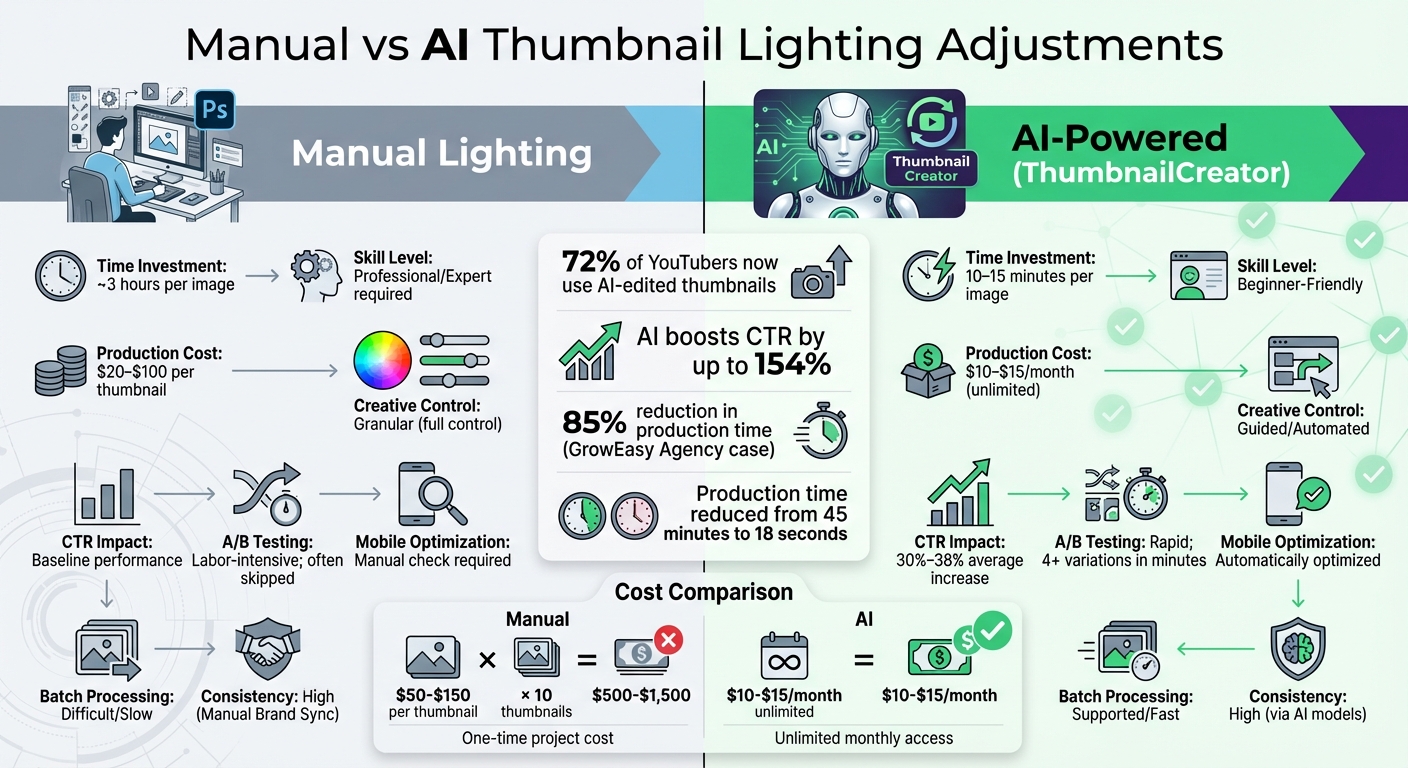
Manual vs AI Thumbnail Lighting: Time, Cost & Performance Comparison
Manual adjustments give you full control over shadows, highlights, and color temperature. But that level of precision demands advanced Photoshop skills and about three hours per image. For creators juggling daily uploads or managing multiple channels, this process simply doesn’t scale.
AI changes the game. Tools like ThumbnailCreator handle tasks like background generation, lighting separation, and composition in just 10 to 15 minutes. Using data-driven algorithms, these tools optimize contrast and brightness specifically for mobile screens - where over 52% of educational videos are viewed. The results speak for themselves: 72% of YouTubers now use AI-edited thumbnails, and those who use AI effectively report an average 38% boost in click-through rates. While manual edits offer unmatched control, they come with significant time and cost hurdles.
"If you're doing it all by hand, you're basically trying to win a drag race on a bicycle." - Riley Santos, Creative Storyteller
The cost comparison is just as striking. Hiring professional designers can cost $20 to $100 per thumbnail, whereas AI tools like ThumbnailCreator offer unlimited downloads for as little as $10 per month. For instance, the GrowEasy Agency reduced production time by 85% with an AI workflow, producing thumbnails in just 10 minutes while maintaining consistent quality across 20 channels. This kind of efficiency frees up time for creators to focus on content, not tedious editing tasks.
Here’s a quick breakdown of how manual and AI lighting adjustments compare:
Comparison Table: Manual vs AI Lighting
| Feature | Manual Lighting Adjustments | AI-Powered Lighting (ThumbnailCreator) |
|---|---|---|
| Time Investment | ~3 hours per image | 10–15 minutes per image |
| Skill Level | Professional/Expert | Beginner-Friendly |
| Production Cost | $20–$100 per thumbnail | ~$10–$15/month (unlimited) |
| Creative Control | Granular | Guided/Automated |
| CTR Impact | Baseline | 30%–38% average increase |
| A/B Testing | Labor-intensive; often skipped | Rapid; 4+ variations in minutes |
| Mobile Optimization | Manual check required | Automatically optimized |
| Batch Processing | Difficult/Slow | Supported/Fast |
| Consistency | High (Manual Brand Sync) | High (via AI models) |
This comparison highlights how AI-powered tools like ThumbnailCreator make lighting adjustments quicker, more affordable, and easier to scale. By combining AI speed with manual fine-tuning when needed, creators can achieve both efficiency and brand consistency.
Conclusion
AI-powered lighting optimization is changing the game for YouTube creators, delivering professional results without the hefty price tag. The stats speak for themselves: AI tools can boost click-through rates by an average of 37.2%, improve viewer retention by 22.6%, and slash production time from 45 minutes to just 18 seconds per thumbnail. This isn’t just an upgrade - it’s a complete shift in how creators approach thumbnail design.
Tools like ThumbnailCreator make these advancements accessible to everyone, whether you're a newcomer or managing multiple channels. For $10–$15 per month, you get unlimited automated lighting corrections, contrast adjustments, and mobile-friendly designs. Compare that to hiring a designer, which can cost between $50 to $150 per thumbnail, and the return on investment becomes crystal clear.
What’s even better? You don’t have to sacrifice quality for speed. AI takes care of the technical work - balancing exposure, enhancing subject focus, and making your thumbnails stand out on any screen. Simple tweaks, like a 10–15% vibrance boost, allow you to maintain creative control while leveraging data-driven insights. These tools, trained on millions of high-performing images, know exactly how to guide viewers' attention, giving you an undeniable edge over manual editing.
AI-enhanced lighting doesn’t just save time; it raises the bar for quality. With 72% of YouTubers using AI-edited thumbnails and seeing up to a 38% CTR increase, you can spend more time crafting amazing content.
Curious to see the difference for yourself? ThumbnailCreator’s automated workflow lets you test it out on your next video - no design expertise required.
FAQs
Will AI lighting changes make my thumbnails look fake?
AI lighting adjustments are crafted to refine thumbnails in a way that feels natural. When applied properly, they steer clear of appearing artificial by carefully tweaking shadows, highlights, and color temperature for a more lifelike result. These advanced tools work to seamlessly integrate the adjustments, enhancing the visual appeal while maintaining a genuine look.
How can I keep lighting consistent across my whole channel?
To keep the lighting consistent across your channel, consider using AI tools like ThumbnailCreator. These tools can analyze your videos and help create thumbnails that match your branding. They take care of things like lighting, brightness, and color schemes, ensuring everything looks uniform. This consistency strengthens your channel's identity, makes your content visually cohesive, and helps build trust with your audience. Plus, it can improve click-through rates by making your thumbnails instantly recognizable.
What’s the best way to A/B test lighting changes fast?
To test lighting changes efficiently, consider using AI tools like ThumbnailCreator. These tools allow you to generate multiple thumbnail variations - up to 10 - in no time. Pair this with YouTube's 'Test & Compare' feature to evaluate performance. This method helps you pinpoint which lighting tweaks boost watch time and click-through rates, making it easier to implement quick, data-backed improvements.