

How AI Rates YouTube Thumbnails Before Upload
AI thumbnail scores flag design problems - not future clicks. Before uploading, score the final image, read the feedback, and fix the biggest design mistakes. Most tools use a 1–100 scale, but a higher number doesn’t guarantee better results.
The process comes down to three steps:
- Check the design: Review contrast, layout, text, faces, and color. Treat attention heatmaps as estimates, not recorded eye movements.
- Edit and compare: Make one change at a time, keep the thumbnail aligned with the title and video, and prepare different concepts for testing.
- Check viewer results: Use YouTube testing to compare watch time share, then review CTR, impressions, and retention in Studio.
The goal isn’t a perfect score. It’s a clear thumbnail that matches the video - and earns clicks that lead to viewing.
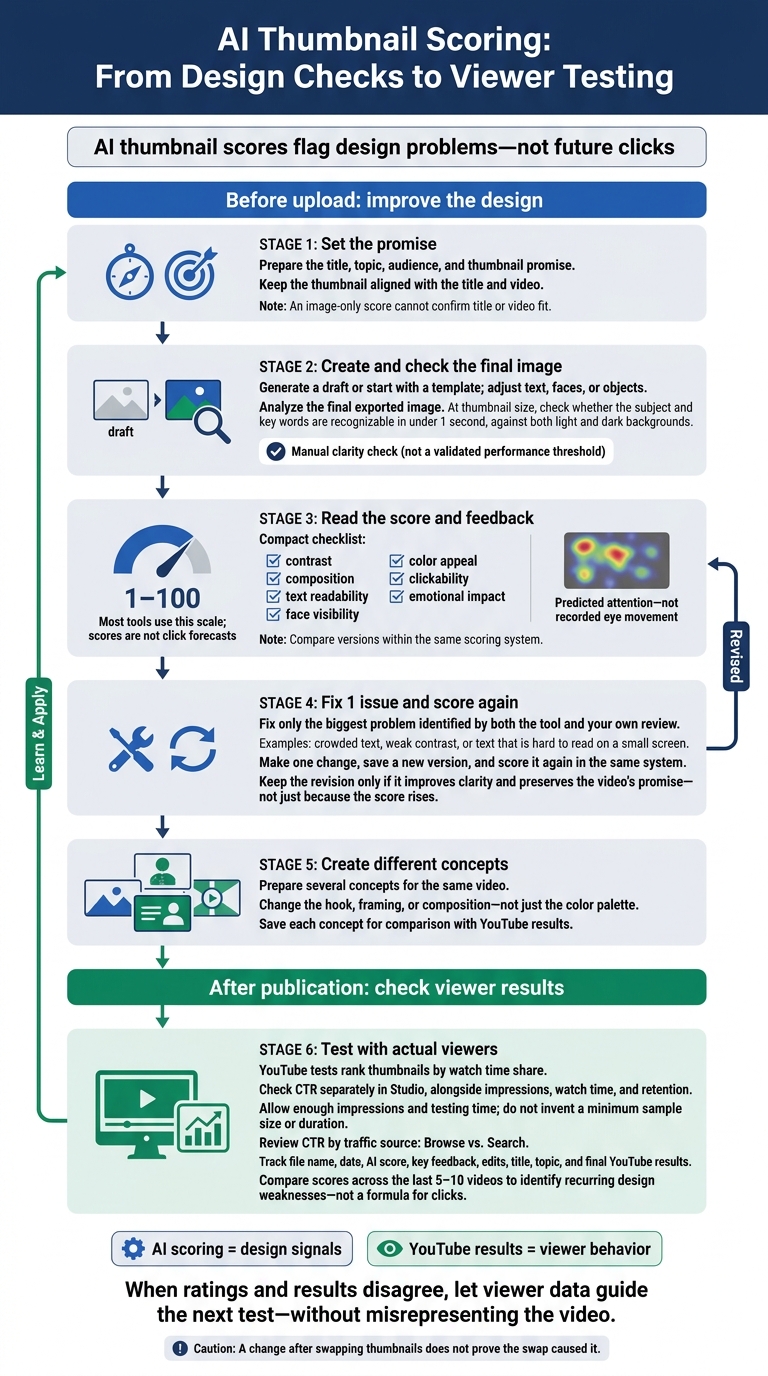
AI Thumbnail Scoring: From Design Checks to Viewer Testing
How AI Analyzes a YouTube Thumbnail
AI turns design choices into specific signals you can check before uploading.
Check the File and Identify Image Elements
Analyze the final exported image so the tool scores the version viewers will see, including any clarity lost during export. Tools differ, but AI can detect text, faces, objects, colors, and the main subject to judge which elements stand out most. Use those findings to understand why one version reads better than another.
Check Focus, Readability, and Title Fit
The analyzer may check subject size, layout, text contrast, and separation from the background. Face detection can also flag expressions that are too small to recognize. Shrink the image to a thumbnail-size preview, then check whether you can identify the subject and read the key words in under 1 second against both light and dark backgrounds.
Checking title fit requires the title or video concept - not just the image. An image-only score cannot confirm whether the thumbnail matches the video’s promise. Once that match is clear, check whether the layout gives viewers a reason to click.
Review Design Factors That May Affect CTR
Look for a recognizable subject, clear separation from the background, and readable text. AI can also weigh face prominence, color contrast, click appeal, and emotional tone. Some analyzers adjust their criteria by content category.
Use the attention heatmap to see whether predicted attention falls on the subject or a distracting background detail. It’s a model estimate, not recorded eye movement. Labels such as click appeal and emotional tone are automated judgments; measure actual clicks in YouTube Studio after publishing.
If predicted attention falls away from the subject, simplify the background or make the focal point larger before scoring the image again.
sbb-itb-b59debf
Create, Score, and Edit a Thumbnail Before Upload
Once your thumbnail concept is clear, start the create-score-edit loop.
Prepare Your Title and Thumbnail
Set the title, topic, audience, and thumbnail promise before making the image. Use ThumbnailCreator to generate a draft or start with a template. Then adjust the text, faces, or objects to match that promise before scoring it.
Read Scores, Feedback, and Attention Estimates
Review the 1–100 score and all seven checks: contrast, composition, text readability, face visibility, color appeal, clickability, and emotional impact. Compare versions within the same system to decide what to edit next.
Fix 1 Issue and Score Again
After the first score, fix only the biggest problem that both the feedback and your own review flag. That might be crowded text, weak contrast, or text that's hard to read on a small screen.
Make that one change, save a new version, and score it again in the same system. Keep the revision only if it makes the thumbnail clearer and keeps the video’s promise intact - not just because the score goes up.
Create Different Concepts for Audience Testing
Once readability is sorted out, create several different concepts. Change the hook, framing, or composition - not just the color palette. Use these as thumbnail options to test for the same video. Save each concept so you can compare data-driven testing with your gut feeling against YouTube results later.
Check AI Ratings Against YouTube Results
Compare AI Scoring and YouTube Thumbnail Testing
After scoring and editing a thumbnail, check whether YouTube results support your choice. AI scores assess design; YouTube results show performance. Use both to guide your decision.
| Comparison | Pre-upload AI scoring | YouTube audience testing |
|---|---|---|
| Method | Automated visual analysis | Testing with actual viewers |
| Timing | Before publication | After publication |
| Evidence | Design signals such as contrast, readability, and focal points | Viewer behavior and watch time share |
| Limitations | Can’t measure audience intent, topic fit, or trend timing | Needs enough impressions and testing time to be reliable |
| Best use | Catch design flaws before launch | Check which concept connects with viewers |
A higher score doesn’t always mean a better thumbnail. YouTube tests rank thumbnails by watch time share, so check CTR separately in Studio. Don’t declare a winner based on a small gap without enough impressions or testing time.
Track Versions, Traffic Sources, and Watch Time
Keep a simple log to connect pre-upload edits with live results. For each candidate, record its file name, date, score, key feedback, edits, and final YouTube results. Include the title, topic, impressions, CTR, watch time, and retention. Compare scores across your last 5–10 videos to spot recurring weaknesses - not to treat the score as a formula for clicks.
Review CTR by traffic source, especially Browse vs. Search, alongside impressions, watch time, and retention. The same thumbnail can perform differently with different audiences and traffic sources. A change after swapping thumbnails doesn’t prove the swap caused it. When AI ratings and YouTube results disagree, let viewer data guide the next test while keeping the thumbnail true to the video.
Conclusion: Use Scores to Guide Edits, Not Predict Results
After scoring and revising, use the result as a final pre-upload check. Start with a thumbnail that matches both the title and the video. Read the feedback - not just the number - then fix the weakest point and score it again.
ThumbnailCreator can help you generate and refine thumbnail concepts before you score them.
Put the strongest concepts through viewer testing. Treat ratings as editing signals, not forecasts of clicks or watch time. Keep edits that make the thumbnail clearer without misrepresenting the video.
FAQs
How do I know when to stop revising my thumbnail?
Stop revising when AI analysis gives your thumbnail a high-performing benchmark score and it meets three core standards: readable on mobile, strong contrast, and a clear subject. Use ThumbnailCreator to check text coverage, face accuracy, and composition.
Next, run live A/B tests with YouTube’s Test and Compare. Once testing confirms that the thumbnail attracts engaged viewers, stop manual edits and use the winner as your baseline for future tests.
Can a thumbnail without text or faces score well?
Yes. Thumbnails without text or faces can still score well when they use high contrast, well-placed elements, and clear visual hooks to draw the eye.
That said, thumbnails without faces tend to perform worse. The cited research reports an average click-through rate (CTR) of 6.8% for thumbnails with a human face, compared with 4.1% for those without one.
What if my highest-scoring thumbnail performs poorly?
AI predictions estimate performance based on patterns that have worked before, but you still need to test them with viewers. Check whether your test reached statistical significance, which typically requires at least 1,000 impressions.
If performance is still poor, your thumbnail may promise more than the video delivers. YouTube prioritizes watch time, so clicks followed by early drop-offs can hurt performance. Let audience engagement metrics guide your next tests, and test different concepts rather than small tweaks.