

How to Test Thumbnail CTR by Video Type
Your video thumbnail plays a key role in grabbing attention and boosting clicks. A strong click-through rate (CTR) above 6% can significantly increase views and improve your video's performance in YouTube's algorithm. But here's the challenge: different audiences respond to different thumbnail styles based on the type of content they’re watching. For example:
- Tech reviews: Clear product shots and expressive faces work best.
- Tutorials: Focus on clarity with bold text and final results.
- Gaming: Use unique gameplay moments and switch designs often.
- Vlogs: Emotional expressions and mystery drive clicks.
- DIY: Contextual visuals, like tools in action, perform well.
To find what works, use YouTube's Test & Compare tool to run A/B tests, experimenting with elements like text, faces, or colors. Prioritize high-contrast designs and mobile-friendly text. Monitor CTR and watch time to identify winning thumbnails. Even small changes can lead to big improvements in views, provided you avoid common thumbnail mistakes that hurt performance.
How to A/B Test YouTube Thumbnails (Step-by-Step)
sbb-itb-b59debf
How Video Type Affects Thumbnail CTR
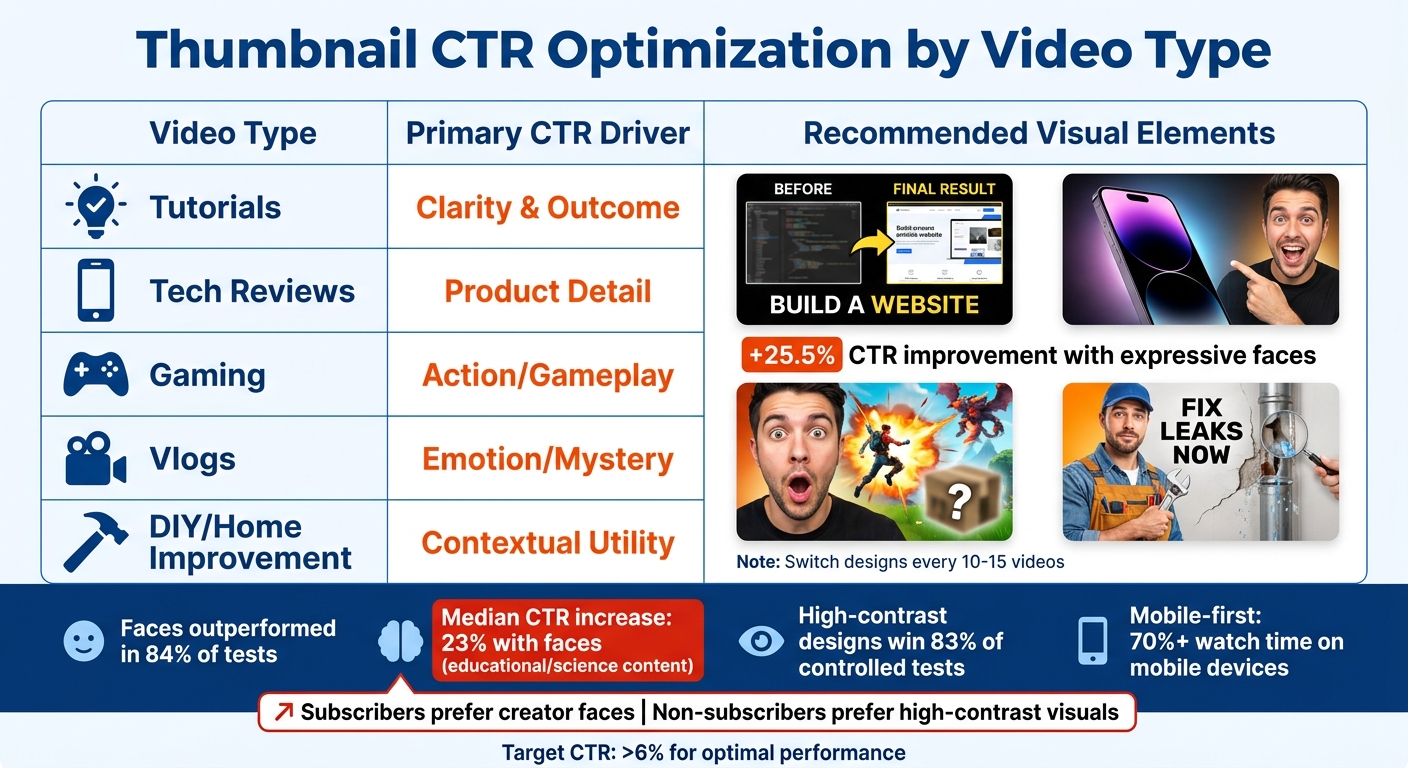
Thumbnail CTR Optimization Guide by Video Type
Thumbnails don’t perform the same across all video categories. Why? Viewers have different expectations based on the type of video they’re watching. For example, someone searching for a tutorial wants to instantly see the solution or outcome, while a vlog viewer is drawn in by emotion or curiosity. When your thumbnail aligns with what your audience expects, you can see a noticeable boost in your click-through rate (CTR).
How Audience Behavior Changes by Category
Audience preferences vary widely depending on the type of content they’re consuming. Here’s how these preferences play out across popular categories:
Educational and science content benefits from thumbnails that exude clarity and authority. Including faces with clear emotions - like surprise, concern, or joy - can make a big difference. In fact, a study of 127 videos found that thumbnails featuring faces outperformed others in 84% of tests, increasing median CTR by 23%.
For tech review videos, combining clear product images with high-contrast designs works best. A great example comes from Marcus Chen, who tested two thumbnail designs for a smartphone comparison video. Variant A, showing only the products, had a 7.32% CTR. Variant B added the creator’s expressive face and jumped to a 9.19% CTR - a 25.5% improvement across 57,625 impressions. Importantly, the audience stayed engaged (average view duration was nearly identical), proving the face wasn’t just clickbait.
"Faces, especially eyes, capture attention in cluttered visual environments." - Marcus Chen, YouTube Optimization Consultant
Gaming commentary is a completely different story. Here, gameplay footage often outshines the creator’s face. However, this audience tends to experience "visual fatigue" from repetitive designs. For gaming channels that post frequently, switching up thumbnail styles every 10–15 videos can help keep viewers engaged and prevent "banner blindness".
In DIY and home improvement, faces work well only when they add context - like holding a tool or pointing to a specific problem. Meanwhile, storytelling and challenge videos thrive on mystery. Thumbnails that tease viewers with blurred objects or cliffhanger phrasing often outperform those that are overly clear.
"A thumbnail that pulls new audiences in is often more valuable than one that just appeals to loyal fans." - Nadica Naceva, Writer, Influencer Marketing Hub
Another important factor: subscribers vs. cold traffic. Subscribers are more likely to respond to thumbnails featuring the creator’s face because they already trust them. On the other hand, non-subscribers - who make up the bulk of "Suggested" traffic - are drawn to high-contrast visuals and clear value propositions.
Thumbnail Examples for Different Video Types
Here’s a quick breakdown of how successful thumbnails vary by video category:
| Video Type | Primary CTR Driver | Recommended Visual Element |
|---|---|---|
| Tutorials | Clarity & Outcome | Final result + 3-5 words of bold text |
| Tech Reviews | Product Detail | High-contrast product shot + expressive face |
| Gaming | Action/Gameplay | Unique gameplay moments (avoid repetitive templates) |
| Vlogs | Emotion/Mystery | Expressive faces + intrigue (blurred objects) |
| DIY/Home Imp. | Contextual Utility | Creator holding tools or pointing at a problem |
Text legibility is another critical factor. A personal finance channel tested two thumbnail designs for a video on credit scores. Variant A used a long phrase ("The Hidden Factor Destroying Your Credit Score"), while Variant B opted for a short, bold phrase ("Credit Score Mistake"). Variant B earned an 8.91% CTR compared to 7.43% for Variant A, proving that concise, mobile-friendly text often wins.
"Mobile-first design constraints force clarity, which benefits all viewers." - Marcus Chen, YouTube Optimization Consultant
The bottom line? Tailor your thumbnails to your niche. Use intrigue for entertainment and vlogs, and focus on clarity for tutorials and tech reviews. High-contrast designs that separate the subject and text from the background consistently perform well, winning 83% of controlled tests. By understanding these category-specific nuances, you can refine your thumbnail strategies and track the right metrics to optimize CTR.
How to Set Up A/B Tests for Thumbnails
Building on the idea that video type impacts thumbnail performance, here’s how to set up effective tests.
YouTube’s Test & Compare tool allows creators to run controlled experiments directly in YouTube Studio. This tool shows different thumbnail versions to viewers simultaneously, eliminating timing-related biases since all variants are tested under the same conditions.
The tool determines the winning thumbnail based on watch time share rather than just clicks, ensuring the focus is on engagement quality. As YouTube explains:
"To help your video get high quality engagement, we optimize tests for overall watch time over other metrics, like click-through-rate".
In a study of 127 controlled A/B tests conducted through January 2026, 70% of tests identified a clear winner, with an average CTR increase of 37%. Testing thumbnails effectively ensures your design aligns with viewer preferences and expectations.
Finding the Test & Compare Tool
The Test & Compare tool is accessible through YouTube Studio on desktop for creators who have enabled "advanced features". To find it, sign in to YouTube Studio on a computer, go to Content, and select the video you want to test. In the Thumbnail section, you’ll see an option for A/B Testing (or "Test & Compare").
Not every video qualifies for testing. You can’t use this tool for YouTube Shorts, videos "made for kids", private videos, or age-restricted content. Scheduled Lives and active Premieres are also excluded, but you can test thumbnails on Live Archives or Premieres that have transitioned to standard long-form videos. To refine your strategy, consider starting with older long-form videos in each category, reducing risks tied to new uploads.
How to Upload and Manage Thumbnail Variants
Once you open the Test & Compare tool, select Thumbnail only (or "Title and thumbnail" if testing both). You can upload up to 3 thumbnail variants at once. Ensure your images are high-resolution - at least 1280×720 pixels. If any variant is lower than 720p, YouTube will downscale all thumbnails to 480p, potentially skewing results.
Focus on one variable at a time. Testing a single element ensures clearer results. For example, in NoteLM’s January 2026 study, experiments involving face-related changes had an 82% success rate, with an average improvement of +42%.
After uploading your thumbnails, click Done or Publish test to start the experiment. Tests typically run for about two weeks. During this time, monitor progress in the Reach tab of YouTube Analytics. Avoid changing the video’s title or thumbnail while testing, as this will terminate the experiment. Once a winner is determined, YouTube automatically applies the best-performing thumbnail to your video.
Next, dive into how to analyze these test results for actionable insights.
Creating Custom Thumbnails for Each Video Type
Craft thumbnails tailored to each video category to connect with your audience's specific preferences. By creating a variety of thumbnail styles for each category - focusing on elements like facial expressions, text placement, and color schemes (following a typography guide for readability) - you can streamline testing and better align with viewer expectations.
Using AI Tools to Design Thumbnails
AI tools like ThumbnailCreator simplify thumbnail creation by offering templates designed with principles like high contrast and optimal subject placement. These templates are customized for specific niches, enabling you to produce polished thumbnails quickly, even if you're new to design.
ThumbnailCreator's AI features let you create eye-catching designs in seconds. With tools like face swapping, you can test different expressions or subjects, while the text editing function ensures your message remains bold and easy to read. Considering that over 70% of YouTube watch time happens on mobile devices, the built-in mobile preview ensures your thumbnails are clear and legible on smaller screens. The version history feature also makes it easy to manage and compare thumbnail variants for A/B testing, helping you identify which designs perform best side-by-side.
By using these AI-driven tools, you can create thumbnails that align with the category-specific click-through rate (CTR) improvements discussed earlier - like the 25.5% boost achieved by optimizing face placement in tech reviews. With AI as your foundation, the following tips can help fine-tune thumbnails for different video types.
Design Tips for Different Video Categories
Using custom AI templates, you can refine thumbnail designs based on the type of video:
- Tutorials and How-To Videos: Highlight value with before-and-after images or showcase the final result. Add text overlays like "Easy Method" or "Quick Results" to emphasize benefits. Clean, high-contrast backgrounds can also improve CTR for these videos.
- Gaming Videos: Use dramatic gameplay scenes with concise text such as "Hidden Easter Eggs" or "Secret Ending" to capture the thrill of the content.
- Entertainment and Vlogs: Thumbnails featuring spontaneous, authentic reactions tend to resonate more than overly staged shots.
- Product Reviews: Focus on clear product images with strong color contrast. Simple graphics like star ratings or percentage scores can provide instant context.
- News and Commentary Videos: Bold, urgent headlines paired with a consistent brand style work well to grab attention.
Keep your text short and impactful - one or two words work best. Stick to a limited color palette of two contrasting hues plus one base color to avoid clutter. High-contrast combinations like purple/yellow or blue/orange are especially effective at drawing attention.
"A well-designed thumbnail can capture attention, spark curiosity, and drive more clicks, all before a single second of your video is watched." - vidIQ
Always design thumbnails at 1280x720 pixels in JPG, PNG, or GIF format. Focus on a single emotion, benefit, or moment to keep the design simple and ensure viewers immediately understand what your video offers.
How to Analyze Thumbnail CTR Test Results
After running your two-week test, it’s time to dig into the data and pinpoint the winning thumbnail. YouTube's Test & Compare tool uses watch time share as the main metric, which reflects the percentage of total watch time generated by each thumbnail variant. But relying on this alone won’t give you the full picture.
You’ll also want to keep an eye on click-through rate (CTR), which measures the percentage of impressions that result in clicks. On YouTube, CTRs generally fall between 2% and 10%, with anything above 5% considered strong. Interestingly, a study of 127 A/B tests found that identifying a clear winner led to an average CTR improvement of 37%. Thumbnails with altered facial expressions had an 82% success rate in producing a winner, boosting CTR by an average of 42%.
YouTube suggests running tests for at least two weeks to minimize noise and ensure reliable results. Along with CTR, make sure to evaluate Average View Duration (AVD). A high CTR paired with a low AVD indicates your thumbnail might be misleading - drawing clicks but failing to retain viewers, which could hurt your channel’s growth. The best thumbnail increases CTR without reducing AVD. As the Thumbnailr Team puts it:
"A thumbnail that generates clicks but increases bounce rate is misleading, not effective".
By analyzing these results, you can refine your thumbnails for better performance. Let’s look at the key metrics you’ll need to track for a complete evaluation.
Key Metrics to Track
To get actionable insights, focus on these metrics: Watch time share, CTR, impressions, and AVD. Together, they provide a complete view of your thumbnail’s performance.
- CTR shows how effectively your thumbnail grabs attention compared to others in the feed. You can calculate CTR improvement using this formula:
((New CTR - Old CTR) / Old CTR) × 100. For example, if your original CTR was 4.2% and the new thumbnail hits 7.3%, the improvement is 74%. - Impressions ensure your data is reliable. Aim for at least 2,000 impressions per variant for meaningful results.
- Average View Duration (AVD) acts as your quality control. A winning thumbnail should maintain or improve AVD.
| Metric | Importance | Target/Benchmark |
|---|---|---|
| Watch Time Share | Primary (YouTube Native) | Highest % among variants |
| CTR | Primary (Manual) | 2–10% (Average); >5% (Strong) |
| Impressions | Reliability | 2,000+ per variant for high confidence |
| Avg. View Duration | Quality Control | Should remain stable or increase |
Using Comparison Tables for Analysis
A comparison table can help you track results across different video types, making it easier to identify patterns. For instance, you might notice that tutorial videos perform better with text overlays, while vlog thumbnails thrive on emotional expressions.
Here’s an example of how to structure your analysis:
| Video Type | Thumbnail Variant | CTR % | Impressions | Winner |
|---|---|---|---|---|
| Tech Tutorial | Variant A (Neutral) | 4.2% | 2,500 | |
| Tech Tutorial | Variant B (Surprised) | 7.3% | 2,500 | Yes (+74%) |
| Finance | Variant A (Text Only) | 4.9% | 3,000 | |
| Finance | Variant B (With Numbers) | 6.6% | 3,000 | Yes (+35%) |
These insights allow you to create a "thumbnail playbook" tailored to your channel’s needs. If your test results in "No Winner", it likely means the variations weren’t distinct enough to influence viewer behavior. For your next test, try bolder changes to stand out. Focus on improving thumbnails for videos with high impressions but below-average CTR to make the most impact.
Conclusion and Next Steps
Testing thumbnails helps uncover which visual elements resonate most with your audience. For instance, how-to viewers often engage with before-and-after visuals, while gaming fans gravitate toward high-energy emotional reactions. Tech reviewers typically see better results with clear product images, whereas storytelling channels succeed with intrigue and subtle hints. These patterns provide a strong foundation for refining your approach.
Consistent thumbnail testing can lead to a 20–40% boost in CTR over time. A standout example from 2023 is YouTuber JackSucksAtLife, who swapped the thumbnail on an older video and saw a 978% spike in views by aligning the design with current viewer preferences. Similarly, Nolan Molt from Think Media revamped a stagnant video’s thumbnail, driving views from 40,000 to 1.5 million. These real-world examples highlight the impact of strategic thumbnail updates.
To refine your thumbnails, build on your A/B testing results. Keep a thumbnail playbook to document what works best for each video category. Focus on testing one variable at a time - whether that's facial expressions, text length, or color contrast - and let each test run for at least 14 days or until you hit 2,000 impressions per variant. Don’t forget to prioritize mobile-friendly designs in your playbook.
Tools like ThumbnailCreator simplify the process with AI-powered templates and features tailored to different video styles. Instead of manually designing thumbnails, you can quickly generate multiple versions, test them, and apply the insights across your channel. Features like face swapping and object swapping make it easier to pinpoint what drives higher CTRs.
Top creators achieve click-through rates between 5–10% by systematically testing thumbnails, while many channels average around 3–4%. Even a small CTR increase of 0.5% can translate to significant traffic gains when applied across your videos. Start testing today, track your results, and watch your channel's performance improve.
FAQs
How do I pick what to test first on a thumbnail?
To boost viewer engagement, focus on elements that grab attention and resonate with your audience. Pay special attention to facial expressions, text overlays, and color schemes in your visuals. These details can significantly influence how viewers interact with your content.
When testing, stick to one variable at a time. This approach makes it easier to identify which specific change improves your click-through rate (CTR). For example, you might start by testing bold, eye-catching colors or experimenting with text that highlights your video's key message.
Make sure your tests run for 7–14 days and gather enough impressions to produce reliable data. This timeframe allows you to collect meaningful insights without rushing decisions. By isolating variables and analyzing results carefully, you can refine your content to better connect with your audience.
What if my test boosts CTR but lowers watch time?
If your A/B test shows a higher click-through rate (CTR) but a drop in watch time, it’s a sign that the thumbnail might be grabbing attention but not delivering on what viewers expect. This mismatch can happen if the thumbnail is misleading or appealing to the wrong audience. Take a closer look to ensure your thumbnails are not only eye-catching but also a true representation of the video’s content. This way, you can keep viewers engaged longer and boost overall performance.
How many impressions do I need for reliable results?
To get dependable results, aim for each variation to receive between 1,000 and 5,000 impressions. Make sure to run the test for at least 7 to 14 days to gather enough data for a proper analysis.