

Object Detection in Thumbnail Design
Want your thumbnails to grab attention in milliseconds? Object detection, powered by AI, is changing how creators design thumbnails. By identifying key elements - like faces, products, or logos - this technology helps you create visuals that stand out, boost click-through rates (CTR), and save time.
Key Highlights:
- Thumbnails matter: 90% of top YouTube videos use custom thumbnails, increasing CTR by 30%-40%.
- AI precision: Tools like YOLOv5 identify important elements, ensuring clear, engaging designs.
- Time-saving: Automated object detection eliminates manual editing, generating thumbnails in milliseconds.
- Mobile-friendly: Over 70% of YouTube views happen on mobile, making clear and impactful thumbnails essential.
Using object detection, creators can streamline their workflow, focus on essential design elements, and increase engagement. Tools like ThumbnailCreator automate this process, offering features like subject isolation, face detection, and layout suggestions. Ready to optimize your thumbnails? Let’s dive deeper into how this works.
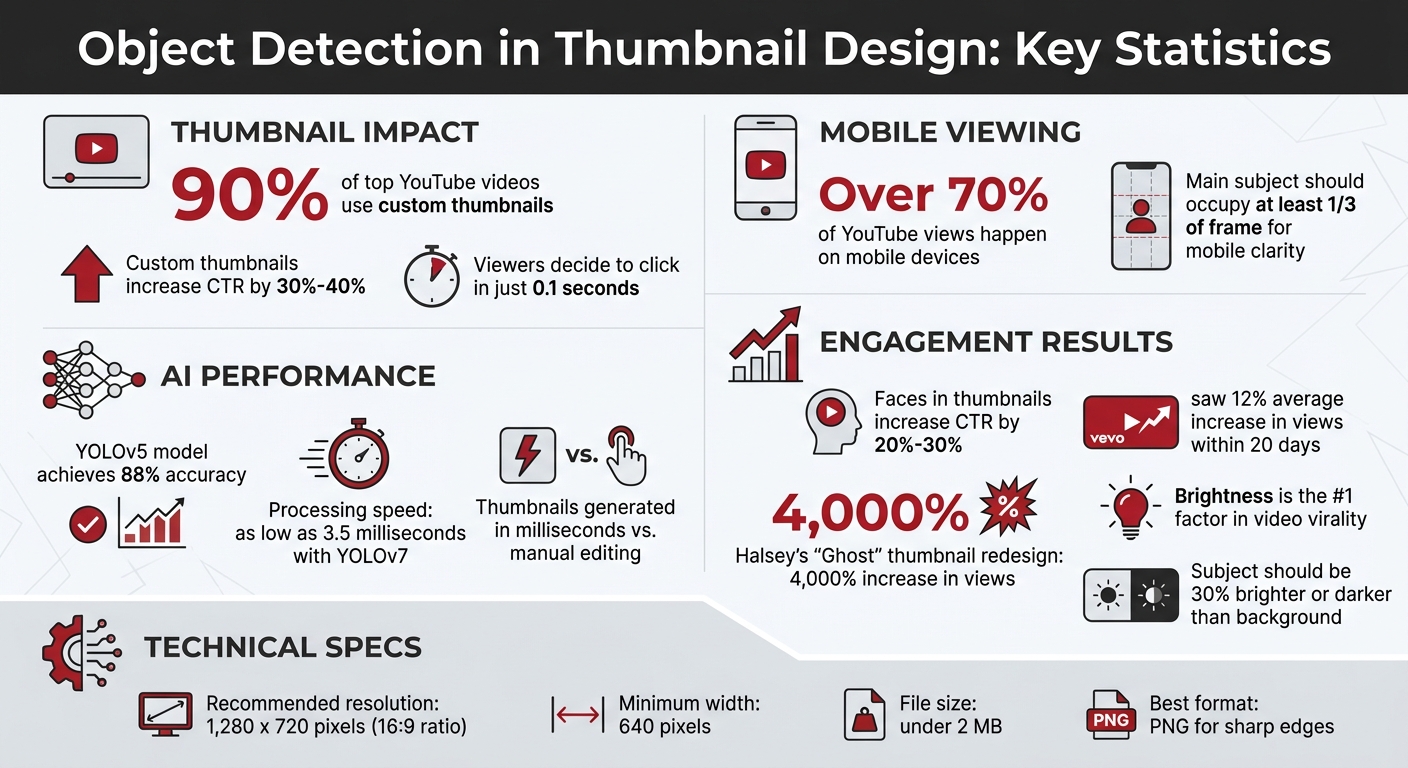
Object Detection Benefits for YouTube Thumbnails: Key Statistics and Impact
What Object Detection Is and How It Works in Thumbnail Design
Object Detection Basics
Object detection is a machine learning technique that identifies specific elements within an image - like faces, products, logos, or landmarks - by marking them with bounding boxes. This process has replaced older methods, such as fixed time segment extraction, which often resulted in blurry or poorly focused frames. Modern algorithms now analyze video content to select frames based on the frequency of key objects and faces appearing in the footage.
"The algorithm can select sprites and thumbnails by looking at the frequency of occurrence of certain objects and faces" – Christoph Prager, Bitmovin
This advancement ensures thumbnails more accurately reflect the video’s content, fostering viewer trust and encouraging engagement. Now, let’s see how this precise detection turns thumbnails into attention-grabbing visuals. This is a core component of AI thumbnail generation workflows.
How Object Detection Makes Thumbnails More Clickable
Object detection helps designers position key visual elements with precision. By using models like YOLOv5, creators can apply design principles like the Rule of Thirds, placing subjects slightly off-center to create visually appealing compositions that stand out in busy feeds. Highlighting human faces further boosts emotional engagement, as shown in a 2024 study of Thai YouTube thumbnails. A great example of this is Vevo’s redesign of the thumbnail for Halsey’s "Ghost" in May 2019, which resulted in an astonishing 4,000% increase in views.
sbb-itb-b59debf
Benefits of Using Object Detection for YouTube Thumbnails
Object detection is a game-changer for YouTube thumbnail design, helping creators streamline their workflow and boost engagement.
Highlighting Key Visual Elements
This technology simplifies design by automatically identifying the most important parts of your thumbnail - such as faces, products, logos, or landmarks - and marking them with bounding boxes. It answers the critical design question: "What objects are where?". With this insight, you can use techniques like the Rule of Thirds vs. centered layouts, positioning key elements at grid intersections to create a more dynamic and visually appealing thumbnail.
Data also plays a significant role in improving composition. For example, researchers in Thailand developed a recommendation system using the YOLOv5 object detection model and Xception CNN. This system analyzed thumbnails from popular YouTubers in food, IT, and travel niches, offering new creators specific placement advice. Impressively, the Xception model classified images with 88% accuracy.
Visual elements like brightness and contrast are critical for grabbing attention. Studies show brightness is often the top factor in video virality, with contrast coming in second. Object detection helps apply these principles effectively. By identifying the main subject, you can ensure it stands out - making it at least 30% brighter or darker than the background to catch a viewer’s eye mid-scroll. This not only improves design but also saves creators valuable time.
Faster Thumbnail Creation
Creating thumbnails manually can be a tedious process, especially for creators who publish multiple videos daily. Object detection eliminates the need to sift through footage frame by frame. Instead of relying on fixed time segments, advanced algorithms automatically pick the best frames based on object clarity and frequency.
"Machine learning based thumbnail creation can increase the relevance of the thumbnails and sprites, without using any additional manual resources for this task." – Christoph Prager, Bitmovin
With modern one-stage detectors like YOLOv7, processing speeds can reach as low as 3.5 milliseconds, enabling almost instant thumbnail generation during video uploads. For creators uploading 40+ videos daily, this automation makes scaling up manageable. It also minimizes common issues like black screens, blurry shots, or irrelevant frames that often occur with traditional methods.
Higher Click-Through Rates
Speed and precision in thumbnail creation don’t just save time - they also drive results. Well-optimized thumbnails can boost click-through rates (CTR) by 30% to 40%. Why? Because viewers decide whether to click in just 0.1 seconds. Object detection ensures that your thumbnail highlights the most relevant visual element instantly.
On mobile devices, where over 70% of YouTube views occur, clarity is even more critical. Object detection ensures the main subject occupies at least one-third of the frame, making it easy to see even on small screens. Human faces, in particular, can significantly improve CTR. Thumbnails featuring expressive faces, properly highlighted, can increase CTR by 20% to 30% compared to neutral or faceless designs.
A study published in INST414 demonstrated the power of visual metrics in predicting thumbnail success. Using a Random Forest Classifier, researchers analyzed features like brightness and contrast in 30 thumbnails and accurately identified "high CTR" videos (the top 30% of most-viewed videos on the channel). Vevo, for instance, applied these optimization strategies and saw a 12% average increase in views within the first 20 days of updating their thumbnails.
How to Use Object Detection in Thumbnail Creation
Steps for Applying Object Detection to Thumbnails
Start by filming at 60 FPS to capture sharp frames that allow AI tools to detect clean edges without the interference of motion blur.
The first step is automated detection, where tools like Photoshop's "Select Subject" or Canva's "Magic Grab" identify and isolate the main subject. These tools can separate the subject from the background, creating a precise layer mask that you can reposition as needed.
Once the subject is isolated, focus on adjusting the composition. You can resize or reposition the subject using the Rule of Thirds to create a balanced and visually appealing layout. Add elements like outlines or drop shadows to make the subject pop. Remember, YouTube thumbnails need to be 1,280 x 720 pixels (16:9 aspect ratio), with a minimum width of 640 pixels and a file size under 2 MB.
To ensure readability, especially when text overlaps the detected object, use a black-to-transparent gradient layer behind the text. This maintains clarity and legibility. Before finalizing, perform a quick "shrink test" by viewing the thumbnail at a reduced size to confirm that the key elements remain clear, even on smaller mobile screens.
These manual steps form the groundwork for creating eye-catching thumbnails. Once you're comfortable with this process, you can explore AI tools to simplify and speed up the workflow.
Using AI Tools for Automated Object Detection
While manual adjustments give you control, AI tools like ThumbnailCreator can automate much of this process, delivering consistent, professional results. ThumbnailCreator’s object detection features can identify faces, isolate subjects, and suggest layouts based on effective visual patterns. For example, its object swapping feature allows you to replace or modify detected elements with simple prompts, while integrated face detection ensures that human subjects are emphasized - because faces naturally grab attention.
"AI doesn't replace your design instincts - it structures them." – Caleb Leigh, Founder, CreatorSkills
For creators with tight schedules, AI tools can automatically select the best frames, eliminating the need for tedious manual reviews. This not only saves time but also helps establish a consistent style. Using templates with recurring elements, like familiar face poses or brand visuals, reinforces your channel’s identity and builds recognition among viewers. Plus, tools like ThumbnailCreator offer pre-designed templates and AI-powered generation features, enabling you to create polished thumbnails in just minutes instead of hours.
Best Practices for Object Detection in Thumbnail Design
When it comes to leveraging ThumbnailCreator's object detection tools, a few key strategies can make a big difference in your thumbnail design. These tips will help you get the most out of the platform while ensuring your thumbnails stand out, even after YouTube's compression.
Using ThumbnailCreator's Object Detection Features

Once you've isolated your subject, adjust its brightness and contrast to make it pop. This step is especially important because YouTube's compression can blur fine details, reducing overall image quality. By enhancing these aspects, your subject remains clear and visually distinct.
Positioning is another critical factor. Place your subject along the rule of thirds power points to create a dynamic and engaging composition. This principle, introduced by John Thomas Smith, ensures your subject naturally draws attention while secondary elements provide subtle support.
ThumbnailCreator also allows you to swap faces and objects within your design. If your subject is facing a particular direction, leave extra lead room in that direction to create a balanced and visually pleasing layout. This technique guides the viewer's eye naturally across the thumbnail.
For thumbnails with cluttered or busy backgrounds, start with a higher-resolution source image - ideally 1,920 x 1,080 pixels instead of the minimum 1,280 x 720. As Michelle Pruitt notes, "High-contrast or patterned backgrounds add visual noise, making it harder to find different components". A higher resolution provides the AI with more detail to work with, improving detection accuracy even after compression.
Finally, save your completed thumbnails as PNG files rather than JPEG. PNG files preserve sharp edges around text, logos, and other detected elements, ensuring your final design looks crisp and professional.
Choosing the Right ThumbnailCreator Plan
ThumbnailCreator offers three plans tailored to different types of creators. Here's a quick breakdown of each:
- Free Plan: Perfect for testing the waters, this plan gives you access to basic templates and AI-powered generation. It’s ideal for creating a few thumbnails to see if the tool fits your workflow. However, it does come with a limited number of thumbnails.
- Pro Plan: Designed for creators who publish regularly, this plan unlocks unlimited thumbnails and advanced features like face and object swapping. It also includes access to all templates and enhanced brightness/contrast controls, making it a great choice for those who want professional results without spending hours on manual editing.
- Agency Plan: Best for teams managing multiple YouTube channels, this plan includes everything in Pro plus collaboration tools and priority support. It’s a solid option for agencies looking to produce thumbnails at scale while maintaining brand consistency.
| Plan | Best For | Key Object Detection Features | Thumbnail Limit |
|---|---|---|---|
| Free | Testing and occasional use | Basic AI generation, limited templates | Limited number |
| Pro | Active creators | Full AI features, face/object swapping, all templates | Unlimited |
| Agency | Multi-channel management | All Pro features plus team collaboration tools and priority support | Unlimited |
When deciding on a plan, consider how often you upload and your feature requirements. For weekly uploads or more, the Pro Plan offers unlimited access and advanced tools, saving you significant time compared to manual editing. For those looking to scale further, advanced thumbnail optimization techniques can help refine your data-driven strategy. If you're managing multiple channels, the Agency Plan ensures your team can work efficiently while maintaining a consistent look across all thumbnails.
Conclusion
Object detection has turned thumbnail creation into a precise, data-driven process. By identifying key visual elements - like food, technology, or people - it enables creators to apply proven composition techniques for better engagement. For example, a study from September 2024 found that models like YOLOv5 reached 88% accuracy in classifying thumbnails and providing category-specific design tips.
Research also shows that brightness and contrast are two of the most reliable indicators of thumbnail performance. When paired with thoughtful composition - such as aligning subjects along the rule of thirds grid - these factors significantly boost a thumbnail's visual appeal. This underscores the importance of using object detection as part of your design workflow.
Tools like ThumbnailCreator make this process even easier by embedding AI-powered object detection directly into their platform. Instead of tweaking elements manually, you can follow a YouTube thumbnail beginners guide to create professional-quality thumbnails in just minutes. The tool automates tasks like face swapping, object placement, and visual adjustments, freeing you to focus on producing content.
To get the best results, start with high-resolution images (1,920 x 1,080 pixels), apply thumbnail photography best practices, save your thumbnails as PNG files to maintain sharpness, and use object detection to ensure your focal points align with YouTube's safety guidelines. These steps help safeguard your channel and improve its overall presentation.
FAQs
Do I need to train an AI model to use object detection for thumbnails?
You don’t need to train an AI model to create thumbnails. Tools like ThumbnailCreator come equipped with powerful features like object detection, background removal, text placement, and design adjustments. These tools analyze effective thumbnail designs and automate much of the process, allowing you to produce professional-quality thumbnails quickly and easily - no manual AI training required.
What makes object detection select a “good” frame from a video?
A "good" frame for object detection is one that ensures objects are easy to identify and locate, boosting detection accuracy. These frames usually have clear, well-defined objects with little to no motion blur or obstructions. In some cases, AI tools are used to suggest the most informative frames, focusing on clarity, object visibility, and improving the model's ability to interpret the scene effectively.
How can I check if my thumbnail will still work on mobile?
To make sure your thumbnail looks good on mobile devices, preview it at smaller sizes - around 120×90 pixels - to see if it remains clear and readable. With over 70% of YouTube views coming from mobile, it’s important to test your design on phones and tablets. Check that the text is easy to read, faces stand out, and important details are visible without being cluttered or distorted. This way, your thumbnail will grab attention no matter the screen size.