

Ultimate Guide to Social Proof in Thumbnails
I build social proof thumbnails around one claim I can verify - not the biggest number I can find. My starting point: one proof signal, one clear subject, and one short phrase that matches what the video delivers.
That signal might be a viewer comment, a relevant credential, a subscriber milestone, or a measured result. I check the source, date, context, and permissions before designing, then make sure the claim reads clearly on a phone.
My process is simple:
- Choose proof that fits the viewer and video. Popularity, expertise, participation, and results answer different questions.
- Keep the claim accurate. I don’t use AI images, edited quotes, or missing context to imply support or results that don’t exist.
- Test up to three thumbnail options. I keep titles fixed and separate test outcomes from video-level analytics.
- Check more than clicks. I review CTR, watch time, and retention, then check privacy, disclosures, and upload rules.
My rule: <u>the video must deliver what the thumbnail promises</u>. Social proof can support that promise - but it doesn’t guarantee more clicks.
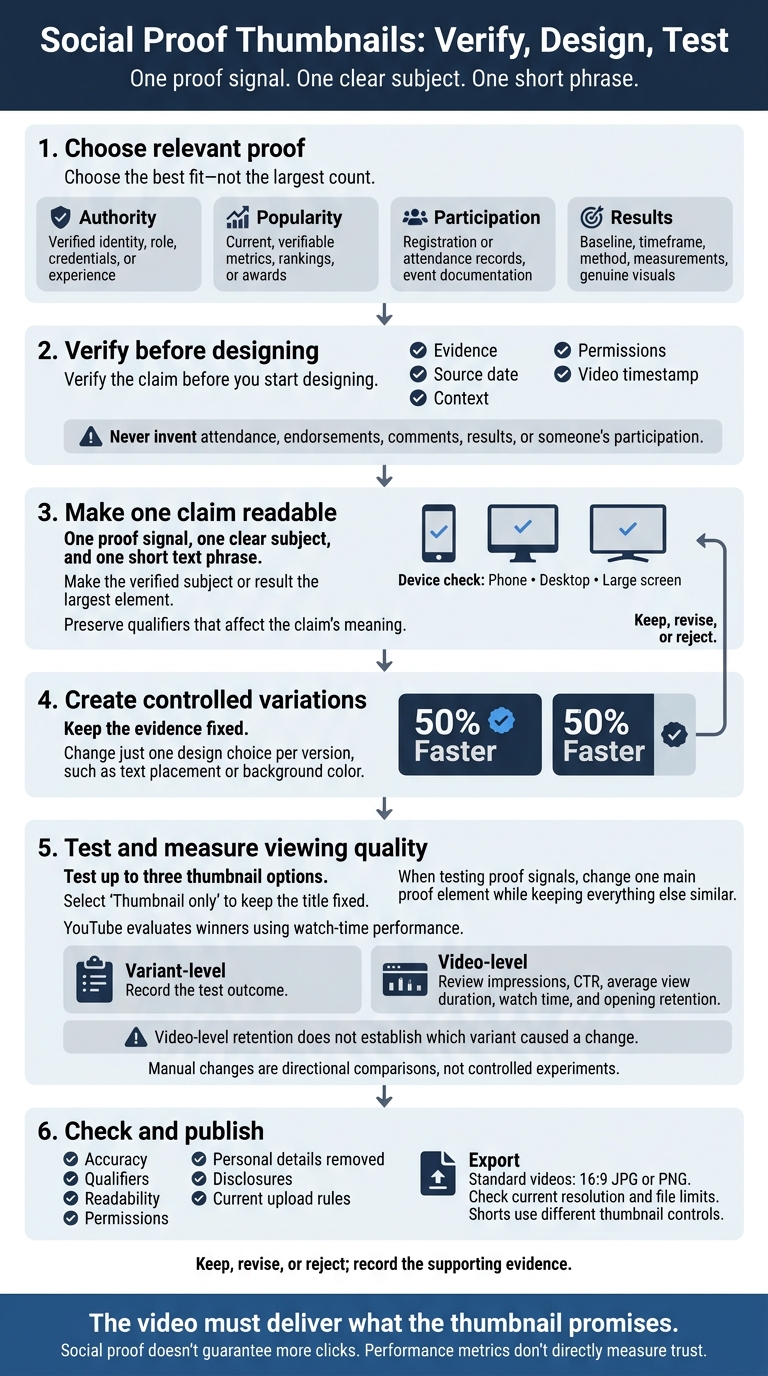
Social Proof Thumbnails: Verify, Design, Test
Social Proof: The Secret Weapon of Digital Marketing
sbb-itb-b59debf
Choose the Right Proof for Your Video
The goal isn’t the biggest number. It’s proof viewers can read and trust at a glance. Choose a signal that supports the video’s promise, then match it to evidence you can show.
Compare Proof Types and Required Evidence
Use this table to match your video’s promise with the right proof and supporting evidence.
| Proof type | Suitable use | Why it works | Main risk | Proof needed |
|---|---|---|---|---|
| Authority | Tutorials, interviews, reviews, commentary | Establishes topic relevance | Fame does not prove expertise | Verified identity, role, credentials, or experience |
| Popularity | Trends, entertainment, audience interest | Signals general interest | Popularity does not prove quality or accuracy | Current, verifiable metrics, rankings, or awards |
| Participation | Events, challenges, workshops, community content | Shows actual involvement | Attendance does not prove approval or success | Registration or attendance records, event documentation |
| Results | Case studies, tests, transformations, demonstrations | Shows a measurable outcome | One result may be atypical or lack context | Baseline, timeframe, method, measurements, genuine visuals |
A credential helps only when viewers understand why it matters. A result needs evidence that backs the claim. Choose the best fit - not the largest count.
Use Faces, Comments, Milestones, and Results
Show real collaborators or subjects whose identity matters to the video. Pair each face with just one accurate identifying cue, and use that description only when it’s true and you have permission. Never use a celebrity’s face to suggest involvement that doesn’t exist.
Keep comment snippets true to their original meaning, and get permission where required. Back milestones with dated records, and distinguish registrations from attendance. For rankings and awards, include the issuer, category, and time period.
For before-and-after images, keep lighting, framing, angle, and timing comparable. Disclose material connections behind endorsements.
Then turn your chosen proof into one claim viewers can read in a thumbnail.
Make One Proof Signal Easy to Read
Build around one proof signal, one clear subject, and one short text phrase. If you use a comment, choose a brief excerpt that preserves its meaning. Cut secondary badges, long testimonials, extra numbers, and tiny screenshots.
YouTube recommends readable fonts and checking thumbnails across devices. Preview yours at phone, desktop, and large-screen sizes. If viewers can’t read the source, qualification, or meaning at any size, simplify it.
Create and Test Your Thumbnail
Use the proof signal you chose above to guide your design and testing.
Build a Layout Around a Verified Claim
Write the thumbnail promise first. Then collect the evidence, source date, permission records, and video timestamp. Verify the claim before you start designing. The design should highlight your chosen proof type, not change its meaning.
Make the verified subject or result the largest element. Use contrast and open space to draw the eye, and add text only when it makes the claim clearer. Match the thumbnail to the video’s opening and main payoff. If viewers need extra context to understand the claim, revise it.
Create Variations With ThumbnailCreator
Use ThumbnailCreator’s templates, AI generation, and text editing to make controlled variations. Keep the evidence fixed and change just one design choice per version, such as text placement or background color.
Review every generated asset. Never use generated images or swaps to invent attendance, endorsements, comments, results, or someone’s participation.
Compare versions that use the same evidence and differ in only one design variable.
Test Proof Signals and Measure Viewing Quality
Once the design is locked, test which proof signal holds attention without weakening trust. Look at viewing quality - not just attention. Performance metrics don’t directly measure trust.
Check YouTube Studio and the current YouTube Help docs for eligibility, feature requirements, controls, and metrics. Use up to three options and select “Thumbnail only” to keep the title fixed. Change one main proof element while keeping everything else similar. YouTube evaluates winners using watch-time performance. Let the test report guide your decision instead of stopping when an early result looks favorable.
Keep variant-level test results separate from video-level analytics. Record the test outcome on its own. Then review impressions, CTR, average view duration, watch time, and opening retention to check whether the video delivered on the thumbnail’s promise.
Overall retention doesn’t tell you which variant caused a change unless variant-level reporting supports that link. Where the data is available, account for traffic source, device, geography, and new and returning viewers.
If native testing isn’t available, treat manual changes as directional comparisons, not controlled experiments. Audience mix, distribution, and video age can change between test periods.
Use this compact worksheet before publishing and after testing:
| Field | What to record |
|---|---|
| Video promise | Promised outcome and viewer problem |
| Target viewer | Audience segment the proof should persuade |
| Primary proof signal | Exact claim and proof type |
| Supporting visual | Source visual |
| Text treatment | Exact wording, placement, and contrast |
| Accuracy check | Evidence, date, permissions, and video timestamp |
| Test method | Native test settings or manual-change dates |
| Test result | Variant outcome separately from video-level impressions, CTR, watch time, retention, and traffic source mix |
| Decision | Keep, revise, or reject; record the supporting evidence |
Check Accuracy, Permissions, and Publishing Rules
After testing, run a final compliance check before publishing. Use the winning thumbnail concept, then confirm that each claim is accurate and that you have the rights to publish the content.
Spot Weak or Misleading Proof
Check what viewers will infer, not just what the thumbnail says. Keep any dates, conditions, or qualifiers that affect the claim’s meaning. Remove unsupported claims rather than burying corrections in the video.
Viewer interpretation Primary risk Correction method “This video or channel was popular at a specific time” An old count may imply current performance Include the date or use a current count “The creator reached a verified achievement” The milestone may be unrelated to the video Connect it directly to the topic and verify the number “A real person achieved or experienced this result” Selective, edited, or unrepresentative testimonials can mislead Preserve the original meaning and explain typical results when relevant “This person endorses, appears in, or supports the video” Using someone’s likeness without permission or implying endorsement can damage trust Obtain permission and state the person’s actual role “The video caused a visible change” Editing, lighting, timing, or omitted conditions can exaggerate results Use comparable images, disclose material conditions, and avoid unsupported causation “An independent organization recognized this creator or product” A self-made or expired badge can look official Name the awarding organization and confirm the award’s scope and date “A reputable publication covered or recommended this subject” A headline, quote, or logo may be taken out of context Use the original wording accurately, preserve qualifiers, and obtain permission where required
Check Permissions, Privacy, and Endorsements
Publicly available doesn’t mean cleared for use. Get written permission for promotional testimonials and identifiable participants, especially minors or people shown in connection with sensitive outcomes. Remove usernames, email addresses, order numbers, and uninvolved faces. Copyright, privacy, and publicity rights are separate from YouTube’s platform rules.
For compensated testimonials, review the FTC’s current endorsement guidance and YouTube’s paid-promotion requirements. Payment, free products, employment, and affiliate relationships are material connections that may require disclosure. Use YouTube’s paid-promotion setting when applicable, but don’t assume its opening disclosure label meets every legal obligation.
Review Readability and Export Settings
Once you’ve cleared the claim, check that the thumbnail reads clearly on mobile and meets upload rules.
Before publishing, review accuracy, qualifiers, readability, permissions, and the removal of personal details. Make sure the design has one dominant proof signal. Check YouTube’s thumbnail rules and Community Guidelines, including rules on nudity, hate speech, violence, and dangerous content.
For standard videos, use a 16:9 JPG or PNG. Check the current upload guidance for resolution and file limits before exporting. Shorts use different thumbnail controls.
Conclusion: Use Relevant Proof and Measure Results
Verify the claim and publish the compliant version. Then measure viewing quality alongside clicks, test a few accurate variations, and keep only the design the evidence supports.
FAQs
What social proof can I use as a new creator?
Highlight performance metrics like “100M+ Views” or “Trending Now” to tap into the bandwagon effect. Faces showing shock or surprise can increase click-through rates by 38%. For finance and business thumbnails, faces work particularly well for conveying trust.
ThumbnailCreator’s AI generation, face swapping, and professional templates help you bring these elements together in high-quality thumbnails that encourage clicks.
Can social proof make my thumbnail seem less credible?
Yes - if it has no real connection to your video. Recognizable figures, brands, or credentials can increase click-through rates. But fake endorsements, misleading affiliations, and exaggerated results damage trust.
Your thumbnail needs to match what your video delivers. If it doesn't, viewers may leave early, lowering retention and hurting long-term channel growth.
Keep every social proof element accurate, honest, and backed by your video’s content.
When should I update outdated thumbnail proof?
Update your thumbnail when the data suggests it promises something your video doesn’t deliver. In YouTube Analytics, watch for high click-through rates paired with steep viewer drop-offs in the first 15–30 seconds. Check comments for mentions of clickbait, misleading content, or disappointment, too.
Redesign the thumbnail to make it clear and honest about what viewers will see. Then use A/B testing to see whether clicks and viewer satisfaction improve. ThumbnailCreator can help keep your workflow consistent and your thumbnails high quality.