

How to Test Thumbnails for CTR
Your video thumbnail is the first impression your audience gets - and small tweaks can make a big difference in your click-through rate (CTR). A/B testing is the best way to find out what works. By comparing different thumbnail designs with real viewers, you can figure out which version gets more clicks and keeps viewers engaged.
Key takeaways:
- A/B Testing Works: Testing thumbnails can boost CTR by 20–40%. For example, swapping a neutral face for a surprised one increased CTR by 74% in a case study.
- YouTube's 2026 Algorithm: Focus on "qualified clicks" (viewers who stay and engage), not just CTR. Misleading thumbnails can hurt your video's performance.
- What to Test: Start with major elements like facial expressions, text hooks, and color schemes. Test one change at a time for clear results.
- Test Duration Matters: Run tests for at least 7–14 days and gather 1,000–5,000 impressions per variation for reliable conclusions.
- Use Tools: YouTube Studio's "Test & Compare" feature simplifies A/B testing, and tools like ThumbnailCreator make designing variations faster.
Testing thumbnails isn’t just about getting more clicks - it’s about attracting the right audience and boosting overall engagement. Let data-driven testing guide your design decisions.
How to A/B Test YouTube Thumbnails (Step-by-Step)
Before you begin, it helps to compare thumbnail strategies to see which design styles typically perform best in your niche.
sbb-itb-b59debf
Step 1: Plan Your Thumbnail Test
Getting solid results from a test starts with having a clear plan. A well-thought-out approach ensures you gather data you can actually use. The trick is to be intentional about what you're testing and why.
Set Your Goal
First, define what success looks like. While CTR (Click-Through Rate) is a key metric, it’s not the only thing to watch. YouTube’s "Test & Compare" tool prioritizes watch time share over clicks, since a thumbnail that grabs attention but leads to viewers leaving after 10 seconds can hurt your channel’s overall performance.
The focus should be on "qualified clicks" - viewers who are genuinely interested in your content and are likely to stick around. YouTube’s 2025 Satisfaction-Weighted Discovery algorithm evaluates what happens after someone clicks, not just the click itself. Misleading thumbnails can backfire, causing up to a 42% drop in completion rates, which signals the algorithm to stop recommending your video.
Set specific benchmarks before diving in. For instance, if you’re aiming to improve CTR, consider a 10–20% increase as a realistic target. To ensure reliable data, plan to gather at least 1,000–2,000 impressions per thumbnail variation, though 5,000+ impressions will give you even more confidence in your results. If you’re testing a thumbnail on an older video with declining performance, your goal might be to revive its CTR and get it back into YouTube’s recommendation system.
Once you know your objectives, focus on the elements of your thumbnail that are most likely to influence these outcomes.
Choose What to Test
The golden rule? Test one element at a time. If you tweak the text, colors, and facial expression all at once, you won’t know which change made the difference.
Start with "Tier 1" elements - these have the biggest impact on CTR. Key factors include facial expressions, text hooks, color schemes, and whether or not you include a face at all. For example, a study by the NoteLM Team found that simply changing the facial expression led to a winning result 82% of the time, with an average 42% CTR boost. Another test showed that adding or removing a face entirely resulted in a 47% CTR increase on average.
Once you’ve tested these high-impact elements, move on to "Tier 2" items like layout, background style, and added graphics. Finally, tackle "Tier 3" elements - things like fonts, logo placement, or borders - which tend to have less influence on performance.
Design Multiple Versions
After deciding which elements to test, create a few distinct thumbnail variations. Aim for 2–3 different designs that explore clear contrasts. For example, you could test a bright color scheme against a darker one or compare a surprised facial expression to a neutral one.
A useful framework to follow is "Safe, Bold, and Wild Card":
- Safe: A version that sticks to your channel’s usual style.
- Bold: A version with high contrast, exaggerated emotion, or a striking design.
- Wild Card: A completely new concept or angle that breaks the mold.
This method ensures you’re testing drastically different ideas rather than making minor adjustments.
Whatever you design, make sure the thumbnails align with your video’s content. A thumbnail with slightly fewer clicks but better viewer retention might still be the winner because it sets the right expectations. Also, remember that mobile-friendliness is key - since 70% of YouTube views happen on mobile, your thumbnail needs to work well at smaller sizes. Stick to short text hooks and bold fonts to ensure readability on small screens.
Step 2: Run Your A/B Tests
After creating your thumbnail variations, the next step is to let your audience decide which design works best. Running accurate A/B tests is essential for making data-backed decisions and improving your click-through rate (CTR).
Use YouTube Studio's Test & Compare Feature
YouTube offers a built-in tool called Test & Compare, available in YouTube Studio for creators with advanced features enabled. To use it, select a video in YouTube Studio, navigate to the Thumbnail section, and upload up to three variations using the "Test & Compare" option.
This tool stands out because it shows all thumbnail variations to viewers simultaneously, unlike sequential testing, where thumbnails are rotated on different days. By doing this, it avoids timing-related biases, such as differences in weekday and weekend traffic. YouTube evaluates the results based on watch time share rather than just CTR, rewarding thumbnails that attract viewers who stick around.
"To help your video get high-quality engagement, we optimise tests for overall watch time over other metrics, like click-through rate." - YouTube
However, keep in mind that this feature is not available for Shorts, "Made for Kids" content, private videos, or active Premieres and Live streams. It can, however, be used for Live archives and videos after a Premiere. Once the test identifies a clear winner, YouTube automatically applies the winning thumbnail to your video. If no winner is found, the first uploaded thumbnail remains the default.
The next step is to determine how long to run your test for reliable results.
Choose the Right Test Duration
The duration of your test plays a critical role in its accuracy. Running tests for up to two weeks helps capture diverse viewer behaviors and ensures statistical reliability. Don’t cut the test short, even if one thumbnail seems to perform better early on. YouTube requires thousands of impressions to account for audience variations and deliver dependable results.
For high-traffic videos, results may become clear in just a few days. But for videos with fewer than 10,000 impressions per week, tests might need to run for up to a month. Here’s a general guide to help you gauge confidence levels based on impressions:
| Impressions per Variant | Confidence Level | Recommendation |
|---|---|---|
| 500–1,000 | Low (60–70%) | Keep testing |
| 1,000–2,000 | Medium (75–85%) | Preliminary winner |
| 2,000–5,000 | High (85–95%) | Confident decision |
| 5,000+ | Very High (95%+) | Definitive result |
For the most accurate results, aim for at least 1,000 to 2,000 impressions per thumbnail and let the test run for at least 7 days to capture weekly viewer patterns. YouTube reports that 14-day tests achieve a 92% accuracy rate, compared to just 78% for 48-hour tests. Following these guidelines can help you make informed decisions based on reliable data.
Step 3: Review Your Results
After completing your tests in Steps 1 and 2, it's time to evaluate which thumbnail design connects best with your audience. Your analysis will focus on both click-through rate (CTR) and viewer retention. Once the test wraps up, YouTube Studio will provide one of three outcomes: Winner (a clear top performer), Performed Same (all designs performed similarly), or Inconclusive (not enough data to determine a winner).
Compare CTR and Impressions
While CTR is important, YouTube prioritizes watch time share when deciding a winner. This means a thumbnail with slightly lower CTR but higher viewer retention can still come out on top because it better aligns with audience expectations. To review your results, head to the "Reach" tab in YouTube Analytics and look at the "Impressions and how they led to watch time" report.
For example, if your CTR drops from 9% to 3.5% while impressions climb from 10,000 to 100,000, it shows your video is reaching a broader, less engaged audience. This is normal as your video transitions from a core audience to a wider discovery phase, where viewers are less familiar with your content.
Traffic source also plays a big role. Search results often produce higher CTR because viewers are actively looking for specific content, whereas the Homepage generates more impressions but tends to have lower CTR due to tougher competition. Always examine where your impressions are coming from to understand how your thumbnail is performing.
Use Data to Make Decisions
With the metrics in hand, decide whether to stick with the winning design. If YouTube names a clear winner, apply that thumbnail permanently and take note of what worked - whether it was the use of bold colors, eye-catching text, or a specific facial expression. If the results are similar across designs, choose the one that aligns best with your overall branding. If the outcome is "Inconclusive", it’s likely your designs were too similar, so try creating more distinct variations and run the test again.
Make sure the winning thumbnail also boosts Average View Duration (AVD). A high CTR paired with low AVD could indicate clickbait, which might harm your video's long-term performance as YouTube may stop recommending it.
For dependable results, aim for at least 1,000 impressions per thumbnail before making a decision. If you're using YouTube's Test & Compare feature, you’ll typically need around 10,000 total impressions to achieve statistically significant results at a 95% confidence level.
Step 4: Use ThumbnailCreator to Speed Up Design
Once you've nailed down what works from your A/B tests, the next step is streamlining your design process. This is where ThumbnailCreator comes in. Instead of spending hours tweaking designs in complex software, this tool helps you churn out professional-looking thumbnails in no time. You can check it out at ThumbnailCreator.
ThumbnailCreator Features
ThumbnailCreator uses AI to simplify thumbnail creation. With access to over 200 templates and more than 300 assets, you’ll never have to start from scratch. The tool also includes features like face swapping and text editing, so you can experiment with different expressions or tweak hooks - like changing "Complete Guide" to "In 5 Minutes" - which can increase your click-through rate (CTR) by up to 46%.
Other handy features include toggling text on and off, swapping backgrounds in seconds, and applying your brand kit (think colors, fonts, and logos) to ensure your thumbnails stay consistent with your channel’s identity. For example, you could compare surprised vs. neutral facial expressions or test a bright yellow background against a dark blue one [1,7]. These tools work seamlessly with your testing process, making it easier to refine your thumbnails.
Create Test Variations Faster
ThumbnailCreator allows you to generate 10 thumbnail variations in just 15 minutes. This speed is a game-changer because consistent testing can boost your CTR by 20–40% over time. As mentioned in Step 1, focus on testing one element at a time to pinpoint what drives performance changes.
Start with Tier 1 elements - like facial expressions, text hooks, and color schemes - since these have the biggest impact. Once you’ve identified a winning design, use it as your baseline and create a new variation to keep improving your CTR. The key is rapid iteration to build on your success.
"Stop guessing which thumbnail works best. Learn to run data-driven tests and let your audience tell you what gets clicks." - ThumbnailCreator
Best Practices for Thumbnail Testing
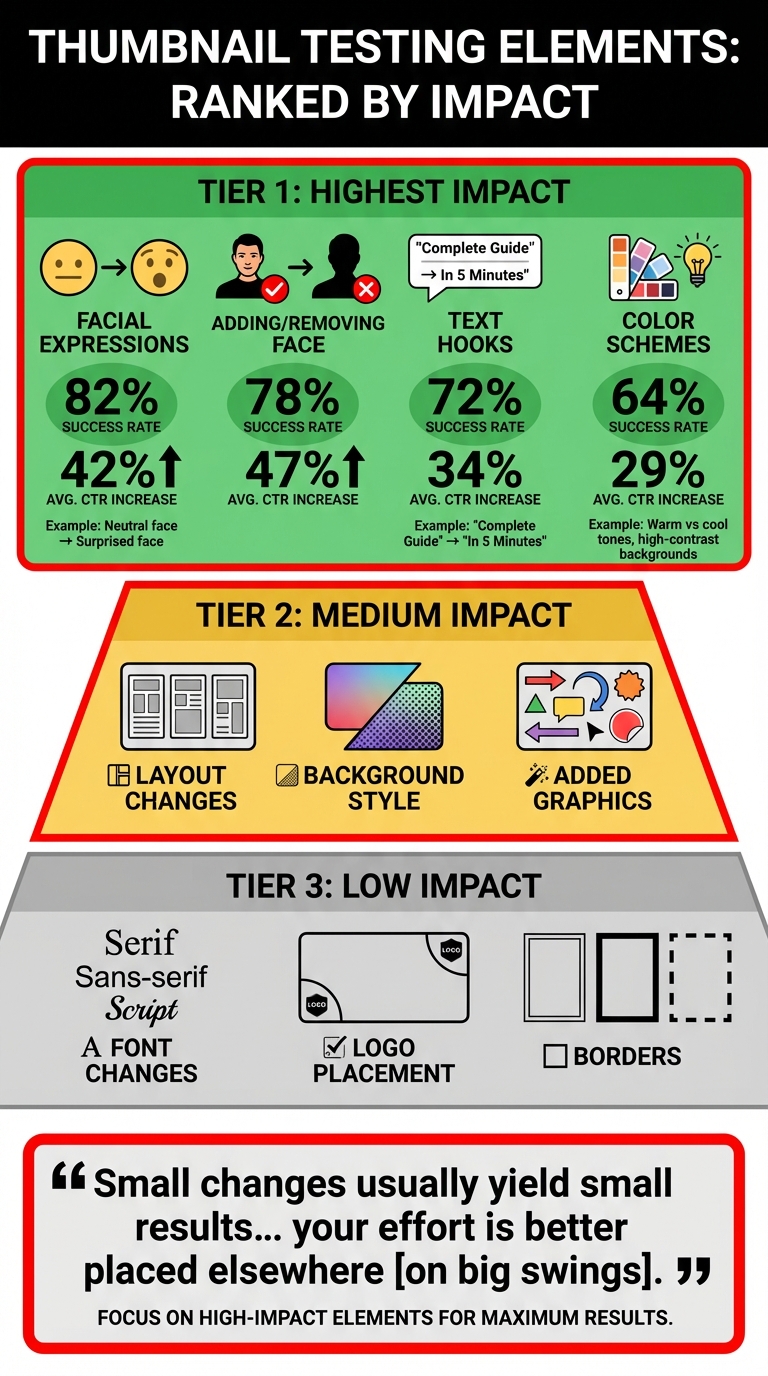
Thumbnail Testing Elements Success Rates and CTR Impact
Building on the steps provided earlier, these best practices can make your testing process more efficient and refine your design strategy. Without a clear plan, A/B tests can waste both time and impressions. Following these guidelines helps ensure quicker, more reliable results while avoiding common thumbnail mistakes that lead to inconclusive data.
Test High-Impact Elements First
Start by focusing on elements that have the greatest potential to influence performance, like facial expressions, text hooks, and color schemes. Facial expressions are especially powerful. For example, switching from a neutral face to one showing surprise has an 82% success rate, often resulting in a 42% increase in CTR. Even more impactful, adding or removing a face entirely has a 78% success rate and delivers an average 47% improvement.
Next, turn your attention to text hooks and color schemes. Modifying the main text - such as changing "Complete Guide" to "In 5 Minutes" - can achieve a 72% success rate with a 34% average boost in CTR. Meanwhile, experimenting with color schemes, like warm versus cool tones or high-contrast backgrounds, succeeds 64% of the time and improves CTR by 29%. On the other hand, minor adjustments like font changes or logo placement typically have little impact, so save those for later.
"Small changes usually yield small results... your effort is better placed elsewhere [on big swings]." - Alec Opperman, Video Producer
Once you've optimized these key elements, focus your tests on videos that can provide rapid feedback, such as those with high traffic.
Test on Popular Videos
Videos with high traffic generate test results more quickly and reliably. Choose content that naturally garners impressions at a fast pace. This allows you to reach the necessary data thresholds in days rather than weeks.
The first 24–72 hours after a video is published are particularly important for testing. During this launch window, impressions tend to spike, offering an ideal opportunity to assess thumbnail performance. Early improvements in CTR during this period can also send stronger signals to YouTube's algorithm, potentially increasing your video's visibility in suggested and browse feeds.
"The earliest days of a video's life cycle present the best conditions for running thumbnail tests because impressions are concentrated and signals feed the recommendation algorithm quickly." - Nadica Naceva, Writer, Influencer Marketing Hub
Monitor Long-Term Performance
Even after identifying a winning thumbnail, it's important to keep an eye on its performance over time. Consistent monitoring ensures that your data-driven decisions continue to deliver results. For instance, a thumbnail that improves CTR but negatively impacts viewer retention could ultimately harm overall video performance. Aim for an average view duration (AVD) of at least 50% of the total video length to maintain healthy engagement.
Use YouTube Analytics to check how your thumbnail performs across different traffic sources, such as "Suggested" versus "Browse" features. Subscriber traffic may respond differently compared to new viewers, so a thumbnail that works well with your core audience might not resonate as effectively with a broader, unfamiliar audience. Additionally, if an older, evergreen video starts losing views, consider running a new test to see if a fresh thumbnail design can revive its performance.
"What works today may change in 6 months." - YouGenie Blog
Conclusion
Testing thumbnails through A/B methods shifts your approach from guesswork to informed decisions. The numbers speak for themselves: creators who consistently test their thumbnails report an average 23% improvement in click-through rates (CTR). Over time, systematic testing can lead to a 20–40% increase in CTR or more. Considering that even a modest 1% boost in CTR can potentially double a video's total views, the long-term benefits of testing are hard to ignore.
Start by focusing on one impactful element - like facial expressions or text hooks - and run your test using YouTube Studio's "Test & Compare" tool. Gather enough data to make reliable conclusions. When reviewing results, prioritize metrics like watch time share over simple click counts. YouTube’s algorithm now penalizes thumbnails that attract clicks but fail to hold viewers' attention. By refining your designs based on these insights and adapting to YouTube's evolving algorithm, you can steadily improve both CTR and audience retention.
Once you’ve collected your testing data, simplify your design process for future success. Tools like ThumbnailCreator (available at https://thumbnailcreator.com) can save you time by generating multiple professional thumbnail variations in seconds. Instead of spending hours tweaking designs in Photoshop, you can quickly create and test thumbnails with different facial expressions, color schemes, or text hooks. This efficient approach removes obstacles to consistent testing and helps you stay on track for better results.
FAQs
How do I know if a higher CTR thumbnail is actually hurting retention?
To determine if a high-CTR thumbnail is impacting retention, take a close look at viewer engagement metrics like watch time and audience retention. A thumbnail that grabs clicks but results in poor retention could hurt your video's overall performance. Compare CTR (click-through rate) with retention data. If you notice viewers clicking but leaving quickly, it might mean the thumbnail is misleading or attracting an audience that doesn’t match the content. The goal is to strike a balance where your thumbnail draws clicks and keeps viewers engaged.
What should I do if YouTube says my thumbnail test is inconclusive?
If your thumbnail test doesn't yield clear results, make sure the test runs for at least two weeks and collects enough impressions to achieve statistical significance. Focus on testing one element at a time to keep the results accurate, and resist the urge to stop the test early - doing so can distort your findings. Tools like YouTube's "Test & Compare" feature can help you verify your outcomes and ensure the data reflects real patterns, not random chance.
How can I A/B test thumbnails on videos that don’t get many impressions?
YouTube's "Test & Compare" feature lets you upload up to three thumbnail variations to see which one performs best. To get accurate results, let the test run for at least two weeks - possibly longer if your channel has lower impressions.
When creating variations, focus on changing just one element at a time. For example:
- Adjust the color scheme
- Modify the text style or size
- Experiment with different images
For smaller channels, gathering enough data may take extra time. Stay patient, as rushing the process can lead to less reliable insights.