

How Thumbnail Branding Boosts Click-Through Rates
A thumbnail brand system can help you get more clicks from the same impressions. If people can spot your videos fast, they spend less time figuring out what they’re looking at and more time clicking.
Here’s the short version:
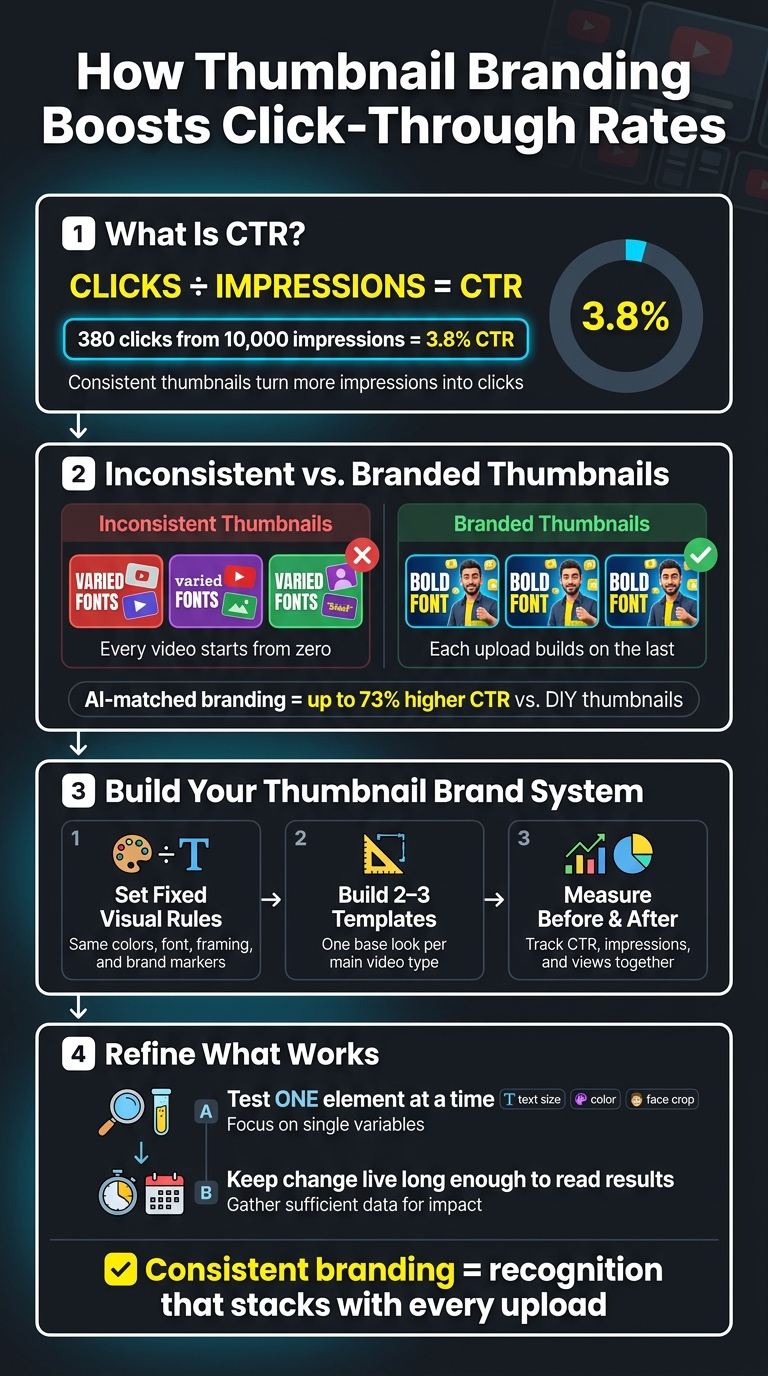
- CTR is clicks divided by impressions.
Example: 380 clicks from 10,000 impressions = 3.8% CTR. - Mixed thumbnail styles make recognition harder.
- A steady look helps returning viewers spot your videos faster.
- Simple templates keep your channel from looking random.
- You should track CTR, impressions, and views before and after changes.
- Test one thumbnail element at a time so you know what changed performance.
- Some creators using AI-based style matching for branding have seen up to 73% higher CTR than DIY thumbnails.
If I had to sum it up in one line, it would be this: when your thumbnails look connected, each upload helps the next one get clicked.
I’d focus on three things first:
-
Set fixed visual rules
Use the same colors, font, framing, and brand markers. -
Build 2–3 templates
Keep the same base look for your main video types. -
Measure the before-and-after data
Check CTR, impressions, and views together.
The big idea: inconsistent thumbnails make every video start from zero, while a steady system gives your channel a look people can learn to spot.
That’s what this article explains: why branding in thumbnails affects clicks, what a messy thumbnail system looks like, and how I’d build a simple process to improve results over time.
How to Build a Thumbnail Brand System That Boosts CTR
The Thumbnail Experiment: Using Science to Boost CTR
sbb-itb-b59debf
The Problem: Inconsistent Thumbnails Hurt Recognition and Clicks
Most creators don’t spot this issue until they zoom out and look at their whole channel page at once.
What inconsistency looks like across a channel
Pull up your last 12 uploads in a grid. If they don’t feel like parts of one system, the channel starts to look scattered.
Colors shift. Fonts change. Layouts jump around. Even when the videos themselves are strong, the channel can still feel uneven.
That usually happens when thumbnails are made one by one instead of built from a repeatable system. And the problem stands out most in search and suggested feeds, where people make snap decisions.
Why mixed styles slow recognition in search and suggested videos
In crowded feeds, people decide fast, especially on mobile. If your thumbnail doesn’t instantly show who it’s from, viewers have to pause and figure it out. That little bit of extra effort can cost you the click. This is often the result of common thumbnail mistakes that hurt performance.
Without consistency, every new upload has to earn recognition from zero. You’re not building on the trust past videos already earned, which makes it harder to turn impressions into clicks. Familiarity builds trust, and consistency helps that trust kick in faster.
That’s why a repeatable thumbnail system is the fix, not another one-off design.
How Consistent Thumbnail Branding Raises CTR
Consistent branding helps people spot your videos faster and click with less second-guessing. That starts with a few visual cues you use again and again.
Recognition helps returning viewers click faster
When subscribers see your videos on a regular basis, they start to pick up on your style before they even read the title. A familiar color palette, a repeat font, or the same facial framing can spark an instant “I know this channel” reaction.
That kind of recognition speeds up the click.
But recognition by itself doesn’t do the whole job. consistency also shapes expectations by balancing curiosity with authenticity.
Consistency builds trust and clearer expectations
Familiar visuals build trust and reduce hesitation. When your thumbnails follow the same visual style, viewers get a clearer sense of what kind of video they’re about to watch.
If people already know your look, they also have a better idea of what they’ll get after they click. And when the promise feels clear, the click feels easier.
Those expectations make the click easier.
A branded system supports stronger channel-wide performance
A branded system helps each thumbnail feed into the same channel identity. When every upload uses the same visual system, each impression strengthens that brand.
Instead of one thumbnail doing all the work on its own, each new upload adds to the pattern viewers already know. The result is stronger channel-wide CTR, not just better results on a single video.
Next, turn that system into templates you can repeat.
How to Build a Thumbnail Brand System You Can Repeat
Once the upside is clear, the next step is turning consistency into a system you can use again and again.
Lock in the visual elements that affect clicks most
Start with the few visual rules that matter most: your color palette, font, and framing. (See our color psychology guide for help choosing.) Set how you frame your face or product so the composition stays easy to spot from one upload to the next. That way, viewers can recognize the thumbnail faster, and the click decision feels simpler.
Pull up your last 12 thumbnails in a grid view. If the grid looks all over the place, you're starting from zero with every upload.
Stick with high contrast, short text, and one clear focal point. If a thumbnail doesn't read well at a small size, it can cost you clicks.
Then turn those rules into templates for the video formats you use most.
Create templates for your main video formats
Build 2 or 3 templates for your main video formats. Keep your brand markers fixed, then tweak the layout to match the format. The point of templates is simple: keep recognition steady across formats, not make more styles.
If you publish often, it helps to use a tool that makes those repeat edits easier.
Use ThumbnailCreator to apply branding faster
Consistency gets harder when your upload pace picks up. Use ThumbnailCreator to apply your brand faster with AI generation, templates, face swaps, text editing, and object swapping - so you can keep your thumbnails consistent at scale without slowing down production.
Measure Results and Refine What Increases CTR
Track before-and-after CTR, impressions, and views
After the template stage, check whether the system is actually getting more clicks. Once your brand system is live, use advanced thumbnail optimization to compare YouTube Analytics from before and after the change. Look at CTR, impressions, and views together so you can tell if the new thumbnail style is improving click behavior and reach.
If the numbers stay flat, the issue is usually the visual system, not the analytics. Pull up your last 12 thumbnails in a grid and study them side by side. If they feel scattered, your visual system likely needs to be tighter. A scattered grid makes recognition harder, and that can push CTR down.
Test one branding variable at a time
When something isn't working, don't redo everything at once. Change one element per test - like text size, color emphasis, or face crop - and compare A/B testing vs gut feeling to judge the result. Trust builds little by little, so testing one change at a time gives you a cleaner read on what helped.
Conclusion: Consistency turns thumbnails into a growth asset
Once you have a repeatable system and a testing loop, the next job is to refine what performs best. Inconsistent thumbnails make every video fight for recognition from zero. A clear brand system lets each new upload build on the credibility of the last one.
Simple templates make that consistency easier to keep. Regular measurement shows you what's working and what isn't. Creators using AI-driven style matching for consistent branding have seen up to 73% higher CTR compared to DIY thumbnails. Over time, consistent branding turns into a growth asset because recognition stacks up with every upload.
FAQs
How do I know if my thumbnails are too inconsistent?
Review your channel page as a grid. If your thumbnails don’t share a clear visual style - like repeat colors, fonts, and layouts - and instead look like a patchwork, they’re probably too inconsistent.
You can also run a 20-video audit. Compare your top-performing uploads with videos that use less consistent designs, and look for patterns.
Then do the squint test at 120x90 pixels. If the main elements stop feeling clear or balanced at that size, your thumbnail system likely needs work.
Which thumbnail elements should I standardize first?
Start with your core visual identity: 2–3 signature colors, 1–2 bold sans-serif fonts, and a fixed logo placement. Those basics help people recognize your thumbnails at a glance, which can support higher click-through rates.
If you use ThumbnailCreator, you can save your brand kit so these settings stay the same from one thumbnail to the next. After that, tweak the secondary pieces - like image style, text layout, and backgrounds - to fit each video.
How long should I test thumbnail branding changes?
Test thumbnail branding changes for 7 to 14 days. That usually gives the data enough time to settle and helps you reach at least 1,000 impressions per variation, which makes your read on performance more dependable.
You might notice early spikes from subscriber traffic in the first 24 to 72 hours. But longer tests tend to show a better picture of organic performance. If you're making broader branding updates, track results over 4 to 6 weeks.