

A/B Testing vs. Feedback: Thumbnail Optimization
If you want better YouTube thumbnails, use feedback to spot the problem and A/B testing to prove the fix. That’s the short answer.
I’d break it down like this:
- A/B testing shows which thumbnail gets more clicks and better watch time.
- Feedback shows why people feel confused, bored, or clear on what they’re about to watch.
- Templates matter because one good change can help every future upload.
- CTR benchmarks in the article put 1%–2% as weak, 3%–4% as average, and 5%–6%+ as strong.
- Some thumbnail changes can move results fast:
- Background color: about 18%–25%
- Facial expression: about 12%–18%
- Simpler backgrounds: up to 57% better in some cases
If I already had steady traffic, I’d test one big visual change at a time and watch CTR plus early retention. If I had lower traffic, or the thumbnail felt unclear, I’d ask viewers first through polls, comments, or DMs.
How To A/B Test YouTube Thumbnails
sbb-itb-b59debf
Quick Comparison
| Point | A/B Testing | Feedback |
|---|---|---|
| What it gives you | Numbers | Opinions and reactions |
| Best for | Fine-tuning a template | Early ideas and big changes |
| Traffic needed | More | Less |
| Speed | Slower | Fast |
| Main strength | Shows what won | Shows why people react a certain way |
| Main weakness | Doesn’t explain the reason | Can be biased |
My takeaway: use feedback first when you need diagnosis, then test the best fix when you need proof. That keeps your template clear, repeatable, and easier to improve over time. This is a core part of advanced thumbnail optimization for growing channels.
How A/B Testing Improves Thumbnail Templates
For reusable thumbnail templates, A/B testing works best when you change one visual element at a time while keeping the title, upload time, and video itself the same. That way, you can pin the result on the thumbnail instead of relying on gut feeling thumbnails to explain the shift.
Start with the changes most likely to move CTR. Background color and facial expression usually have more impact than tiny layout edits. Small design tweaks often just don't move the needle enough to matter.
What to Measure in a Thumbnail A/B Test
Use CTR as the main metric, and check it alongside early retention in the first 30–60 seconds. A thumbnail can drive a spike in clicks and still be bad for the video if viewers leave right away. When that happens, the thumbnail may be setting the wrong expectation, which can hurt long-term performance.
Give the test at least 48 hours, but 7–14 days is a better window for most channels. Look at results across steady traffic sources like Home, Browse, and Suggested instead of leaning on a one-day jump. CTR tells you what won; feedback helps explain why.
What A/B Testing Does Best
A/B testing tends to work best for channels with steady traffic and repeatable formats. It gives you objective proof before you switch to a new design. For template work, that's the main draw: you want results you can test again, not a lucky bump.
How ThumbnailCreator Supports Controlled Test Variants
ThumbnailCreator makes this process simpler. You can duplicate a master template, swap out one element, and keep everything else fixed. That makes controlled tests faster and cleaner. Those results show what wins; feedback shows why.
How Audience Feedback Improves Thumbnail Templates
Audience feedback shows you how people read a thumbnail before they click. That matters more than it sounds. A thumbnail can look fine to you and still confuse the people you want to reach.
You can gather that feedback from Community polls, short surveys, comments, DMs, and a few trusted creators or editors in your niche. Then use what you hear to find the thumbnail mistakes in your template that need to change.
What Feedback Can Show That Metrics Cannot
Feedback helps explain why a thumbnail misses. Maybe the topic isn't clear. Maybe the text is hard to read. Maybe the image gives off the wrong idea. When several people point out the same problem on their own, you're not looking at one random take. You're looking at a template issue.
Feedback also shows emotional reactions that metrics miss. A viewer might feel curious, distrustful, confused, or bored. Your analytics dashboard won't spell that out for you. It also won't tell you whether a thumbnail feels clear and trustworthy from the viewer's side.
How to Collect Useful Thumbnail Feedback
A YouTube Community poll is a simple place to start. Use two or three options and ask one focused question. Keep it concrete and comparative, like this:
- Which thumbnail is easiest to understand at a glance?
- Which one best matches the video topic?
If you want more detail, post in a Discord server or Reddit community centered on creator feedback. Ask about mobile readability and whether the thumbnail feels on-brand. Those are the kinds of questions metrics don't answer.
How Feedback Shapes Template Design Choices
The goal is to turn repeated reactions into template rules. If viewers keep saying the text is hard to read, make the font larger and cut the word count in your base template. If several people say the thumbnail looks cluttered, simplify the background. Simpler backgrounds can outperform complex photo scenes by 57%. If the design feels off-brand, set your font family, color palette, and logo placement as fixed defaults.
ThumbnailCreator can help you move on that feedback faster. Once you know what needs to change - maybe a larger subject, a brighter background, or cleaner text - you can apply those updates across future thumbnails with its template tools, face swap, and object swap features. Those patterns show you which template change to test next.
A/B Testing vs. Audience Feedback: Key Differences, Pros, and Limits
A/B testing measures performance. Feedback explains reaction. For thumbnail templates, the choice usually comes down to this: do you need to prove a design change, or do you need to understand how viewers are responding? They solve different problems.
Once feedback helps you spot an issue, the next move is deciding whether to run a test, ask your audience, or combine both. This side-by-side view makes that choice easier:
| Dimension | A/B Testing | Audience Feedback |
|---|---|---|
| Data Type | Quantitative (CTR, watch time) | Qualitative (opinions, sentiment) |
| Best Use Case | Refining an existing template | Early-stage ideas and major template changes |
| Traffic Needed | High traffic | Low |
| Speed | Slower, but statistically stronger | Fast |
| Confidence | High at scale, when properly designed | Subjective, prone to bias |
| Explains Why | No | Yes |
Where A/B Testing Has the Advantage
A/B testing cuts out guesswork and gives you results you can measure. That’s a big deal when you use the same template across many uploads. If you change a background color or swap in a different facial expression, you get a number back, not just someone’s take.
It also works well over time. Once a channel has enough traffic, you can keep testing across multiple videos and build a running record of what gets better results. YouTube's native "Test & Compare" feature measures success by watch-time share, not just clicks, so the winning thumbnail is the one that brings in the right viewers, not just the most clicks.
That said, there are limits. You need enough impressions for each variant, often 5,000–10,000 at about a 5% base CTR to reach around 95% confidence. And tests usually run for 3–14 days before a clear winner shows up. A/B tests tell you what won. Feedback tells you why.
Where Audience Feedback Has the Advantage
Feedback shines when your sample size is small. It helps you figure out which part of the template needs work. If your channel doesn’t get enough traffic to produce a useful A/B result fast, a quick community poll or a focused question in comments, surveys, or DMs can still reveal the core issue - unclear topic, hard-to-read text, or a misleading image - in 48–72 hours.
It also helps with things numbers can miss, like brand fit or clarity. But feedback has its own problems. A few loud people can pull the response in one direction. Vague replies don’t give you much to work with. And loyal viewers may hold back because they don’t want to sound harsh.
Use feedback to shape a hypothesis. Then test it.
The practical choice depends on whether you need proof first or insight first.
Which Method to Use and How to Combine Both
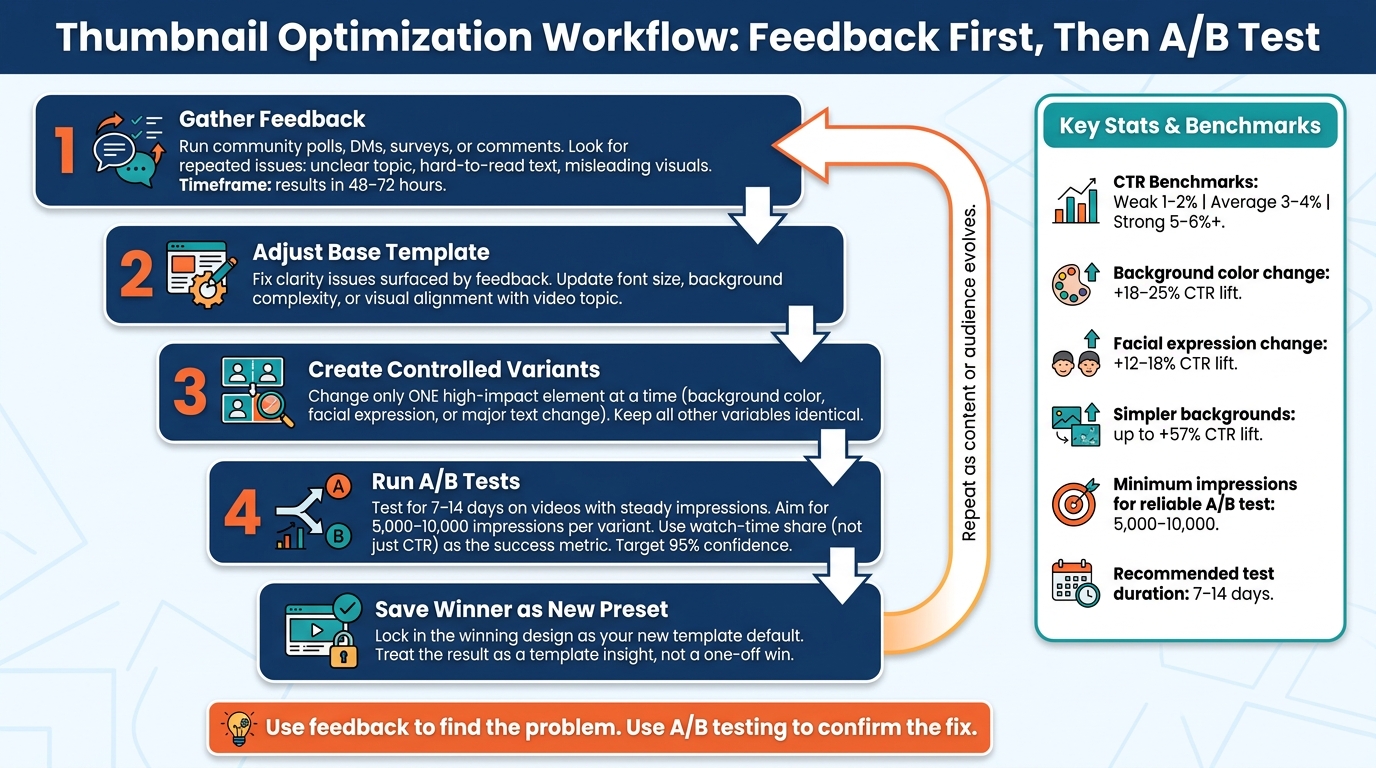
Thumbnail Optimization Workflow: Feedback First, Then A/B Test
The comparison points to a simple rule for template work: use feedback to find the problem, then use A/B tests to confirm the fix.
That rule works especially well for reusable thumbnail templates. Start with feedback first. It helps you spot issues that can make any A/B test a waste of time - confusing messaging, text people can't read, or visuals that don't line up with the video's promise. After you fix those problems, A/B testing helps you see which polished version does better with actual viewers.
For reusable templates, the best method comes down to one thing: do you need diagnosis or proof?
When to Prioritize A/B Testing
A/B testing makes the most sense when your channel already gets steady traffic and you have a tight question to answer.
Use A/B tests for focused questions, like whether a close-up face beats a product shot. Those are the kinds of changes that can lead to measurable differences. Put your attention on high-impact variables such as:
- Background color
- Facial expression
- Major text changes
Skip tiny layout tweaks at this stage. They usually don't move the needle enough to justify the test.
Run tests on videos with steady impression volume, not uploads with traffic that's all over the place. And set your success metric before the test begins. Watch time per impression is the better success metric, because YouTube judges experiments by which thumbnail brings in viewers who actually stick around.
When to Prioritize Audience Feedback
If your channel is newer, or you're making a big visual shift - like a new color scheme, a new host style, or a redesigned template - start with feedback.
With low traffic, A/B tests may not get enough impressions to give you results you can trust.
Feedback is also the better choice when something feels unclear at a basic level. Maybe viewers misread the topic. Maybe the text is too small on mobile. Maybe the thumbnail gives off one tone, but the video delivers another. Feedback helps surface that missing context.
A Simple Workflow Using ThumbnailCreator
Use this process when you want both clarity and measurable results:
- Gather feedback on your current thumbnail through community polls, social posts, or direct viewer questions. Pay attention to repeated comments, like text being hard to read or imagery not making the topic clear.
- Adjust your base template in ThumbnailCreator to fix the clarity issues that feedback brought up.
- Create controlled variants that change only one high-impact element at a time.
- Run A/B tests until one version clearly wins.
- Save the winner as your new preset so future videos in the same series start from a proven foundation.
Treat each test result as a template insight, not just a one-off win. As your content changes or your audience starts expecting something different, go back to the feedback step and run the cycle again.
FAQs
How much traffic do I need to A/B test thumbnails?
Aim for at least 1,000 impressions per thumbnail variant if you want results you can trust. If the variants are close in performance, push that range to 2,000 to 5,000 impressions per variant so the outcome is clearer.
It also helps to let the test run for 7 to 14 days. That gives you a better read on weekly traffic patterns instead of judging things too early. In plain terms: data matters more than speed. A little patience helps you measure steady viewer behavior, not random early swings.
What should I do if a thumbnail gets clicks but low retention?
High clicks with low retention often mean the thumbnail sets one expectation, but the video gives people something else.
When that happens, viewers click, realize the match is off, and leave early. That drop-off can limit long-term reach.
The fix is usually simple: adjust the thumbnail so it lines up more closely with the actual video.
When you review results, put more weight on watch time than click-through rate. A high CTR may look good at first, but if people bounce fast, that’s a red flag.
ThumbnailCreator can help you refine thumbnail designs fast, so they better match what viewers will actually see.
How often should I update my thumbnail template?
Update your thumbnail template based on performance data, not a fixed schedule.
A simple rule: review your top 20 videos every month. Check click-through rate and early viewer retention to spot signs that the design no longer fits your content or what your audience expects.
When you test changes, use A/B tests for 7 to 14 days. Try to get 1,000 to 5,000 impressions per version before you make a call.