

Why Thumbnail Text Size Matters for CTR
I start with readable text - not the biggest font. Check your thumbnail at its actual size on a phone, trim extra words, and use strong contrast so viewers can read it.
A 2026 analysis of 1,000 thumbnails linked 1–5 words with higher average CTR. But word count isn’t font size, and that finding doesn’t prove larger text gets more clicks.
Here’s how I’d test it:
- Change only text size. Keep wording, imagery, placement, contrast, and the title the same.
- Compare versions at the same time. Check traffic sources, since search and browse results can differ.
- Track clicks and viewing results. Use YouTube’s impressions CTR, watch time, and average view duration - not total views divided by impressions.
<u>There’s no proven font-size rule.</u> I’d use ThumbnailCreator to make the variants, then let channel data guide the choice.
Text Importance in YouTube Thumbnails
sbb-itb-b59debf
Why Text Gets Harder to Read in Small Thumbnails
Text in a small thumbnail has to survive compression - not just look good in a design tool. As the image shrinks, fewer pixels form each letter. Thin strokes can fade, and small gaps inside letters can close, making words harder to recognize.
Check Text at Mobile Viewing Sizes
Preview the thumbnail on a phone at its actual display size and resolution. Look for fading strokes, blurry letters, or words that blend into the background. If the text is hard to read, cut words or make the styling stronger. This helps avoid common thumbnail mistakes that can lower your click-through rate.
Balance Text Size, Contrast, and Word Count
Text size works alongside weight, spacing, and contrast. Thin letters can lose definition when reduced, while tightly spaced letters can run together. Contrast matters as much as size: smaller, high-contrast text can be easier to read than larger, low-contrast text.
Keep only the words needed to make the main point, and move supporting context to the title. Once the text is readable, the next question is whether different text sizes actually change CTR.
What Research Shows - and What It Does Not
Most available studies measure word count, so they tell us more about copy length than font size.
Findings on Text Size and Word Count
The clearest evidence concerns word count, not font size. A 2026 analysis of 1,000 thumbnails across 10 niches found that thumbnails with 1–5 words had higher average CTR than those with more text or no text.
That’s an association - not proof that shorter copy caused the higher CTR. The summary does not report controls for topic, title, imagery, audience, or traffic source. The pattern also changes by traffic source, so length alone doesn’t tell the whole story.
Findings by Traffic Source and Video Category
A 2026 observational study linked high-contrast vs. low-contrast text of 3–5 words with stronger CTR in search-heavy categories, but slightly weaker performance in browse or Suggested placements. Again, this is an association, not a causal test.
The finding points to the need to check readability where viewers encounter the thumbnail. It does not isolate text size.
YouTube’s guidance is straightforward: if you add text, make it easy to read.
Assess the Strength of the Evidence
Platform guidance supports readability, while observational data suggest shorter copy can perform better. But none of these sources isolates font size as a cause of higher CTR or establishes a fixed size rule.
To test text size, keep wording, title, imagery, placement, and contrast the same, then compare CTR, watch time, and retention. Until such a test provides evidence, larger text is a hypothesis, not a guarantee.
How to Test Thumbnail Text Size
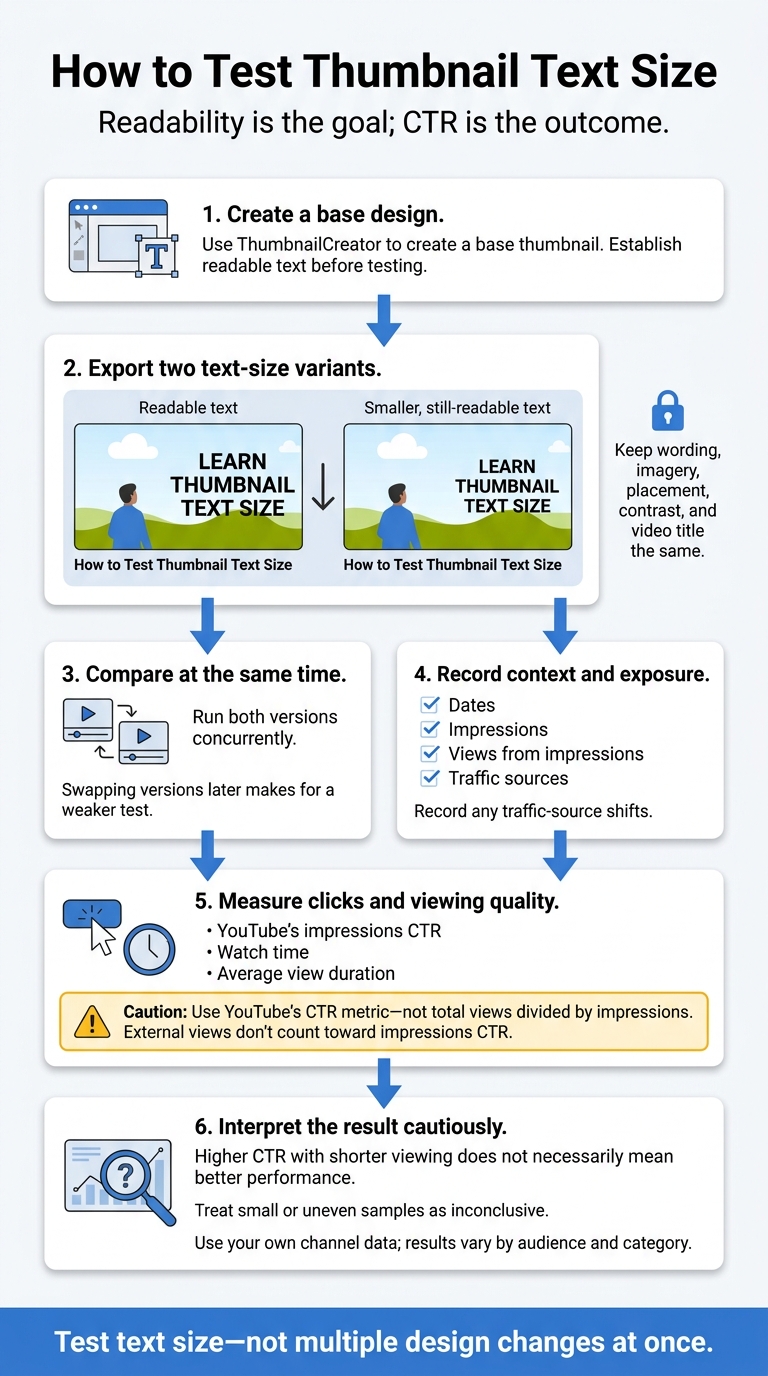
How to Test Thumbnail Text Size
Research supports readable text, but it doesn’t point to one fixed size. Test text size on your own channel: readability is the goal; CTR is the outcome.
Change Text Size, Keep Other Elements the Same
Create two versions: one with readable text and another with smaller text that’s still readable. Keep the wording, image, placement, and title identical.
Run both versions at the same time and record any traffic-source shifts. Swapping versions later makes for a weaker test.
Use your own channel data. Results vary by audience and category.
Measure CTR and Viewing Results
Measure both clicks and viewing quality. Track dates, impressions, views from impressions, traffic sources, watch time, and average view duration.
Use YouTube’s CTR metric, not total views divided by impressions. External views don’t count toward impressions CTR.
A higher CTR paired with shorter viewing doesn’t necessarily mean the thumbnail performed better. Treat small or uneven samples as inconclusive.
Create Text-Size Variants With ThumbnailCreator
Use ThumbnailCreator to create a base design, then export versions that differ only in text size.
Use YouTube performance data to judge whether the text-size change helped.
Conclusion: Make Text Readable and Test Its Size
Check text at actual thumbnail size on a phone. Keep copy short, with strong contrast and enough font weight to keep letters clear. Readability comes first; research can only point to what tends to work.
Use research as guidance, not a fixed rule. Deciding between A/B testing vs gut feeling is key to finding what works for your audience. Larger text may improve results in some contexts, but that lift isn’t universal.
Let your channel’s data guide the size choice. Put readability first, then test text sizes using CTR and viewing results.
FAQs
How many impressions do I need to test text size?
Target at least 1,000 impressions per variant to separate real patterns from random noise and reduce false positives. Some analyses recommend 2,000 to 5,000 impressions for greater confidence in the results.
Whatever the impression count, run tests for at least 7 to 14 days to account for day-to-day fluctuations. ThumbnailCreator can help you create and manage variations, making it easier to test one element at a time.
Should I adjust text size for different traffic sources?
Make text easy to read on every platform instead of changing its size for different traffic sources. Over 70% of YouTube views occur on mobile devices, so text needs to stay legible even at 168 × 94 pixels.
Keep text to 3–5 words, use bold sans-serif fonts at 100–200 px on a 1,280 × 720 canvas, and choose high-contrast colors. Leave the bottom-right timestamp area clear, and always shrink-test the thumbnail to check legibility.
What if larger text boosts CTR but lowers watch time?
Larger thumbnail text can draw the wrong audience or promise something your video doesn’t deliver. A high CTR alone isn’t enough: YouTube may rank videos with high CTR but poor retention below videos with moderate CTR and strong engagement.
Use ThumbnailCreator to test designs that give viewers an honest preview of your content. Compare AI-predicted CTRs with average view duration to balance initial curiosity with long-term viewer satisfaction.