

Top Tools for Tracking Thumbnail Trends in 2026
Your thumbnails can make or break your video’s success. In 2026, aligning thumbnails with seasonal trends can boost click-through rates (CTR) significantly. For example, using red and green during the holidays increases clicks by 38%, while summer-themed thumbnails see a 25% lift in engagement. Staying ahead of these trends is easier with tools that identify patterns, analyze competitors, and automate designs.
Key Takeaways:
- Seasonal Trends Matter: Thumbnails tailored to holidays, events, or seasons can drive more clicks.
- Top Tools to Use:
- ThumbnailCreator: AI-powered designs with templates for major U.S. events.
- YouTube Analytics: Tracks seasonal performance and enables A/B testing.
- ThumbRadar: Monitors competitor thumbnails and trends in real-time.
- Actionable Tips:
- Plan thumbnails 2–3 weeks before major events.
- Use AI tools to create multiple variations for testing.
- Keep text short and ensure designs are mobile-friendly.
By combining trend insights with the right tools, you can maximize your video's visibility and engagement.
This AI Tool Creates YouTube Thumbnails in Seconds (Game Changer)
Key Features To Look for in Thumbnail Trend Tools
When choosing thumbnail trend tools, focus on those that provide actionable insights rather than just surface-level data. Here are three key capabilities to prioritize.
Spotting Seasonal Patterns
A good tool doesn’t just collect data - it identifies trends in color schemes, layouts, and visual themes that resonate during specific times of the year. For example, clean and simple designs in January often see a 31% lift in clicks, leveraging the fresh-start mindset tied to New Year’s resolutions. Similar seasonal boosts occur during back-to-school periods and major shopping events like Black Friday. The right tool should uncover these trends automatically, saving you from combing through countless thumbnails manually.
Look for tools that provide frequent updates, such as weekly or monthly insights, that align with the U.S. content calendar. Events like Thanksgiving, the Super Bowl, and back-to-school seasons can be pivotal for planning. The more detailed the data, the better prepared you’ll be. Combine this with competitor analysis for an even sharper seasonal strategy.
Tracking and Analyzing Competitors
Keeping an eye on competitors' thumbnails during peak seasons can reveal emerging design trends. The most effective tools allow you to monitor specific channels and highlight changes in color schemes, text placement, or overall composition.
"Thumbnails with a single dominant color palette outperformed busy, multi-color designs." - Hooksnap Blog
These insights are particularly useful during high-traffic events. Spotting a competitor’s shift in design choices - whether it’s a new layout or a bold color palette - can guide your own creative decisions and help you stay ahead of the curve.
Using Historical Data for Trend Insights
Historical data takes trend analysis to the next level, helping you move from reactive to strategic planning. Tools with multi-year data allow you to compare past seasonal performances and predict future trends with greater accuracy.
For instance, an analysis of over 50,000 thumbnails revealed that using red and yellow together can increase click-through rates by 41%. Such insights come from large-scale historical analysis, so opt for tools that let you filter data by time frame and niche. This feature is invaluable for crafting a precise thumbnail strategy that incorporates AI-driven insights, as detailed in our workflow steps.
How ThumbnailCreator Supports Trend-Based Thumbnail Design
Once you've identified trends in colors, layouts, and historical click-through rates (CTR), the next step is turning those insights into eye-catching thumbnails - fast. That’s where ThumbnailCreator steps in. This AI-powered platform is designed specifically for YouTube creators who want professional-quality thumbnails without the hassle of traditional design tools. Let’s explore how its features bring trend-based thumbnail designs to life.
AI-Powered Features for Seasonal Thumbnails
ThumbnailCreator makes seasonal thumbnail design effortless. For example, you can input a video title like "Best Black Friday Tech Deals Under $100" and instantly generate a thumbnail tailored to the occasion. The platform offers pre-designed templates for major U.S. events, including Thanksgiving, Christmas, New Year's, the Super Bowl, and back-to-school season. These templates are packed with event-specific visuals and optimized for mobile viewing, ensuring your text and key graphics pop on smaller screens.
"Our AI helps you apply trending styles automatically." - ThumbnailCreator
But it doesn’t stop at templates. You can personalize thumbnails using features like face swapping, which allows you to add your own expressions to reaction-style designs. Object swapping lets you replace generic props with more relevant items - like swapping a plain gift box for a popular gadget. The built-in text editor also helps you fine-tune your message, making adjustments for U.S. audiences (e.g., using "fall" instead of "autumn") and aligning the copy with current trends.
Turning Trend Insights Into Finished Thumbnails
ThumbnailCreator bridges the gap between research and execution. Suppose your competitor analysis reveals that Halloween thumbnails with neon outlines and bold yellow text are trending. You can open a Halloween template, tweak the headline color to yellow, and add a neon glow effect - all within the platform. Similarly, if your data shows that dollar-amount cues drive higher CTRs during Q4, you can quickly add a "Save $50" label using the text editor. No extra design software needed.
Pricing Plans for U.S.-Based Creators
ThumbnailCreator offers three pricing tiers in USD to suit different needs:
- Free Plan: Provides basic template access and limited AI generation, perfect for creators trying out the platform.
- Pro Plan: Unlocks the full library of templates, advanced AI features, and unlimited face and object swapping - ideal for solo creators with a steady upload schedule.
- Agency Plan: Includes team collaboration tools and priority support, making it a great fit for teams managing multiple channels and seasonal campaigns.
For the latest monthly pricing, visit thumbnailcreator.com.
sbb-itb-b59debf
Top Analytics Tools for Monitoring Thumbnail Trends
Using analytics tools can help you track how your thumbnails perform during different seasons or events. Here's a breakdown of the best tools and features to integrate into your workflow.
Using YouTube Analytics for Seasonal Data
YouTube Studio's built-in analytics is a go-to option for tracking how your thumbnails perform over time. It allows you to filter important metrics like impressions, click-through rate (CTR), and watch time by custom date ranges. This makes it easy to compare the performance of, say, your holiday-themed content in Q4 against your summer uploads.
One standout feature is YouTube's "Test & Compare" tool, which lets you test up to three thumbnail variants at once. Instead of focusing solely on CTR, this tool measures performance based on watch time share. Why? Because a thumbnail that gets clicks but doesn't hold viewers' attention can misrepresent what your video delivers.
"The winning thumbnail is no longer the most clickable one. It is the one that sets the most accurate expectation." - Hooksnap Blog
Another useful addition is "Ask Studio AI", a chatbot within YouTube Studio. It analyzes your channel data and highlights patterns in your top-performing thumbnails. It can even spot recurring themes in viewer comments, giving you insights into what resonates visually with your audience.
Browser Extensions for Competitor Thumbnail Monitoring
Keeping an eye on your competition can be just as important as analyzing your own data. Tools like ThumbRadar make this easier by monitoring competitor thumbnails and titles every 15 minutes. They even link these changes to VPH (views per hour) data, so you can see if a competitor's updated design is actually driving results.
"ThumbRadar revealed that MrBeast changes thumbnails an average of 3.2 times per video. We adopted similar testing and saw CTR increase by 47% in two months." - Marketing Director, Top 100 YouTube Gaming Channel
ThumbRadar offers a free tier, making it accessible without requiring a credit card. Another tool, ThumbMagic, lets you upload your thumbnail and compare it side-by-side with live competitor thumbnails. You can preview how yours stacks up in search results, home feeds, and sidebar layouts.
Once you've gathered insights from competitor activities, validate your own designs through A/B testing.
A/B Testing Tools for Thumbnail Validation
A/B testing is crucial for turning thumbnail trends into actionable results. YouTube's "Test & Compare" tool, mentioned earlier, lets you test three thumbnail variants simultaneously. To get the best insights, create:
- A baseline design
- A slightly modified version
- A bold, creative alternative
When analyzing results, focus on watch time share rather than just CTR. A thumbnail that keeps viewers engaged longer is a better indicator of success.
For pre-launch validation, consider tools like Growit.lol's Predictive Upload Engine. This tool predicts views, CTR, and retention risk based on your channel's historical data. Its Pro plan, priced at $14.97 per month, also includes "Competitor Ambush" alerts. These notify you when a competitor's video exceeds 1.8 times their median view velocity.
One important tip: Ensure all A/B test variants use the same resolution. As of March 2026, YouTube supports 4K thumbnails (3840×2160) with a 50 MB file size limit. Mixing resolutions can skew your test results.
A Step-by-Step Workflow for Seasonal Thumbnail Optimization
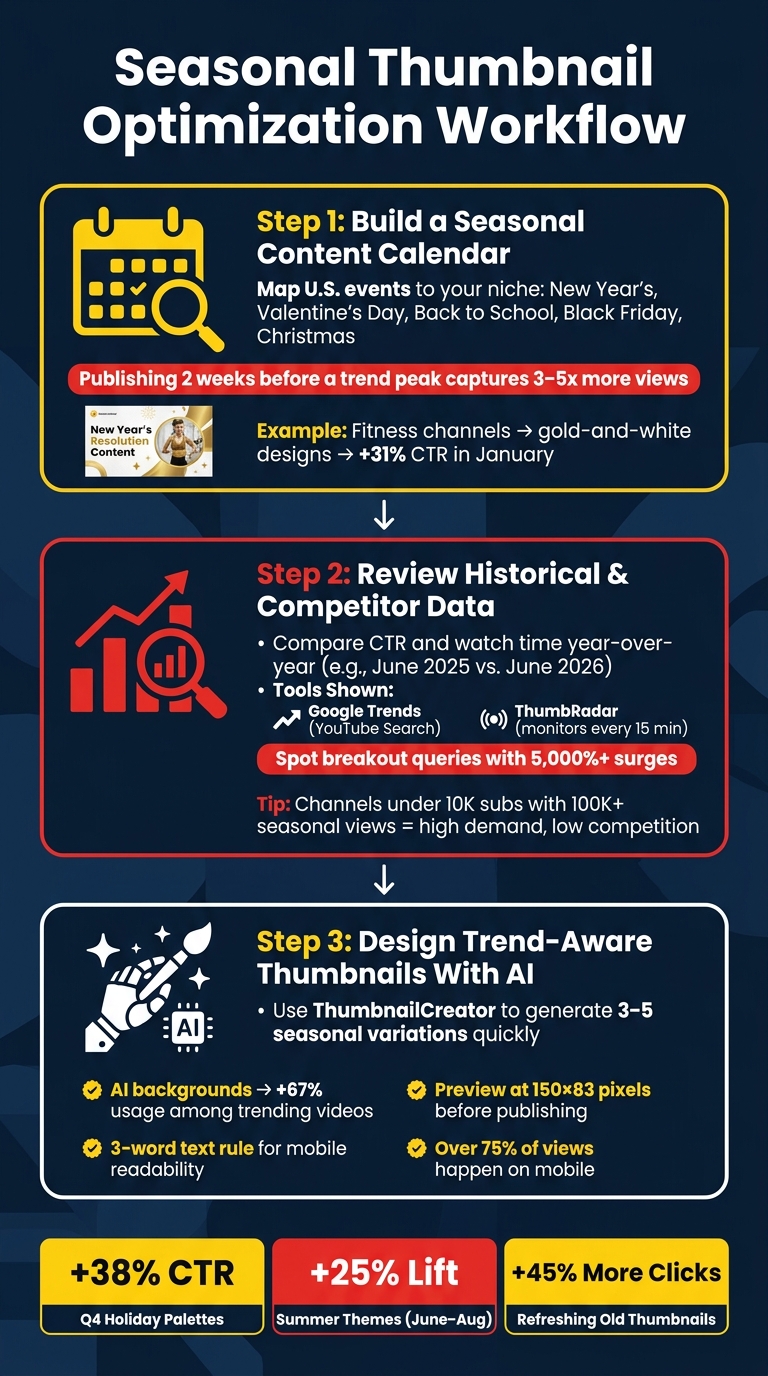
Seasonal Thumbnail Optimization Workflow for YouTube Creators
Now that you’re familiar with the tools, here’s a straightforward process to refine your seasonal thumbnail strategy.
Build a Seasonal Content Calendar
Start by identifying key U.S. events like New Year’s, Valentine’s Day, Back to School, Black Friday, and Christmas. Then, align these events with your content niche.
"The difference between riding a trend and chasing one is timing. A video published 2 weeks before a trend peaks captures 3–5x more views than the same video published after the peak." - ThumbMentor
For instance, if you have a fitness channel, capitalize on New Year’s resolutions by creating goal-setting content. Incorporate clean, gold-and-white designs, which could potentially boost clicks by 31% in January. Similarly, tech channels can prepare Black Friday content ahead of time, using black, gold, and red palettes by early November.
Review Historical and Competitor Data
Once your seasonal events are planned, dive into past performance and competitor analysis. Compare seasonal click-through rates (CTR) and watch time data from previous years (e.g., June 2025 vs. June 2026) to find thumbnails that performed well. Look for recurring visual elements like color schemes, text placement, or facial expressions.
Complement this with Google Trends, set to "YouTube Search", to spot breakout queries - terms that have recently surged by over 5,000%. If a smaller channel (under 10,000 subscribers) racks up 100,000+ views on a seasonal topic, that’s a clear indicator of high demand but lower competition.
"By the time a topic appears on YouTube's category charts... the peak is already happening and the feed is saturated with competing videos." - ThumbMentor
Design Trend-Aware Thumbnails With AI
With your insights in hand, use tools like ThumbnailCreator to design your thumbnails. Take advantage of its AI features to make seasonal updates quickly. For example:
- Use AI-generated backgrounds to replace plain ones with high-contrast, seasonally relevant scenes. Thumbnails with AI backgrounds have seen a 67% uptick in usage among trending videos.
- Apply the 3-word rule: limit text to three bold, impactful words for better readability on mobile, where over 75% of views happen.
- Before uploading, scale your design down to 150×83 pixels to ensure text and visuals remain clear at smaller sizes.
Additionally, ThumbnailCreator’s face swap and object swap tools allow you to create multiple seasonal variations quickly, making A/B testing easier and more efficient. These steps will help you seamlessly integrate seasonal trends into your thumbnail strategy.
Conclusion
Thumbnails have become a critical piece of the puzzle for video discovery in 2026. With click-through rate (CTR) making up 80% of YouTube's main ranking signal - and thumbnails driving 80% of that CTR - nailing your designs isn’t just important, it’s essential. A well-crafted thumbnail can mean the difference between your video being seen or skipped.
Seasonal trends are a goldmine for boosting performance. For instance, Q4 holiday palettes can deliver a +38% bump in CTR, while summer-inspired outdoor themes generate a +25% lift during June through August. Even refreshing older thumbnails with current trends can net you +45% more clicks. These stats make it clear: staying on top of trends and adapting your thumbnails accordingly is a must for growing your channel.
Key Takeaways
Here’s how to put these insights into action:
- Stay trend-savvy. Tools like ThumbnailCreator help you track trending designs by niche and U.S. region so you can keep your content relevant.
- Get ahead of the curve. Plan your content 2–3 weeks before a trend peaks to capture the most views.
- Leverage AI for efficiency. Quickly generate 3–5 thumbnail variations to test and find the most effective design.
- Optimize for mobile viewers. With over 70% of YouTube traffic coming from mobile devices, keep text short - 3–5 words max - and test how it looks at 150×83 pixels before publishing.
- Audit your thumbnails often. Trends in colors, text, and facial expressions shift quickly. Regularly review and update your thumbnails to stay current.
Success on YouTube favors creators who stay informed, plan proactively, and embrace tools like AI to streamline their process. Use these strategies to keep your channel competitive and thriving.
FAQs
How do I know which seasonal thumbnail trend fits my niche?
Start by diving into monthly trend reports to see which color schemes, text styles, and face-focused designs are making waves in your industry. Use tools with real-time filters to check out trending thumbnails specific to your category and region. Match these insights with seasonal themes - think holiday hues for winter or vibrant, warm tones for summer - to craft thumbnails that connect with your audience.
What should I prioritize more: CTR or watch time share?
Click-through rate (CTR) still matters, but YouTube's algorithm has shifted its priorities. Now, thumbnails that lead to longer watch times take the spotlight. Why? Because high CTRs without strong viewer retention can trigger penalties, especially if the content feels like clickbait.
To stay ahead, focus on creating thumbnails that clearly communicate what your video delivers. This way, viewers know what to expect, stick around longer, and help your content align with the algorithm's preference for retention.
How many thumbnail variations should I A/B test per video?
YouTube’s Test and Compare tool lets you experiment with up to three thumbnail variations at once. To get meaningful results, focus on tweaking just one design element at a time - whether it’s the text, colors, or facial expressions.
For accurate insights, run your tests for 7–14 days and aim for each variation to gather at least 1,000 impressions. Tools like ThumbnailCreator can simplify the process, making it easier to create and test multiple designs. This approach can help you fine-tune your thumbnails for stronger viewer engagement.