

Ultimate Guide to Thumbnails for Trending Keywords
I build thumbnails around one clear promise - not just a trending keyword. I start by checking search interest and viewer intent, then choose one main subject and use 2–5 words only when they add meaning beyond the title.
Here’s my process:
- Check demand and timing: Match the topic to what viewers want and when they’re searching.
- Design for phones: Make the subject and text clear at a glance.
- Draft and review: Use ThumbnailCreator to produce options, then check accuracy, asset rights, image specs, and YouTube rules.
- Test the promise: Compare thumbnail versions and review CTR benchmarks alongside watch time and retention during the first 30–60 seconds.
My rule: <u>the image, title, and video must deliver the same promise</u>. More clicks alone don’t prove a thumbnail works.
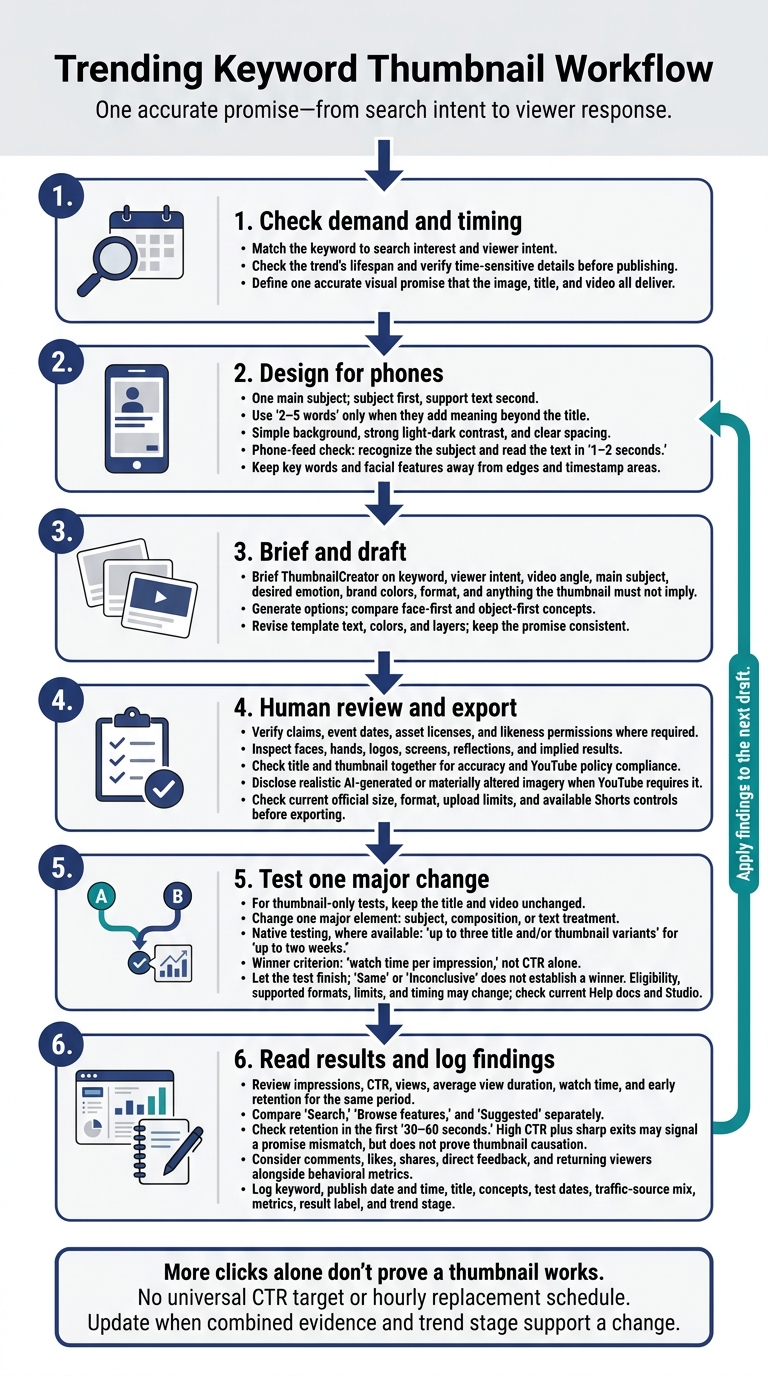
Trending Keyword Thumbnail Workflow
Design Clear Thumbnails That Follow YouTube Rules
Choose One Main Subject and Short Text
Turn your visual promise into a thumbnail people can read at a glance. Pick one main subject that immediately matches the trend’s core image. Set a clear reading order: subject first, support text second.
Use a simple background, strong light-dark contrast, and enough space to keep the subject recognizable on small screens. Use 2–5 words only when they add meaning the title doesn’t. Don’t use color alone to convey meaning. Add labels, shapes, or icons so viewers with color-vision deficiencies - or low-quality displays - can still understand the message.
Check Image Specs and Mobile Readability
Check YouTube’s official thumbnail guidance when you publish, since requirements can change. For standard videos, current guidance recommends 3,840 × 2,160 pixels, a 16:9 aspect ratio, a minimum width of 640 pixels, and JPG or PNG files. Upload limits are 2 MB on mobile and 50 MB on desktop. Shorts guidance lists 2,160 × 3,840 pixels, 9:16, and a minimum height of 640 pixels. Confirm the available Shorts thumbnail controls before exporting.
Export in sRGB, then check the compressed file for fuzzy lettering or rough edges. Preview it at actual phone-feed size: viewers should recognize the subject and read the text in 1–2 seconds. Keep key words and facial features away from edges and timestamp areas. Test against both light and dark interface backgrounds. If viewers need to zoom in to understand the topic, cut the clutter. Once the thumbnail reads clearly on mobile, check its accuracy and policy compliance.
Check Accuracy, Permissions, and Content Policies
Before uploading, check that claims have support, the event date is correct, asset licenses are in place, and likeness permissions are secured where required. Review every photo, screenshot, logo, font, and stock asset separately.
Remove fabricated results, fake urgency, and images that suggest an event or endorsement happened when it didn’t. Misleading visuals break the keyword promise and damage trust. Review the title and thumbnail together: their combined message must match what viewers actually see. Disclose realistic AI-generated or materially altered imagery when YouTube requires it.
Check the thumbnail against YouTube’s rules before upload:
- No misleading imagery under the thumbnail policy.
- No pornography, sexual acts, nudity, or unwanted sexualization.
- No hate speech.
- No graphic or disturbing blood and gore.
- No harmful or dangerous content.
YouTube’s Community Guidelines apply to thumbnails, too. Violations can lead to thumbnail removal, strikes, or loss of custom-thumbnail access. Sexualized or shocking imagery can also limit advertising.
sbb-itb-b59debf
Create Thumbnails With ThumbnailCreator
Write a Brief and Draft Visual Concepts
Use the visual promise you’ve already defined to guide your first draft. Give ThumbnailCreator a brief covering the keyword, viewer intent, video angle, main subject, desired emotion, brand colors, format, and anything the thumbnail must not imply. Generate several drafts from a prompt or YouTube link. Then compare face-first and object-first versions against that same promise.
Start with a template, but revise the text, colors, and layers rather than settling for the first draft. Use face swaps only with permission, and keep object swaps accurate to the context.
Match the Design to the Trend’s Lifespan
Adjust the draft based on how long the trend is likely to stay relevant. For sustained search interest, focus on a lasting benefit. For breaking news, use verified subjects and keep claims restrained. Seasonal topics need accurate timing cues. Fast-changing topics need text and objects you can edit for quick updates. Keep fonts and brand colors consistent, but vary the subject and composition. Check time-sensitive details again just before publishing.
Review and Export the Thumbnail
Leave the final decision to a human reviewer, weighing A/B testing vs gut feeling. Check swapped faces, hands, logos, screens, and reflections for errors. Make sure template edits still fit your channel’s style and the final crop matches the intended frame.
Export in the required format and size, then check the file before publishing. Publish while the topic is still relevant, but don’t skip the final review. Record production time, the chosen concept, and any later corrections to help improve the next draft. Save the approved draft for the testing step.
How to make thumbnails that STAND OUT IN SEARCH
Test Thumbnails and Measure Viewer Response
After publishing, check whether your thumbnail delivered on the promise you made in its design.
Read CTR Alongside Retention and Watch Time
In YouTube Studio, review counted impressions, CTR, and other metrics, including views, average view duration, watch time, and early retention for the same period. Compare Search, Browse features, and Suggested separately. Not every view comes from a counted impression: external websites and some YouTube surfaces are excluded. As distribution grows, CTR can fall even as views and watch time increase. Judge each traffic source on its own.
Check retention during the first 30–60 seconds. High CTR followed by sharp exits may mean the opening doesn't deliver the thumbnail’s promise. But that pattern alone doesn't prove the thumbnail caused the drop. Retention and watch time measure behavior, not satisfaction, so also look at comments, likes, shares, direct feedback, and returning viewers.
Test One Major Visual Change
Where native testing is available, YouTube supports up to three title and/or thumbnail variants for up to two weeks. It selects winners by watch time per impression, not CTR alone. Check the current Help docs and Studio for eligibility, supported formats, limits, and timing.
For a thumbnail-only test, leave the title and video unchanged. Change one major element: the subject, composition, or text treatment. Let the test finish instead of picking a winner from early clicks. A result of Same or Inconclusive doesn't establish a winner.
Manual swaps provide weaker evidence because the audience mix, distribution, and trend demand can change between versions. Use them only to fix problems.
Review Results and Log Findings
Review results once enough impressions have accumulated. Check again when the traffic mix, trend interest, or trend stage changes. Smaller audiences may need more time. There’s no universal CTR target or hourly replacement schedule.
Update packaging when the combined evidence and trend stage support a change - not just because CTR drops. Log the keyword, publish date and time, title, concepts, test dates, traffic-source mix, metrics, result label, and trend stage. Treat each result as specific to that video.
Conclusion: Use a Thumbnail Checklist
Use this final checklist to connect trend research with performance review. Before publishing, make sure the keyword still reflects current demand and the thumbnail makes one accurate visual promise. Match the image to the title and opening content. Stick to one main subject, strong contrast, and a few words that are easy to read on a phone, as outlined in our YouTube thumbnail beginners guide.
Check your export against YouTube’s current size, format, and upload limits. Verify that you have the rights to every asset and that the thumbnail follows YouTube’s Community Guidelines.
ThumbnailCreator can speed up production, but human review still matters. Check every face, object, number, brand mark, and implied result.
After publishing, shift from design checks to performance checks. If eligible, test thumbnail versions in YouTube Studio, changing only one major visual element per test. Compare CTR with retention and watch time. Then save the final thumbnail, test versions, keyword, publish date, concept, and results.
FAQs
How do I spot trends worth making videos about?
Keep an eye on U.S. events, including major holidays, the Super Bowl, and back-to-school season. Look for ways to connect them to your niche. In Google Trends, select YouTube Search and check for breakout queries with growth above 5,000%. Then review your channel data to see which topics your audience consistently responds to.
Use ThumbnailCreator to track trending thumbnail styles, layouts, and colors in your niche and region. Apply those trends to keep your content relevant and competitive.
Should I update my thumbnail when a trend fades?
Yes. Update your thumbnail when a trend fades, the topic changes, or the design looks dated. Keep the visuals accurate so viewers can trust what they see. If dates or results are out of date, replace the thumbnail manually and log the change to compare performance before and after the update.
ThumbnailCreator lets you draft and edit updates quickly, keeping your thumbnails relevant and professional without advanced design skills.
How can I test thumbnails with few impressions?
If you’re getting fewer than 100 impressions a day, consider waiting 14 to 28 days, as long as the topic stays relevant. At low volumes, small shifts often reflect noise. Avoid swapping thumbnails frequently based on those changes, and wait until each variant has at least 1,000 impressions before assessing results for statistical reliability.
If the topic changes or becomes outdated, replace the thumbnail manually. Track that change separately to keep your performance records accurate.